
varunmoka7@varunmoka7
varunmoka7/side-chat
varunmoka7/side-chat
在工作旁邊的面板中問 Claude 一個旁支問題。主對話永遠看不到它。用法就像桌面應用程式的 /btw。
請先查看作者 README,確認 marketplace 與外掛名稱;指令可能隨儲存庫結構而變動。
claude plugin marketplace add varunmoka7/side-chat
claude plugin install side-chat
Ask Claude a side question without adding it to the main conversation.
Halfway through a task you want to know what a flag does, or why Claude chose one approach over another. Ask in the main prompt and the question and its answer become part of the conversation Claude works from. side-chat opens a pane next to your work instead. The answer comes from a fork of your session, so it knows what you have been doing, and nothing you ask there reaches the main thread.
The same pane takes /btw @name your question, which sends the question to
one of your agents and shows its answer when it finishes.
It works like the side chat in the Claude desktop app. This is an independent mod, not made by Anthropic.
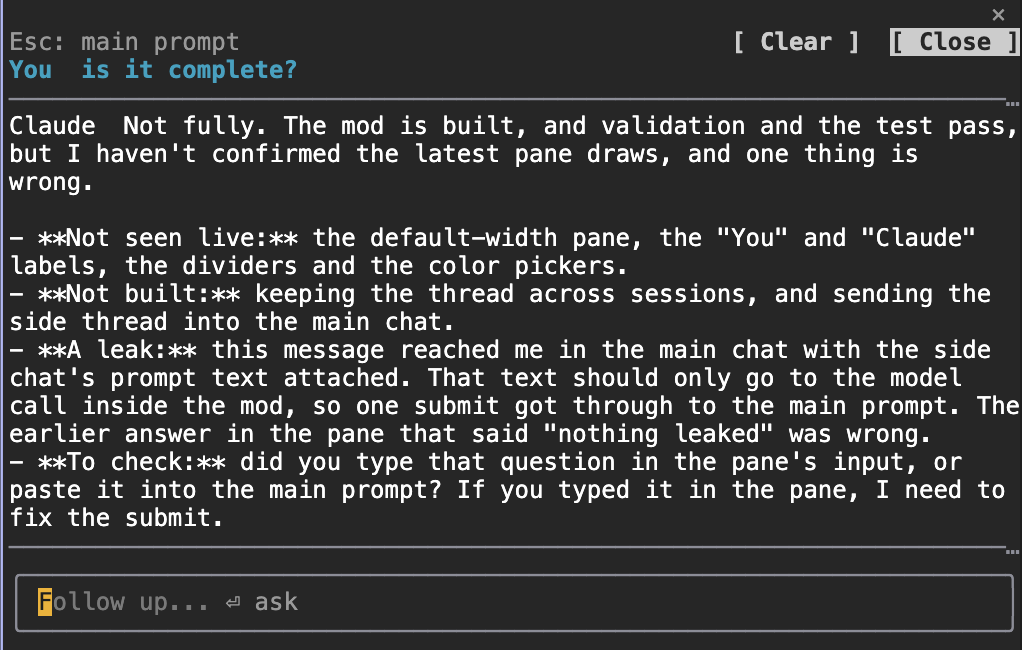
The pane in a VS Code terminal on macOS. Your question sits above the divider, Claude's answer below it, and the input at the bottom takes the next question.
Read this before installing: while side-chat is enabled, /btw opens this
pane instead of the built-in one. Disable the plugin to get the built-in
/btw back.
/btw and /side both open the pane. Type in it, or ask from the main
prompt with /btw your question or /side your question./btw @nahida your question starts one of your agents in the background
and shows its final answer in the pane. Each call starts a fresh agent.
/model haiku|sonnet|opus|default picks the model those agents use./clear to wipe it and /close to hide it. Esc goes
back to the main prompt.Claude Code with plugin function hooks (mods). Tested on 2.1.289, where the
mod loads with no extra setting: I ran it from a clean checkout with
CLAUDE_CODE_ENABLE_FUNCTION_HOOKS unset and /side clear answered. Builds
around 2.1.270 needed CLAUDE_CODE_ENABLE_FUNCTION_HOOKS=1 before any mod would
load, so if /btw does nothing on an older build, set that and restart.
Function hooks are early access and the API changes between releases.
/plugin marketplace add varunmoka7/side-chat
/plugin install side-chat@side-chat
Open /config and look for side-chat: your text color, Claude's text color,
your own instructions for the side chat, whether the pane takes the keyboard
when it opens, and the default model for agent calls.
This was built and tested inside one Claude Code setup (VS Code terminal, macOS). The unit tests pass, but some parts have not been seen working live:
@agent calls arriving in the pane, and the model switch./clear and /close.An agent started with @name runs with that agent's own tools and your
session's permission mode. It can edit files if you ask it to.
JayDoubleu/aside is the same idea, a
read-only side chat answered by a fork of the session, with its own /aside
command and a cost footer on each answer. side-chat adds the /btw takeover,
@agent calls, running-agent context, a model switch and color settings.
claude plugin test .
MIT license.

將工作階段作為 skill 使用的瀏覽器自動化:Playwright + RVF 認知容器 + ruvector 軌跡 + AgentDB 選擇器記憶 + AIDefence PII/注入守門。作為 mod(ADR-445 模式):只收緊的工具守門、本機斜線指令和控制台顯示的狀態檔。

提供 Claude 一個 register_assumption 工具,並在提示列上方顯示這個回合的假設、決定與考慮過但未完成的事項。

給 hermitd 使用的測試包裝 Mod;hermitd 是一個具備聊天頻道、例程、心跳與學習迴圈的常駐 Claude Code agent plugin。