
simplecore-inc@simplecore-inc
simplecore-inc/claude-mods/tree/main/mods/workspace
simplecore-inc/claude-mods/tree/main/mods/workspace




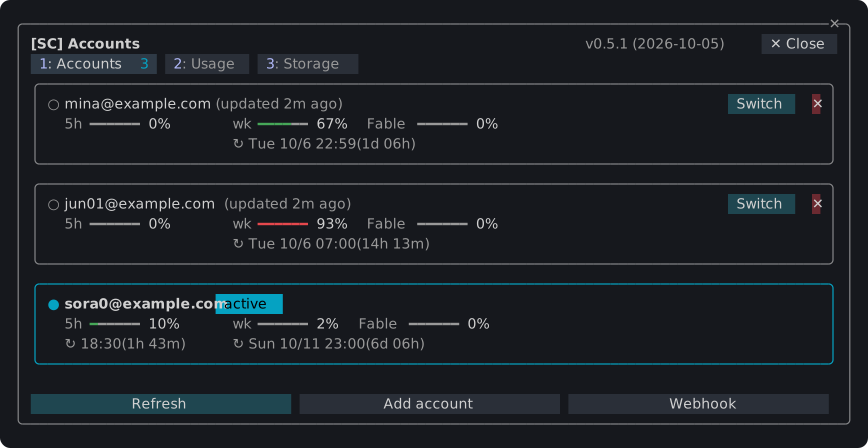
為 Claude Code 開發的外掛,在終端中新增窗格、狀態列和斜線命令:在多個 Claude 帳戶間切換,監控它們的使用限額和權杖用量,查看並清理 Claude Code 在機器上保存的內容,以及在一個窗格中統一管理 agent、工作樹、檢查點、diff 和記憶體檔案。只需安裝一個外掛 sc,就能獲得全部功能。
/sc:accounts

~/.claude 按類別和專案的占用空間,以及透過輸入驗證詞清理閒置工作階段。/sc:workspace
任何無法撤銷的操作會先在對話框中詢問;按 Esc 取消。
claude plugin marketplace add simplecore-inc/claude-mods
claude plugin install sc@simplecore-mods
sc 會同時安裝 sc-accounts 和 sc-workspace。外掛為使用者安裝,因此在每個工作階段中都會執行。在已開啟的工作階段中執行 /reload-plugins。
要使用本機克隆,可將其資料夾新增為市場:
git clone https://github.com/simplecore-inc/claude-mods.git
claude plugin marketplace add ./claude-mods
claude plugin install sc@simplecore-mods
claude plugin marketplace update simplecore-mods
claude plugin update sc@simplecore-mods
claude plugin update sc-accounts@simplecore-mods
claude plugin update sc-workspace@simplecore-mods
然後在每個開啟的工作階段中執行 /reload-plugins。對於本機克隆,在克隆中執行 git pull 和 /reload-plugins 即可:從資料夾市場取得的外掛從該資料夾讀取。
claude plugin uninstall sc@simplecore-mods
claude plugin prune
claude plugin marketplace remove simplecore-mods
prune 會移除 sc-accounts 和 sc-workspace,這兩個是作為 sc 的相依專案安裝的;如果你自己安裝了它們,請按名稱解除安裝。marketplace remove 僅在你不再從該市場安裝時才需要。
這些 mod 會留下一些資料,你可以手動刪除:
| 內容 | 位置 |
| --- | --- |
| 已保存的登入資訊 | macOS:服務為 account-switch 的鑰匙圈專案。其他系統:~/.claude/account-switch/ |
| Webhook 權杖 | macOS:服務為 sc-webhook 的鑰匙圈專案。其他系統:~/.claude/sc-accounts/webhook-token |
| Webhook 範本 | ~/.claude/sc-accounts/ |
| 設定、帳戶索引、筆記、檢查點清單 | ~/.claude/plugins/store/sc-*.json |
| 檢查點 | 在每個儲存庫中:refs/sc/ 下的參照和檔案 .git/sc-snapshot-*.index |
~/.claude 是設定 CLAUDE_CONFIG_DIR 時的值。要刪除儲存庫的檢查點:
git for-each-ref --format='%(refname)' refs/sc/ | xargs -n 1 git update-ref -d
rm -f "$(git rev-parse --git-dir)"/sc-snapshot-*.index
目前登入的帳戶會繼續登入;只有已保存的副本會被清除。
Mod 顯示英文,當 Claude Code 的 language 設定為韓文時顯示韓文;其他任何語言都會回退到英文。沒有該設定時,按此順序使用 LC_ALL、LC_MESSAGES 和 LANG。
開發 mod 涵蓋版面配置、引擎強制的規則、檢查和發布方式。
請先查看作者 README,確認 marketplace 與外掛名稱;指令可能隨儲存庫結構而變動。
claude plugin marketplace add simplecore-inc/claude-mods
claude plugin install sc-workspace
Plugins for Claude Code that add panes, a status band and slash commands to the terminal: switch between several Claude accounts, watch their usage limits and token use, see and clean up what Claude Code keeps on the machine, and keep agents, worktrees, checkpoints, diffs and memory files in one pane. Install one plugin, sc, and you get them all.
/sc:accounts

~/.claude holds by kind and project, and a cleanup of idle sessions confirmed by typing a word./sc:workspace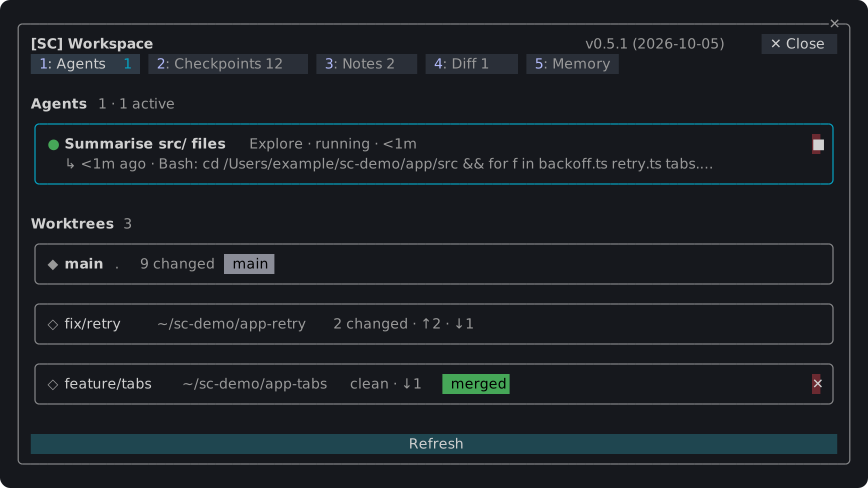
Anything that cannot be taken back asks in a dialog first; Esc cancels.
claude plugin marketplace add simplecore-inc/claude-mods
claude plugin install sc@simplecore-mods
sc installs sc-accounts and sc-workspace with it. The plugins are installed for your user, so they run in every session. Run /reload-plugins in a session that was already open.
To use a local clone instead, add its folder as the marketplace:
git clone https://github.com/simplecore-inc/claude-mods.git
claude plugin marketplace add ./claude-mods
claude plugin install sc@simplecore-mods
claude plugin marketplace update simplecore-mods
claude plugin update sc@simplecore-mods
claude plugin update sc-accounts@simplecore-mods
claude plugin update sc-workspace@simplecore-mods
Then run /reload-plugins in each open session. With a local clone, git pull in the clone and /reload-plugins are enough: a plugin from a folder marketplace is read from that folder.
claude plugin uninstall sc@simplecore-mods
claude plugin prune
claude plugin marketplace remove simplecore-mods
prune removes sc-accounts and sc-workspace, which were installed as dependencies of sc; uninstall them by name instead if you installed them yourself. marketplace remove is only needed when you will not install from it again.
The mods leave some data behind, which you can delete by hand:
| What | Where |
| --- | --- |
| Saved logins | macOS: keychain items of the service account-switch. Elsewhere: ~/.claude/account-switch/ |
| Webhook token | macOS: the keychain item of the service sc-webhook. Elsewhere: ~/.claude/sc-accounts/webhook-token |
| Webhook template | ~/.claude/sc-accounts/ |
| Settings, account index, notes, checkpoint lists | ~/.claude/plugins/store/sc-*.json |
| Checkpoints | in each repository: the refs under refs/sc/ and the files .git/sc-snapshot-*.index |
~/.claude is CLAUDE_CONFIG_DIR when that is set. To delete a repository's checkpoints:
git for-each-ref --format='%(refname)' refs/sc/ | xargs -n 1 git update-ref -d
rm -f "$(git rev-parse --git-dir)"/sc-snapshot-*.index
The account you are logged in with stays logged in; only the saved copies go.
The mods show English, and Korean where Claude Code's language setting is Korean; any other language falls back to English. Without that setting, LC_ALL, LC_MESSAGES and LANG decide, in that order.
Developing a mod covers the layout, the rules the engine enforces, the checks and how to release.

Substrate plugin for Ruflo memory: AgentDB controller bridge (15 agentdb_* MCP tools), RuVector ONNX embeddings (10 embeddings_* tools incl. RaBitQ 32x quantization), and WASM HNSW pattern router (3 ruvllm_hnsw_* tools). As a mod (ADR-445): opt-in safe recall into the prompt, a write guard that keeps secrets out of memory, /agentdb, and a status file the console shows

Fabric Data App plugin in the data-goblin/power-bi-agentic-development Claude Code plugin marketplace, described as a pane that follows the rayfin CLI.


Finish What You Start - Sessions that last, AI that learns, Features that ship. Context engineering + Theory of Mind + Knowledge Graph + Loop Mode + Task Mode. Features Project Knowledge Graph (unified search, experiential memory), unified workflow orchestration, auto-update on session start, ToM-based verification checkpoints, bilateral modeling, quality detection, enhanced context markers, and Loop Mode. 92% token reduction with proven strategies. Based on Riedl & Weidmann 2025 Human-AI Synergy research.
