Running multiple Claude Code sessions in parallel is great. Until my 16 GB Mac starts yelling at me. Idle sessions, leftover dev servers, orphaned processes, all eating up memory. So I built watch-my-ram, a small Claude Code mod to keep an eye on my Mac's memory. Here's what it does: • Shows RAM usage and memory pressure right above the prompt. • /watch-my-ram lists active sessions, their memory usage, PR merge status, leftover dev processes, and open ports. • Warns when Claude starts running tests while another session is already testing. It only reads and warns. It doesn't kill anything automatically. You can ask Claude for suggestions and decide what to close. It's open source. Link to repo: https://github.com/nguyenphusi/watch-my-ram P.S. A better solution is probably getting a new Mac with more RAM though 😂
watch-my-ram:一個用來關注 Mac 記憶體的 Claude Code 模組
一個小型開源 Claude Code 模組,會在提示字元上方顯示 RAM 使用量和記憶體壓力,並新增 /watch-my-ram 指令,列出使用中的工作階段、殘留的開發程序、開啟的連接埠。它只會讀取並提出警告——絕不會自動終止任何東西。
關於這個 mod
同時並行執行多個 Claude Code 工作階段很棒。直到我的 16 GB Mac 開始對我大喊。閒置的工作階段、殘留的開發伺服器、孤兒程序,全都在佔用記憶體。
所以我打造了 watch-my-ram,一個用來關注 Mac 記憶體的小型 Claude Code 模組。
它會做這些事: • 在提示字元正上方顯示 RAM 使用量和記憶體壓力。 • /watch-my-ram 會列出使用中的工作階段、其記憶體使用量、PR 合併狀態、殘留的開發程序,以及開啟的連接埠。 • 當 Claude 在另一個工作階段已經在測試時開始執行測試,它會提出警告。
它只會讀取並提出警告。它不會自動終止任何東西。你可以向 Claude 詢問建議,並決定要關閉什麼。
它是開源的。儲存庫連結:https://github.com/nguyenphusi/watch-my-ram
安裝
請先查看作者 README,確認 marketplace 與外掛名稱;指令可能隨儲存庫結構而變動。
claude plugin marketplace add nguyenphusi/watch-my-ram
claude plugin install watch-my-ram@watch-my-ram
原文 / README
Running multiple Claude Code sessions in parallel is great. Until my 16 GB Mac starts yelling at me.
Idle sessions, leftover dev servers, orphaned processes, all eating up memory.
So I built watch-my-ram, a small Claude Code mod to keep an eye on my Mac's memory.
Here's what it does:
• Shows RAM usage and memory pressure right above the prompt.
• /watch-my-ram lists active sessions, their memory usage, PR merge status, leftover dev processes, and open ports.
• Warns when Claude starts running tests while another session is already testing.
It only reads and warns. It doesn't kill anything automatically. You can ask Claude for suggestions and decide what to close.
It's open source. Link to repo: https://github.com/nguyenphusi/watch-my-ram
P.S. A better solution is probably getting a new Mac with more RAM though 😂
取得徽章
這是你的專案嗎?把這個徽章放進 README 或網站,連回本頁。

更多類似作品
一篇 Reddit 貼文介紹了 "Context Diet",這是一個 Claude Code 模組,旨在防止大型工具輸出淹沒上下文視窗。貼文文字僅包含提交中介資料(作者、子版、連結/留言預留位置),沒有儲存庫連結、安裝步驟或示範媒體,因此僅從來源無法驗證該模組。
✳︎ Context Diet:一個防止巨大工具輸出淹沒上下文的 Claude Code 模組
└─ 讓每一次對話更順手
Context Diet:一個防止巨大工具輸出淹沒上下文的 Claude Code 模組
把 context window 畫成一顆腦:工具呼叫點亮對應腦區,用量越滿越擁擠,compact 時睡眠整理。

working-memory

一個 Claude Code function hooks 外掛。主要對話閒置達到 idleMinutes(預設 50 分鐘)時,它會在提示快取過期前執行 compact,並把 AGENTS.md 的 Compact Instructions 傳給每次 compact。執行中的工作階段、低於 minMessageTokens 的對話,以及超過 cutoffMinutes 的情況都會跳過,並把原因留在轉錄中。
✳︎ idle-compact
└─ 讓每一次對話更順手
idle-compact

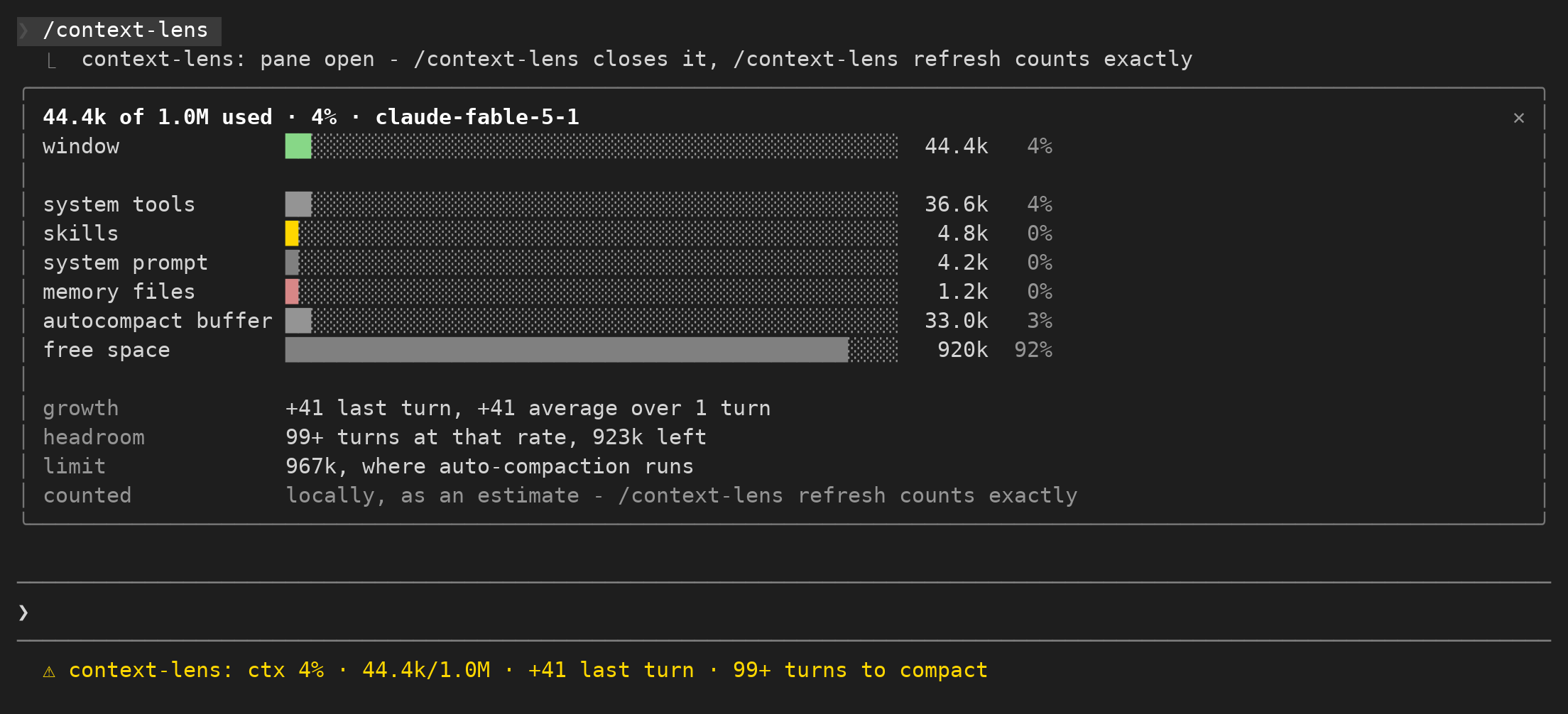
追蹤上下文視窗的使用量與每回合增幅,協助判斷何時需要整理內容。
context-lens
Crew 是一個純 Markdown 的紀錄保存系統,用於 AI 工作交接,透過帶有 GitHub 指南連結的 Threads 貼文分享。
✳︎ 「完成」不是交接,如果下一個人還得四處尋找檔案。Crew keeps A
└─ 讓每一次對話更順手
「完成」不是交接,如果下一個人還得四處尋找檔案。Crew keeps A

lcm 是編碼代理的共享記憶體基礎設施,以人類和代理的持久執行時取代 sliding-window 遺忘,並具有 SQLite 持久性、DAG 摘要和 cross-session 記憶體。
✳︎ lcm
└─ 讓每一次對話更順手