dukechain2333@dukechain2333
dukechain2333/red-alert/tree/main/plugin
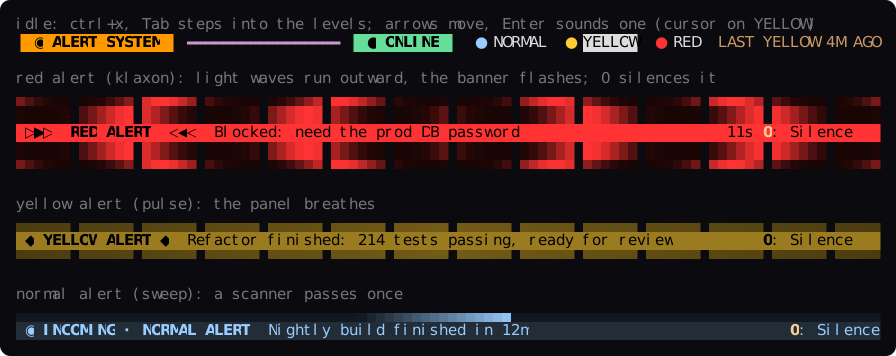
Claude Code 的聲音警報:Claude 會透過伺服器喇叭播放一般/黃色/紅色警報,並顯示 LCARS 狀態列和警報動畫。
dukechain2333/red-alert/tree/main/plugin
一個 Claude Code 外掛,會透過伺服器的喇叭播放聲音警報。Claude 使用警報工具選擇警報等級;等級名稱、聲音和「何時使用」說明來自 TOML 設定。背景 Python 常駐程式只使用標準函式庫,以 systemd 使用者服務執行,並在 127.0.0.1:1701 提供 HTTP API,同時提供用於手動發出警報的 CLI。在 Claude Code 中,LCARS 風格的提示列上方狀態列會顯示系統狀態和已設定等級;播放聲音期間,警報橫幅會執行 klaxon、pulse、sweep 動畫;按下 0 鍵可靜音,並提供 /alert 主控台和子命令(status、stop、mute、unmute、start)。等級支援任意聲音(URL 或檔案)、持續時間、優先順序、色彩、動畫、音量、冷卻時間和桌面通知。可透過 ./install.sh 安裝,也可作為外掛市集專案安裝(claude plugin install red-alert@red-alert)。
請先查看作者 README,確認 marketplace 與外掛名稱;指令可能隨儲存庫結構而變動。
claude plugin marketplace add dukechain2333/red-alert
claude plugin install red-alert
Audible alerts for Claude Code. Claude decides when its work deserves your attention and sounds an alert through your server's speakers: a chirp for a milestone, a yellow alert when a big task is done, a red alert klaxon when it's blocked and needs you. A Claude Code mod shows whether the alert system is online and animates every alert in the terminal.
alert tool whose
levels and their "when to use" descriptions come from your config, so
Claude picks among the levels you define.0), and a console pane and
/alert command for sounding alerts by hand.┌───────────────────────── your server ─────────────────────────┐
│ │
│ Claude Code ── red-alert mod ──HTTP──▶ red-alert daemon ──▶ 🔊│
│ (terminal) · alert tool 127.0.0.1:1701 │
│ · status band · levels from TOML │
│ · /alert console · systemd user unit │
│ · desktop notification│
│ red-alert CLI / curl / scripts ──HTTP──▶ │
└───────────────────────────────────────────────────────────────┘
| Level | Sound | Sounds for | Claude uses it when… |
| --- | --- | --- | --- |
| normal | TNG communicator chirp | once (0.5 s) | a small milestone or FYI: a long build or test run finished, a progress checkpoint |
| yellow | computer alert | twice (4.7 s) | a significant body of work is complete and ready for review |
| red | TNG red alert klaxon | 12 s (of 21 s) | it is blocked, needs a decision, credentials or approval, or something failed badly |
pw-play) or PulseAudio
(paplay); ffplay, mpv and mpg123 also work.git clone https://github.com/dukechain2333/red-alert.git
cd red-alert
./install.sh
red-alert test # plays every level in turn
install.sh installs, for your user only:
| What | Where |
| --- | --- |
| daemon and CLI | ~/.local/share/red-alert/, ~/.local/bin/red-alert |
| config (kept if it exists) | ~/.config/red-alert/config.toml |
| systemd user service, started now and at boot | ~/.config/systemd/user/red-alert.service |
| Claude Code mod | ~/.claude/skills/red-alert/ (loads as red-alert@skills-dir) |
The service starts at boot because the installer enables lingering
(loginctl enable-linger), which starts your user's services without a
login. Sounds are downloaded once, on first start, to ~/.cache/red-alert/.
Options: --no-service (files only), --no-mod (no Claude Code mod),
--link-mod (symlink the mod to the checkout while you develop it).
The repository is also a plugin marketplace:
claude plugin marketplace add dukechain2333/red-alert
claude plugin install red-alert@red-alert
You still need the daemon: ./install.sh --no-mod.
Start a new Claude Code session after installing. Then:
Claude raises alerts by itself. The mod adds the
mcp__red-alert__alert tool and a short system-prompt note: Claude calls
it once, as the last step of a turn where one of the levels fits, or right
before it stops to ask you something, whether or not you seem to be at the
keyboard. To change how often it alerts, tell it ("only red
alerts today", "no alerts for this task") or edit the level descriptions.
The tool never asks for permission, since all it does is play a sound on
your own machine.
The band above the prompt shows the alert system's state (● ONLINE,
○ OFFLINE or ◐ MUTED 25M), your levels and the last alert. The levels
are a menu: press ctrl+x, release, then Tab to step into the band (the
cursor lands on the first level), move with ←/→, and press Enter to
sound that alert by hand, for the level's duration. Esc takes you back to
the prompt. The levels get no number keys on purpose: a bare digit typed
into an empty prompt presses the band's buttons, so you couldn't start a
message with "1." without sounding an alert. (ctrl+x tab is Claude
Code's abovePrompt:focus action; rebind it in ~/.claude/keybindings.json
if you like.)
When an alert sounds, the band turns into an animated banner that runs for
as long as the sound plays, with a countdown when the level has a
duration:
Alerts raised elsewhere (another session, the CLI, a script) animate too, with their source shown, so every open session sees them.
Press 0 to silence an alert. While a banner is up, typing 0 into
the empty prompt stops the sound and takes the banner down; you don't need
to focus anything first. (A bare digit at an empty prompt goes to the
band's buttons, as with Claude Code's own surveys; 0 in a message you are
typing is just a 0.) After the sound ends, a red or yellow banner from
this session stays lit until you press 0 (now Dismiss). Typing your
next prompt also clears an alert that Claude raised, and silences it if
it's still sounding.
Sound an alert by hand with /alert <level> [duration] [message]:
/alert red 30s Meeting in 5 minutes sounds the red alert for 30 seconds
(2m works too), /alert yellow sounds yellow for its configured time.
/alert runs even while Claude is working.
The alert console (/alert with no arguments) has the system status, a Manual alert form and the alert log.
Type an optional message, press Enter, then the level's number (1–9)
to sound it. Other keys: 0 silence, m mute 30 min, u unmute,
r refresh, x close.
Other /alert subcommands: status, stop, mute [minutes] (0 =
until unmuted), unmute, start (starts the systemd service).
▐ LCARS 1701 ▌ ━━━━━━━━━━━━━━━━━━━━━━━━━━━━━━━━━━━━━━━━━━━━━━━━━ ▐ ALERT CONDITION ▌

SYSTEM     ● ONLINE  http://127.0.0.1:1701 · v0.2.0 · bridge · up 3h · auto (pw-play)
CONDITION  GREEN · STANDING BY

▐ MANUAL ALERT ▌ ━━━━━━━━━━━━━━━━━━━━━━━━━━━━━━━━━━━━━━━━━━━━━━━━━━━━━━━━━━━━━━━━━━━━━━
Message  Lunch is ready_
1: Sound ▐ NORMAL   ▌ p10  sweep  once  A light ping: a small milestone or an FYI…
2: Sound ▐ YELLOW   ▌ p50  pulse  4.7s  A significant body of work is complete…
3: Sound ▐ RED      ▌ p90  klaxon 12s   The user is needed now: you are blocked…

▐ LOG ▌ ━━━━━━━━━━━━━━━━━━━━━━━━━━━━━━━━━━━━━━━━━━━━━━━━━━━━━━━━━━━━━━━━━━━━━━━━━━━━━━
21:04:11  RED     stopped    Need the prod DB password  · claude-code:shop
20:51:37  YELLOW  played     Checkout refactor done, 214 tests pass  · claude-code:shop
20:12:02  NORMAL  played     Nightly build finished  · cli@bridge

[ Silence ] [ Mute 30m ] [ Unmute ] [ Refresh ] [ Close ]
Set these in /config (or claude plugin configure red-alert):
| Setting | Default | |
| --- | --- | --- |
| url | http://127.0.0.1:1701 | where the daemon listens |
| token | empty | the daemon's server.token, if you set one |
| pollSeconds | 5 | how often the band checks the daemon and picks up alerts raised elsewhere |
| permissionPromptLevel | off | sound this level whenever Claude Code waits on a permission prompt, the one wait Claude cannot announce itself (e.g. red) |
| idleBand | true | show the status strip while no alert is up |
Edit ~/.config/red-alert/config.toml, then run red-alert reload.
Claude Code picks up the change on its own: the mod rebuilds the alert tool
from the daemon's levels.
[[levels]]
name = "deploy"                     # what Claude passes as the level
priority = 40                       # higher wins when alerts overlap
sound = "~/sounds/fanfare.ogg"      # https:// URL or a file path
style = "pulse"                     # sweep | pulse | klaxon
color = "#33CC99"
volume = 70                         # 0-100
duration = 8                        # sound for 8 s: cut a longer sound, loop a
                                    # shorter one; 0 plays it once (the default)
cooldown_seconds = 30               # ignore repeats within 30 s
notify = true                       # also show a desktop notification
description = "A deployment or release finished successfully."
duration is how long the alert sounds, up to 300 seconds. A 21-second
klaxon with duration = 12 stops after 12 seconds; a 2-second doorbell with
duration = 6 rings three times. Leave it out (or set 0) to play the sound
once, in full. An alert raised by hand or through the API can override it.
Claude reads each description to decide which level to use, so write it as
advice on when to use the level. Overlapping alerts: a higher-priority
alert cuts off a lower one that is still playing, and a lower one is skipped
while a higher one plays. See config.example.toml
for every option, including audio.player (choose a player or give your
own command line) and server.token.
red-alert send LEVEL [MESSAGE...]   sound an alert (-d SECONDS, --title, --source, --json)
red-alert status                    is the daemon up? what is playing?
red-alert levels                    the configured levels
red-alert history [-n 20]           recent alerts
red-alert test [LEVEL]              play one level, or all of them in turn
red-alert stop [ID]                 silence the alert that is playing
red-alert mute [MINUTES]            mute (default 30; 0 = until unmuted)
red-alert unmute
red-alert reload                    re-read the config
red-alert serve                     run the daemon in the foreground
The CLI finds the daemon through the config file, $RED_ALERT_URL or --url
(and $RED_ALERT_TOKEN or --token). It exits with 3 when the daemon is
unreachable.
curl -s localhost:1701/health
curl -s -X POST localhost:1701/alert -H 'Content-Type: application/json' \
     -d '{"level": "yellow", "message": "Backup finished", "source": "cron"}'
Endpoints: GET /health, GET /levels, GET /history, POST /alert,
POST /stop, POST /mute, POST /unmute, POST /reload. See
docs/API.md.
Any Claude Code session that can run shell commands can use the CLI. Put
this in your CLAUDE.md:
## Alerts
This machine runs red-alert. When you finish a significant task, or right
before you stop to ask me something, run exactly one of:
- `red-alert send normal "<what finished>"`: small milestone or FYI
- `red-alert send yellow "<summary>"`: a big task is done and ready for review
- `red-alert send red "<what you need>"`: you are blocked and need me now
The simplest setup is an SSH tunnel, which keeps the daemon on localhost:
ssh -N -L 1701:127.0.0.1:1701 you@your-server
To expose the daemon on the network instead, set server.host = "0.0.0.0"
and a server.token in the config, restart the service, and set the
mod's url and token to match.
red-alert status says offline. Run systemctl --user status red-alert
and journalctl --user -u red-alert -e.played. The player reached the sound
server; check the default output and its volume with wpctl status (or
pactl info). Try pw-play some.wav yourself.failed. red-alert history shows the reason. Usually a sound
could not be downloaded (red-alert levels flags uncached sounds) or no
player could decode it: install ffmpeg or set audio.player.audio.player at a player that writes to ALSA directly.red-alert/<version>), which works. If
it changes, download the files yourself and point sound at them../uninstall.sh # keeps ~/.config/red-alert
./uninstall.sh --purge # also removes the config and cached sounds
python3 -m unittest discover -s tests       # daemon tests (a fake player, no sound)
claude plugin validate plugin               # the mod's manifest and hooks
claude plugin test plugin                   # the mod's tests (mocked daemon and clock)
To type-check the mod, run /plugin-types plugin/.claude/types in Claude
Code, then npx -p typescript tsc -p plugin.
Layout: red_alert.py (daemon and CLI), config.example.toml,
systemd/, install.sh, plugin/ (the Claude Code mod: hooks/register.tsx
hooks and UI, hooks/frames.ts animation frames, hooks/api.ts API types,
types/index.d.ts its state contract), tests/.
The default sounds are fetched from TrekCore when the daemon first starts. They are not part of this repository. Star Trek and its sounds belong to their respective owners; swap in your own sounds if you need to. The UI borrows the look of LCARS, the Star Trek computer interface.

為 Claude Code 提供兩種 Cuelume 聲音:長回合結束時提示就緒,權限提示等待時提醒注意。

一個 Claude Code mod,收集工作階段中等你處理的事項:代理的問題、Claude 記下的問題,以及你的 PR 檢查和審查。它會在提示列上方和 `/inbox` 面板中顯示這些內容,並標明工作階段目前的狀態。

OffiCraft 是一間跑在你自己 Mac 上的 AI 工作室:你可以雇用幾位常駐 AI 成員,把整件事交給他們,在網頁控制台查看進度,等他們需要你核准時回覆一句。執行的就是你機器上的 Claude Code 或 Codex。