
skanehira@skanehira
1/
サイドパネルにセッションの概要を表示するClaude Modsを作りました 複数のセッションを並行で進めると現状がよくわからなくなるので、そういうときに便利です https://github.com/skanehira/claude-recap-plus
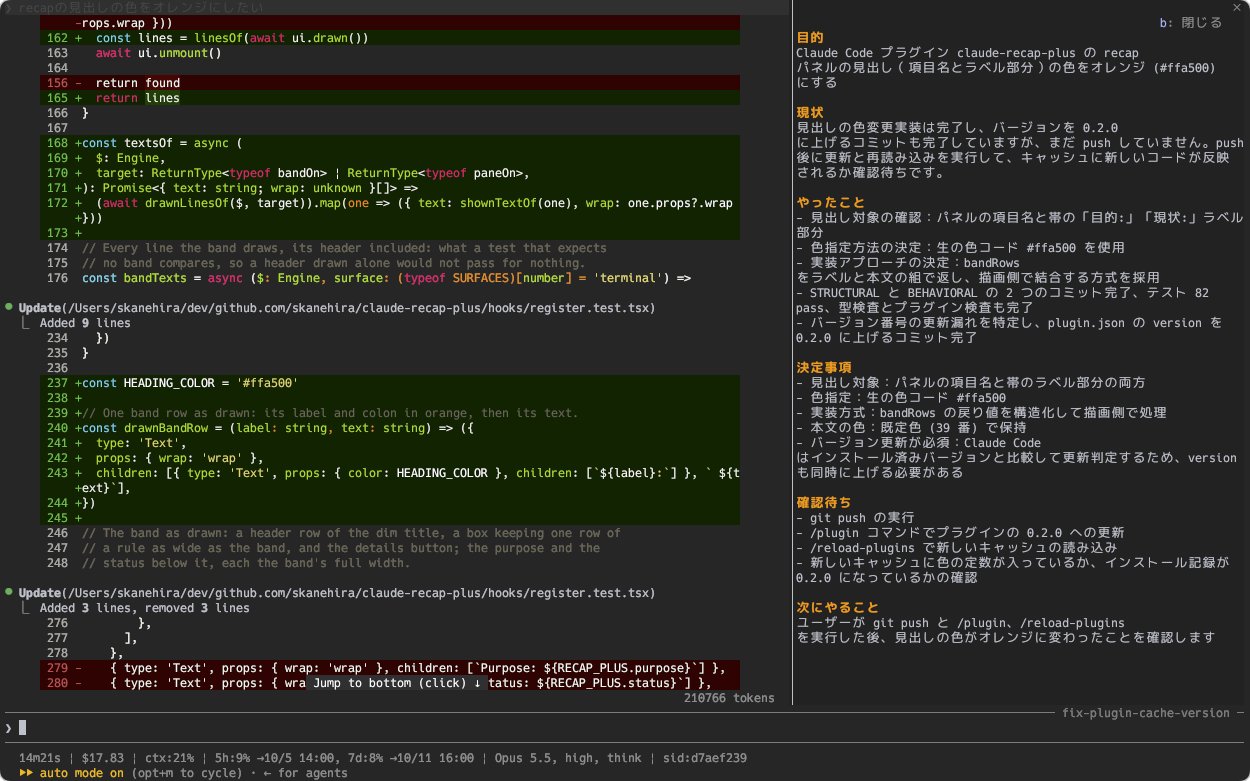
サイドパネルにセッションの概要を表示するClaude Modsを作りました 複数のセッションを並行で進めると現状がよくわからなくなるので、そういうときに便利です https://github.com/skanehira/claude-recap-plus
recap-plus 是一個 Claude Code 外掛程式,可在提示上方顯示摘要區塊,讓您無需捲動對話即可查看每個會話的目的和狀態。它會在每次主要對話輪次後更新,以「(working)」標記進行中的狀態,並且可以透過 /recap-plus 或區塊的詳細資訊按鈕展開,以顯示目的、狀態、已完成、決策、待處理和下一步。摘要會按會話儲存,遵循語言設定,並透過會話自己的帳戶使用 Haiku 進行生成,這會消耗權杖。需要啟用掛鉤;透過 /plugin marketplace add skanehira/claude-recap-plus、/plugin install recap-plus@claude-recap-plus、/reload-plugins 安裝。在 VS Code 擴充功能、行動裝置或 claude -p 執行中不可用。可選的自訂按鍵綁定 (ctrl+x b 開啟窗格,ctrl+x i 折疊區塊)。
請先查看作者 README,確認 marketplace 與外掛名稱;指令可能隨儲存庫結構而變動。
claude plugin marketplace add skanehira/claude-recap-plus
claude plugin install recap-plus
A Claude Code mod that shows a session summary right above the prompt. When you switch between sessions, you can see what each is for and where the work stands without scrolling through the conversation.
── recap-plus ──────────────────────────────────────────────────── b: details
Purpose: Add retry with backoff to the payment webhook handler
Status: The tests pass locally. Claude is waiting for your OK to open the pull
request.
Run these commands in Claude Code:
/plugin marketplace add skanehira/claude-recap-plus
/plugin install recap-plus@claude-recap-plus
/reload-plugins
Type /recap and check that /recap-plus appears. You can also check that recap-plus@claude-recap-plus is enabled with claude plugin list.
If you installed the plugin under its former name, disable that copy in /plugin before installing this one. Saved summaries and usage totals are not migrated; the new plugin rebuilds summaries from the conversation and starts usage totals from zero. Existing files are left in place.
Start a conversation as usual. The band shows the session's purpose and status, and updates after each turn of the main conversation. During a turn, it keeps the previous summary and marks the status with (working). The first summary appears after the first turn finishes.
Open the full summary with /recap-plus or the band's details button:
| Part | What it shows | | -------------- | --------------------------------------------------------------------------- | | Purpose | What the session is for, including the target file, feature or pull request | | Status | Where the work stands now | | Done | The latest 5 completed items | | Decisions | The latest 5 decisions, including answers to Claude's questions | | Waiting on you | The latest 5 things Claude is waiting for you to answer or do | | Next | What Claude will do next |
Text wraps to the available width. Close the pane with Esc or its close button; press b when the pane has focus. The band is hidden while the pane, a dialog or a survey is shown.
Summaries are saved per session. Resuming a session shows its saved summary, or generates one if it is missing or out of date. /clear starts a new summary.
Without custom bindings, use /recap-plus to open the pane, or ctrl+x tab to focus the band and then b. Use ctrl+x ctrl+a to fold or restore the band.
For shorter access, add these bindings to the Chat context in ~/.claude/keybindings.json. /keybindings opens that file. If a Chat context already exists, add the two entries to its bindings. Changes apply without restarting Claude Code.
{
  "bindings": [
    {
      "context": "Chat",
      "bindings": {
        "ctrl+x b": "app:cycleDiffBase",
        "ctrl+x i": "abovePrompt:toggle"
      }
    }
  ]
}
| Keys | Action | | -------- | --------------------------------------------------- | | ctrl+x b | Open the summary pane, or close it when it is shown | | ctrl+x i | Fold or restore the band |
ctrl+x b works only while the band or summary pane is visible. If the band is folded or a dialog is open, use /recap-plus once the dialog closes. In the diff panel, ctrl+x b retains its usual action of cycling the comparison base.
The summary follows Claude Code's language setting, for example in ~/.claude/settings.json:
{
  "language": "Japanese"
}
Japanese settings such as Japanese, 日本語, ja and ja-JP give Japanese labels and summaries. Other languages give English labels and summaries in the configured language. With no setting, both are English.
After changing the setting, run /reload-plugins or restart the session. Existing summary text changes language after the next turn.
The mod uses Haiku through the same account and provider as your Claude Code session. It calls Haiku after each main conversation turn, and when opening a session that needs a new summary. These calls use tokens and follow your session's billing arrangements.
Summary requests include the previous summary, your request, Claude's final answer, questions and answers, and selected tool activity such as command descriptions, file paths, URLs and search queries. When rebuilding a summary, they can also include earlier requests and the compaction summary. File-read and file-search tool activity is excluded; text quoted in a request or answer can still be included.
Non-interactive runs (claude -p) do not generate summaries. To stop Haiku calls, disable the plugin in /plugin or run:
claude plugin disable recap-plus@claude-recap-plus
There is no mode that keeps the band without Haiku calls. See request details and usage totals for more information.
Refresh the marketplace, update the plugin, and restart Claude Code:
claude plugin marketplace update claude-recap-plus
claude plugin update recap-plus@claude-recap-plus
/plugin, run /reload-plugins, and start a turn. Restore a folded band with ctrl+x ctrl+a or ctrl+x i if configured.claude -p runs./recap-plus is unavailable, try the band's details button or ctrl+x b if configured.claude plugin uninstall recap-plus@claude-recap-plus
claude plugin marketplace remove claude-recap-plus
Remove the two custom bindings from ~/.claude/keybindings.json if you added them. To also delete all saved summaries and usage totals:
rm ~/.claude/plugins/store/recap-plus_*.json
The documents below are in Japanese.

Cache-aware /loop workers and CronCreate background automation. Substrate plugin for every recurring task in the ruflo family.

A shared Kanban board for a project, with a live one-line summary of it above the prompt.

顯示目前工作階段是否有 Playwright 瀏覽器、由誰持有瀏覽器,並可透過 /browser clean 關閉殘留瀏覽器的 Claude Code mod。
