
2bo@2bo
2bo/pr-inbox
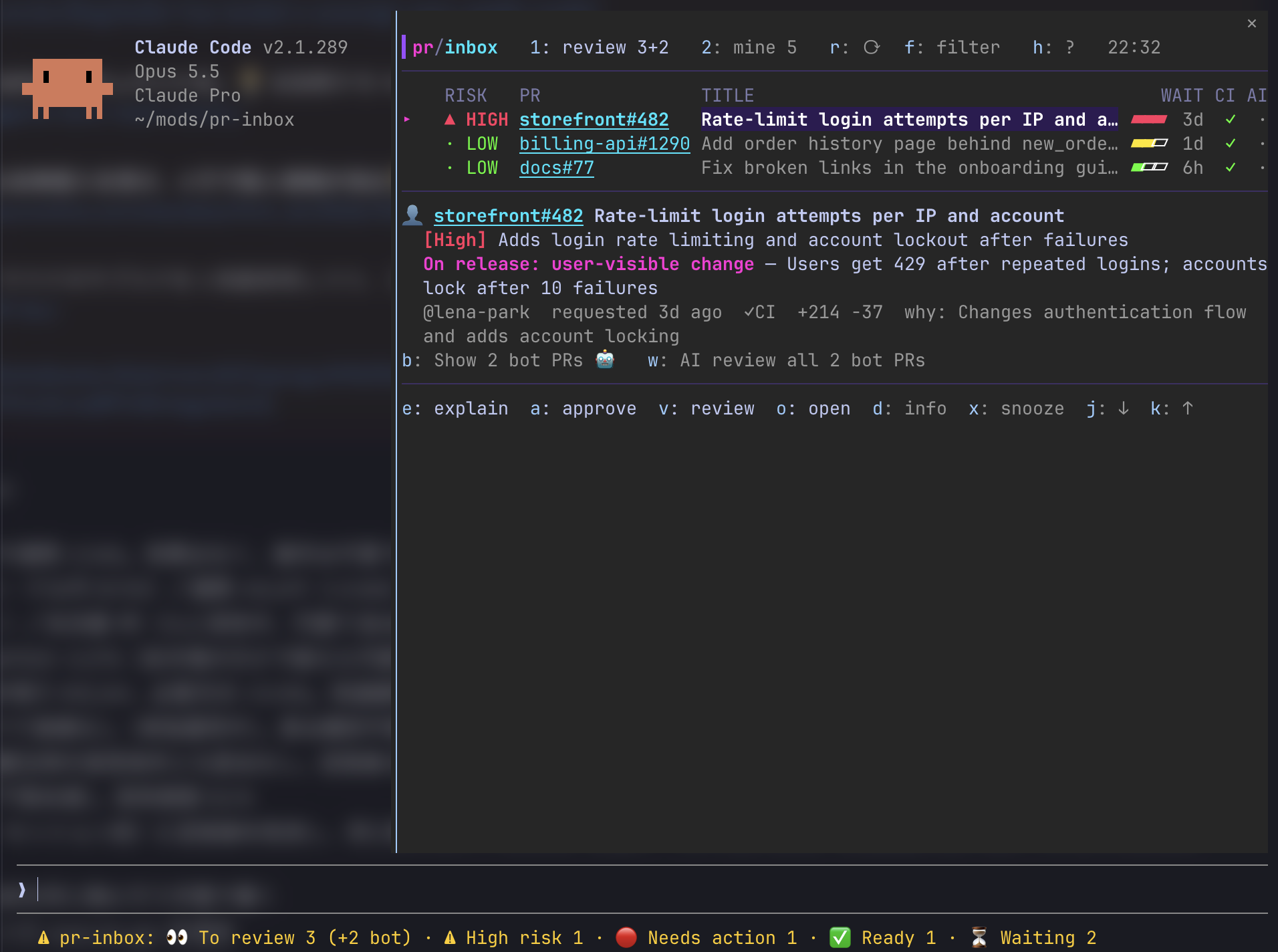
2bo/pr-inbox
一個 Claude Code 外掛,將你的審查請求和你自己的拉取請求轉變成一個收件箱,按需要優先順序排序。
review 3 ⚙2 · ▲1 high │ mine ✗1 fix · ✓1 ship · …2 wait)/pr-inbox 打開一個窗格,風格類似 lazygit 和 gh-dash:每個 PR 一行(風險或狀態、等待時間熱力條、CI、AI 審查),選中的 PR 的詳情在列表下方,快捷鍵在底部。兩個分頁

使用 Claude Code v2.1.288 測試。外掛需要 v2.1.287 或更高版本。
在 Claude Code 中:
/plugin marketplace add 2bo/pr-inbox
/plugin install pr-inbox@pr-inbox
或從 shell:claude plugin marketplace add 2bo/pr-inbox && claude plugin install pr-inbox@pr-inbox。
| 快捷鍵 | 動作 |
| :- | :- |
| 1 / 2 | 待審查 / 我的 PR |
| j / k | 選擇下一個 / 上一個 PR |
| e | 要求 Claude 解釋 PR(對你自己的 PR,診斷阻礙因素)。Claude 讀取描述、評論、審查和相關問題與 PR,不僅是差異 |
| a | 批准(僅在確認對話中選擇 批准 後執行,其中 取消 被先選中) |
| v | AI 審查,如果通過則批准(見下文)。再按 v 取消正在執行的審查 |
| d | 差異,一次一個檔案,繪製方式類似 Claude Code 自身的差異:n / b 下一個/上一個檔案,l 檔案清單,q 返回 PR。鎖定檔案和產生的檔案被折疊(g 顯示它們);AI 審查在檔案中的發現列出在上方 |
| i | 資訊:AI 審查的每個發現,包含行連結 |
| n | 當資訊不適合窗格時的下一頁(在末尾返回頂部) |
| x | 暫停 PR 直到更新(z 顯示暫停的 PR) |
| w | AI 審查每個尚未審查的機器人 PR,一次一個(再按 w 停止) |
| m | 合併一個可以合併的 PR,在選擇方法後(固定到螢幕上的提交) |
| c | 重新執行你 PR 的失敗 GitHub Actions 工作 |
| f | 按儲存庫、編號、標題或 @作者 篩選(Enter 保留;空的清除) |
| h | 顯示快捷鍵 |
| Ctrl+X Tab | 從提示列返回窗格(或點選它)。窗格有焦點時快捷鍵才能到達窗格。提示列下方的提示行說明哪邊要去 |
| o | 在瀏覽器中開啟 |
| b / s / z | 顯示或隱藏機器人 PR / 過期 PR / 暫停的 PR |
| r | 再次擷取 |
| Esc | 返回提示列;窗格保持開啟 |
| q | 關閉窗格(/pr-inbox 重新開啟) |
● 標記自你上次選擇後更新的 PR。你批准的 PR 會離開待審查,因為 GitHub 刪除審查請求;從這裡批准的 PR 在 "最近批准" 下列出一天。
PR 編號和失敗的檢查是超連結:在支援超連結的終端中 Cmd+click 它們。
/pr-inbox refresh 再次擷取並列印計數,不開啟窗格。
在審查請求上按 v 從多個角度執行審查,每個是獨立的模型呼叫,通過時批准 PR:
.claude/ 規則、技能、子任務程式等)。接下來發生什麼取決於誰決定:當批准在沒有你的情況下進行時(ai_approve auto 適用於作者),這些中的任何一個都會停止審查;當你在對話中批准時,審查繼續並在窗格、對話和記錄中顯示為 ⚠ 警告review_model 上(預設 Sonnet)。每個首先說它需要讀什麼(PR 頭的檔案、程式碼搜尋、上游發布說明);外掛檢查請求、擷取並篩選,然後審查人審查:
.claude/rules/ 中的規則以及審查人要求的任何 AI 指令(技能、子任務程式定義、命令、嵌套 CLAUDE.md、Cursor 或 Copilot 指令)從基分支讀取,所以 PR 無法重寫它被審查的規則。它們按設計與 AI 交談,所以它們與 PR 內容分開給出,不進行注入篩選在 PR 下方,結果首先出現,然後每個角度的結論用一兩句話:✓ 無問題、✗ 阻止批准、△ 發現不阻止的東西(低信心度或被驗證者反駁)、? 無法判斷。i 顯示每個發現及其證據和行連結。在批准對話前,結論和發現也寫入記錄。
僅每個審查人角度內的問題計數,從兩個角度發現的同一問題顯示一次。結果為審查的提交保留,所以重啟後仍在那裡;當新提交到達時,行說審查是較早提交的。
當通過時,ai_approve 決定:confirm(預設)先問你;auto 為儲存庫的成員和協作者以及 Dependabot 或 Renovate 的 PR 立即批准,但仍為任何人和分支問。批准固定到審查的提交。結果顯示在 PR 和記錄下方。
一次審查對每個角度進行約兩個 Sonnet 呼叫加驗證者和幾個小篩選呼叫,在你的計畫上。通常不到一分鐘。
gh auth login 登入。外掛透過 gh 擷取、差異和批准 PR,因為帳戶 gh 登入到使用 /config 或 /plugin configure 變更它們。
| 設定 | 預設 | 功能 |
| :- | :- | :- |
| org_filter | (空) | 僅顯示此 GitHub 組織中的 PR |
| stale_days | 30 | 將未更新超過這麼多天的 PR 折疊在 Stale 下 |
| refresh_minutes | 5 | 多久從 GitHub 擷取一次 |
| summary_model | sonnet | 寫摘要、風險和發布影響的模型 |
| desktop_notify | review requests | review requests 的作業系統通知,all(也批准、請求變更和你 PR 的 CI 失敗)或 off。在 macOS 上使用 osascript,在 Linux 上使用 notify-send。在 macOS 上,在系統設定中為指令稿編輯器允許通知,如果沒有出現 |
| analysis | auto | 何時分析審查請求:auto(從啟動)、when opened(一旦你在工作階段中開啟 /pr-inbox)或 off |
| ai_approve | confirm | v 當 AI 審查通過時做什麼:confirm 或 auto |
| review_model | sonnet | AI 審查的模型 |
| review_purpose / review_correctness / review_tests / review_security / review_conventions | (內置) | 每個審查人的指令。off 跳過該角度 |
| review_dependency_impact / review_supply_chain | (內置) | 相同,對於 Dependabot 和 Renovate PR |
| explain_prompt | (內置) | e 對審查請求問什麼。{url} 變成 PR URL |
| risk_high / risk_medium / risk_low | (內置) | 什麼在分析中計為每個風險等級 |
| release_impact | (內置) | 如何判斷對發布的影響(是/否/未知) |
| language | auto | AI 摘要、風險和發布影響的語言 |
將提示設定留空以使用內置文字。無論你寫什麼,外掛仍新增指令以讀評論和相關問題(對 e)和規則以保持 PR 內容不受信任和 e 唯讀。變更標準重新執行儲存的分析。
選單是英文的。AI 分析及其標籤遵循 language:
language 設定為非 auto 的任何東西,如 English 或 Japaneselanguage 設定LC_ALL、LC_MESSAGES,然後 LANG)當語言是日文時標籤是日文的,否則是英文的。分析本身用選擇的任何語言編寫。
分析呼叫一次模型每個 PR,在你的計畫上。結果與 PR 的更新時間和語言一起儲存,僅當 PR 變更或語言變更時重新執行。失敗的分析在 15 分鐘、30、60 和 120 後重試,然後保持到 PR 變更。一小時最多 30 個分析啟動。
當 PR 太大而無法完全讀取(超過 30,000 字元的差異、4,000 的描述或 300 個檔案)時,分析說這樣(judged on part of the PR)並且永遠不會評為低風險。
e 時,該輪在外掛強制的唯讀保護下執行:僅讀、Grep、Glob 和唯讀 gh pr view、gh pr diff、gh pr checks、gh issue view、gh run view、gh run list 和 gh api PR 或問題評論和審查的 GET 請求可以執行。編輯、其他命令、Web 存取、子任務程式、批准、評論和推送被拒絕,即使你的權限模式或允許規則會讓它們通過。保護以該輪結束;你接下來問的任何東西用你工作階段的常規權限執行v)。 根據 Anthropic 關於間接提示注入和雙 LLM 模式的指導建立。批准從審查人的結構化答案在程式碼中決定,永遠不由模型決定。審查的模型沒有工具:它們無法執行命令、讀本機檔案、到達網路或寫任何東西。它們僅讀外掛從審查中的 PR 擷取的(和,對於相依更新,上游發布說明和 GitHub 上的檔案);他們要求讀的驗證首先。內容到達它們作為標記為不受信任的 JSON、進行注入篩選的螢幕,不可見字元剝除。請先查看作者 README,確認 marketplace 與外掛名稱;指令可能隨儲存庫結構而變動。
claude plugin marketplace add 2bo/pr-inbox
claude plugin install pr-inbox
A Claude Code mod that turns your review requests and your own pull requests into an inbox, ordered by what needs you next.
review 3 ⚙2 · ▲1 high │ mine ✗1 fix · ✓1 ship · …2 wait)/pr-inbox opens a pane in the spirit of lazygit and gh-dash: one line per PR (risk or state, how long it has waited as a heat bar, CI, AI review), the selected PR's details under the list, and the keys on the bottom line. Two tabs
Tested with Claude Code v2.1.288. Mods need v2.1.287 or later.
In Claude Code:
/plugin marketplace add 2bo/pr-inbox
/plugin install pr-inbox@pr-inbox
Or from the shell: claude plugin marketplace add 2bo/pr-inbox && claude plugin install pr-inbox@pr-inbox.
| Key | Action |
| :- | :- |
| 1 / 2 | To review / My PRs |
| j / k | Select the next / previous PR |
| e | Ask Claude to explain the PR (for your own PR, to diagnose what blocks it). Claude reads the description, comments, reviews and linked issues and PRs, not only the diff |
| a | Approve (runs only after you choose Approve in the confirmation dialog, where Cancel is selected first) |
| v | AI review, then approve if it passes (see below). v again cancels a running review |
| d | The diff, one file at a time, drawn like Claude Code's own diffs: n / b next and previous file, l the list of files, q back to the PRs. Lockfiles and generated files are folded (g shows them); the AI review's findings in a file are listed above it |
| i | Info: every finding of the AI review, with links to the lines |
| n | Next page of the info when it does not fit the pane (at the end, back to the top) |
| x | Snooze the PR until it is updated (z shows snoozed PRs) |
| w | AI review every bot PR not reviewed yet, one at a time (w again stops) |
| m | Merge one of your PRs that is ready, after picking a method (pinned to the commit on screen) |
| c | Re-run the failed GitHub Actions jobs of one of your PRs |
| f | Filter by repository, number, title or @author (Enter keeps it; an empty one clears it) |
| h | Show the keys |
| Ctrl+X Tab | From the prompt back to the pane (or click it). Keys reach the pane only while it has the focus. The hint line under the prompt says which way to go |
| o | Open in the browser |
| b / s / z | Show or hide bot PRs / stale PRs / snoozed PRs |
| r | Fetch again |
| Esc | Back to the prompt; the pane stays open |
| q | Close the pane (/pr-inbox opens it again) |
● marks PRs updated since you last selected them. A PR you approve leaves To review, as GitHub drops the review request; PRs approved from here stay listed under it as "Approved recently" for a day.
PR numbers and failed checks are hyperlinks: Cmd+click them in a terminal that supports hyperlinks.
/pr-inbox refresh fetches again and prints the counts without opening the pane.
v on a review request runs a review from several perspectives, each an independent model call, and approves the PR when it passes:
.claude/ rules, skills, subagents and the like). What happens next depends on who decides: when the approval would go through without you (ai_approve auto for an author it applies to), any of these stops the review; when you approve in the dialog, the review goes on and they are shown as ⚠ warnings in the pane, the dialog and the transcriptreview_model (Sonnet by default). Each first says what else it needs to read (files at the PR head, code searches, upstream release notes); the mod checks the request, fetches and screens it, then the reviewer reviews:
.claude/rules/, and any AI instruction a reviewer asks for (skills, subagent definitions, commands, nested CLAUDE.md, Cursor or Copilot instructions) are read from the base branch, so a PR cannot rewrite the rules it is reviewed by. They talk to AI by design, so they are given apart from the PR content and not screened for injectionUnder the PR, the outcome comes first, then each perspective's conclusion in a sentence or two: ✓ no problems, ✗ blocks the approval, △ found something that does not block (low confidence, or refuted by the verifier), ? could not tell. i shows every finding with its evidence and a link to the line. Before the approval dialog, the conclusions and findings are also written to the transcript.
Only problems within each reviewer's perspective count, and the same problem found from two perspectives is shown once. The result is kept for the reviewed commit, so it is still there after a restart; when new commits arrive, the row says the review is of an older commit.
When it passes, ai_approve decides: confirm (default) asks you first; auto approves at once for PRs from members and collaborators of the repository and from Dependabot or Renovate, and still asks for anyone else and for forks. The approval is pinned to the reviewed commit. The outcome shows under the PR and in the transcript.
A review makes about two Sonnet calls per perspective plus the verifier and several small screening calls, on your plan. It usually takes under a minute.
gh auth login. The mod fetches, diffs and approves PRs through gh, as the account gh is signed in toChange them with /config or /plugin configure.
| Setting | Default | What it does |
| :- | :- | :- |
| org_filter | (empty) | Only show PRs in this GitHub organization |
| stale_days | 30 | Fold your PRs not updated for this many days under Stale |
| refresh_minutes | 5 | How often to fetch from GitHub |
| summary_model | sonnet | The model that writes the summary, risk and release impact |
| desktop_notify | review requests | OS notifications for review requests, all (also approvals, changes requested and CI failures on your PRs) or off. Uses osascript on macOS and notify-send on Linux. On macOS, allow notifications for Script Editor in System Settings if none appear |
| analysis | auto | When review requests are analyzed: auto (from startup), when opened (once you open /pr-inbox in the session) or off |
| ai_approve | confirm | What v does when the AI review passes: confirm or auto |
| review_model | sonnet | The model of the AI review |
| review_purpose / review_correctness / review_tests / review_security / review_conventions | (built-in) | Instructions for each reviewer. off skips that perspective |
| review_dependency_impact / review_supply_chain | (built-in) | The same, for Dependabot and Renovate PRs |
| explain_prompt | (built-in) | What e asks about a review request. {url} becomes the PR URL |
| risk_high / risk_medium / risk_low | (built-in) | What counts as each risk level in the analysis |
| release_impact | (built-in) | How to judge the impact on release (yes / no / unknown) |
| language | auto | The language of the AI summary, risk and release impact |
Leave the prompt settings empty to use the built-in text. Whatever you write, the mod still adds the instruction to read comments and linked issues (for e), and the rules that keep PR content untrusted and e read-only. Changing the criteria redoes the stored analyses.
The menus are in English. The AI analysis and its labels follow language:
language set to anything other than auto, such as English or Japaneselanguage settingLC_ALL, LC_MESSAGES, then LANG)The labels are in Japanese when the language is Japanese, and in English otherwise. The analysis itself is written in whatever language is chosen.
The analysis calls the model once per PR, on your plan. Results are stored with the PR's update time and language, and are redone only when the PR changes or the language does. A failed analysis is retried after 15 minutes, then 30, 60 and 120, and then left until the PR changes. At most 30 analyses start in an hour.
When a PR is too large to read whole (more than 30,000 characters of diff, 4,000 of description or 300 files), the analysis says so (judged on part of the PR) and never rates it low risk.
e, that turn runs under a read-only guard enforced by the mod: only Read, Grep, Glob and the read-only gh pr view, gh pr diff, gh pr checks, gh issue view, gh run view, gh run list, and gh api GET requests for a PR's or issue's comments and reviews can run. Edits, other commands, web access, subagents, approvals, comments and pushes are refused, even if your permission mode or allow rules would let them through. The guard ends with that turn; anything you ask next runs with your session's usual permissionsv). Built along Anthropic's guidance on indirect prompt injection and the dual-LLM pattern. The approval is decided in code from the reviewers' structured answers, never by a model. The review's models have no tools: they cannot run commands, read local files, reach the network or write anything. They read only what the mod fetched from the PR under review (and, for dependency updates, upstream release notes and files on GitHub); what they ask to read is validated first. Content reaches them as JSON labeled as untrusted, screened for injected instructions, with invisible characters stripped. Any error, timeout or unparsable answer blocks the approval; a suspected injection blocks it when no person approves, and is a ⚠ warning when you do. auto is still a choice to trust an AI judgment: keep it to repositories where that is acceptable, and keep branch protection and required reviews as the last lined) is drawn by Claude Code's own highlighter, line by line with the same characters stripped (tabs kept), and is never sent to a model. Links open only canonical https:// URLs. Failed-check links point wherever the CI system says, which may be a third-party siteanalysis on auto, as soon as Claude Code starts (including claude -p runs and sessions in other projects) and on every refresh, each review request that has not been analyzed yet is sent to the model Claude Code is configured with (Anthropic, or your Bedrock, Vertex or gateway setup), under your account: its repository and number, author, title, list of changed files, description (first 4,000 characters) and diff (first 30,000 characters). You do not have to open the pane. Follow your organization's rules for work code: narrow it with org_filter, or set analysis to when opened or off~/.claude/plugins/store/): the URLs of your review requests and the state of your own PRs (to notice changes), each analysis (summary, risk, release impact), each AI review's findings, snoozed PRs and which updates you have seen. Analyses of PRs that are no longer open are deleted on the next refreshgh; the mod holds no token. OS notifications go through osascript or notify-send, with the text passed as arguments, never as script. Commands run as argument lists, without a shellpnpm install
claude --plugin-dir . # run the working copy; loading once also writes the type declarations to .claude-plugin/types/ (needed by typecheck)
pnpm run check # validate (--strict) → tsc → Biome → claude plugin test
pnpm run demo starts Claude Code with the mod against made-up PRs: a fake gh (scripts/demo/gh) answers every GitHub call, so nothing real is read or written, and approvals and merges go nowhere. The mod's real state is set aside and put back when you /exit. It is also how the screenshot is taken.
Tests live in tests/*.test.ts. GitHub, the model, the store and the environment are all stubbed, so tests make no network calls.
MIT

Ruflo 記憶系統的基底層外掛:AgentDB 控制器橋接(15 個 agentdb_* MCP 工具)、RuVector ONNX 嵌入(10 個 embeddings_* 工具,包含 RaBitQ 32x 量化)和 WASM HNSW 模式路由器(3 個 ruvllm_hnsw_* 工具)。作為 mod(ADR-445):可選的安全召回會進入提示,寫入守衛會把機密排除在記憶之外,還提供 /agentdb 和控制台顯示的狀態檔。

建立、格式化、最佳化及檢視互動式 Power BI 報表,並提供遵循 pbir CLI 的報表面板,顯示 Claude 讀取與修改的內容。


在提示列上方、狀態列與通知中顯示未讀 AMP 訊息,還能喚醒閒置的 Claude Code 工作階段來讀取。需要 Claude Code 2.1.287 或更新版本。
