
hacksurvivor@hacksurvivor
hacksurvivor/claude-mods/tree/main/mods/nightshift

Claude Code 裡的 Codex:Claude 用量上限用完時接手聊天,透過 Codex 的即時語音與你交談,製作 Claude 可以要求的圖片,並在 Claude 的瀏覽器窗格中瀏覽。
hacksurvivor/claude-mods/tree/main/mods/nightshift
Codex 在 Claude Code 裡。Nightshift 是一個 Claude Code mod,讓 OpenAI 的 Codex 在同一個視窗中只要點一下就能使用:
/codex <prompt> 不論模式為何,都用 Codex 回答一則訊息。需要 Claude Code 2.1.286 或更新版本(mods)、PATH 上的 Codex CLI 0.159 或更新版本,並已登入(codex login)。ChatGPT plan 即可,不需要 OpenAI API key。Node.js 22 或更新版本。語音需要 macOS。
在 Claude Code 中安裝:
/plugin marketplace add hacksurvivor/claude-mods
/plugin install nightshift@hacksurvivor
/reload-plugins
請先查看作者 README,確認 marketplace 與外掛名稱;指令可能隨儲存庫結構而變動。
claude plugin marketplace add hacksurvivor/claude-mods
claude plugin install nightshift
Codex inside Claude Code. Nightshift is a Claude Code mod that puts OpenAI's Codex one click away in the same window:
/codex <prompt> answers one message with Codex, whatever the mode.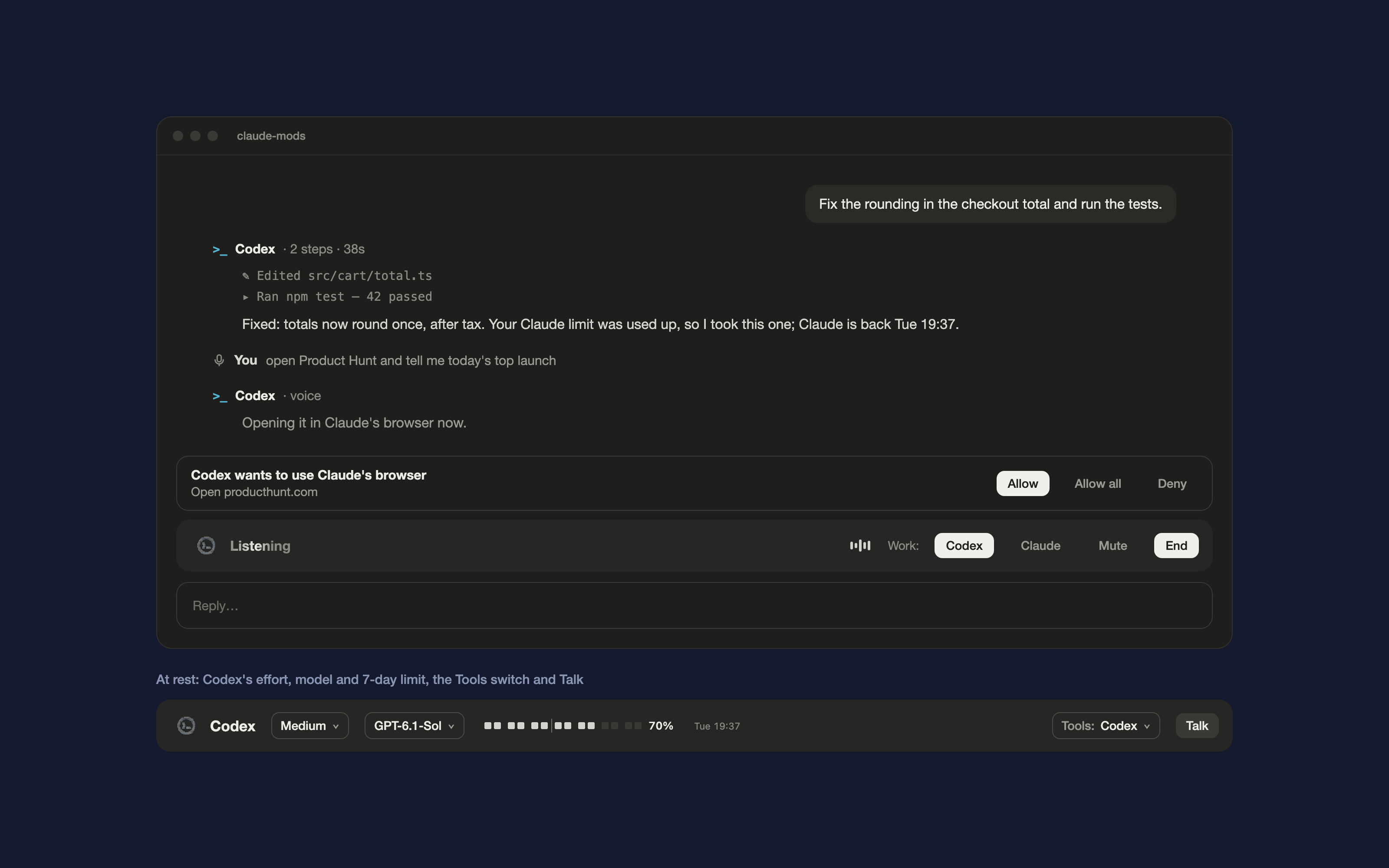
PATH, signed in (codex login). A ChatGPT plan works; no OpenAI API key is needed.PATH, for Nightshift's two small helper scripts.In Claude Code:
/plugin marketplace add hacksurvivor/claude-mods
/plugin install nightshift@hacksurvivor
/reload-plugins
/nightshift auto | codex | claude: Codex only when Claude's limit is used up (the default), Codex for every message, or never./nightshift effort <level>, /nightshift model <name>, /nightshift tools claude | codex | auto./codex <prompt>: one message to Codex. Start it with $imagegen for an image.Nightshift is open about everything it does on your machine and what leaves it:
PATH through your login shell: codex exec in the project folder with Codex's workspace-write sandbox, and codex app-server for voice. Codex then works with your own Codex login and settings./codex; the brief Claude writes when it calls the codex tool; and during Talk, your voice, which Codex's voice helper streams to OpenAI. The microphone is used only while Talk is on.~/.codex/sessions (never your messages there), the model list in ~/.codex/models_cache.json, the default model and effort in ~/.codex/config.toml, and the images Codex saves in ~/.codex/generated_images, to show them (it makes small JPEG previews with macOS sips). It never reads ~/.codex/auth.json or any credential.hooks/voice.mjs (the voice bridge) and hooks/browser-mcp.mjs (the browser bridge Codex uses). They talk to Nightshift over Unix sockets in your private temp folder ($TMPDIR). Neither opens a network port.All on your computer. Nothing is downloaded or installed, and no package manager runs.
| Program | When | Why |
| --- | --- | --- |
| codex exec --json … and codex exec resume …, through /bin/zsh -lc 'exec codex "$@"' | When Codex picks up the chat, for /codex, and when Claude calls the codex tool | To have Codex do the work. The login shell finds codex on your PATH the way your terminal does. The arguments are fixed apart from the prompt, the Codex model and effort, images you attach, and the settings that connect Codex to the browser bridge. |
| node hooks/voice.mjs, through /bin/zsh -lc 'exec node "$@"' | While Talk is on | The voice bridge. It runs codex app-server and the voice helper that ships with the Codex CLI. |
| node hooks/browser-mcp.mjs | Started by Codex during runs Nightshift begins | The browser bridge: Codex's way into Claude's browser pane. |
| /bin/zsh -c with ls, grep and tail | At session start, after each Codex run, and every 5 minutes | To read the newest usage-limit line from ~/.codex/sessions, for the 7-day meter. |
| /bin/zsh -c with cat and awk | At session start | To read Codex's model list and the two settings it uses (default model and effort) from ~/.codex. |
| /bin/zsh -c with stat, and sips with base64 | After a Codex run that made images | To find the PNGs Codex saved for that run and make small JPEG previews (in a temporary file deleted right after). |
| /usr/bin/getconf DARWIN_USER_TEMP_DIR | When a bridge starts | To find your private temp folder for the bridges' sockets. |
Nightshift's own requests ($.http.fetch) go only to http://localhost, over Unix sockets in your private temp folder, to its two bridges. They never leave your computer:
GET /next (the next step Codex asks for) and POST /result (its result).POST /mute, POST /end, POST /route (Codex or Claude does the work) and POST /speak (Claude's answer, for the voice to read out).Data leaves your computer only through the Codex CLI, to OpenAI, as listed above.
While a Codex run or a call that Nightshift started is going, Nightshift calls the tools of Claude's browser pane (navigate, get_page_text, read_page, find, computer, form_input, tabs_context, tabs_create) on Codex's behalf: one call for each step Codex asks for, asked or not as described above. Before Codex's first step and each page it opens, Nightshift also calls tabs_context to see whether you can watch: if the pane isn't open, it opens Codex's page with preview_start, which shows the pane; if the pane is hidden behind something else, it shows a toast saying ⌘⇧B brings it back. It calls no other tools.
/codex <prompt>: your prompt, and Codex answers it.When Claude answers again after Codex covered for it, Nightshift adds one note to Claude's context. The note says how many messages Codex answered and which files it changed.
session.start: registers /nightshift, /codex and the codex tool, and reads your settings and Codex's limits.prompt.submit: adds the note above when Claude takes back over from Codex. Everything else passes through unchanged.turn.start, turn.step, turn.complete: when Codex covers for Claude, or a voice exchange is kept, turn.step answers the turn itself instead of Claude. Otherwise the turn goes to Claude unchanged. turn.complete sends Claude's answer to the voice for work you passed to Claude, and retries a limit-hit message with Codex.tool.call: answers Nightshift's own codex tool. When Tools is set to Codex, it refuses calls to Claude's browser tools (mcp__Claude_Browser__*, mcp__claude-in-chrome__*) and computer-use tools (mcp__computer-use__*), telling Claude to use Codex instead. Every other tool call passes through unchanged.tool.describe: only when Tools is set to Codex. It describes those same browser and computer-use tools as off and moves them behind tool search, and adds to the codex tool's description that it takes that work.ui.render: draws the strip, Codex's replies, voice rows, image cards and the Allow row. It changes nothing else.command.run: serves /nightshift and /codex.Nightshift uses your Codex login only by running the Codex CLI. It never reads, stores or sends a credential, so there is no key or token to configure.
>_ header are OpenAI's; parts of the Codex CLI's art and shimmer are ported under Apache-2.0 (see NOTICE).Apache-2.0. See LICENSE and NOTICE.

將工作階段作為 skill 使用的瀏覽器自動化:Playwright + RVF 認知容器 + ruvector 軌跡 + AgentDB 選擇器記憶 + AIDefence PII/注入守門。作為 mod(ADR-445 模式):只收緊的工具守門、本機斜線指令和控制台顯示的狀態檔。

提供 Claude 一個 register_assumption 工具,並在提示列上方顯示這個回合的假設、決定與考慮過但未完成的事項。

透過 SSH RemoteForward 通道,將 REMOTE 主機上的 Claude Code 工作階段上下文發布到 Mac 上的 localvoxtral。命令掛勾執行隨附的 POSIX-sh shim,透過 curl POST;遠端主機只需 sh 和 curl,缺少任一項時會靜默放行。