---
title: "named-subagents-mod"
url: "https://claudemods.dev/zh-tw/builds/named-subagents-mod-ae58ad"
source: "https://github.com/Bobby-cell-commits/named-subagents-mod"
source_type: "github"
repo: "https://github.com/Bobby-cell-commits/named-subagents-mod"
author: "Bobby-cell-commits"
author_handle: "Bobby-cell-commits"
stars: 0
category: "多代理與協作"
categories: ["agents"]
tags: ["claude-code", "hooks", "plugin", "subagents", "tui"]
permission_level: 2
scan_complete: true
install: "claude plugin marketplace add Bobby-cell-commits/named-subagents-mod\nclaude plugin install named-subagents-mod"
added: "2026-10-09T05:21:36.988Z"
updated: "2026-10-09T05:21:36.989Z"
locale: "zh-tw"
content_locale: "en"
---
# named-subagents-mod
A Claude Code function-hooks mod that assigns themed names to subagents and shows a live agents pane with task, tokens and timing.
## Description
The mod draws unique themed names from a 395-name registry for each dispatched subagent and displays a pane listing running agents with their task, current tool call, token usage and clock. It supports custom names via options, /names commands and JSON files, offers /roster, toasts and a status line, and uses Claude Code 2.1.287+ hooks without runtime dependencies.
## Install
```
claude plugin marketplace add Bobby-cell-commits/named-subagents-mod
claude plugin install named-subagents-mod
```
## Original README
# named-subagents-mod
[](https://github.com/Bobby-cell-commits/named-subagents-mod/actions/workflows/ci.yml)
Fan out several subagents in Claude Code and the task tree shows each one by its type. This mod gives
every subagent its own themed name instead (`Turing`, `Magellan`, `Holmes`), drawn from a 395-name
registry and never shared by two live agents. It also lists the running agents under those names in a
pane beside the conversation: what each one is doing, its tokens and its clock, with its whole
conversation a press away (see [The agents pane](#the-agents-pane)).
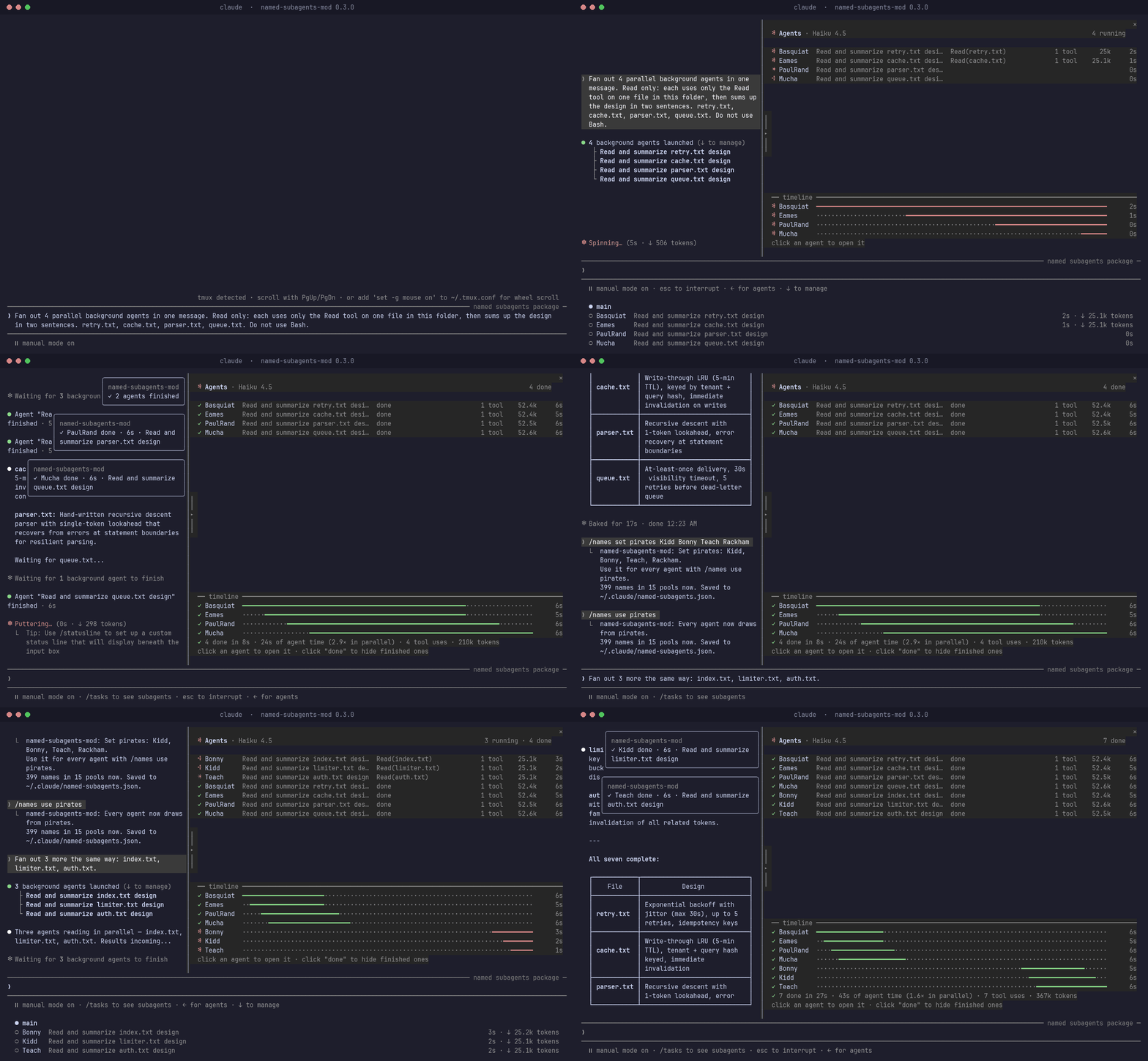
The GIF is a real session, not a mock-up: `scripts/capture_demo.sh` drives Claude Code in tmux and saves
the screen twice a second, and `scripts/render_tree_gif.py` draws the whole screen for some of those
frames, holding the ones with something to read. Two things are taken out: the banner is blanked and the
home directory in a path reads `~`. It was recorded on 0.3.0 in a 150-column terminal in the fullscreen
layout (`/tui fullscreen`), where the pane docks beside the transcript and opens by itself. In a terminal
under 144 columns you get a line under the prompt counting the running agents and a toast as each
finishes, and `/roster` opens the pane.
It is a Claude Code mod (function hooks), so it needs **Claude Code 2.1.287 or later** and nothing
else: no Python, no Node at runtime. It replaces the retired
[named-subagents](https://github.com/Bobby-cell-commits/named-subagents) Python plugin (last release
0.7.2).
The name is for you to read: the agent is **not** told its name (the engine does not put a mod-set
`name` into the subagent's context), so there is no SubagentStart queue, ledger or file lock, and no
burst-start pairing to get wrong.
## Install
Type this at the prompt of a terminal session:
```
/plugin install named-subagents-mod --marketplace Bobby-cell-commits/named-subagents-mod
```
Answer `y` to add the marketplace, pick a scope (user = every session), and set the options or keep
their defaults. The options screen is where you can type your own names straight away (see
[Your own names](#your-own-names)). The mod is active from then on; no reload is needed.
From a shell instead:
```bash
claude plugin marketplace add Bobby-cell-commits/named-subagents-mod
claude plugin install named-subagents-mod@named-subagents-mod --scope user
```
## Your own names
Three ways in, all feeding the same pool. Use whichever is nearest to hand.
**1. The options screen** (at install, or later with `/plugin configure named-subagents-mod` or
`/config`). Type names into *Your names*, separated by commas: `Ripley, Deckard, Mary Shelley`. They join
every built-in pool and get about half of the draws while one of them is free, so even two names show up
often. Turn on *Use only my names* to leave the built-in names out.
**2. The `/names` command**, in any session. It keeps your names in one file and applies to the next
agent dispatched:
```
/names what is set, and where the files are
/names add Ripley "Mary Shelley" more names, for every built-in pool
/names remove Sisyphus never draw this name
/names rename Turing Alan call one name something else
/names set pirates Kidd Bonny define a set (a pool of your own); same name again replaces it
/names unset pirates drop a set
/names use pirates | auto draw every agent from one pool, or go back to picking by task
/names only on | off leave out the built-in names
/names import merge a names file, a JSON list, or one name per line
/names reset clear your file (a .bak copy is kept)
```
`import` joins what it reads with what you have: lists are added to, and a set of the same name gets the
new names as well.
**3. A names file**, for whole sets, dotfiles and sharing: `~/.claude/named-subagents.json` (under
`CLAUDE_CONFIG_DIR` when that is set). A project can carry its own at `.claude/named-subagents.json`,
layered on top of yours. Every key is optional:
```json
{
"only": false,
"use": "pirates",
"names": ["Ripley", "Deckard"],
"remove": ["Sisyphus"],
"rename": { "Turing": "Alan" },
"sets": {
"pirates": { "names": ["Blackbeard", "Bonny", "Kidd"], "for": ["Explore"], "keywords": ["search", "find"] },
"code": { "names": ["Neo", "Trinity"], "replace": true }
}
}
```
| Key | Meaning |
|---|---|
| `names` | Extra names. They join every built-in pool, not the sets you define, and get about half of the draws while one of them is free (so do names a set adds to a built-in pool). |
| `rename` | Old name to new name. |
| `remove` | Names never drawn. Applied after `rename`, so a renamed name is hidden by its new name. |
| `sets` | A set is a pool of your own. `for` lists the agent types that draw from it and wins unless one pool is pinned (`use`, or the *Name pool* option); `keywords` match the task description. A set named like a built-in pool (`code`, `explore`, …) adds to that pool, or with `"replace": true` takes its place. `"pirates": ["Kidd", "Bonny"]` is short for a set with just names. |
| `use` | One pool for every agent, whatever its type. Wins over the *Name pool* option; `auto` or absent leaves the choice to that option, which picks by type and task unless you pinned a pool there. |
| `only` | `true` leaves out everything before this file, the built-in names included. |
Order: built-in names, your file, the project's file, then the options screen's names.
`examples/pirates.json` is a set to try, from a checkout of this repository: `/names import examples/pirates.json`.
**The name rule.** Claude Code accepts an agent name made of letters, digits, `_` and `-`, starting with
a letter or digit, up to 64 characters, and refuses the whole dispatch for anything else. So names are
cleaned on the way in: `Mary Shelley` becomes `MaryShelley`, `Zoë` becomes `Zoe`, `O'Brien` becomes
`OBrien`. A name with nothing usable in it (`名前`, an emoji) is skipped and reported.
**Limits.** A names file is read as untrusted input, since a project's arrives with the repository. A
file over 256 KB is not read. A list holds up to 2,000 names, a file up to 100 sets, and a set up to 200
`for` or `keywords` entries; what is over is left out and reported. Anything quoted from a file in a
warning or in `/names` output has its control characters replaced, so a file cannot send escape sequences
to your terminal. A name holding a control character is skipped.
**When a file is wrong.** A file that is not valid JSON, a name that cannot be used, or an unknown key
raises a toast and a status line once per change of the file; everything else in the file still applies,
and agents are always named. `/names` lists the problems, and will not edit a file it cannot read in
full, because rewriting it would drop the unread part; `/names reset` starts clean and keeps a `.bak`.
## The agents pane
A roster of the session's subagents, one row an agent, in columns: its mark (spinning while it runs),
its name, its task, the tool call it is running now or how it ended, its tool count, tokens and clock.
From a live session (three agents, Claude Code 2.1.292):
```
✻ Agents · Haiku 4.5 3 running
· DaVinci Read retry.txt and write design es… Read(retry.txt) 1 tool 25.1k 5s
✳ Hokusai Read cache.txt and write design es… Read(cache.txt) 1 tool 25.2k 4s
✽ Mucha Read parser.txt and write design e… Read(parser.txt) 1 tool 25.2k 3s
── timeline ──────────────────────────────────────────────────────────────────────────────
✻ DaVinci ━━━━━━━━━━━━━━━━━━━━━━━━━━━━━━━━━━━━━━━━━━━━━━━━━━━━━━━━━━━━━━━━━━━━━━━━━━ 5s
✻ Hokusai ············━━━━━━━━━━━━━━━━━━━━━━━━━━━━━━━━━━━━━━━━━━━━━━━━━━━━━━━━━━━━━━ 4s
✻ Mucha ························━━━━━━━━━━━━━━━━━━━━━━━━━━━━━━━━━━━━━━━━━━━━━━━━━━ 3s
```
The names are the ones in Claude Code's own task tree: both read the engine's agent list. An agent the
model named itself is listed under that name; one with no name (naming turned off) reads
`Type(description)`.
- **Where it shows.** In the fullscreen layout (`/tui fullscreen`) it docks beside the transcript.
On the main screen it is a summary of up to eight rows above the prompt, in the same columns. It
opens by itself when an agent starts, in a terminal at least 144 columns wide; narrower than that,
`/roster` opens it, and until then a line under the prompt counts the running agents
(`✻ 2 of 4 agents running`).
- **A conversation.** Press an agent's name or task: the pane widens and shows its brief, its replies
and its tool calls with their results. `b` goes back, `k` and `j` step through it, `Esc` gives the
keyboard back.
- **Folding.** Ten seconds after the last agent finishes the pane folds to a tab above the prompt
(`◂ Agents ✓ 3`); press the tab to bring it back, and a new agent brings it back by itself. The `▸`
handle on the pane's left edge folds it by hand. `/roster` opens or closes it.
- **Also there.** A model shared by every agent is said once, in the header. An agent's own subagents
sit indented under it. A timeline puts the latest batch on one time axis. A finished batch gets a
receipt (`✓ 3 done in 8s · 21s of agent time (2.6× in parallel) · 3 tool uses · 158k tokens`) and
each finish a toast. `■ Stop`, then `Confirm stop`, ends a running agent through Claude Code's own
TaskStop. A background agent between turns counts as done; a teammate between turns reads `waiting`.
- **What it reaches.** It watches: the agent list, each agent's tool calls (name and a short
argument), its token usage, and its transcript while you have it open. Stop is its one action. It
makes no network request, runs no process and keeps nothing after the session.
The pane is [agentpane](https://github.com/xuanji86/claude-agentpane) 1.1.4 by Anji Xu (MIT), brought
into this mod with a name column, the roster layout and a few wording changes. See [Credits](#credits).
## What it reaches, and what it trusts
Everything the mod does goes through Claude Code's plugin API; it runs no process and makes no network
request. What it reads and writes:
- **Reads:** the session's agent list; every `Agent` dispatch (to set its `name`); each agent's tool
calls (the tool's name and a short argument), its token usage and the model it runs on; an agent's
transcript, only while you have its conversation open in the pane; `HOME`, `USERPROFILE` and
`CLAUDE_CONFIG_DIR`; your names file and the project's; and a file you name to `/names import`.
- **Writes:** your names file (`~/.claude/named-subagents.json`) and its `.bak`, on `/names` edits
only. Nothing else, and nothing is kept after the session beyond that file.
- **One action:** `TaskStop` on the agent whose conversation you have open, after you press *Stop* and
then *Confirm stop*. The consent it gives the engine names the agent's type and id, never text a model
wrote.
What it draws is not all yours. Agent names and descriptions are written by the model; tool arguments
and results and the agents' replies come from whatever the agent read, a web page or a repository
included; and a project's names file arrives with the repository. So all of it is treated as untrusted
text: control characters, escape sequences and the characters that reorder text are removed before
anything is drawn or quoted, every line is cut to length, a names file is bounded in size and in how
many names, sets and routes it may hold, and a name must pass the Agent tool's own rule. An agent's
replies are drawn as Markdown, as Claude Code draws its own transcript, so text an agent read can shape
what its conversation shows you (a heading, a link, a line that looks like a button); it cannot press
anything, run anything or reach the network, and a link in a reply is not pressable. The pane's buttons
are its own elements, not text.
To check this without trusting the README, clone the repository and run `claude plugin validate .`: its
`calls:` line lists every engine method the mod can call. For 0.3.0 that is `$.agent.list`, `$.clock`,
`$.command.register`, `$.env.get`, `$.fs.{exists,read,stat,write}`, `$.session.{messages,root,surfaces}`,
`$.state`, `$.tool.call` and `$.ui.*`; no `$.http`, `$.process`, `$.model` or `$.mcp`. A review of 0.3.0
for exploitable paths found none; its notes are in the changelog.
## What it does
- `tool.call{Agent}`: if the call has no `name`, draws one and calls `next({ ...e, name })`. The
description is left as is. A model-supplied `name` passes through untouched.
- **Pool:** the `theme` option pins one; `auto` matches `subagent_type` first (generic roles like
`general-purpose` go by description keywords first), then the default pool. The pool is the
built-in one with your names layered on; both names files are checked on every dispatch.
- **Uniqueness:** skips every name in `$.agent.list()` and every in-flight draw. An exhausted pool
spills to the default pool, then to any free name, then to `Name-2`, `Name-3`, …
- `agent.spawn`: after the spawn, checks the name reached it and that `$.agent.list()` shows it on the
new agent id. Anything else raises a toast and a status line (`named-subagents: drew X but …`).
Neither hook can block a dispatch: both carry a `.catch` that continues the call.
- The pane: `agent.spawn` lists an agent the moment it starts, a once-a-second read of
`$.agent.list()` keeps the list current, `tool.call` records what each agent is doing, `turn.step`
its tokens and model, and two `ui.render` hooks draw the pane and the summary above the prompt. Every
one of them passes its event on unchanged.
- One status line for both. Naming's alarm stands on it until the next clean spawn (a names file that
is wrong, until it is fixed); with agents running and the pane off screen the count leads and the
alarm follows: `✻ 2 agents running · named-subagents: your names file: not valid JSON …`.
- A failure in the pane's part of a shared hook does not skip naming's part, and naming's "naming
failed" alarm is raised only when the name did not reach the call.
## Options (`userConfig`)
Set at install, later with `/plugin configure named-subagents-mod` or `/config` (type the option's title
to find it; a change applies at once), or in `~/.claude/settings.json` under `pluginConfigs`, keyed by
the plugin's id: `named-subagents-mod@named-subagents-mod` installed from the marketplace,
`named-subagents-mod@inline` loaded with `--plugin-dir`. A project's `.claude/settings.local.json` did
not carry them (Claude Code 2.1.292); `--settings ` does.
| Field | Default | Meaning |
|---|---|---|
| `theme` | `auto` | `auto`, or a category key (`code`, `explore`, `debug`, …) to always use that pool |
| `enabled` | `true` | `false` turns naming off without uninstalling (and `/names` with it) |
| `names` | empty | Your names, separated by commas; they join every built-in pool |
| `only_custom` | `false` | `true` leaves the built-in names out |
| `pane` | `true` | `false` turns the pane off: names only (see below) |
| `autoOpen` | `true` | open the pane when an agent starts; off, `/roster` opens it |
| `foldAfter` | `10` | seconds after the last agent finishes before the pane folds; `0` keeps it open |
| `motion` | `true` | animate the spinner; off, it stands still and the clocks still run |
| `toasts` | `true` | a toast when agents finish |
| `keepFinished` | `8` | finished agents the list keeps (1–30) |
| `statusLine` | `true` | count the running agents under the prompt while the pane is not on screen |
The first four are naming's. `pane` (*Show the agents pane* on the options screen) is the pane's one
switch, and the six after it (*Pane: …*) adjust the pane while it is on. To have names without the
pane, turn `pane` off: nothing opens, nothing is counted under the prompt, no finish toast and no tab
appear, the agent list is not read every second and `/roster` is not offered. Naming, `/names` and
the check of each spawned agent's name work as before. Turned off mid-session, an open pane closes and
its list is forgotten; `/roster` stays in the command list until the session ends (a session cannot take
a command back) and answers that the pane is switched off.
`enabled` turns off naming only: the pane then lists agents by type.
## Layout
- `hooks/index.ts`: the hooks module `hooks.json` names; it registers the two halves.
- `hooks/names.ts`: naming's hooks. `hooks/draw.ts`: pure draw logic. `hooks/custom.ts`: pure
custom-names logic (the name rule, the names file, layering, `/names` edits). `hooks/pool.ts`:
**generated**.
- `hooks/pane.tsx`: the pane's hooks and drawing, and the two hooks both halves share
(`session.start`, `agent.spawn`: a plugin hooks an event once). `hooks/live.tsx`, `hooks/lanes.tsx`:
the spinner, clocks and timeline, drawn on the terminal's own frame clock. `hooks/time.ts`: pure time
helpers. `hooks/status.ts`: the one status line the halves share. `types/index.d.ts`: the pane's
`$.state` contract.
- `registry.json`: the name pool (14 categories, 395 names), the source of `hooks/pool.ts`.
- `scripts/gen_pool.mjs`: regenerates `hooks/pool.ts` from `registry.json`; `--check` exits 1 when it
is stale.
- `scripts/capture_demo.sh`, `scripts/render_tree_gif.py`: record and draw `assets/demo.gif` (tmux and
Python with Pillow; not needed to use the mod). `assets/demo-frames/` is the recording the GIF was drawn
from, so `python3 scripts/render_tree_gif.py assets/demo-frames assets/demo.gif` redraws it.
- `spec/`: draw and custom-names logic tests (plain node). `tests/`: hook tests (the engine's test
kit): `names.test.ts`, `pane.test.tsx` and `pane-logic.test.ts` (the pane's own), and
`together.test.tsx` (naming and the pane in one plugin).
- `examples/`: a names file to import. `probes/`: the live proofs and the TUI capture driver.
## Checks
```bash
node scripts/gen_pool.mjs --check # pool matches the registry
node --test spec/*.spec.ts # draw and custom-names logic, plain node 22.18+ (62 tests)
claude plugin test . # hooks against the engine's test kit (150 tests)
claude plugin validate .
```
CI runs the two node checks; the two `claude` checks need a local Claude Code.
## Develop
`claude --plugin-dir .` loads the checkout for one session. To run every session from a checkout,
add the folder as a marketplace (edits apply after `/reload-plugins`):
```bash
claude plugin marketplace add /path/to/named-subagents-mod
claude plugin install named-subagents-mod@named-subagents-mod --scope user
```
Headless proof and TUI evidence: `probes/mods-names-proof/` (naming), `probes/custom-names-probe/`
(custom names) and `probes/pane-fold/` (one plugin for both: what the engine allows, and the live
captures).
## Known limits
- The name shows in the task tree and in `$.agent.list()`; the transcript's launch list and finish
notices quote the description only.
- The name is display-only: a subagent cannot say its own name, and nothing records which name ran
which task after the session ends.
- A set smaller than the number of live agents runs out: the next draw comes from the default pool,
then from any free name, then gets a number (`Ripley-2`).
- `/names` edits your file only, and only while the whole file reads cleanly: one unknown key or bad
entry and it asks you to fix the file by hand first. A project's names file is edited by hand. A
project file can rename or hide names for anyone who opens that project (names only, within the
name rule).
- Overlapping draws (two dispatches in flight at once) are covered by the kit test only. In live runs
the engine started same-message dispatches 0.5–2 s apart.
- With the retired 0.7.2 Python plugin also enabled, the mod's name wins, but the Python hooks still
run (see `probes/mods-names-proof/README.md`). Uninstall the Python plugin.
- The pane opens by itself only in a terminal at least 144 columns wide (Claude Code's rule for a pane
nobody asked for). Below that you get the line under the prompt and the toasts, and `/roster`.
- A row has no token count in a pane under 88 columns and no tool count under 72; both are in the
agent's conversation header.
- The pane's start times are when it first saw an agent, and its tokens count from when the mod loaded.
- Naming's alarm and the pane's finish notice share the plugin's one toast: the newer replaces the
older. The alarm also stays on the status line.
- A reload of the mod (an option changed in `/config`, `/reload-plugins`) forgets a standing alarm. A
names file that is still wrong is alarmed again at the next dispatch; a "drew X but…" alarm is not.
- If `/roster` cannot be registered the mod says so in a toast, and the pane still opens by itself
and counts agents.
- With the separate `agentpane` plugin also installed there are two panes with the same id. Uninstall
it: `claude plugin uninstall agentpane@claude-agentpane`.
- Not tried live: the pane in the desktop app, VS Code and mobile with named agents (the test kit
draws them); a teammate's `waiting` row.
- On the options screen a number option (*fold after*, *finished agents listed*) reads blank until you set
it; the default (10, 8) applies all the same.
- The mods API is new (Claude Code 2.1.287, 2026-10-01) and a release may change what this mod relies
on; tested on 2.1.291 and 2.1.292 only. Both install paths above were tried on 2.1.292 from a clean
`CLAUDE_CONFIG_DIR`.
## Credits
The agents pane is [agentpane](https://github.com/xuanji86/claude-agentpane) by Anji Xu, version 1.1.4,
used under the MIT licence. Its notice is kept in [LICENSE-agentpane](LICENSE-agentpane) and covers
`hooks/pane.tsx`, `hooks/live.tsx`, `hooks/lanes.tsx`, `hooks/time.ts`, `types/index.d.ts`,
`tests/pane.test.tsx` and `tests/pane-logic.test.ts`, which carry this mod's changes on top.
The pane here is a copy, so agentpane's later fixes arrive only by hand. It was taken at upstream commit
[`17be889`](https://github.com/xuanji86/claude-agentpane/commit/17be889) (1.1.4). To bring a newer one in:
```bash
git clone https://github.com/xuanji86/claude-agentpane && cd claude-agentpane
git diff 17be889 -- hooks/ types/
```
Apply that diff by hand to the files listed above (`hooks/hooks.json` there is not used here; a new or
changed option is in `.claude-plugin/plugin.json`, so diff that file too). Three have other names there: `hooks/register.tsx`
is `hooks/pane.tsx` here, `hooks/pane.test.tsx` is `tests/pane.test.tsx` and `hooks/agentpane.test.ts` is
`tests/pane-logic.test.ts`. Then run the checks under [Checks](#checks), and write the new commit here and at the top of
`hooks/pane.tsx`. The command is `/roster` here and `/agentpane` there.
## License
MIT. See [LICENSE](LICENSE); the pane's files are under [LICENSE-agentpane](LICENSE-agentpane), also MIT.