
theonly1me@theonly1me
theonly1me/claude-code-mods/tree/main/plugins/looks
讓 Claude Code 呈現您喜歡的樣式:透過 `/theme` 切換四種主題,以及兩種可選的版面配置變更,每個工具呼叫一行,回覆顯示在置中的閱讀欄位中。
theonly1me/claude-code-mods/tree/main/plugins/looks
讓 Claude Code 呈現您喜歡的樣式:透過 /theme 切換四種主題(復古 CRT、龐克、合成波、禪意紙),更整潔的工具呼叫,以及可選的單行工具列和置中顯示在閱讀寬度的回覆。
請先查看作者 README,確認 marketplace 與外掛名稱;指令可能隨儲存庫結構而變動。
claude plugin marketplace add theonly1me/claude-code-mods
claude plugin install looks
Make Claude Code look the way you like: four themes you switch with /theme, and two optional layout changes, one line per tool call and replies in a centered reading column.
claude plugin marketplace add theonly1me/claude-code-mods
claude plugin install looks@claude-code-mods
Register the marketplace once. Run /reload-plugins in an open session after installing. Requires Claude Code 2.1.289 or later; no build step or runtime dependencies.
Looks redraws the rows of the transcript. It never changes what Claude reads or does. Out of the box it tidies tool calls and leaves the layout alone. Themes, compact rows, and the centered layout are choices you make.
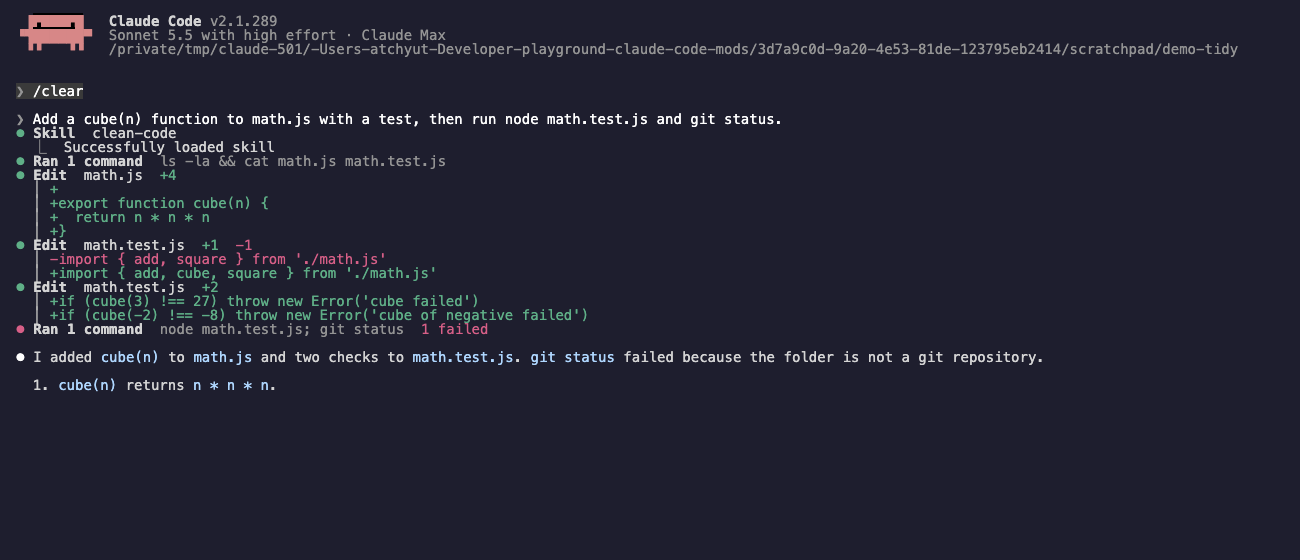
Tidy tool calls (setting toolCalls: full, the default) draw each call as a header line: a mark, the tool, its target, and a short result such as +4 -1 or failed. Under it, the output sits in a short dim bar. An edit shows only its changed lines in green and red. A shell command shows its first 6 lines and N more lines (ctrl+o for all). Reads, searches, and other calls with no output add nothing under the header. A failed call shows the first lines of its error in red.
Compact tool calls (setting toolCalls: compact) draw one line per call and hide the output. A run of reads and searches folds into one line such as Read 3 files, ran 1 command. Any other tool, MCP tools included, gets one line with its name and its main argument.
Plain tool calls (setting toolCalls: plain) leave every tool row to Claude Code.
Centered layout (setting layout: centered) puts replies, prompts, and tool lines in one column at the reading width (100 characters by default), centered in the transcript.
Themes give each look its own character. With the default themeStyle: rich, a theme draws:
themeStyle: simple only recolors text. Themes keep Claude Code's own spinner and turn footer words, unless you turn on themeWords.
Base theme: a theme also sets the Claude Code base theme that suits it, in the same tone (dark or light) as yours. Retro CRT uses the ANSI variant, Zen paper the colorblind-friendly one, and Punk and Synthwave the plain one. If your base theme is auto, Looks leaves it alone. /theme off and /exit put your own base theme back.
/theme opens the theme picker./theme retro, /theme punk, /theme synthwave, /theme zen switch at once. /theme off turns themes off and restores your base theme./theme base opens the Claude Code base theme picker. /looks does the same as /theme.Your choice is kept for the next sessions. If you change the base theme in /config while a Looks theme is on, Looks keeps your new choice as the one to restore.
In the picker:
r, p, s, or z to apply Retro CRT, Punk, Synthwave, or Zen paper, or o for Off.b to open the Claude Code base themes.With tidy or compact tool calls, press ctrl+o to see every tool call in full, with diffs and output. Press ctrl+o again to return.
Each image is a real session with the theme on.
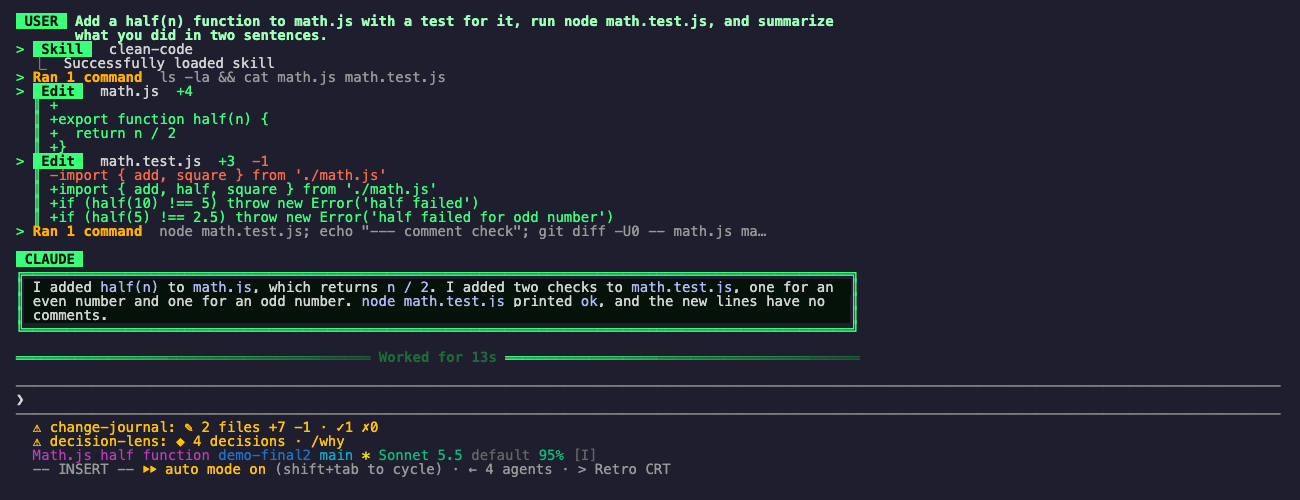
Retro CRT: phosphor green on black, double-line panels, an amber accent, and ═ dividers.
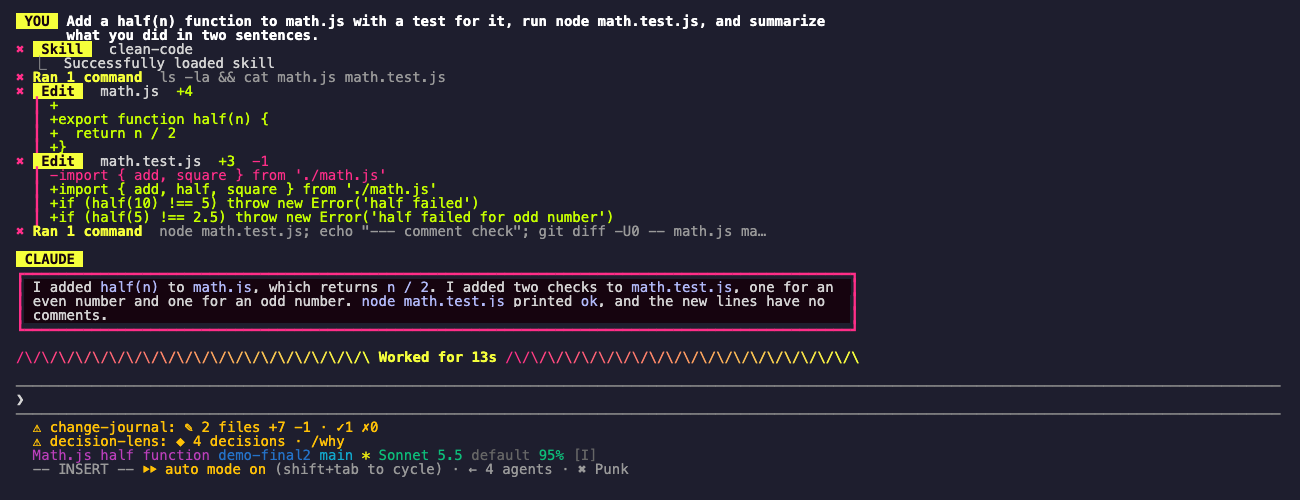
Punk: hot pink and acid yellow, bold frames, yellow name tags, and zigzag dividers.
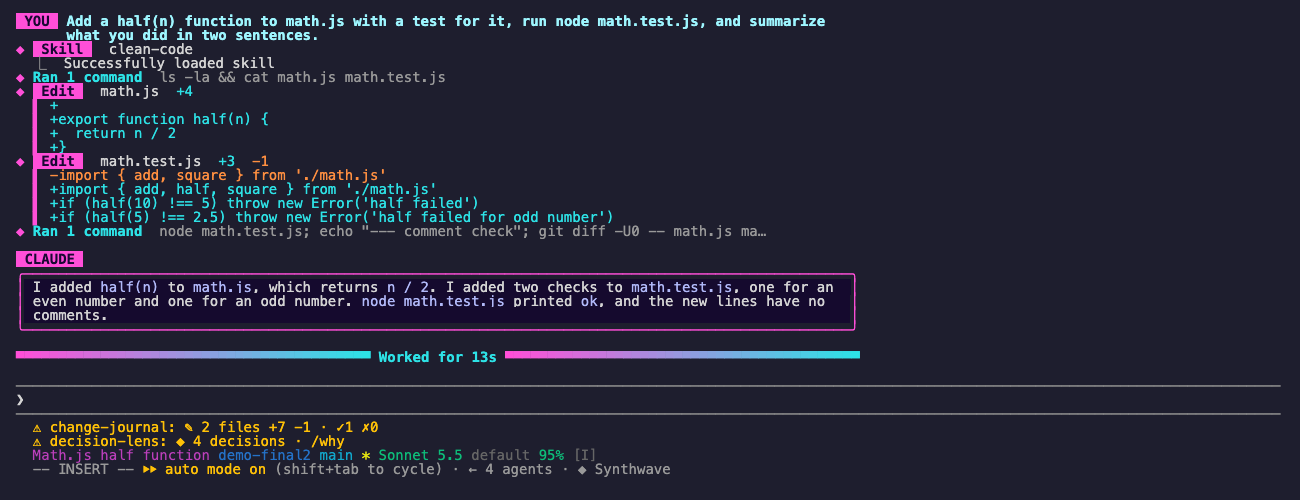
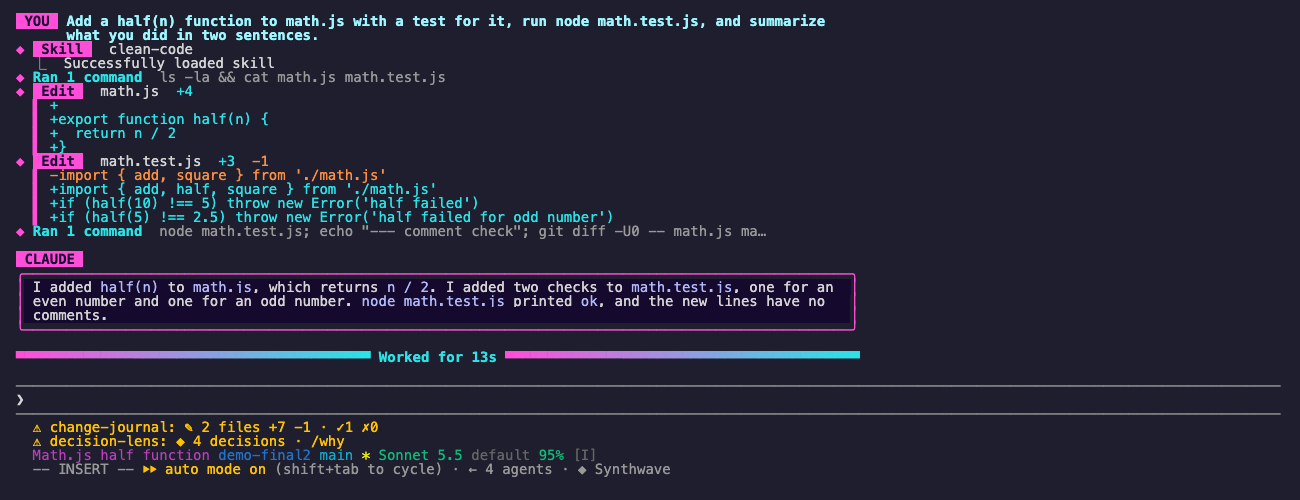
Synthwave: neon magenta and cyan, rounded frames, and a divider that fades from magenta to cyan.
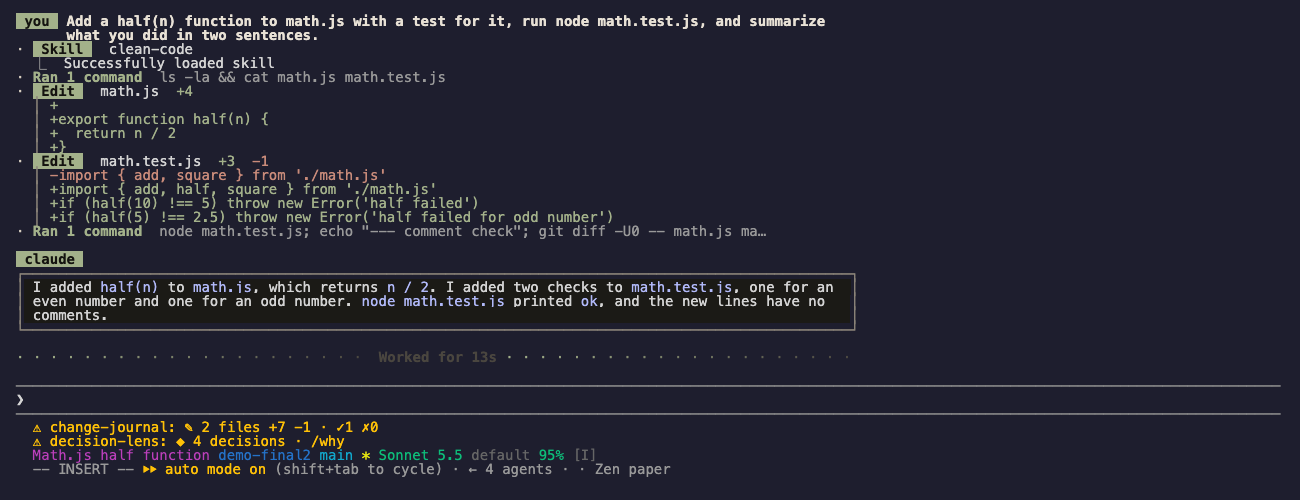
Zen paper: quiet ink and moss tones, thin frames, sage name tags, and dotted dividers. It also has a light paper variant when your terminal is light.
Change these in /plugin:
theme (off): the theme for new sessions until you pick one with /theme.toolCalls (full): full is the tidy view above. compact draws one line per call. plain keeps Claude Code's own tool rows.layout (left): centered puts rows and replies in one column at the reading width. left keeps them at the left edge.readingWidth (100): the column width in characters.themeStyle (rich): rich is the full look above. simple only recolors text.themeWords (off): on uses the theme's spinner and footer words, such as CRUISING or Shredded. Off keeps Claude Code's own words.verbose on in /config, Claude Code reports every row as expanded, so ctrl+o cannot switch back to full rows. The tidy view then shows up to 30 lines of output per call. Set toolCalls to plain to see Claude Code's own rows./theme off. /exit restores it.See the marketplace README for configuration, privacy, updates, and removal.

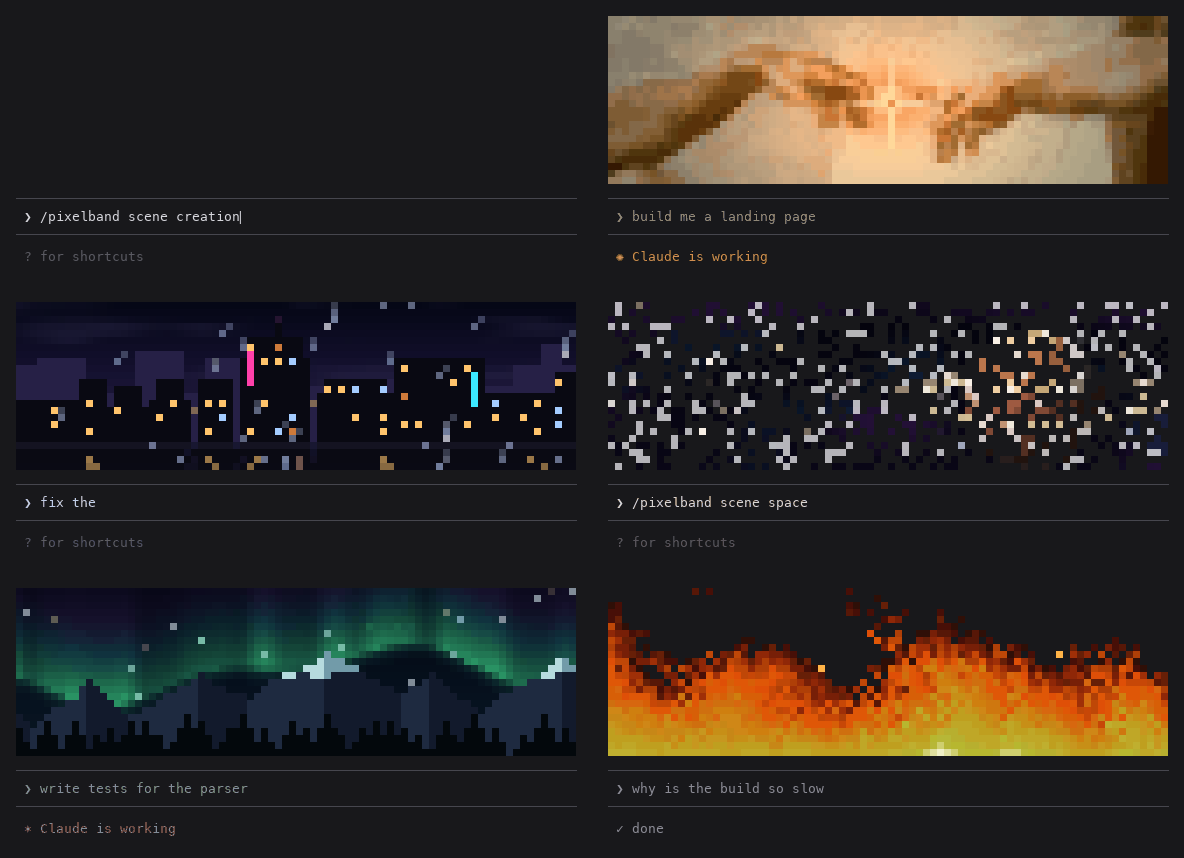
一個像素寶可夢住在你的 Claude Code 提示列上方,對 Claude 所做的一切做出反應。


Claude 工作時在提示列上方會回應的動畫像素畫:七個場景,或使用自己的圖片或 GIF。不消耗 token。

在同一個 TUI 中重繪 Claude Code 的助手回覆、工具列與回合頁尾,提供彩色指令、程式碼卡片、差異卡片、無邊框表格與子代理橫幅。