
DJPalefaceSD@DJPalefaceSD
DJPalefaceSD/rostech-mods/tree/main/plugins/logo
DJPalefaceSD/rostech-mods/tree/main/plugins/logo
您自己的標誌會顯示在提示上方的儀表板上。它位於您的其他條帶旁邊,例如油量表和速度計,因此儀表板會帶有您的品牌。
/logo set C:/path/to/logo.png 會將 PNG 放在儀表板上。帶有粗體形狀的方形標誌效果最佳。/logo 會顯示正在使用的檔案。/logo hide 和 /logo show 會切換它。標誌以彩色塊狀字元繪製,每個字元兩個像素,因此它可以在任何可以顯示顏色的終端機中顯示。不需要圖片。
為了獲得最清晰的標誌,請自行繪製一個用於儀表板的小型 PNG,邊長 40 像素或更小。16x16 像素的 PNG 是個不錯的尺寸。小型 PNG 會完全按照您繪製的方式繪製,每個像素對應半個字元,沒有任何模糊。
更大的 PNG 也可以。它的透明邊框會被修剪,並縮小到 16x16 像素。每個像素要麼是純色,要麼是透明的,絕不會是兩者的模糊,但細線在該尺寸下仍然可能會斷裂。
當您在自己的機器上使用 Windows PowerShell 設定它時,PNG 會被讀取一次,結果會保存在 Claude Code 的外掛程式儲存中,跨工作階段保留。沒有任何內容會被傳送到任何地方。PNG 的透明部分會採用您終端機自己的顏色。
目前僅限 Windows,因為讀取 PNG 使用 PowerShell。
已使用 Claude Code 2.1.288 進行測試。
請先查看作者 README,確認 marketplace 與外掛名稱;指令可能隨儲存庫結構而變動。
claude plugin marketplace add DJPalefaceSD/rostech-mods
claude plugin install logo
Your own logo on the dash above the prompt. It sits beside your other bands, such as Gas Gauge and Speedometer, so the dash carries your brand.
/logo set C:/path/to/logo.png puts a PNG on the dash. A square logo
with bold shapes reads best./logo shows which file is in use./logo hide and /logo show toggle it.The logo is drawn in coloured block characters, two pixels to a character, so it shows in any terminal that can show colour. Pictures are not needed.
For the sharpest logo, draw a small PNG for the dash yourself, 40 pixels a side or smaller. A 16 by 16 PNG is a good size. A small PNG is drawn exactly as you drew it, one pixel to half a character, with nothing blurred.
A bigger PNG works too. Its see-through border is trimmed, and it is shrunk to 16 by 16 pixels. Every pixel comes out either solid colour or clear, never a blur of the two, but thin lines can still break up at that size.
The PNG is read once when you set it, on your own machine with Windows PowerShell, and the result is kept across sessions in Claude Code's plugin store. Nothing is sent anywhere. See-through parts of the PNG take your terminal's own colour.
Windows only for now, because reading the PNG uses PowerShell.
Tested with Claude Code 2.1.288.

一個像素寶可夢住在你的 Claude Code 提示列上方,對 Claude 所做的一切做出反應。


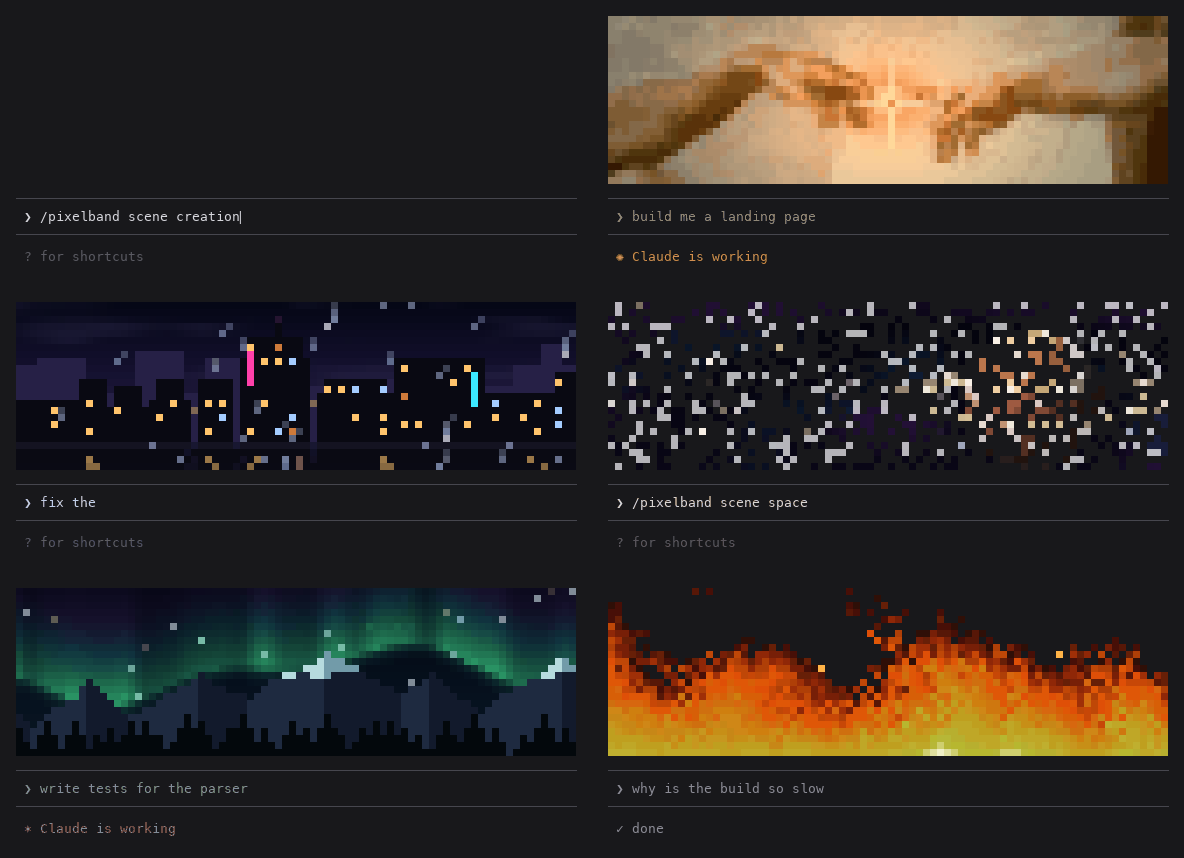
Claude 工作時在提示列上方會回應的動畫像素畫:七個場景,或使用自己的圖片或 GIF。不消耗 token。

在同一個 TUI 中重繪 Claude Code 的助手回覆、工具列與回合頁尾,提供彩色指令、程式碼卡片、差異卡片、無邊框表格與子代理橫幅。