
jamubc@jamubc
jamubc/toolbox/tree/main/plugins/instantnotes
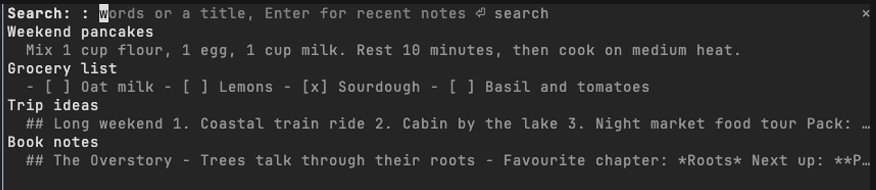
Claude Code 外掛,可透過 InstantNotes MCP 伺服器或本機 `instantnotes mcp`,在終端機的面板中搜尋、閱讀和擷取 InstantNotes 筆記。
jamubc/toolbox/tree/main/plugins/instantnotes
instantnotes 是 jamubc 製作的 Claude Code 外掛,會把 InstantNotes 資料庫帶到 Claude Code 旁邊的面板中。透過 /plugin marketplace add jamubc/toolbox 和 /plugin install instantnotes@toolbox 安裝。指令包括:/notes 開啟包含最近筆記的面板,/notes <words> 搜尋整個資料庫,/note <text> 儲存新筆記(第一行會成為標題)。在面板中,可以邊輸入邊篩選、以 Markdown 開啟筆記、在提示中提及筆記讓 Claude 透過 MCP 讀取、貼上或複製筆記文字,以及建立新筆記。它透過正在執行的 instantnotes MCP 伺服器,或依要求執行 instantnotes mcp 來存取 InstantNotes,並從 ~/.claude.json、.mcp.json、/Applications/InstantNotes.app、~/Applications 或 PATH 尋找程式。需要 InstantNotes 0.9.0+,並在 Settings › Agents 中啟用 Access;只有將筆記加入提示後,Claude 才能收到筆記內容,而且外掛只與本機程式通訊,從不連線到網路。
請先查看作者 README,確認 marketplace 與外掛名稱;指令可能隨儲存庫結構而變動。
claude plugin marketplace add jamubc/toolbox
claude plugin install instantnotes
Your InstantNotes library, directly in Claude Code. Search, read and capture notes without leaving the terminal.
Every note you have, one command away.
Add the marketplace:
/plugin marketplace add jamubc/toolbox
Install the plugin:
/plugin install instantnotes@toolbox
| Command | What it does |
| --- | --- |
| /notes | Opens a pane with your recent notes. |
| /notes <words> | Opens the pane searching for those words or a title. |
| /note <text> | Saves the text as a new note. The first line becomes the title. |
In the pane:
b goes back.u) puts a reference to the note in your prompt, so Claude can read it through the InstantNotes MCP server. paste into prompt (p) puts the note's text itself there. copy (c) copies it.r) reads one again.The plugin uses what InstantNotes › Settings › Agents sets up, in this order:
instantnotes MCP server Claude Code already runs, once you ran the claude mcp add instantnotes … command from that page. This is the fast path: the server stays up, and every request is a call to it.instantnotes mcp run by the plugin, one request at a time. It finds the program from what claude mcp add wrote in ~/.claude.json or the project's .mcp.json (the exact program and library you use), from /Applications/InstantNotes.app or ~/Applications/InstantNotes.app, or on your PATH.When none of these can start, the pane says so and lists the steps.
<details> <summary>Setup details</summary> <br>/config → InstantNotes program names the program when the plugin cannot find it. /config → Notes library names a library other than the one the app or claude mcp add uses; the attachments folder is read beside it.~/.local/share/com.instantnotes.app on Linux, ~/Library/Application Support/com.instantnotes.app on macOS.hooks/register.tsx draws the pane and answers /notes and /note.hooks/library.ts finds the program and library from your configuration, and shapes text for the pane.tools/call, through the connected server or one instantnotes mcp process, so the plugin follows the same rules as any agent./clear and /compact leave the search and the open note in the pane./note, or the field in the pane).instantnotes program or the MCP server you connected, never the network. ~/.claude.json is read only to find that server's command line.claude --plugin-dir plugins/instantnotes # load it; edits hot-reload
claude plugin validate plugins/instantnotes
claude plugin test plugins/instantnotes

了解快取的 /loop worker 與 CronCreate 背景自動化。ruflo 系列每個週期性工作都使用的基礎外掛。

作為 Claude Code mod 的 claude-reflect:每個簡短提示都會進行模型檢查,找出可重複使用的修正(任何語言皆可);提示列上方的橫條讓你按一次就將它們儲存到 CLAUDE.md。


Claude Code 裡的早期 crit:在面板中評論對話、差異或檔案,把審查送給 Claude,並在線程中閱讀 Claude 的回覆。