ClaudeModsClaude Code 模組目錄
☰
● 0 人在線上 · 瀏覽 0 次
+ 提交作品
← 返回作品集
X 貼文 · 多代理與協作 / 開發與除錯 / 儀表板與 HUD / 工作流程與 CI

Claude Code 搜尋效率計量器 — Claude Code 插件/外掛 · ClaudeMods

回報這個作品這是你的作品?認領

在 ClaudeMods 了解這款 Claude Code 插件/外掛,查看原始來源與所需權限。 作者自建首個 Claude Code Mod:一個顯示 Claude 在程式碼庫中查找難易程度的計量條,並配有按鈕讓下次搜尋更快。

JJJ Englert@JJEnglert

1/

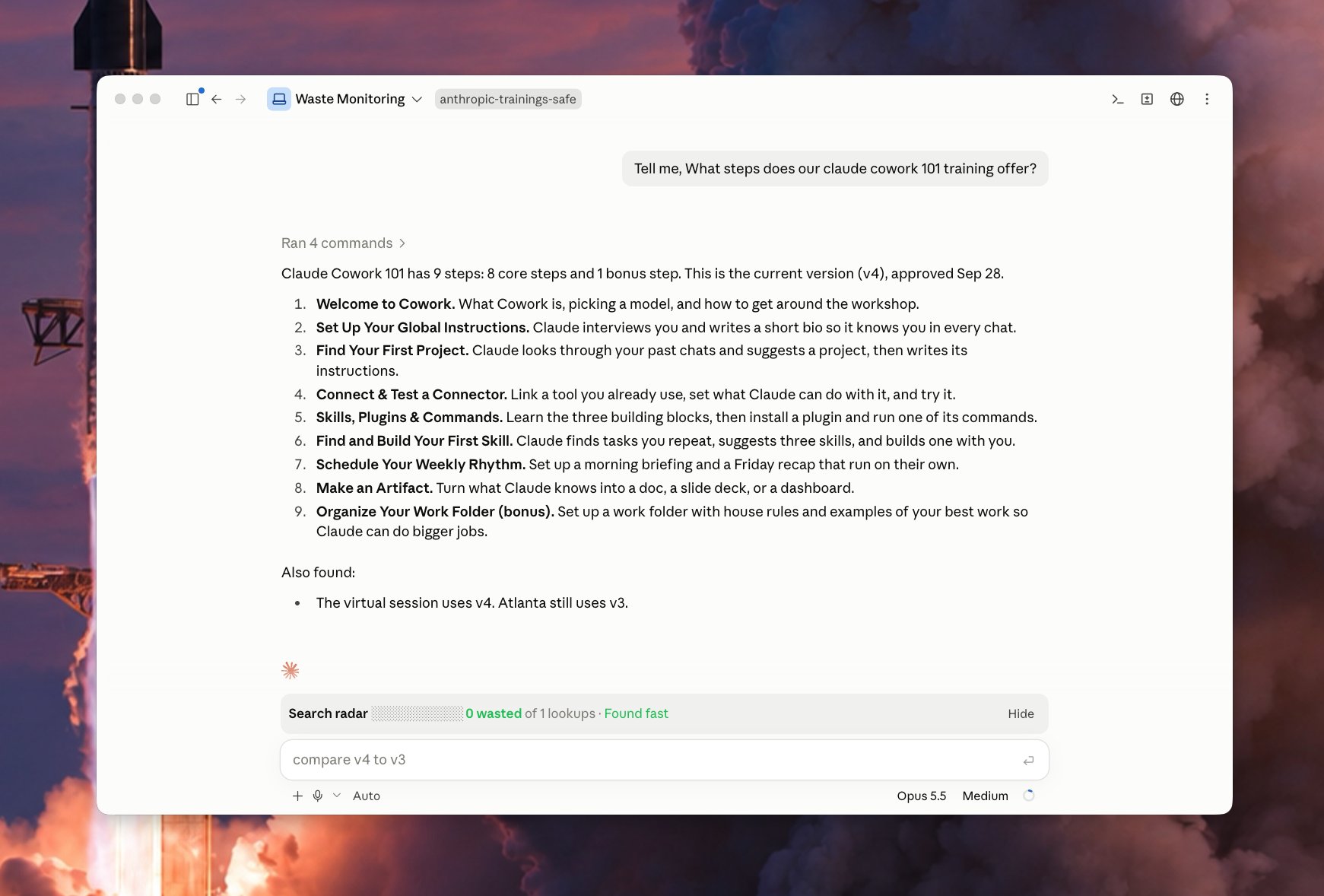
I just built my first Claude Code Mod! 🔥 I built a meter that shows how easily Claude finds things in my code. It comes with a button that makes the next search faster. What it does Every time you ask Claude something, the bar watches Claude look through your files. It counts the wasted searches: a) searches that found nothing b) the same search done twice c) files Claude opened but didn't need Green means Claude found it fast. Yellow means some waste. Red means Claude got lost. It also tells you which folder caused the most trouble. The fix button Click Patch the waste and a helper Claude starts in the background. It writes a short note in your project that says "the thing you need is here." Next time, Claude reads that note and goes straight to the right spot. The helper only writes notes. It never changes your code. It works on its own, so your main chat stays clean. Why it matters Think of your codebase as a library. The bar shows when Claude wandered the shelves. The button adds a sign to the shelf, so the next visit is quick. Over time, the bar shows which parts of your code need better notes.

原貼文圖片1
已翻譯

關於這個 mod

作者發布首個 Claude Code Mod:一個即時計量條,在每次提問時觀察 Claude 遍歷檔案的程序,統計三類浪費搜尋——什麼都沒找到的搜尋、重複執行的同一搜尋、打開了卻不需要的檔案。綠色表示快速定位,黃色表示有浪費,紅色表示 Claude 迷路,並指出哪個資料夾最麻煩。另有「Patch the waste」按鈕,點擊後在後台啟動一個輔助 Claude,只在專案中寫入「你需要的東西在這裡」這類簡短提示,絕不修改程式碼,且獨立運行不影響主對話。隨著時間推移,計量條能顯示哪些程式碼區域需要更好的註解。

安裝

安裝方式請查看原始來源。

原文 / README

I just built my first Claude Code Mod! 🔥

I built a meter that shows how easily Claude finds things in my code. It comes with a button that makes the next search faster.

What it does

Every time you ask Claude something, the bar watches Claude look through your files. It counts the wasted searches: a) searches that found nothing b) the same search done twice c) files Claude opened but didn't need

Green means Claude found it fast.

Yellow means some waste.

Red means Claude got lost.

It also tells you which folder caused the most trouble.

The fix button

Click Patch the waste and a helper Claude starts in the background.

It writes a short note in your project that says "the thing you need is here."

Next time, Claude reads that note and goes straight to the right spot.

The helper only writes notes. It never changes your code.

It works on its own, so your main chat stays clean.

Why it matters

Think of your codebase as a library. The bar shows when Claude wandered the shelves.

The button adds a sign to the shelf, so the next visit is quick.

Over time, the bar shows which parts of your code need better notes.
查看原始來源 ↗

更多類似作品

