
JeongJaeSoon@JeongJaeSoon
JeongJaeSoon/hintvim/tree/main/plugin
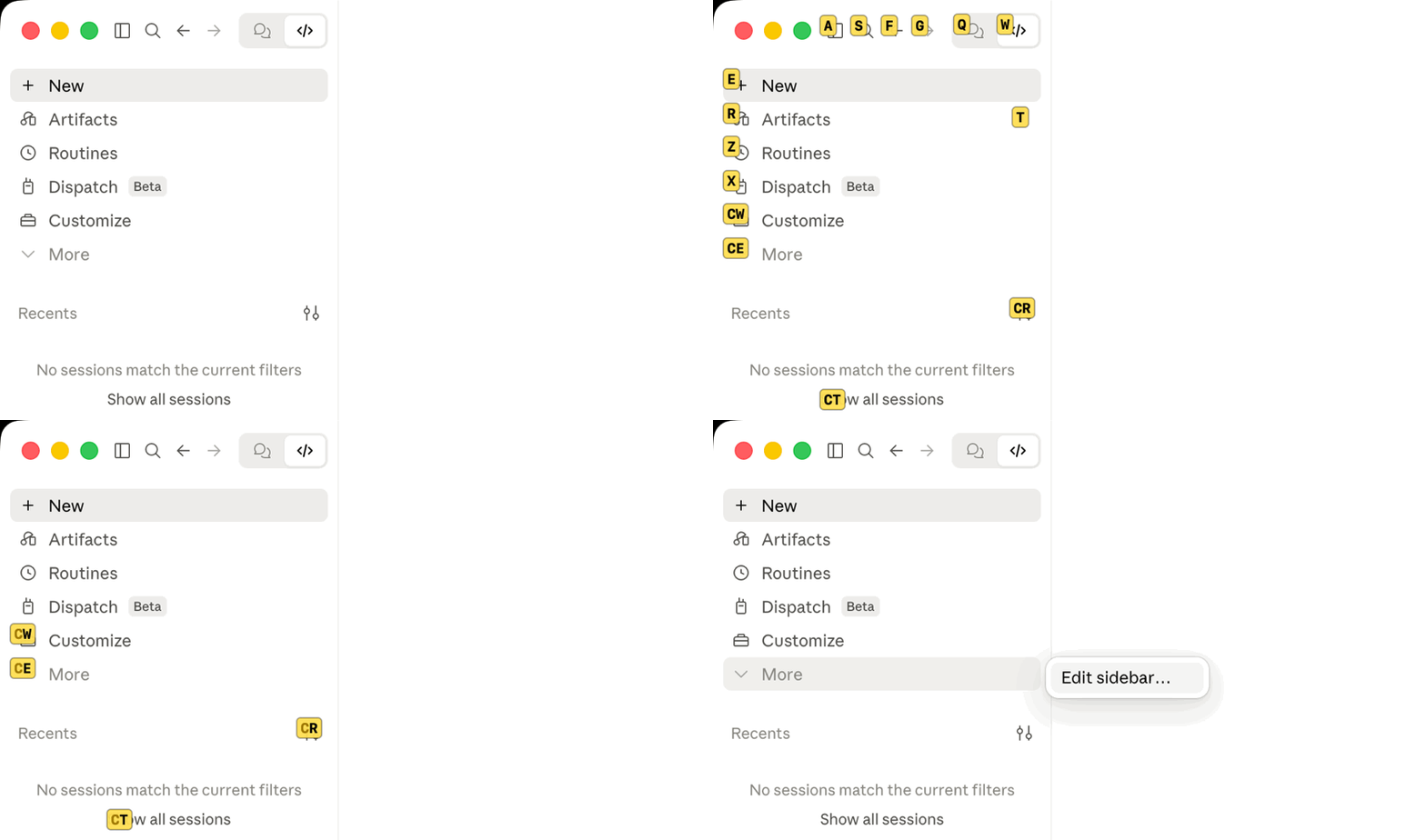
在 Claude Desktop 應用程式上提供 Vimium 風格提示:`/hintvim` 或 Ctrl+;。需要 macOS 上的 hintvim 應用程式。
JeongJaeSoon/hintvim/tree/main/plugin
適用於 Claude Desktop 應用程式 的 Vimium 風格鍵盤提示。
按
Ctrl+;、輸入標籤,就會按下那個按鈕。
hintvim 是一個小型 macOS 選單列應用程式。按 Ctrl+; 後,它會為 Claude 視窗中透過輔助使用暴露的最多 169 個可見控制項加上標籤:側邊欄、標題列、模型和模式選單,以及每則訊息的按鈕。輸入標籤,就會按下對應元素。不需要滑鼠。

Ctrl+;            →  在可使用的按鈕、連結和輸入框上顯示標籤
type "sf"         →  按下對應元素
j / k / d / u     →  捲動
Esc               →  離開
hintvim 是非官方的社群專案。它與 Anthropic 沒有關聯,也未獲 Anthropic 認可或贊助。「Claude」是 Anthropic, PBC 的商標。
Claude Desktop 提供不少快速鍵(Cmd+K、Cmd+1…9、Cmd+Shift+F),但沒有快速鍵的內容仍需要滑鼠:工作目錄膠囊、模型和模式選單,以及每則訊息的操作。提示模式會為這些控制項加上標籤,不必為每個控制項準備一個快速鍵。
需要 macOS 13 或更新版本,以及 Claude Desktop。
brew install jeongjaesoon/tap/hintvim && hintvim setup
接著在 系統設定 → 隱私權與安全性 → 輔助使用 中開啟 hintvim。應用程式第一次啟動時 macOS 會詢問權限。完成後,點入 Claude 並按 Ctrl+; 即可。
這個 formula 會在你的 Mac 上從原始碼建置應用程式,因此不需要 Developer ID,Gatekeeper 也不會阻止它。Homebrew 已經要求安裝本次建置使用的 Command Line Tools。
hintvim setup 會變更什麼Setup 具備冪等性,會將每個步驟記錄到 ~/Library/Logs/hintvim/setup.log,而 hintvim uninstall 會還原全部變更。
~/Library/LaunchAgents/io.github.jeongjaesoon.hintvim.plist,並啟動應用程式。這就是 Ctrl+; 所需的全部內容。claude plugin marketplace add JeongJaeSoon/hintvim 和 claude plugin install hintvim@hintvim。它會為 Desktop 的 Code 分頁提供 /hintvim 指令。"CLAUDE_CODE_ENABLE_FUNCTION_HOOKS": "1" 加到 ~/.claude/settings.json 的 env。舊版只有在這個開關後才會載入外掛 mod;從 2.1.287 起預設載入,並忽略這個開關。Setup 會記錄自己加入了開關,Desktop 使用 2.1.287 或更新版本後就移除它,也絕不碰你自行設定的開關。若要保持 ~/.claude 不變,請執行 hintvim setup --app-only:你會得到 Ctrl+; 和選單列圖示,但不會有外掛、開關或 /hintvim。
如果從 Claude 的外掛管理器開始,請加入 marketplace 並安裝外掛(在終端機執行,或在 Desktop 的 Code 分頁選擇 + → Plugins → Add plugin):
claude plugin marketplace add JeongJaeSoon/hintvim
claude plugin install hintvim@hintvim
然後在新的 Code 工作階段中執行 /hintvim:setup。Claude 會替你安裝應用程式:有 Homebrew 就使用它,沒有就從原始碼建置,接著執行 hintvim setup。單獨的外掛無法完成提示模式:運作方式會說明為什麼需要應用程式。
點入 Claude 視窗並按 Ctrl+;。
| 按鍵 | 動作 |
|---|---|
| Ctrl+; | 顯示或隱藏標籤。只有 Claude 位於最前方應用程式時才會佔用它,因此其他應用程式仍可使用這個組合鍵。 |
| a s f g q w e r t z x c v | 輸入標籤。對應元素會被按下;如果是文字欄位,則會取得焦點。 |
| j / k | 向下 / 向上捲動一點,然後重新標記 |
| d / u | 向下 / 向上捲動半頁,然後重新標記 |
| Delete | 復原一個已輸入的字母;如果尚未輸入,則離開 |
| Esc | 離開 |
| Cmd + 任意按鍵 | 離開,但快速鍵仍然有效(Cmd+Tab、Cmd+W) |
顯示標籤時,按鍵會交給 hintvim,絕不會傳到 Claude,因此不會有內容漏進提示框。切換到其他應用程式會結束提示模式。視窗移動或調整大小時,標籤會跟著視窗。視窗的關閉、最小化和全螢幕按鈕不會取得標籤,因此打錯不會關閉視窗。
字母是依 US(ANSI)鍵盤配置的實體位置讀取,因此即使開啟韓文或日文輸入來源,標籤也能運作。使用 Dvorak 或 AZERTY 時,請按 QWERTY 位置的按鍵。
選單列圖示(鍵盤)會顯示提示、顯示輔助使用是否已允許,並結束應用程式。
Ctrl+; 和選單列只需要應用程式本身。在 Desktop Code 分頁的 Local 工作階段中(或終端機中的 claude),外掛會加入:
/hintvim:與 Ctrl+; 相同。如果找不到應用程式,會說明安裝方式。/hintvim-palette:包含六個動作的面板(複製上一則回覆、上一個程式碼區塊、工作目錄或工作階段 id;顯示上下文使用量;壓縮)。在 Desktop 中按一下即可;它們的字母快速鍵只在終端機中有效。/hintvim:setup 和 /hintvim:doctor:用來安裝應用程式,或找出提示沒有出現的原因的技能。Desktop 的提示框會在任一指令下方印出 /hintvim isn't a command here.,因為它只知道內建指令。這個指令仍會執行。
brew upgrade hintvim && hintvim setup
hintvim 在 1.0.0 以前稱為 claude-vimium。brew upgrade 會將 claude-vimium 安裝移到 hintvim,接著 hintvim setup 會移除 claude-vimium 的登入項目、外掛、狀態和輔助使用項目。
Setup 會重新啟動應用程式,讓新版本執行。因為應用程式是在你的 Mac 上簽署的(臨時簽署),不是使用 Developer ID,macOS 會把每個升級後的建置視為新應用程式:舊的輔助使用項目仍顯示為開啟,但已不再適用。在輔助使用列表中使用 − 移除 hintvim,然後在系統詢問時再次允許。能在升級之間保留權限的簽署並經過公證的建置,正在 #4 中追蹤。
Claude Desktop 更新時不需要重新設定任何內容。應用程式透過 macOS 操作 Desktop 的視窗,外掛會繼續安裝在 ~/.claude,登入項目也會重新檢查 mod 開關。
hintvim uninstall && brew uninstall hintvim
uninstall 會移除登入項目、外掛及其 marketplace、由 setup 加入的 mod 開關,以及應用程式的狀態和記錄。它也會嘗試對應用程式執行 tccutil reset Accessibility。如果失敗,會告訴你自行從輔助使用列表移除 hintvim。
執行 hintvim doctor,或在 Code 工作階段中執行 /hintvim:doctor。Doctor 會檢查應用程式、登入項目、輔助使用權限、提示模式在 Claude 視窗中能看見多少元素、外掛和 mod 開關。每一行失敗訊息都會指出修正方式。
| 症狀 | 修正 |
|---|---|
| Ctrl+; 沒有顯示任何內容 | Claude 必須位於最前方應用程式。如果你關閉最後一個視窗,Ctrl+; 會重新開啟它;如果沒有視窗回來,請點選 Dock 中的 Claude。然後執行 hintvim doctor。 |
| 輔助使用已開啟但沒有反應 | 這個項目屬於舊版建置。使用 − 移除,然後執行 hintvim stop && hintvim start,在系統詢問時再次允許。 |
| brew untap jeongjaesoon/tap 拒絕執行 | 這個 tap 還有你已安裝的其他 formula。保持 tap 不變即可;brew uninstall hintvim 已經足夠。 |
| /hintvim 不明 | 外掛只會在 setup 之後啟動的工作階段載入,而且只在 Local 工作階段載入。啟動新的工作階段。仍然缺少時:hintvim doctor 會說明 mod 是否能載入。Anthropic 可以從遠端關閉已安裝的 mod,此時 /hintvim 會消失,直到 Anthropic 重新開啟;Ctrl+; 仍然可以運作,因為應用程式不依賴外掛。 |
| | 測試結果 | |---|---| | macOS | 26.5(Apple silicon)。應用程式以通用版本建置,目標為 macOS 13。 | | Claude Desktop | 2.7032.0,內含 Claude Code 2.1.280(mod 開關開啟) | | Claude Code | 2.1.287(終端機,預設開啟 mod) | | 輸入來源 | US English、Korean |
提示模式依輔助使用角色而非 class 名稱尋找元素(應用程式的 class 名稱經過雜湊處理,每次發佈都會變更),所以 Claude Desktop 更新很少影響它。大型 UI 改版可能會影響。若更新後標籤不再出現,請附上 hintvim doctor 的版本資訊開啟 issue。
Claude Desktop ── Code session ──▶ hintvim plugin (a Claude Code mod)
                                      │ /hintvim → open hintvim://toggle
                                      ▼
Ctrl+; ──────────────────────────▶ hintvim app (menu bar, starts at login)
                                      │ macOS Accessibility API
                                      ▼
                         labels over the whole Claude window
單獨的外掛無法實作提示模式。Claude Code 外掛掛接的是 Claude Code 引擎,而不是視窗:它們只能在引擎自己的位置(面板、提示列上方的列、工具列)繪製,因此無法觸及應用程式的側邊欄和標題列。外掛也無法註冊全域按鍵。Button 快速鍵只有一個字母,而且只有在外掛自己的面板取得焦點時有效;在 Desktop 中,點擊面板不會讓鍵盤焦點離開提示框。
macOS 的輔助使用 API 可以看見視窗。透過 AXManualAccessibility 提出要求後,Chromium 會暴露 Claude 視窗的完整樹狀結構,包括網頁內容和 chrome;AXPress 會觸發與點擊相同的處理常式。因此工作分成:
app/ 是選單列應用程式:用於 Ctrl+; 的 Carbon 快速鍵、在可見捲動區域內裁剪可點擊角色的輔助使用走訪、繪製標籤的透明面板,以及在標籤顯示時接管按鍵的事件 tap。它只需要輔助使用權限,不需要輸入監控。plugin/ 是選用的外掛。它透過 hintvim:// URL scheme 連到應用程式;如果應用程式沒有執行,這個 scheme 也會啟動應用程式。bin/hintvim 負責設定、檢查和移除周邊的一切。外掛是最初的計畫,外掛也是其中一部分。但外掛無法完成這項工作:
Ctrl+;。/hintvim 就會消失。把腳本注入視窗也行不通:視窗會呈現遠端 claude.ai,應用程式是會拒絕除錯器和注入式函式庫的強化二進位檔,以遠端除錯旗標啟動時還會退出。輔助使用 API 從應用程式外部運作,因此 Desktop 更新或關閉 mod 開關都不會影響 Ctrl+;。
DevTools 片段 可以在視窗內的網頁上提供相同的提示模式(不包括側邊欄或標題列),並附有設定和說明面板。它不需要權限,也不需要安裝任何東西,但每次應用程式重新啟動後都要再次執行。頁面也說明了為什麼無法將片段永久安裝到 Claude Desktop。
請先查看作者 README,確認 marketplace 與外掛名稱;指令可能隨儲存庫結構而變動。
claude plugin marketplace add JeongJaeSoon/hintvim
claude plugin install hintvim
Vimium-style keyboard hints for the Claude desktop app.
Press
Ctrl+;, type a label, and that button is pressed.
hintvim is a small macOS menu bar app. Press Ctrl+; to label up to 169 visible controls exposed through Accessibility in the Claude window: the sidebar, the title bar, the model and mode menus, each message's buttons. Type the label and that element is pressed. No mouse.
Ctrl+;            →  labels appear on accessible buttons, links, and inputs
type "sf"         →  that element is pressed
j / k / d / u     →  scroll
Esc               →  leave
hintvim is an unofficial community project. It is not affiliated with, endorsed by, or sponsored by Anthropic. "Claude" is a trademark of Anthropic, PBC.
Claude Desktop ships plenty of shortcuts (Cmd+K, Cmd+1…9, Cmd+Shift+F), but anything without a binding needs the mouse: the working-directory pill, the model and mode menus, per-message actions. Hint mode labels these controls without a shortcut per control.
Requires macOS 13 or later and Claude Desktop.
brew install jeongjaesoon/tap/hintvim && hintvim setup
Then turn on hintvim in System Settings → Privacy & Security → Accessibility. macOS asks the first time the app starts. That's it: click into Claude and press Ctrl+;.
The formula builds the app from source on your Mac, so it needs no Developer ID and Gatekeeper does not stop it. Homebrew already requires the Command Line Tools this build uses.
hintvim setup changesSetup is idempotent, logs each step to ~/Library/Logs/hintvim/setup.log, and hintvim uninstall reverts all of it.
~/Library/LaunchAgents/io.github.jeongjaesoon.hintvim.plist, and starts the app. This is all Ctrl+; needs.claude plugin marketplace add JeongJaeSoon/hintvim and claude plugin install hintvim@hintvim. It gives Desktop's Code tab the /hintvim command."CLAUDE_CODE_ENABLE_FUNCTION_HOOKS": "1" to env in ~/.claude/settings.json, after a backup. Older releases load plugin mods only behind this switch; from 2.1.287 they load by default and ignore it. Setup records that it added the switch, removes it once Desktop is on 2.1.287 or later, and never touches a switch you set yourself.To keep ~/.claude untouched, run hintvim setup --app-only: you get Ctrl+; and the menu bar icon, without the plugin, the switch, or /hintvim.
If you start from Claude's plugin manager, add the marketplace and install the plugin (in a terminal, or + → Plugins → Add plugin in Desktop's Code tab):
claude plugin marketplace add JeongJaeSoon/hintvim
claude plugin install hintvim@hintvim
Then, in a new Code session, run /hintvim:setup. Claude installs the app for you, with Homebrew if you have it or by building from source if you don't, and runs hintvim setup. The plugin alone can't do hint mode: How it works explains why it needs the app.
Click into the Claude window and press Ctrl+;.
| Key | Action |
|---|---|
| Ctrl+; | Show or hide the labels. Claimed only while Claude is the frontmost app, so other apps keep the chord. |
| a s f g q w e r t z x c v | Type a label. The element is pressed, or focused if it's a text field. |
| j / k | Scroll down / up a little, then relabel |
| d / u | Scroll down / up half a page, then relabel |
| Delete | Undo one typed letter, or leave if nothing is typed |
| Esc | Leave |
| Cmd + anything | Leave, and the shortcut still works (Cmd+Tab, Cmd+W) |
While labels show, keys go to hintvim and never reach Claude, so nothing leaks into the prompt. Switching to another app ends hint mode. Labels follow the window when it moves or resizes. The window's close, minimize and full-screen buttons get no label, so a typo can't close the window.
Letters are read by physical position on a US (ANSI) layout, so labels work with a Korean or Japanese input source on. With Dvorak or AZERTY, type the key in the QWERTY position.
The menu bar icon (a keyboard) shows hints, shows whether Accessibility is allowed, and quits the app.
Ctrl+; and the menu bar need only the app. In a Local session of Desktop's Code tab (or in claude in a terminal), the plugin adds:
/hintvim: the same as Ctrl+;. If the app is missing, it says how to install it./hintvim-palette: a pane of six actions (copy the last reply, the last code block, the working directory or the session id; show context usage; compact). In Desktop you click them; their letter hotkeys only work in the terminal./hintvim:setup and /hintvim:doctor: skills that install the app or find out why hints don't appear.Desktop's prompt box prints /hintvim isn't a command here. under either command because it only knows built-in commands. The command still runs.
brew upgrade hintvim && hintvim setup
hintvim was called claude-vimium before 1.0.0. brew upgrade moves a claude-vimium install to hintvim, and hintvim setup then removes claude-vimium's login item, plugin, state and Accessibility entry.
Setup restarts the app so the new version runs. Because the app is signed on your Mac (ad hoc) rather than with a Developer ID, macOS treats each upgraded build as a new app: the old Accessibility entry still shows as on but no longer applies. Remove hintvim with − in the Accessibility list, then allow it again when asked. A signed and notarized build that keeps the permission across upgrades is tracked in #4.
When Claude Desktop updates, nothing needs redoing. The app works on Desktop's window through macOS, the plugin stays installed in ~/.claude, and the login item re-checks the mods switch.
hintvim uninstall && brew uninstall hintvim
uninstall removes the login item, the plugin and its marketplace, the mods switch if setup added it, and the app's state and logs. It also tries tccutil reset Accessibility for the app. If that fails, it tells you to remove hintvim from the Accessibility list yourself.
Run hintvim doctor, or /hintvim:doctor in a Code session. Doctor checks the app, the login item, the Accessibility permission, how many elements hint mode can see in Claude's window, the plugin, and the mods switch. Each failing line names its fix.
| Symptom | Fix |
|---|---|
| Ctrl+; shows nothing | Claude must be the frontmost app. If you closed its last window, Ctrl+; reopens it; if no window comes back, click Claude in the Dock. Then run hintvim doctor. |
| Accessibility is on but nothing happens | The entry belongs to an older build. Remove it with −, then hintvim stop && hintvim start and allow it again. |
| brew untap jeongjaesoon/tap refuses | The tap holds other formulae you have installed. Leave it tapped; brew uninstall hintvim is enough. |
| /hintvim is unknown | The mod loads only in a session started after setup, and only in Local sessions. Start a new one. Still missing: hintvim doctor says whether mods can load. Anthropic can turn installed mods off remotely, and then /hintvim is gone until they turn them back on; Ctrl+; keeps working, since the app does not depend on the plugin. |
| | Tested | |---|---| | macOS | 26.5 (Apple silicon). The app is built universal and targets macOS 13. | | Claude Desktop | 2.7032.0, bundling Claude Code 2.1.280 (mods switch on) | | Claude Code | 2.1.287 (terminal, mods on by default) | | Input sources | US English, Korean |
Hint mode finds elements by their Accessibility roles, not by class names (the app's are hashed and change every release), so a Claude Desktop update rarely affects it. A large UI redesign could. Please open an issue with the versions from hintvim doctor if labels stop appearing after an update.
Claude Desktop ── Code session ──▶ hintvim plugin (a Claude Code mod)
                                      │ /hintvim → open hintvim://toggle
                                      ▼
Ctrl+; ──────────────────────────▶ hintvim app (menu bar, starts at login)
                                      │ macOS Accessibility API
                                      ▼
                         labels over the whole Claude window
A plugin alone can't do hint mode. Claude Code mods hook the Claude Code engine, not the window: they draw only in the engine's own places (panes, the band above the prompt, tool rows), so the app's sidebar and title bar are out of reach. A mod can't register a global key either. A Button hotkey is one letter, and only while the mod's own pane has the focus, and in Desktop clicking a pane doesn't take the keyboard from the prompt box.
macOS's Accessibility API can see the window. Asked through AXManualAccessibility, Chromium exposes the full tree of Claude's window, web content and chrome alike, and AXPress fires the same handlers a click would. So the work splits:
app/ is the menu bar app: a Carbon hotkey for Ctrl+;, an Accessibility walk over clickable roles clipped to visible scroll areas, a transparent panel that draws the labels, and an event tap that takes the keys while they show. It needs only the Accessibility permission, not Input Monitoring.plugin/ is the optional mod. It reaches the app through the hintvim:// URL scheme, which also starts the app if it isn't running.bin/hintvim sets up, checks, and removes everything around them.Mods were the first plan, and the plugin is one. But a mod can't do this job:
Ctrl+;./hintvim disappears.Injecting a script into the window is closed too: the window renders remote claude.ai, the app is a hardened binary that refuses debuggers and injected libraries, and it quits when started with remote-debugging flags. The Accessibility API works from outside the app, so a Desktop update or a mods switch-off leaves Ctrl+; working.
A DevTools snippet gives the same hint mode over the web page inside the window (not its sidebar or title bar), with a settings and help panel. It needs no permissions and nothing installed, but you run it again after each app restart. The page also explains why the snippet can't be installed into Claude Desktop permanently.
make test                                  # Node, shell and Swift unit tests
make app                                   # build/Hintvim.app (universal)
claude plugin validate plugin              # what the mod hooks and calls
claude plugin test plugin                  # plugin/hooks/register.test.tsx
bin/hintvim run from the repository uses build/Hintvim.app, and HINTVIM_MARKETPLACE=$PWD bin/hintvim setup installs the plugin from your checkout. Every rebuild is a new app to macOS, so allow Accessibility again after each one.
See CONTRIBUTING.md for the manual checks a change to the app needs, and SECURITY.md to report a vulnerability. docs/superpowers/ holds the original design spec, plan, and research notes.
If hintvim saves you some clicks, you can sponsor its development.

Ruflo 記憶系統的基底層外掛:AgentDB 控制器橋接(15 個 agentdb_* MCP 工具)、RuVector ONNX 嵌入(10 個 embeddings_* 工具,包含 RaBitQ 32x 量化)和 WASM HNSW 模式路由器(3 個 ruvllm_hnsw_* 工具)。作為 mod(ADR-445):可選的安全召回會進入提示,寫入守衛會把機密排除在記憶之外,還提供 /agentdb 和控制台顯示的狀態檔。

建立、格式化、最佳化及檢視互動式 Power BI 報表,並提供遵循 pbir CLI 的報表面板,顯示 Claude 讀取與修改的內容。


在提示列上方、狀態列與通知中顯示未讀 AMP 訊息,還能喚醒閒置的 Claude Code 工作階段來讀取。需要 Claude Code 2.1.287 或更新版本。
