
chrisjainsley@chrisjainsley
chrisjainsley/claude-dotnet-workflow-kit
給 .NET 團隊使用的預算化規劃到審查交付工作流程:開始、規劃、實作、測試、審查與下一步;規劃頁與審查頁以 Claude Artifacts 呈現,由一個設定檔客製,並在提示列上方顯示即時進度列。
chrisjainsley/claude-dotnet-workflow-kit
給 .NET 團隊使用的 Claude Code 外掛,把工作從工單一路帶到規劃、實作、審查與 QA 交接。它會建立有強制字數預算的規劃頁與審查頁,讓你在每個階段核准前都能讀到預定工作與結果。
一個專案設定檔會設定你的架構、測試、追蹤器與 QA 工作流程。六個技能 start、plan、implement、test、review 與 next 可以一起使用,也可以單獨使用;有沒有工單追蹤器或 Artifact 工具都不影響。
安裝 | 工作流程 | 技能 | 進度列 | /goal | 品牌 | 設定檔參考 | dotnet-claude-kit | Jev | 參與貢獻
在終端機執行:
claude plugin marketplace add chrisjainsley/claude-dotnet-workflow-kit
claude plugin install dotnet-workflow-kit@dotnet-workflow-kit
接著從專案裡的 Claude Code 執行設定:
/dotnet-workflow-kit:setup
設定會詢問團隊狀況,並寫入 .claude/dotnet-workflow-kit.json。提交這個檔案即可分享設定。工作流程變更時,再執行一次設定。
腳本需要 Python 3.11 或更新版本。Pillow 是選用套件;沒有它時,規劃建構器會嵌入完整尺寸的圖片,而不會縮小圖片。
要從這個儲存庫的複製目錄進行終端機設定:
python scripts/setup.py
使用工單 ID 開始;當 tracker 是 none 時,也可以使用簡短的 slug:
/dotnet-workflow-kit:start 1234
使用流水線驅動器繼續,或把它包在目標中,讓它一路執行到下一個關卡:
/dotnet-workflow-kit:next
/goal /next has stopped at a gate
驅動器會檢查分支、PR 與已儲存狀態,然後執行最早尚未完成的階段。它會在規劃回答或核准、審查決定與阻塞項目處暫停。在審查檢查點之前,呼叫它就代表授權提交、推送、建立草稿 PR 與套用已設定的部署標籤。這個套件永遠不會合併;每次合併都由人員核准。
| 階段 | 執行者 | 結果 | |---|---|---| | 0. 開始 | Agent | 建立並推送分支;設定追蹤器時,指派並啟用項目。 | | 1. 規劃 | Agent,然後是你 | 建立規劃頁;你回答開放問題或核准。 | | 2. 實作 | Agent | 每次提交實作規劃的一層,接著執行審查器掃描、修正發現項並驗證。 | | 3. 測試 | Agent | 執行測試套件,再於設定好的環境執行規劃中的情境;修正失敗後重新執行。 | | 4. 審查 | Agent,然後是你 | 在單一頁面呈現最終差異、發現項與 QA 證據;你核准或退回。 | | 5. Pull request | Agent,然後是你 | 解決討論串並讓檢查變成綠色。核准後,發布 QA 報告、套用標籤並將 PR 標記為就緒。由你合併。 |
要求修改會把流水線退回實作階段,並帶上你的備註以及每個發現項的修正或接受選擇。草稿在核准前都會維持草稿狀態。
用來從 ID、問題 URL 或未追蹤的 slug 開始工作。它會依 branch_pattern 從 base_branch 建立並推送分支。設定追蹤器時,它會把項目指派給 user,並移到設定好的啟用狀態。支援時,它接著會重新命名工作階段並交接給 plan。
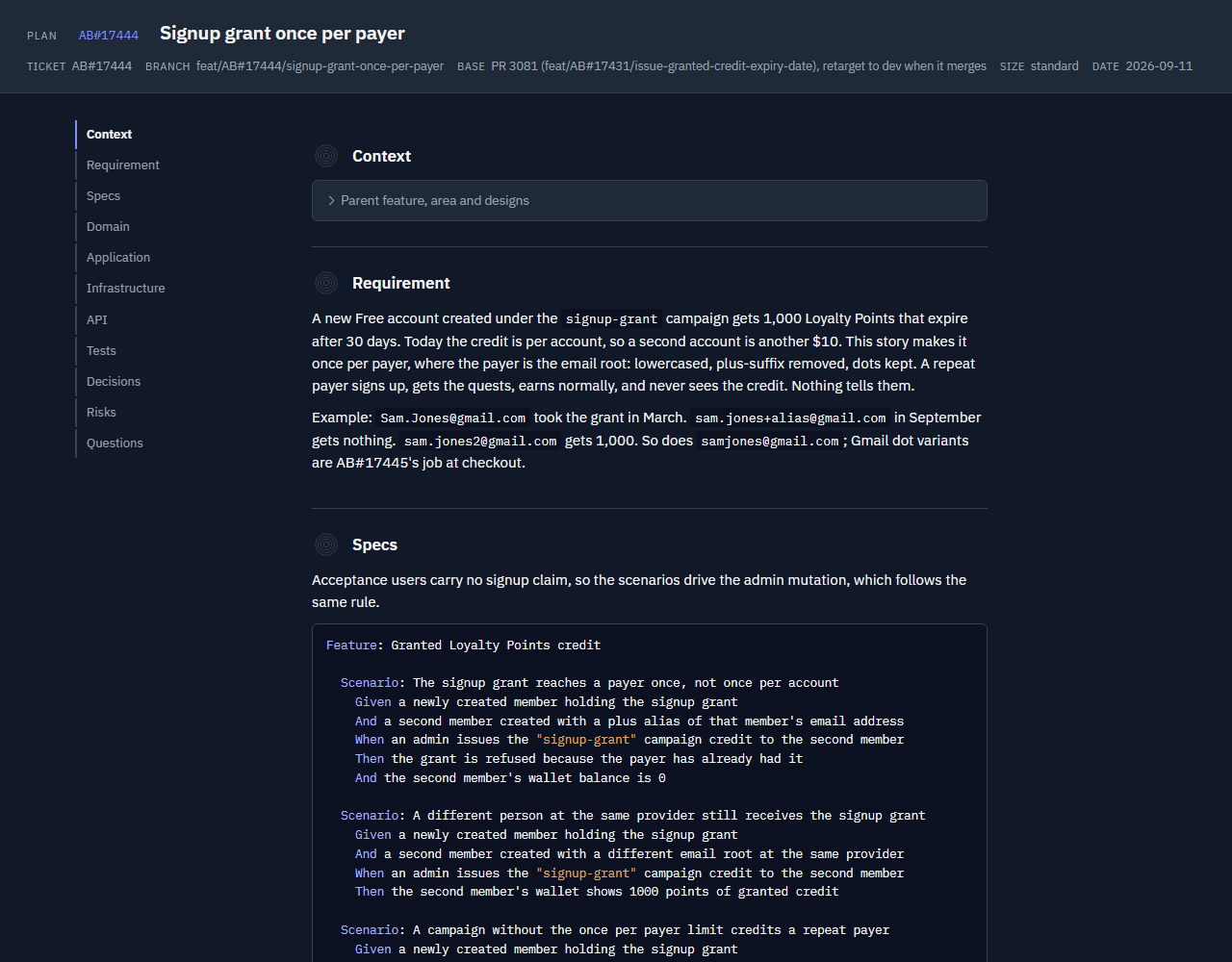
用於實作規劃。它會讀取工單與程式碼庫,接著寫入 plans/<id>-<slug>/plan.md 並建立 plan.html。各節依照你的架構安排,包含測試情境、決策、風險與開放問題。腳本會在發布前檢查各節的字數預算。
設定 stack.frontend,且工單要變更原本沒有設計的畫面時,這項技能會先畫出畫面,使用 Claude Code 的 /design 命令或 Design canvas Artifact 類型,並把畫板嵌入規劃頁的 Designs 區段,旁邊附上可編輯畫布的連結。追蹤器提供的設計會照原樣使用,不會建立畫布。
在 Artifact 頁面選擇回答,選 Approve 或 Revise the plan,再按 Send answers。頁面會把選擇傳給工作階段,工作階段會將它們納入規劃;選 Approve 後就直接進入 Implement。如果頁面要求告訴 Claude「decided」,代表無法連到工作階段;在聊天中說出這個詞,技能就會讀取已儲存的選擇。

用來建置已核准的規劃。它依序走過規劃的各層,每層提交一次;testing.tdd 嚴格時先測試,再執行審查器掃描:唯讀審查器平行執行,清理與驗證依序進行。內建審查器是 bug-hunt 與 conventions;設定檔可以啟用搭配的審查器與 Codex 第二意見。在進行任何測試前,會先在分支上修正發現項;缺少的工具會附上原因並出現在略過清單中。這項技能會編輯檔案。
用來執行 Test 階段並記錄測試內容。它會執行建置與測試套件,接著在 qa.environment 中執行已核准規劃的情境;當環境需要部署時,會開啟草稿 PR 並套用 qa.deploy_label。然後寫入 QA 報告,或為 QA 團隊撰寫測試筆記。
| 模式 | 內容 | 發布方式 |
|---|---|---|
| Report | Given/When/Then 情境、Pass/Fail/Blocked 結果、證據(API 請求與回應配對、折疊到各步驟所證明的查詢結果下;每個情境的螢幕截圖與影片放在可見網格中)、摘要與未測試條件。 | 核准後,依 qa.evidence 發布。 |
| Notes | 變更內容、各角色的步驟、測試資料、邊界情況、範圍、環境與旗標。 | 核准後,依 qa.evidence 發布給 qa-team;否則輸出到聊天中。 |
報告涵蓋針對真實環境的驗收執行與手動檢查。單元與整合測試套件不算 QA 證據。筆記來自已核准規劃的 Specs;沒有規劃時則來自差異。使用以下指令選擇筆記模式:
/dotnet-workflow-kit:test notes
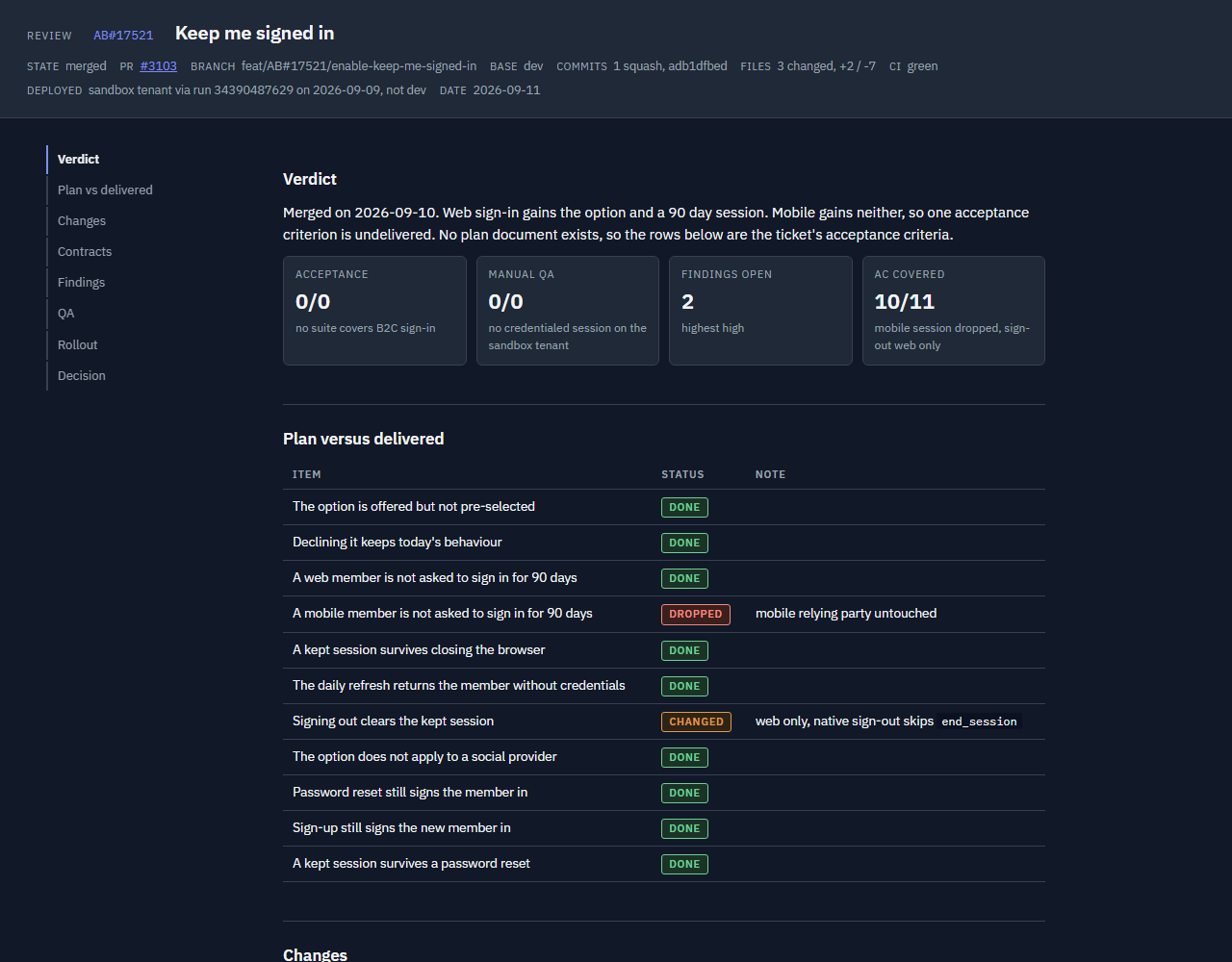
用來審查分支或 PR。它會把已核准的規劃、實際差異、掃描發現項與 QA 證據整合到 review.md 和 review.html。如果分支沒有新的掃描結果,它會先執行一次,因此即使這個工作階段沒有實作過分支,也能進行審查。
頁面包含判定數量、規劃與交付內容的比較、變更圖(點擊可開啟完整尺寸)、完整差異的檔案連結、發現項、QA 報告與發布檢查清單。選 Approve 或 Request changes,再按 Send decision。頁面會把決定傳給工作階段,工作階段會讀取每個未解決發現項的修正或接受選擇;選 Approve 後就直接進入拉取請求階段。如果頁面要求,在聊天中說「decided」。

用來從目前階段執行工作流程。它會讀取即時訊號以及 ~/.claude/dotnet-workflow-kit/pipeline/<slug>.json,並更新階段完成狀態。即時證據會覆蓋儲存的狀態;新提交後,較舊的掃描、測試執行與審查都必須重新執行。0.5.0 寫入的狀態檔會在第一次讀取時遷移。
要在不執行階段的情況下查看進度:
/next status
現在技能使用它們所執行階段的名稱。舊名稱沒有別名;請更新已儲存的提示或 /goal 文字。
| 之前 | 現在 |
|---|---|
| start-ticket | start |
| visual-plan | plan |
| next 裡的 Execute 階段,加上 mega-review | implement(掃描位於 skills/review/sweep.md) |
| qa-report,加上 next 裡的 QA 階段 | test |
| visual-review | review |
| Draft PR、Resolve comments、Publish 與 hand off 階段 | next 階段 5,Pull request |
這個套件附有 Claude Code mod,會在提示列上方繪製進度列,終端機與桌面 Code 分頁都支援。它會在工作項目的專屬分支上顯示項目:工單 ID 與簡短標題、每個階段各有一段的進度列、目前階段、百分比,以及 Claude 現在正在做什麼。等待你處理的階段會變成琥珀色。進度列會讀取 start、plan 與 next 寫入的流水線狀態檔。
同一個儲存庫其他分支上、最近一天有異動的項目,會在進度列末端顯示為 +N 標籤;其中一個等待你處理時,標籤會變成琥珀色。按下標籤或 /sessions 會開啟 Sessions 窗格:每個項目分成 Needs you、Running 與 Done。開啟中的項目是卡片,顯示階段與狀態,並有 Show 按鈕指出要開啟哪個分支的工作階段;目前查看的項目有紫色邊框,等待你處理的項目有琥珀色邊框。外掛無法將應用程式切換到另一個工作階段,所以 Show 只會指引你前往該處。完成的項目各佔一行,可以用叉號隱藏一個,也可以用 Dismiss all 隱藏全部。另一個項目抵達關卡時,提示預設關閉,因為應用程式自己的通知已涵蓋等待你處理的工作階段;窗格最後一列可以開啟它。/progress 會隱藏或顯示進度列,完成項目上的叉號會將它隱藏。
拉取請求合併或關閉時,或啟動它的工作樹消失時,項目會自行關閉;工作樹聊天封存後,工作樹就會消失。/progress done 會手動關閉目前分支的項目。關閉的項目會顯示每個階段都已完成,一天後該列會消失,scripts/close_items.py 會刪除狀態檔。PR 檢查每十分鐘詢問一次 gh(Azure Repos 則使用 az)。
外掛安裝後進度列會自行開啟:每個新工作階段都會載入 mods,不需要啟用任何東西。開始工作項目以前它會保持空白。組織的受控設定可以封鎖使用者安裝的 mods,例如設定 allowManagedModsOnly。
/next 會在單一回合中逐階段執行,但回合提早結束時,沒有任何東西會重新啟動它。這個套件的 hooks 會把執行的兩半分別包在目標中:
| 時機 | hooks 設定 |
|---|---|
| 規劃核准後 | /goal /next has reached the review checkpoint |
| 審查核准後 | /goal complete /next: the pull request is ready |
每個目標都會由 /next 結束那一半時送出的訊息完成,因此會自行清除,不會在你決定時重複提示。/next 因阻塞項目停止時,hooks 會讓目標保持安靜,直到你回答。從規劃頁或審查頁傳送內容時,Send to Claude 會喚醒工作階段,核准後執行會自行繼續。頁面無法連到工作階段時會說明;請改為告訴工作階段「decided」。
沒有 function hooks 時,每個關卡後自行設定目標:
/goal /next has stopped at a gate
工具權限提示仍可能需要輸入。流水線回報阻塞項目時,先解決再繼續。
Artifact 工具無法使用時,透過設定將 artifacts 設為 false。技能會建立相同的 HTML 頁面,並提供要開啟的本機檔案路徑。
本機表單無法儲存回答或決定。在聊天中回覆問題編號與選項,或回覆「approve」或「changes」並附上你的發現項決定。發布檢查清單的勾選不會持久保存;請在套件之外追蹤發布進度。 請參閱沒有 Artifact 工具時執行。
規劃頁與審查頁使用 Delivery Labs 的色彩,並在頁尾附上連往該處的署名連結。透過設定或設定檔將 branding 設為 false,即可使用沒有頁尾的中性色盤。
設定會在專案中寫入 .claude/dotnet-workflow-kit.json。設定檔解析會依序使用明確路徑、專案檔、使用者檔案 ~/.claude/dotnet-workflow-kit.json,最後使用預設值。缺少的欄位會取得預設值。
下方每一列都列出一個欄位,也包含以點號表示的巢狀欄位。例如,testing.tdd 位於 i
請先查看作者 README,確認 marketplace 與外掛名稱;指令可能隨儲存庫結構而變動。
claude plugin marketplace add chrisjainsley/claude-dotnet-workflow-kit
claude plugin install dotnet-workflow-kit
A Claude Code plugin for .NET teams that takes work from a ticket through planning, implementation, review and QA hand-off. It builds plan and review pages with enforced word budgets, so you can read the proposed work and the results before approving each.
One project profile sets your architecture, tests, tracker and QA workflow. Use the six skills, start, plan, implement, test, review and next, together or on their own, with or without a ticket tracker or the Artifact tool.
Install | Workflow | Skills | Progress bar | /goal | Branding | Profile reference | dotnet-claude-kit | Jev | Contributing
Run in a terminal:
claude plugin marketplace add chrisjainsley/claude-dotnet-workflow-kit
claude plugin install dotnet-workflow-kit@dotnet-workflow-kit
Then run setup in Claude Code from your project:
/dotnet-workflow-kit:setup
Setup asks about your team and writes .claude/dotnet-workflow-kit.json. Commit that
file to share the settings. Run setup again when your workflow changes.
The scripts require Python 3.11 or later. Pillow is optional; without it, the plan builder embeds full-size images instead of downscaling them.
For terminal setup from a clone of this repository:
python scripts/setup.py
Start with a ticket ID, or a short slug when tracker is none:
/dotnet-workflow-kit:start 1234
Use the pipeline driver to continue, or wrap it in a goal so it keeps going until the next gate:
/dotnet-workflow-kit:next
/goal /next has stopped at a gate
The driver checks the branch, PR and saved state, then runs the earliest unfinished stage. It pauses for plan answers or approval, the review decision, and blockers. Invoking it authorizes commits, pushes, a draft PR and configured deployment labels before the review checkpoint. The kit never merges; a person approves every merge.
| Stage | Who | Result | |---|---|---| | 0. Start | Agent | Create and push a branch; assign and activate the item when a tracker is configured. | | 1. Plan | Agent, then you | Build the plan page; you answer the open questions or approve. | | 2. Implement | Agent | Implement the plan one layer per commit, then run the reviewer sweep, fix findings and verify. | | 3. Test | Agent | Run the suites, then the plan's scenarios in the configured environment; fix failures and rerun. | | 4. Review | Agent, then you | Present the final diff, findings and QA evidence on one page; you approve or send it back. | | 5. Pull request | Agent, then you | Resolve threads and get checks green. After approval, post the QA report, apply labels and mark the PR ready. You merge. |
Requesting changes returns the pipeline to implementation with your notes and per-finding fix or accept choices. The draft stays a draft until approval.
Use to start work from an ID, issue URL or untracked slug. It creates and pushes a
branch from base_branch using branch_pattern. With a tracker, it assigns the item
to user and moves it to the configured active state. It then renames the session
when supported and hands off to plan.
Use for an implementation plan. It reads the ticket and codebase, then writes
plans/<id>-<slug>/plan.md and builds plan.html. Sections follow your architecture,
with test scenarios, decisions, risks and open questions. A script checks section
budgets before publication.
When stack.frontend is set and a ticket changes a screen that came with no design,
the skill draws the screens first, with Claude Code's /design command or the Design
canvas Artifact type, and embeds the artboards in a Designs section of the plan page
next to a link to the editable canvas. Designs supplied by the tracker are used as they
are and no canvas is made.
On an Artifact page, choose answers, pick Approve or Revise the plan and press Send answers. The page passes the choices to the session, which folds them into the plan; on Approve it goes straight on to Implement. If the page says to tell Claude "decided", the session could not be reached; say it in chat and the skill reads the stored choices.
Use to build an approved plan. It walks the plan's layers in order, one commit each,
tests first when testing.tdd is strict, then runs the reviewer sweep: read-only
reviewers in parallel, cleanup and verification in sequence. The built-in reviewers
are bug-hunt and conventions; the profile can enable companion reviewers and a
Codex second opinion. Findings are fixed on the branch before anything is tested, and
missing tools appear in the skipped list with a reason. This skill edits files.
Use to run the Test stage and write up what was tested. It runs the build and the
suites, then the approved plan's scenarios in qa.environment, opening the draft PR
and applying qa.deploy_label when that environment needs a deployment. It then writes
the QA report, or testing notes for a QA team.
| Mode | Content | Posting |
|---|---|---|
| Report | Given/When/Then scenarios, Pass/Fail/Blocked results, evidence (API request and response pairs, query results folded under the step each proves; screenshots and videos in a visible grid per scenario), summary and untested criteria. | After approval, post according to qa.evidence. |
| Notes | What changed, steps per persona, test data, edge cases, scope, environment and flags. | After approval, post for qa-team according to qa.evidence; otherwise print in chat. |
Reports cover acceptance runs against a real environment and manual checks. Unit and integration suites do not count as QA evidence. Notes come from the approved plan's Specs, or the diff when no plan exists. Select notes mode with:
/dotnet-workflow-kit:test notes
Use to review a branch or PR. It combines the approved plan, actual diff, sweep
findings and QA evidence into review.md and review.html. When no sweep is fresh
for the branch, it runs one first, so a branch nobody implemented in this session can
still be reviewed.
The page includes verdict counts, plan versus delivered, a change diagram (click it to open full size), file links to full diffs, findings, the QA report and a rollout checklist. Choose Approve or Request changes and press Send decision. The page passes the decision to the session, which reads it with each open finding's fix or accept choice; on Approve it goes straight on to the pull request stage. Say "decided" in chat if the page asks.
Use to run the workflow from the current stage. It reads live signals
alongside ~/.claude/dotnet-workflow-kit/pipeline/<slug>.json and updates stage completion.
Live evidence overrides saved state; sweeps, test runs and reviews older than new
commits must run again. State files written by 0.5.0 are migrated on first read.
To inspect progress without running a stage:
/next status
The skills now carry the names of the stages they run. Old names are not aliased;
update any saved prompts or /goal text.
| Before | Now |
|---|---|
| start-ticket | start |
| visual-plan | plan |
| Execute stage inside next, plus mega-review | implement (the sweep lives at skills/review/sweep.md) |
| qa-report, plus the QA stage inside next | test |
| visual-review | review |
| Draft PR, Resolve comments and Publish and hand off stages | next stage 5, Pull request |
The kit ships a Claude Code mod that draws a progress bar above the prompt, in the
terminal and the desktop Code tab. It shows the work item on the session's own branch:
the ticket id and a short title, a bar with a segment per stage, the current stage, the
percentage and what Claude is doing right now. A stage waiting on you turns amber. The
bar reads the pipeline state file that start, plan and next write.
Other items on branches of the same repository, touched in the last day, appear as a
+N chip at the end of the bar; it turns amber when one of them is waiting on you.
Pressing the chip, or /sessions, opens the Sessions pane: every item grouped as
Needs you, Running and Done. Open items are cards with their stages, status and a Show
button that names the branch whose session to open; the item you are viewing has a
purple edge and one waiting on you an amber one. A plugin cannot switch the app to
another session, so Show points you to it instead. Finished items take one line each,
with a cross to hide one and Dismiss all to hide the lot. A toast when another item
reaches a gate is off by default, because the app's own notifications already cover a
session waiting on you; the last row of the pane turns it on. /progress hides or
shows the bar, and the cross on a finished item hides it.
An item closes by itself when its pull request merges or closes, or when the worktree it
was started in is gone, as it is once a worktree chat is archived; /progress done
closes the current branch's item by hand. A closed item shows every stage done, and a
day later its row goes and scripts/close_items.py deletes its state file. The PR check
asks gh (or az for Azure Repos) every ten minutes.
The bar turns on by itself once the plugin is installed: mods load in every new session,
with nothing to enable. It stays empty until a work item is started. An organisation's
managed settings can block user-installed mods, for example with allowManagedModsOnly.
/next runs stage after stage inside one turn, but nothing restarts it if the turn
ends early. The kit's hooks wrap each half of the run in a goal for you:
| When | The hooks set |
|---|---|
| The plan is approved | /goal /next has reached the review checkpoint |
| The review is approved | /goal complete /next: the pull request is ready |
Each goal is met by the message /next ends that half with, so it clears on its own
instead of re-prompting while you decide. While /next is stopped on a blocker the
hooks keep the goal quiet until you answer. Sending from the plan or review page wakes
the session through Send to Claude, and an approval carries the run on by itself. When a
page cannot reach the session, it says so; tell the session "decided" instead.
Without function hooks, set a goal yourself after each gate:
/goal /next has stopped at a gate
Tool permission prompts may still require input. When the pipeline reports a blocker, resolve it before continuing.
Set artifacts to false through setup when the Artifact tool is unavailable.
The skills build the same HTML pages and give you local file paths to open.
Local forms cannot save answers or decisions. Reply in chat with question numbers and choices, or with "approve" or "changes" and your finding decisions. Rollout checklist ticks do not persist; track rollout outside the kit. See Running without the Artifact tool.
The plan and review pages use the Delivery Labs
colours and carry an attribution footer linking there. Set branding to false through
setup, or in the profile file, to render the neutral palette with no footer.
Setup writes .claude/dotnet-workflow-kit.json in the project. Profile resolution
uses an explicit path first, then the project file, then the user file at
~/.claude/dotnet-workflow-kit.json, then defaults. Missing fields receive defaults.
Each row below names a field, including nested fields in dotted form.
For example, testing.tdd lives inside the testing object. Empty strings appear as "".
| Field | Allowed values | Default | Purpose |
|---|---|---|---|
| schema | Integer | 1 | Profile schema version. |
| user | Free text | "" | Assignee and name used in page prose. |
| architecture | clean, vertical, ddd-clean, modular-monolith | "clean" | Plan section order and review rules. |
| testing.tdd | strict, encouraged, none | "encouraged" | TDD expectation; strict means tests first during execution. |
| testing.unit | xunit, nunit, mstest | "xunit" | Unit test framework. |
| testing.integration | webapplicationfactory, testcontainers, none | "webapplicationfactory" | Integration test approach. |
| testing.acceptance | reqnroll, specflow, none | "none" | Acceptance test runner; none keeps scenarios without a BDD runner. |
| qa.owner | qa-team, self, none | "self" | Who tests and signs off. |
| qa.evidence | work-item, pr-comment, none | "none" | Where approved QA reports go. |
| qa.handoff_label | Free text | "" | PR label for QA hand-off. |
| qa.deploy_label | Free text | "" | PR label to deploy to QA. |
| qa.environment | Free text | "local" | Environment named in QA evidence. |
| tracker | azure-boards, github-issues, jira, none | "none" | Ticket adapter; none uses your description. |
| tracker_project | Free text | "" | Project or organization identifier for tracker calls. |
| scm | github, azure-repos | "github" | PR and diff adapter. |
| base_branch | Free text | "main" | Starting branch and fallback PR base; stacked work uses its parent. |
| branch_pattern | Free text containing {slug}; supports {kind} and {id} | "{kind}/{id}-{slug}" | Branch naming template. |
| branch_kinds.feature | Non-empty text | "feat" | Feature value for the kind token. |
| branch_kinds.bug | Non-empty text | "bug" | Bug value for the kind token. |
| tracker_states.active | Free text | "" | State when work starts; blank uses the adapter default. |
| tracker_states.qa_ready | Free text | "" | QA hand-off state; blank uses the adapter default. |
| artifacts | true, false | true | Publish Artifacts, or build local HTML and take answers in chat. |
| branding | true, false | true | Delivery Labs colours and an attribution footer on the plan and review pages; false renders the neutral palette with no footer. |
| stack.data | ef-core, dapper, cosmos, other | "ef-core" | Data access conventions. |
| stack.api | minimal-api, controllers, graphql, grpc | "minimal-api" | API contract style. |
| stack.messaging | masstransit, wolverine, service-bus, none | "none" | Messaging conventions. |
| stack.errors | result, exceptions | "exceptions" | Error handling conventions. |
| stack.local_run | aspire, docker, plain | "plain" | How to start the system for local QA. |
| stack.frontend | none, blazor, razor, react, angular, vue, javascript | "none" | Whether the repo has a frontend and which kind; see the plan skill. |
| reviewers | bug-hunt, conventions, kit, security-scan, convention-learner, code-review-workflow | ["bug-hunt", "conventions"] | Reviewer sweep passes; the two built-ins always run. |
| pipeline.execute | Free text | "" | Execution command; blank implements the plan directly. |
| pipeline.resolve_comments | Free text | "" | Comment-resolution command; blank uses the SCM adapter. |
| pipeline.qa | Free text | "" | QA command; blank runs plan Specs manually per the QA adapter. |
| pipeline.open_pr_in_browser | true, false | true | In Claude desktop, open a newly created PR in the Claude browser pane. Set false to only report the link. |
| pipeline.auto_fix_pr | true, false | true | In Claude desktop, turn on CI auto-fix and comment handling for a newly created PR, so the session wakes on CI failures, conflicts and review comments. Set false to leave it off. |
| optional.dotnet-claude-kit | true, false | false | Companion plugin availability. |
| optional.codex | true, false | false | Enable the Codex second-opinion reviewer. |
| optional.roslyn-mcp | true, false | false | Roslyn MCP availability for code-review-workflow. |
| optional.jev | true, false | false | Jev availability: a TYPESAFE_API_KEY or a jev MCP server. Detected by setup. See Jev. |
| jev.flag_at | Number from 0 to 1 | 0.75 | Probability at or above which a scored check becomes a finding at the rule's severity. |
| jev.review_at | Number from 0 to 1, at most flag_at | 0.4 | Probability at or above which a scored check is listed as low with "confirm by reading". |
| checks | List of {id, rule, severity, files} | [] | Review checks the conventions reviewer enforces; files is an optional glob. Edited in the file, validated by scripts/doctor.py. |
| extra_stages | List of {id, label, after, run, done_when, gate} | [] | The team's own /next stages. after names a built-in stage other than pull_request, or an earlier extra stage; run is a slash command or an instruction; done_when is the yes/no question that marks it done; gate: true stops for you after it. label is at most 12 characters and shows on the progress bar. Edited in the file. |
| stage_checks | Object of stage name to a list of {id, prompt, on_fail} | {} | Yes/no prompts a /next stage must pass before it is marked done. Stages: start, plan, implement, test, review, pull_request. on_fail is fix (default, keep working the stage) or stop (blocker). Edited in the file. |
Validation requires a tracker when qa.evidence is work-item. Both bug-hunt and
conventions remain in the reviewer list.
The clean, ddd-clean and modular-monolith profiles share Domain, Application,
Infrastructure, API and Tests slices. Their adapters define different review rules.
The vertical profile uses Slice, Persistence, Integration, Endpoint and Tests.
See Adapters for supported tools and extension points.
Setup recommends the companion plugin when your answers need its skills, and asks
before installing it. These mappings come from scripts/kit_profile.py:
| Answer | dotnet-claude-kit skills it needs |
|---|---|
| architecture: clean | clean-architecture |
| architecture: ddd-clean | clean-architecture, ddd |
| architecture: vertical | vertical-slice |
| testing.tdd: strict | tdd |
| stack.data: ef-core | ef-core, migration-workflow |
| stack.api: minimal-api | minimal-api, openapi, api-versioning |
| stack.messaging: masstransit | messaging |
| stack.messaging: wolverine | messaging |
| stack.errors: result | error-handling |
| stack.local_run: aspire | aspire |
| reviewers: kit | code-review, 80-20-review, de-sloppify, verification-loop |
| reviewers: security-scan | security-scan |
| reviewers: convention-learner | convention-learner |
| reviewers: code-review-workflow | code-review-workflow (also needs a Roslyn MCP server) |
The workflow kit also runs without the companion. Built-in adapters still guide the
pages; unavailable companion reviewers are recorded as skipped. The
code-review-workflow reviewer also requires a Roslyn MCP server.
Jev is TypeSafe's
System One model: a fast, calibrated judge that returns probabilities, never text. With
optional.jev true the kit uses it wherever a skill would otherwise decide on gut feel,
and every call is skipped, never failed, when it is absent. Setup detects a
TYPESAFE_API_KEY or a jev MCP server. Register the MCP at user scope so it loads in
every project:
claude mcp add -s user jev -e TYPESAFE_API_KEY=<your key> -- npx -y @jkudish/jev-mcp
Add your own stage checks too. Each is a yes/no question a /next stage must answer yes to
before it is marked done, judged on that stage's evidence. Jev scores them when enabled, and
Claude answers them otherwise:
"stage_checks": {
  "implement": [{"id": "migration-reviewed", "prompt": "Does every new EF Core migration have a matching Down method?"}],
  "test": [{"id": "e2e-ran", "prompt": "Does the test output show the Playwright suite ran and passed?", "on_fail": "stop"}]
}
Add your own stages to the pipeline. /next runs each after the stage it names, and the
progress bar gets a segment for it:
"extra_stages": [
  {"id": "security", "label": "Security", "after": "implement",
   "run": "/dotnet-claude-kit:security-scan",
   "done_when": "Did the scan report no high or critical findings?"}
]
Add your own review checks to the profile; the conventions reviewer enforces them on
every sweep, and with Jev scripts/jev_checks.py scores every added hunk against them
first:
"checks": [
  {"id": "cancellation", "rule": "Every new async method that performs I/O accepts and forwards a CancellationToken", "severity": "high", "files": "**/*.cs"},
  {"id": "clock", "rule": "Use the injected IClock, never DateTime.Now", "severity": "medium", "files": "src/**/*.cs"}
]
| Stage | What Jev does | |---|---| | start, plan | Screens ticket text and linked items for injected instructions; ranks linked items so only the relevant ones are read. | | plan | Settles open questions from the research facts, or preselects the recommended option and names the fact that would decide it. | | implement | Classifies open sweep findings as fixable in scope or scope-changing. | | sweep | Scores profile checks and the CLAUDE.md rubric per hunk; deduplicates findings; gates the verdict's claims against the diff and test output. | | test | Buckets failing tests as regression, refactor fallout, flaky or environment before fixing. | | review | Verifies Plan versus delivered rows, QA Pass evidence and Verdict tiles. | | next | Classifies red CI jobs; screens, classifies and ranks review threads. |
Diff hunks, claims, test output and ticket text are sent to api.typesafe.ai when a
touchpoint runs; files matching the secret patterns never are. Set optional.jev to
false when policy forbids it. docs/jev.md has the call shapes, the
skipped wording and the checks reference.
| Path | Contents |
|---|---|
| .claude-plugin/ | Plugin and marketplace manifests. |
| commands/setup.md | Setup command instructions. |
| skills/ | Six skills, the reviewer sweep and their supporting files. |
| adapters/ | Tracker, source control, architecture, QA and stack instructions. |
| assets/ | Shared page shell. |
| scripts/ | Profile, setup, checks, rendering and the Jev checks scorer. |
| docs/ | Usage guides, writing rules, the Jev reference and screenshots. |
| tests/ | Fixtures and automated checks. |
Run the tests and plugin validation from the repository root before opening a PR:
python -m pytest
claude plugin validate .
Keep examples generic. Hygiene tests check for private identifiers and em dashes. Follow the writing rules for plan and review content.
MIT. See LICENSE.
Author: Chris Ainsley

Ruflo 記憶系統的基底層外掛:AgentDB 控制器橋接(15 個 agentdb_* MCP 工具)、RuVector ONNX 嵌入(10 個 embeddings_* 工具,包含 RaBitQ 32x 量化)和 WASM HNSW 模式路由器(3 個 ruvllm_hnsw_* 工具)。作為 mod(ADR-445):可選的安全召回會進入提示,寫入守衛會把機密排除在記憶之外,還提供 /agentdb 和控制台顯示的狀態檔。

建立、格式化、最佳化及檢視互動式 Power BI 報表,並提供遵循 pbir CLI 的報表面板,顯示 Claude 讀取與修改的內容。


在提示列上方、狀態列與通知中顯示未讀 AMP 訊息,還能喚醒閒置的 Claude Code 工作階段來讀取。需要 Claude Code 2.1.287 或更新版本。
