
KyongSik-Yoon@KyongSik-Yoon
KyongSik-Yoon/claude-mods/tree/main/desktop-look
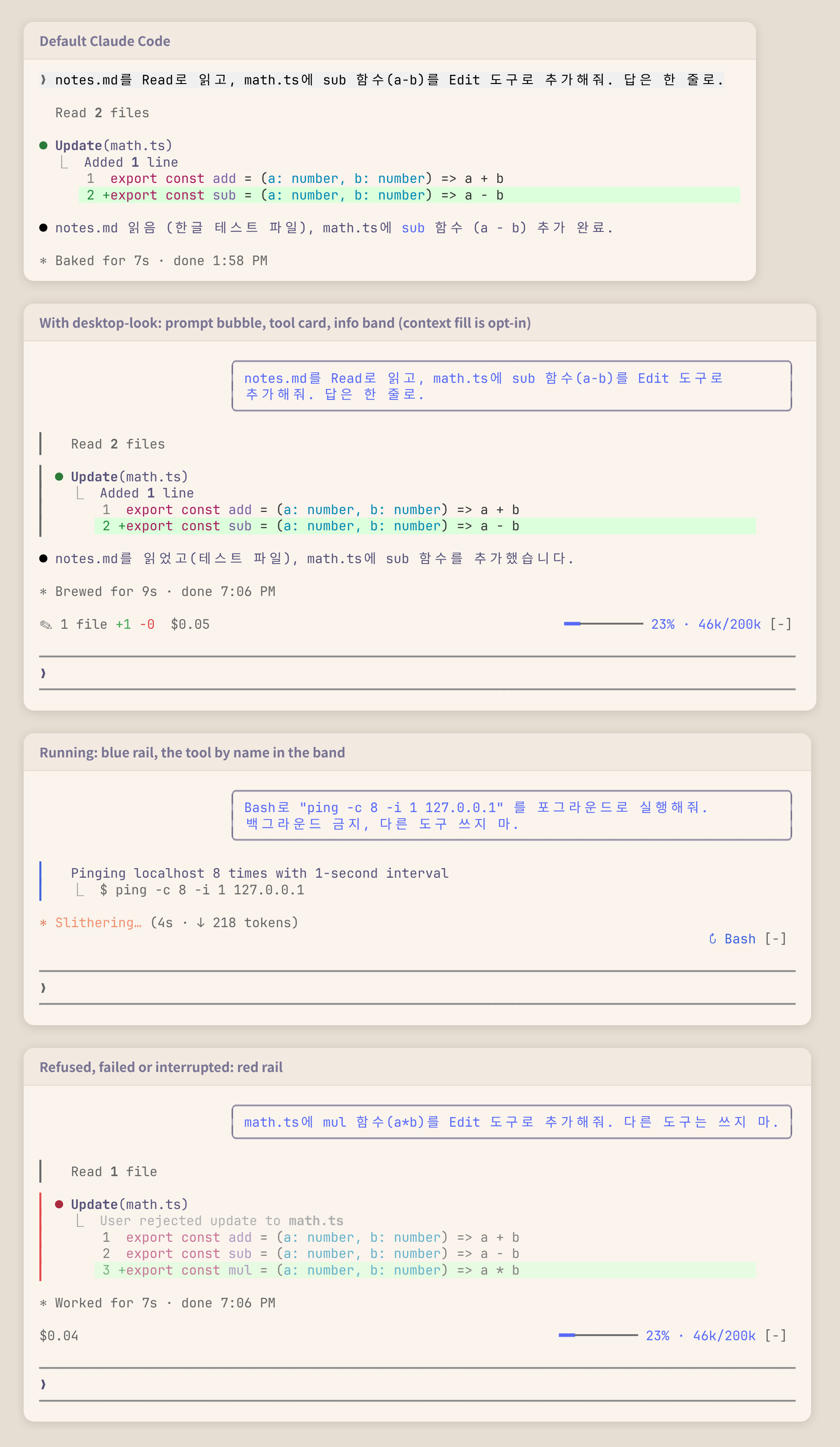
KyongSik-Yoon/claude-mods/tree/main/desktop-look
讓終端機記錄更像桌面應用程式的 Claude Code 外掛。

✎ 2 files +7 -0)以及花費了多少($0.05);右側顯示正在執行的工具(↻ Read ×3, Grep,窄畫面時為 ↻ 4 running);沒有內容可顯示時隱藏claude plugin marketplace add KyongSik-Yoon/claude-mods
claude plugin install desktop-look@kyongsik-mods
接著執行 /reload-plugins 或開始新的工作階段。需要支援 mods 的 Claude Code 建置版本(已在 2.1.289、全螢幕與淺色/深色主題測試)。
不需要設定。要變更一項,執行 /plugin configure desktop-look@kyongsik-mods(或開啟 /config):
| 選項 | 預設值 | |
| --- | --- | --- |
| 氣泡寬度 | 75% | 終端機的 60%、75% 或 90% 寬度 |
| 資訊列 | 開啟 | 提示列上方的資訊列 |
| 資訊列:模型 | 關閉 | 模型與 effort,供不顯示這些內容的狀態列使用 |
| 資訊列:上下文 | 關閉 | 上下文填充:平穩時為藍色,從 300k token 或 70% 起變黃色,從 500k token 或 90% 起變紅色,以先到者為準 |
費用是 Claude Code 依 API 價格計算的金額;使用訂閱時,那不是實際向你收取的金額。
UserMessage(只有你自己的提示,不包含任務通知或其他工作階段的訊息)會繪製成右對齊、帶圓角邊框的 Box。ToolUse、ToolGroup、ToolProgress 與 ToolResult 是分開的渲染位置,因此單一邊框無法跨過它們。每個位置都會包住引擎自己的列(await next(e)),加上一條絕對定位的單欄軌道,延伸到該列高度,同時略過引擎開啟工具列時放入的空白列。isRunning、isErrored、isInterrupted 與群組中的呼叫。$.state 中數值的 AbovePrompt hook,由 tool.call(執行中的工具,以及每個 Edit 和 Write 結果補丁中的 +/- 列)、session.measure(費用、上下文)與 turn.step(模型)寫入。新的工作階段(/clear)會重新開始累計;重新載入會保留累計值。claude plugin validate .
claude plugin test .
請先查看作者 README,確認 marketplace 與外掛名稱;指令可能隨儲存庫結構而變動。
claude plugin marketplace add KyongSik-Yoon/claude-mods
claude plugin install desktop-look
A Claude Code mod that makes the terminal transcript look more like the desktop app.
✎ 2 files +7 -0) and spent ($0.05) on the left, the tools running (↻ Read ×3, Grep, or ↻ 4 running when narrow) on the right; hidden when there is nothing to showclaude plugin marketplace add KyongSik-Yoon/claude-mods
claude plugin install desktop-look@kyongsik-mods
Then run /reload-plugins or start a new session. Requires a Claude Code build with mods support (tested on 2.1.289, fullscreen and light/dark themes).
No setup needed. To change one, run /plugin configure desktop-look@kyongsik-mods (or open /config):
| Option | Default | |
| --- | --- | --- |
| Bubble width | 75% | 60%, 75% or 90% of the terminal |
| Info band | on | The band above the prompt |
| Band: model | off | Model and effort, for a status line that does not show them |
| Band: context | off | Context fill, for a status line that does not show it: blue while calm, yellow from 300k tokens or 70%, red from 500k tokens or 90%, whichever comes first |
The cost is what Claude Code computes at API prices; on a subscription it is not what you are billed.
UserMessage (your own prompts only, not task notifications or other sessions' messages) is drawn as a right-aligned Box with a round border.ToolUse, ToolGroup, ToolProgress and ToolResult are separate render sites, so one border cannot span them. Each wraps the engine's own row (await next(e)) and adds an absolutely positioned one-column rail that stretches to the row's height, skipping the blank line the engine opens a tool row with.isRunning, isErrored, isInterrupted, and the calls of a group.AbovePrompt hook reading values in $.state, written by tool.call (tools running, and the +/- lines of each Edit and Write result's patch), session.measure (cost, context) and turn.step (model). A new session (/clear) starts the tally over; a reload keeps it.claude plugin validate .
claude plugin test .

Ruflo 記憶系統的基底層外掛:AgentDB 控制器橋接(15 個 agentdb_* MCP 工具)、RuVector ONNX 嵌入(10 個 embeddings_* 工具,包含 RaBitQ 32x 量化)和 WASM HNSW 模式路由器(3 個 ruvllm_hnsw_* 工具)。作為 mod(ADR-445):可選的安全召回會進入提示,寫入守衛會把機密排除在記憶之外,還提供 /agentdb 和控制台顯示的狀態檔。

建立、格式化、最佳化及檢視互動式 Power BI 報表,並提供遵循 pbir CLI 的報表面板,顯示 Claude 讀取與修改的內容。


在提示列上方、狀態列與通知中顯示未讀 AMP 訊息,還能喚醒閒置的 Claude Code 工作階段來讀取。需要 Claude Code 2.1.287 或更新版本。
