
theonly1me@theonly1me
theonly1me/claude-code-mods/tree/main/plugins/decision-lens
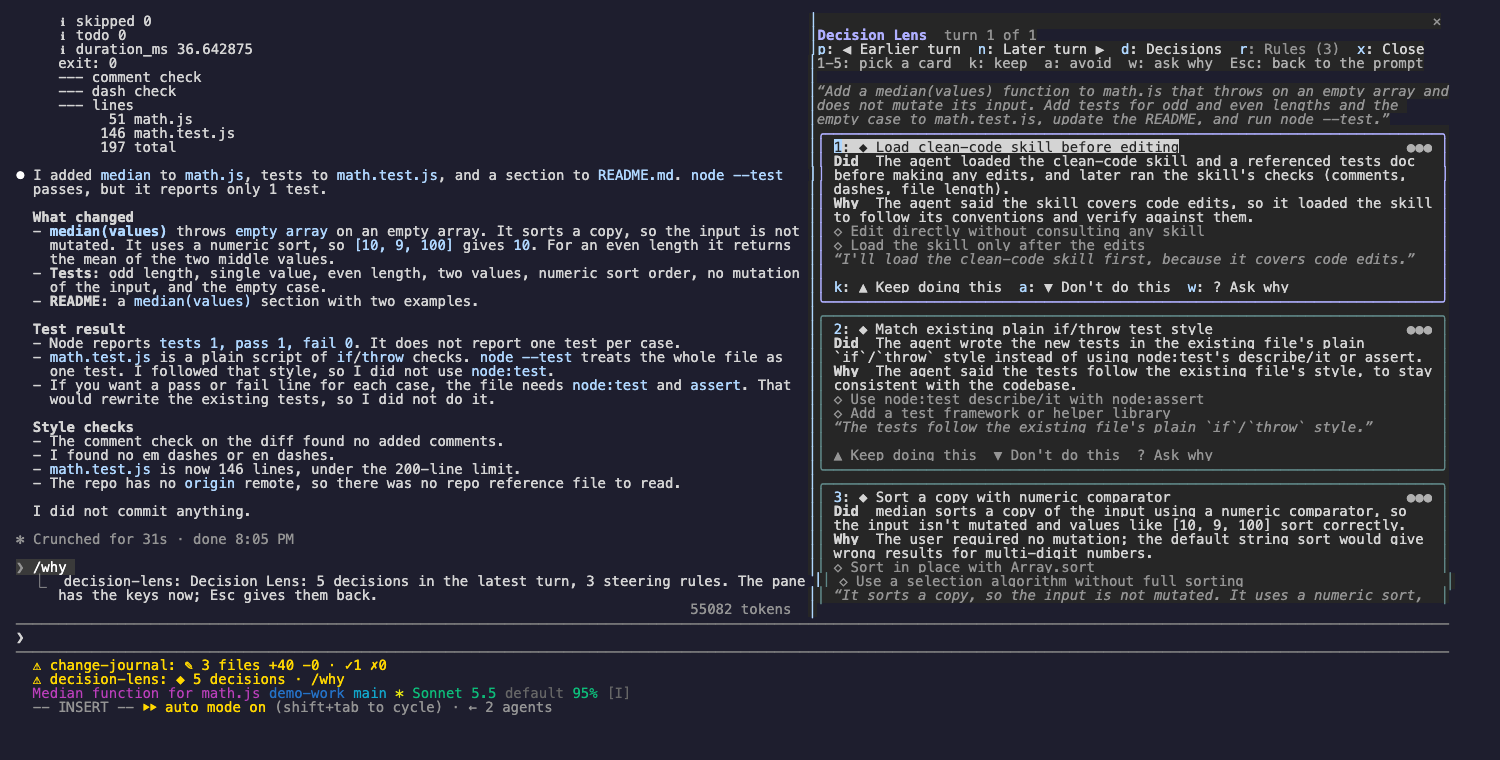
查看 Claude 在每個回合做出的決定、做出決定的原因,以及它選擇不做的事。接著引導後續回合:保留喜歡的行為,或停止不喜歡的行為。
theonly1me/claude-code-mods/tree/main/plugins/decision-lens
查看 Claude 在每個回合做出的決定、做出決定的原因,以及它選擇不做的事。接著引導後續回合:保留喜歡的行為,或停止不喜歡的行為。

claude plugin marketplace add theonly1me/claude-code-mods
claude plugin install decision-lens@claude-code-mods
註冊一次 marketplace。在已開啟的工作階段中安裝後執行 /reload-plugins。需要 Claude Code 2.1.289 或更新版本;不需要建置步驟或執行階段相依套件。
透鏡會在 Claude 工作時記錄每個回合:Claude 寫了什麼、模型分享的思考,以及每次工具呼叫及其結果。回合結束後,輔助模型會讀取這份軌跡,並命名最多五個真正的決定。提示列接著會顯示 ◆ 3 decisions · /why。
每個決定都是一張卡片,包含:
◆ 3 decisions · /why。/why。透鏡會在最新回合開啟並接管按鍵。指令隨時可用,即使面板沒有接管按鍵:
/why:在最新回合開啟透鏡。/why keep 2:儲存卡片 2 中要求 Claude 重複此行為的規則。/why avoid 2:儲存卡片 2 中要求 Claude 停止此行為的規則。/why ask 2:透過工作階段自己的模型和快取對話詢問 Claude,讓它用自己的話解釋卡片 2。答案會出現在卡片上。/why rules:開啟 Rules 分頁。規則從下一個請求開始放入 Claude 的 system prompt,也會套用到之後的每個工作階段。規則會依專案儲存。不會修改 repo 檔案。
標題下方的提示列會一直列出目前可用的按鍵。
| 按鍵 | 功能 |
| --- | --- |
| 1 到 5 | 選取卡片。選取的卡片有亮框,按鈕會顯示各自的按鍵。 |
| k | 繼續這樣做:儲存選取卡片的 keep 規則。 |
| a | 不要這樣做:儲存選取卡片的 avoid 規則。 |
| w | 詢問原因:Claude 用自己的話解釋選取的卡片。 |
| p、n | 顯示較早或較晚的回合(最近 20 個回合)。 |
| d、r | 顯示 Decisions 分頁或 Rules 分頁。 |
| x | 關閉透鏡。 |
| Tab、Enter | 移到下一個按鈕並按下它。 |
| Esc | 把按鍵交還給提示。面板保持開啟。 |
| ctrl+x tab | 再次把按鍵交給面板。 |
在 Rules 分頁中,每條規則都有編號和兩個按鈕:「Make global」(或「This project only」)以及「Remove」。使用 Tab 和 Enter 按下它們。
在 /plugin 中修改:
explainTurns(開啟):使用輔助模型讀取每個回合。這會使用額外 token。helperModel(claude-sonnet-5-5):讀取每個回合的模型。「詢問原因」一律使用工作階段的模型。helperEffort(medium):輔助模型思考的力度(low、medium 或 high)。有些模型不會分享思考文字。此時透鏡會根據 Claude 寫下的內容和它發出的工具呼叫運作。
設定、隱私、更新和移除方式請見 marketplace README。
請先查看作者 README,確認 marketplace 與外掛名稱;指令可能隨儲存庫結構而變動。
claude plugin marketplace add theonly1me/claude-code-mods
claude plugin install decision-lens
See the decisions Claude made in each turn, why it made them, and what it chose not to do. Then steer the next turns: keep a behavior you like, or stop one you do not.
claude plugin marketplace add theonly1me/claude-code-mods
claude plugin install decision-lens@claude-code-mods
Register the marketplace once. Run /reload-plugins in an open session after installing. Requires Claude Code 2.1.289 or later; no build step or runtime dependencies.
The lens records each turn as Claude works: what Claude wrote, any thinking the model shares, and every tool call with its result. When the turn ends, a helper model reads that trace and names up to five real decisions. The status line then shows ◆ 3 decisions · /why.
Each decision is a card with:
◆ 3 decisions · /why./why. The lens opens on the latest turn and takes the keys.Commands work at any time, also while the pane does not have the keys:
/why: open the lens on the latest turn./why keep 2: save a rule from card 2 that tells Claude to repeat the behavior./why avoid 2: save a rule from card 2 that tells Claude to stop./why ask 2: ask Claude, through the session's own model and cached conversation, to explain card 2 in its own words. The answer appears on the card./why rules: open the Rules tab.Rules go into Claude's system prompt from the next request and in every later session. They are saved for this project. No repository files change.
The hint row under the title always names the keys that work now.
| Key | What it does |
| --- | --- |
| 1 to 5 | Pick a card. The picked card has a bright frame, and its buttons show their keys. |
| k | Keep doing this: save the picked card's keep rule. |
| a | Don't do this: save the picked card's avoid rule. |
| w | Ask why: Claude explains the picked card in its own words. |
| p, n | Show the earlier or later turn (the last 20 turns). |
| d, r | Show the Decisions tab or the Rules tab. |
| x | Close the lens. |
| Tab, Enter | Move to the next button, and press it. |
| Esc | Give the keys back to the prompt. The pane stays open. |
| ctrl+x tab | Give the keys to the pane again. |
On the Rules tab, each rule is numbered and has two buttons: "Make global" (or "This project only") and "Remove". Use Tab and Enter to press them.
Change these in /plugin:
explainTurns (on): read each turn with the helper model. This uses extra tokens.helperModel (claude-sonnet-5-5): the model that reads each turn. Ask why always uses the session's model.helperEffort (medium): how hard the helper model thinks (low, medium, or high).Some models share no thinking text. The lens then works from what Claude wrote and the tool calls it made.
See the marketplace README for configuration, privacy, updates, and removal.

了解快取的 /loop worker 與 CronCreate 背景自動化。ruflo 系列每個週期性工作都使用的基礎外掛。

作為 Claude Code mod 的 claude-reflect:每個簡短提示都會進行模型檢查,找出可重複使用的修正(任何語言皆可);提示列上方的橫條讓你按一次就將它們儲存到 CLAUDE.md。


Claude Code 裡的早期 crit:在面板中評論對話、差異或檔案,把審查送給 Claude,並在線程中閱讀 Claude 的回覆。