
rodbegbie@rodbegbie
rodbegbie/rod-claude-mods/tree/main/plugins/context-bar
rodbegbie/rod-claude-mods/tree/main/plugins/context-bar
Rod Begbie 為 Claude Code 編寫的外掛,發佈在外掛市場中。
加入市場,然後安裝你想要的外掛:
/plugin marketplace add rodbegbie/rod-claude-mods
/plugin install context-bar@rod-claude-mods
/plugin install pro-limits@rod-claude-mods
/plugin install sportsball@rod-claude-mods
如果要從本機簽出試用市場,改為指向該資料夾:
/plugin marketplace add /path/to/rod-claude-mods
| 外掛 | 功能 | | --- | --- | | context-bar | 提示列上方的堆疊背景視窗長條圖 | | pro-limits | 提示列上方的 5 小時及每週使用限制量表 | | sportsball | 提示列上方的關注球隊即時比分 |
在提示列上方繪製背景視窗為堆疊長條圖,每個類別用一種顏色,如同 /context 所示。圖例列出每個類別的權杖數及其在視窗中的比例,然後顯示總計。
用 /context-bar 切換。預設開啟,在工作階段開始及每回合後重新整理。
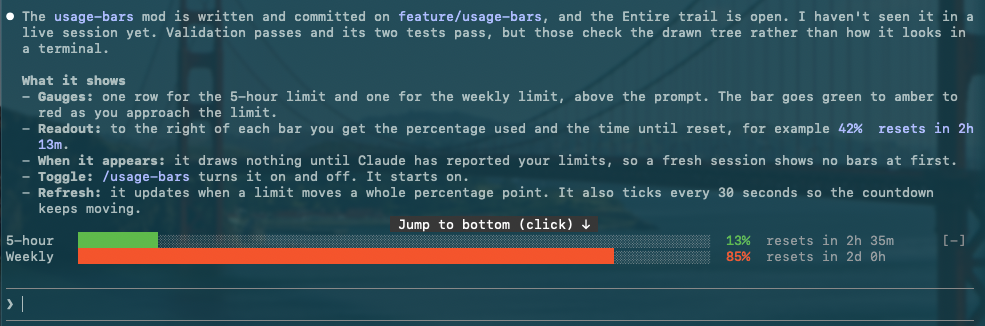
在提示列上方為每個訂閱限制(5 小時及每週)繪製一個量表。每條長條圖隨著接近限制從綠色轉為琥珀色再轉為紅色,後面接著使用百分比及該時間窗口重設的時間。只有在 Claude 回報這些窗口後才會顯示,API 金鑰帳戶上不會顯示任何內容。

每次時間窗口超過 20%、40%、60%、80%、90% 或 95% 時彈出提示訊息。達到 100% 時百分比變為兩個骷髏。工作階段開始時看到的數值不會彈出提示,只有之後的變化才會。
用 /pro-limits 切換。預設開啟,每當限制變化超過一整個百分點時重新整理,每 30 秒勾選一次以保持倒數計時準確。
關注一支隊伍並在提示列上方繪製其即時比賽:運動表情符號、兩隊名、比分、比賽狀態及賽事,顯示在一行上。「Powered by SportScore」的記述連結到 sportscore.com,位於該行右側。無論顯示多少支隊伍,它只出現一次在最後一個遊戲列上,只有在終端機太窄時才會掉到下方單獨一列。當隊伍沒有即時比賽時該長條圖是空的。
<!-- 螢幕截圖佔位符 -->/follow-team <name> 關注一支隊伍,例如 /follow-team golden state valkyries 或 /follow-team club atletico tigre。它同時搜尋籃球及美式足球。如果名稱符合多於一支隊伍,即使完全相同,也會詢問是哪一支。每個選項顯示運動表情符號、隊名及其最新比賽的聯盟(當查詢失敗或隊伍沒有比賽時省略)。最多在問題對話框中提供四支隊伍。超過四支時開啟一個列表窗格,這樣都不會被截斷。關閉兩者之一會不關注任何球隊並保留你目前的球隊。符合單支隊伍的名稱會直接被關注。當 SportScore 的查詢為某支隊伍返回不同的隊伍時(如格拉斯哥流浪者隊),該隊伍會被排除並在回覆中命名。/unfollow-team [name] 停止關注。/sportsball 顯示或隱藏長條圖。關注的球隊無論哪種方式都會在工作階段間保存。當比賽進入新時期(例如「半場」或「第 4 節」)及終場時彈出提示訊息,每次都附上比分。美式足球中,比分變化也會彈出(「進球 60'」或比分未被認定時的「比分變化」),如果有的話還附上比賽分鐘數。籃球的分數變化太頻繁,所以那裡只有時期彈出。載入後的第一次讀取是無聲的,所以在比賽進行中啟動 Claude 不會彈出提示。關閉 /sportsball 會將提示靜音而不會失去追蹤。
美式足球比賽也在狀態旁邊顯示比賽分鐘數,例如 2nd half 84'。它來自每次輪詢的第二個請求,所以查詢失敗只會將分鐘數留空。
在比賽進行中每 30 秒輪詢一次,否則每 5 分鐘輪詢一次。如果輪詢失敗,上一次的比分會在螢幕上保持暗淡最多 10 分鐘。支援籃球及美式足球。
比分來自 SportScore 公開 API,它要求顯示「Powered by SportScore」連結,因此有記述列。不支援超連結的終端機會在名稱旁邊顯示 URL。
隊名的顏色來自它們的標誌。為此外掛在你的機器上執行一個簡短的 Python 3 指令碼(僅限標準程式庫),每個標誌一次,並快取結果。這是選擇性的:沒有 python3 的情況下名稱只會以預設顏色繪製。關於它有兩件事要知道:
在沒有命令行工具的 Mac 上,外掛會跳過指令碼而不是觸發安裝對話框。
每個外掛都在 plugins/ 下自己的資料夾中,並在 .claude-plugin/marketplace.json 中列出。用以下方式檢查所有專案:
claude plugin validate .
claude plugin validate plugins/<mod-name>
claude plugin test plugins/<mod-name>
請先查看作者 README,確認 marketplace 與外掛名稱;指令可能隨儲存庫結構而變動。
claude plugin marketplace add rodbegbie/rod-claude-mods
claude plugin install context-bar
Rod Begbie's mods for Claude Code, published as a plugin marketplace.
Add the marketplace, then install the mods you want:
/plugin marketplace add rodbegbie/rod-claude-mods
/plugin install context-bar@rod-claude-mods
/plugin install pro-limits@rod-claude-mods
/plugin install sportsball@rod-claude-mods
To try the marketplace from a local checkout, point at the folder instead:
/plugin marketplace add /path/to/rod-claude-mods
| Mod | What it does | | --- | --- | | context-bar | Stacked context-window bar above the prompt | | pro-limits | 5-hour and weekly usage-limit gauges above the prompt | | sportsball | Live score of a followed team above the prompt |
Draws the context window as a stacked bar above the prompt, with one
colour per category as in /context. A legend underneath lists each
category's tokens and share of the window, then the total.
Toggle it with /context-bar. It starts on, and refreshes at session
start and after every turn.
Draws one gauge per subscription limit (5-hour and weekly) above the prompt. Each bar shifts from green through amber to red as you approach the limit, followed by the percentage used and the time until that window resets. Windows only appear once Claude has reported them, so nothing shows on API-key accounts.
A toast pops up each time a window passes 20%, 40%, 60%, 80%, 90% or 95%. Hit 100% and the percentage turns into two skulls. Readings seen at session start never toast, only crossings after that.
Toggle it with /pro-limits. It starts on, refreshes whenever a limit
moves a whole point, and ticks every 30 seconds to keep the countdown
honest.
Follows one team and draws its live game above the prompt: a sport emoji, both team names, the score, the game status and the competition, on a single line. A "Powered by SportScore" credit, linking to sportscore.com, sits at the right of that row. It appears once, on the last game row, however many teams are shown, and drops to a row of its own underneath only when the terminal is too narrow for both. The band is empty when the team has no live game.
<!-- screenshot placeholder -->/follow-team <name> follows a team, for example
/follow-team golden state valkyries or /follow-team club atletico tigre. It searches basketball and football together. If the name
matches more than one team, even exactly, it asks which. Each choice
shows a sport emoji, the team name and the league of its latest game
(left off when the lookup fails or the team has no games). Up to four
teams are offered in a question dialog. More than that opens a pane
with a list, so none are cut off. Dismissing either follows nothing
and keeps your current team. A name that matches a single team is
followed straight away. A team is left out, and named in the reply,
when SportScore's lookup for it returns a different team, as it does
for Rangers F.C. (Glasgow)./unfollow-team [name] stops following./sportsball shows or hides the band. The followed team is kept
across sessions either way.A toast appears when the game moves to a new period (for example
"Half time" or "4th quarter") and at full time, each with the score.
In football, a change of score also toasts (Goal 60', or Score change
if a goal is ruled out), with the match minute when there is one.
Basketball scores change too often, so only periods toast there.
The first reading after a load is silent, so starting Claude mid-game
doesn't toast. /sportsball off mutes toasts without losing track.
Football games also show the match minute next to the status, for
example 2nd half 84'. It comes from a second request per poll, so a
failed lookup just leaves the minute off.
It polls every 30 seconds while a game is live and every 5 minutes otherwise. If a poll fails, the last score stays on screen, dimmed, for up to 10 minutes. Basketball and football are supported.
Scores come from the SportScore public API, which asks for a visible "Powered by SportScore" link, hence the credit row. Terminals without hyperlink support show the URL next to the name.
Team names are coloured from their logos. To do that the mod runs a
short Python 3 script (standard library only) on your machine, once per
logo, and caches the result. This is optional: without python3 the
names simply draw in the default colour. Two things to know about it:
On a Mac without the Command Line Tools the mod skips the script rather than trigger the install dialog.
Each mod lives in its own folder under plugins/ and is listed in
.claude-plugin/marketplace.json. Check the lot with:
claude plugin validate .
claude plugin validate plugins/<mod-name>
claude plugin test plugins/<mod-name>

Ruflo 記憶系統的基底層外掛:AgentDB 控制器橋接(15 個 agentdb_* MCP 工具)、RuVector ONNX 嵌入(10 個 embeddings_* 工具,包含 RaBitQ 32x 量化)和 WASM HNSW 模式路由器(3 個 ruvllm_hnsw_* 工具)。作為 mod(ADR-445):可選的安全召回會進入提示,寫入守衛會把機密排除在記憶之外,還提供 /agentdb 和控制台顯示的狀態檔。

建立、格式化、最佳化及檢視互動式 Power BI 報表,並提供遵循 pbir CLI 的報表面板,顯示 Claude 讀取與修改的內容。


Shows unread AMP messages above the prompt, in the status line and as a toast, and can wake an idle Claude Code session to read them. Needs Claude Code 2.1.287 or later.
