
uppinote20@uppinote20
uppinote20/claude-dashboard
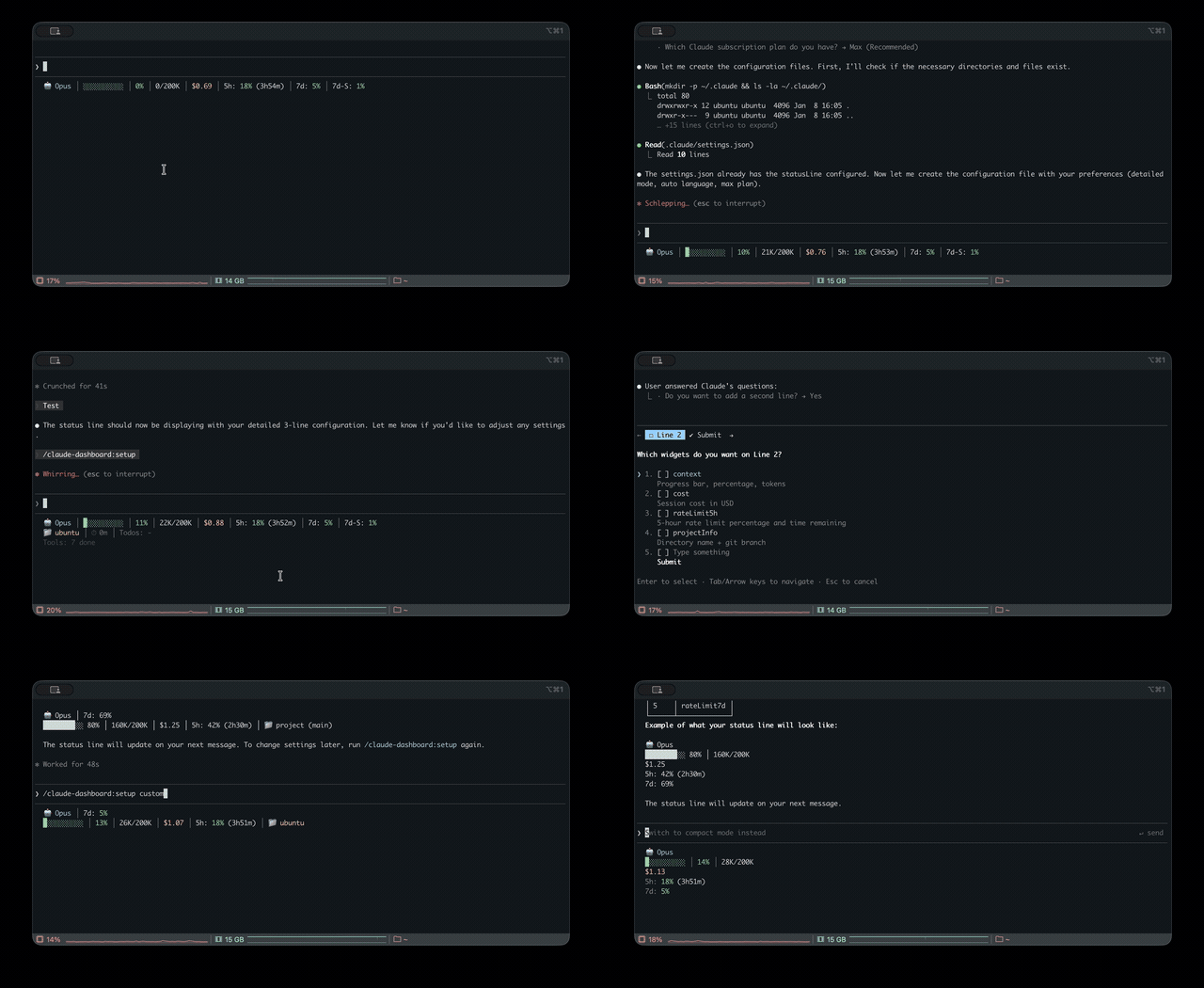
Claude Code 的統一狀態列,監控多 CLI(Claude、Codex、Gemini、Antigravity、z.ai)的用量、內容視窗、速率限制與成本追蹤
uppinote20/claude-dashboard

完整的 Claude Code 狀態列外掛——統一監控 Claude、Codex、Gemini、Antigravity 和 z.ai CLI 的用量,並提供內容視窗、速率限制、成本追蹤與模組化小工具系統。

需求: Claude Code v1.0.80+ / Node.js 18+
/plugin marketplace add uppinote20/claude-dashboard
/plugin install claude-dashboard
/claude-dashboard:setup
git clone https://github.com/uppinote20/claude-dashboard.git "${CLAUDE_CONFIG_DIR:-$HOME/.claude}/plugins/claude-dashboard"
/claude-dashboard:setup
/claude-dashboard:setup會在plugins/cache/claude-dashboard/claude-dashboard/下尋找外掛, 但手動複製到plugins/claude-dashboard/不符合這個路徑——setup 指令的 shim 尋找不到任何可複製的內容。請把statusLine.command直接指向settings.json中複製目錄的dist/index.js(例如node "${CLAUDE_CONFIG_DIR:-$HOME/.claude}/plugins/claude-dashboard/dist/index.js"), 並注意手動安裝不會自動取得新版本——每次發布後都要自行git pull,並更新這個路徑。
精簡(1 列)- 預設:

模型、內容視窗進度條、成本、速率限制(5h/7d)或 z.ai 用量(依提供者互斥)
一般(2 列):

加上專案資訊、工作階段 ID、工作階段時間、消耗速率、待辦進度
詳細(6 列):

加上耗盡時間、設定數量、工具/代理狀態、快取命中、效能徽章、token 明細、預測、預算、Codex/Gemini/Antigravity 用量
支援多個提供者:安裝後會自動偵測 z.ai/ZHIPU、Codex、Gemini 和 Antigravity。
| 類別 | 小工具 | 說明 |
|----------|--------|-------------|
| 核心 | model | 帶 emoji 的模型名稱與版本(例如 Opus 5.5)、Opus/Sonnet/Fable 的 effort 等級(MAX/X/H/M/L),以及 Opus 的快速模式(↯)。從 stdin 讀取即時的 effort.level / fast_mode;較舊的 Claude Code 會回退到 settings.json |
| | context | 進度條、百分比、token(🟢 0-50% / 🟡 51-80% / 🔴 81-100%) |
| | contextBar | 只顯示進度條(context 的子小工具) |
| | contextPercentage | 只顯示百分比(context 的子小工具) |
| | contextUsage | 只顯示 token 數量,例如 42K/200K(context 的子小工具) |
| | cost | 工作階段成本(USD) |
| | projectInfo | 目錄 + git 分支(可點擊的 OSC8 連結)+ ahead/behind(↑↓),來自 project_dir 的子路徑,以及 worktree 指示器(🌳) |
| 速率限制 | rateLimit5h | 5 小時速率限制與重設倒數 |
| | rateLimit7d | 7 天速率限制(Pro 與 Max) |
| | rateLimit7dSonnet | 7 天 Sonnet 限制(僅限 Max)——已棄用 ~2026-06:Anthropic 在 Sonnet 5 發布時把它併入統一的每週配額,因此 API 會回傳 null;除非欄位恢復,否則小工具會保持隱藏 |
| | rateLimit7dFable | 7 天 Fable 限制(僅限 Max) |
| 工作階段 | sessionId | 工作階段 ID(短 8-char) |
| | sessionIdFull | 工作階段 ID(完整 UUID) |
| | sessionName | 來自 /rename 指令的工作階段名稱 |
| | sessionDuration | 工作階段時間 |
| | lastPrompt | 帶時間戳記的上一個使用者提示 |
| | configCounts | CLAUDE.md、AGENTS.md、rules、MCPs、hooks、+Dirs |
| 活動 | toolActivity | 帶目標的執行中/已完成工具(例如 Read(app.ts)) |
| | agentStatus | 已解析模型的子代理進度,例如 Explore(Opus)(來自 Agent 工具的 model 參數或 CLAUDE_CODE_SUBAGENT_MODEL) |
| | todoProgress | todo 完成率 |
| 分析 | burnRate | 每分鐘 token 消耗,工作階段平均值(輸入 + 快取寫入 + 輸出) |
| | cacheHit | 快取命中率百分比(上一次要求) |
| | promptCache | 工作階段提示快取狀態:♨️ 溫熱,距離變冷還有多久 / ❄️ 冷,命中率、未命中次數,例如 ♨️ 4m 91% miss 2(來自 prompt_cache,Claude Code ≥ 2.1.251)。溫熱→變冷會自行切換;設定 statusLine.refreshInterval(例如 60),讓閒置時的分鐘倒數持續更新 |
| | promptCacheState | 只顯示溫熱/冷圖示與剩餘時間,例如 ♨️ 4m(promptCache 的子小工具) |
| | promptCacheHit | 只顯示工作階段快取命中率(promptCache 的子小工具) |
| | promptCacheMisses | 只顯示未命中次數,例如 miss 2;為 0 時隱藏(promptCache 的子小工具) |
| | depletionTime | 預估距離速率限制還有多久(約略值)¹ |
| 多 CLI | codexUsage | OpenAI Codex CLI 用量(未安裝時自動隱藏)² |
| | geminiUsage | Google Gemini CLI - 目前模型(未安裝時自動隱藏)³ |
| | geminiUsageAll | Google Gemini CLI - 所有模型(未安裝時自動隱藏)³ |
| | antigravityUsage | Google Antigravity CLI - 依模型家族計算的每週配額(未安裝時自動隱藏)⁸ |
| | antigravityUsageAll | Google Antigravity CLI - 依模型計算的配額(未安裝時自動隱藏)⁸ |
| | zaiUsage | z.ai/ZHIPU 用量(未使用 z.ai 時自動隱藏)⁴ |
| 洞察 | tokenBreakdown | 輸入/輸出/快取寫入/讀取 token 明細 |
| | performance | 綜合效率徽章(快取命中 + 輸出比例) |
| | forecast | 依工作階段速率估算每小時成本 |
| | budget | 每日支出與設定的預算上限比較⁵ |
| | tokenSpeed | 輸出 token 產生速度(tok/s),工作階段平均值 |
| | tokenSpeedLast | 只顯示最近一次回應的輸出 token 產生速度 |
| | todayCost | 今天所有工作階段的總支出 |
| 狀態 | peakHours | 帶倒數的尖峰時段指示器(依據 PeakClaude)⁶ |
| | tagStatus | 領先符合條件的 git 標籤之提交數(預設模式 v*,可透過 tagPatterns 自訂)⁷ |
| | slashCommand | 目前回合作用中的 slash 指令(🎯),下一則純文字訊息出現時清除 |
| | agentMode | 工作階段代理身分:👤 自訂代理(透過 /agent <name>)或 🤖 子代理類型 |
| 資訊 | linesChanged | 未提交的新增/刪除列數,包含未追蹤檔案(+N -N) |
| | outputStyle | 目前輸出樣式(為 "default" 時隱藏) |
| | version | Claude Code 版本顯示 |
| | vimMode | Vim 模式(NORMAL/INSERT),停用 Vim 時自動隱藏 |
| | apiDuration | API 時間占整個工作階段時間的百分比 |
¹ 假設所有用量都來自本工作階段;執行時間越長,估算越準確。 ² 找不到
~/.codex/auth.json時自動隱藏。 ³ 找不到~/.gemini/oauth_creds.json時自動隱藏——Gemini CLI 個人層級已於 2026-06-18 退役,改由 Antigravity CLI 取代(企業層級仍支援)。 ⁴ 無法透過ANTHROPIC_BASE_URL偵測到時自動隱藏。 ⁵ 設定中需要"dailyBudget"。 ⁶ Peak = 太平洋時間平日 5-11 AM;顯示距離下一次切換的倒數。 ⁷ 使用tagPatterns設定(預設為["v*"]);沒有可連線標籤符合模式時自動隱藏。 ⁸ 找不到~/.gemini/antigravity-cli/antigravity-oauth-token時自動隱藏。
i18n:支援英文和韓文(自動偵測,或透過 setup 設定)。
# Preset modes
/claude-dashboard:setup compact             # 1 line (default)
/claude-dashboard:setup normal en pro       # 2 lines, English, Pro plan
/claude-dashboard:setup detailed ko max     # 6 lines, Korean, Max plan

# Custom mode: control widget order and line composition
# Format: "widget1,widget2,...|widget3,widget4,..." (| separates lines)
/claude-dashboard:setup custom auto max "model,context,cost|projectInfo,todoProgress"
方案差異:
| 功能 | Max | Pro | |---------|--------|-----| | 5h 速率限制 + 倒數 | ✅ | ✅ | | 7d 所有模型 | ✅ | ❌ |
<details> <summary><strong>進階設定</strong></summary>互動模式: 不帶參數執行 /claude-dashboard:setup。適合選擇預設;需要完整控制小工具時,使用直接模式或直接編輯 JSON 檔案。
顯示模式預設(zaiUsage 與 rateLimit* 會依提供者互斥):
| 模式 | 列數 | 小工具 |
|---------|-------|---------|
| compact | 1 | model, context, cost, rateLimit5h/7d/7dSonnet, zaiUsage |
| normal | 2 | + projectInfo, sessionId, sessionDuration, burnRate, todoProgress |
| detailed | 6 | + depletionTime, configCounts, toolActivity, agentStatus, cacheHit, promptCache, performance, tokenBreakdown, forecast, budget, codexUsage, geminiUsage, antigravityUsage, linesChanged, outputStyle, version, peakHours, lastPrompt, vimMode, apiDuration, tagStatus |
設定檔(~/.claude/claude-dashboard.local.json):
{
  "language": "auto",
  "plan": "max",
  "displayMode": "custom",
  "lines": [
    ["model", "context", "cost", "rateLimit5h"],
    ["projectInfo", "todoProgress"]
  ],
  "theme": "default",
  "separator": "pipe",
  "dailyBudget": 15,
  "disabledWidgets": [],
  "modPane": "detailed",
  "modBand": "MC$R|BDO",
  "modBandDefault": false,
  "cache": { "ttlSeconds": 60 }
}
或使用預設簡寫快速設定:
{
  "preset": "MC$R|BDO",
  "theme": "tokyoNight",
  "separator": "dot"
}
主題: default(pastel)/ minimal(monochrome)/ catppuccin / catppuccinLatte(light-mode)/ dracula / gruvbox / nord / tokyoNight / solarized
分隔符號: pipe(│,預設)/ space / dot(·)/ arrow(›)
預設快捷方式: 使用單一字元的快速版面——"preset": "MC$R|BDO"(M=model、C=context、$=cost、R=rateLimit5h 等)
預算追蹤: 設定 "dailyBudget": 15 來追蹤每日支出。在 80% 顯示 ⚠️,在 95% 顯示 🚨。
標籤狀態: 透過 "tagPatterns": ["v*", "release-*"] 自訂 tagStatus 模式。預設是 ["v*"]。沒有可連線標籤符合模式時,小工具會自動隱藏。
小工具切換: 將小工具 ID 加到 disabledWidgets,就能從任何顯示模式隱藏。
Mod 版面: modPane(/claude-dashboard-pane 面板,預設 detailed)和 modBand(/claude-dashboard-band 橫列,預設是狀態列版面)可使用顯示模式名稱(compact / normal / detailed)或類似 "MC$R|BDO" 的預設字串。設定 "modBandDefault": true,讓橫列在工作階段開始時啟用。請參閱 Mods。
色彩圖例: 🟢 0-50% 安全 / 🟡 51-80% 警告 / 🔴 81-100% 嚴重
</details>/claude-dashboard:setup設定狀態列的顯示模式、語言與方案。請參閱 設定。
/claude-dashboard:check-usage一次檢查所有 AI CLI(Claude、Codex、Gemini、Antigravity、z.ai)的用量限制,並建議目前可用容量最多的 CLI。
/claude-dashboard:check-usage              # Interactive output with colors
/claude-dashboard:check-usage --json       # JSON output for scripting
/claude-dashboard:check-usage --lang ko    # Specify language

/claude-dashboard:setup-alias加入 check-ai shell 別名,快速從終端機檢查所有 AI CLI 用量。支援 macOS/Linux(zsh/bash)和 Windows(PowerShell)。
/claude-dashboard:setup-alias
設定完成後:
check-ai          # Pretty output
check-ai --json   # JSON output for scripting
/claude-dashboard:update修復或驗證 statusLine shim。通常不需要——執行 /plugin update 後,狀態列會自行取得新版本。如果停用了 hooks,或狀態列停止更新,就使用這個指令。
/claude-dashboard:update
claude-dashboard 也會以 Claude Code mod(function-hook 外掛,搶先體驗版,已在 Claude Code 2.1.289 測試)隨附。它和同一個外掛一起打包(hooks/hooks.json → "modules": ["../dist/mod.js"]),所以不需要額外安裝。Mods 用來繪製
請先查看作者 README,確認 marketplace 與外掛名稱;指令可能隨儲存庫結構而變動。
claude plugin marketplace add uppinote20/claude-dashboard
claude plugin install claude-dashboard
Comprehensive status line plugin for Claude Code — unified usage monitoring across Claude, Codex, Gemini, Antigravity, and z.ai CLIs, with context, rate limits, cost tracking, and a modular widget system.
Requirements: Claude Code v1.0.80+ / Node.js 18+
/plugin marketplace add uppinote20/claude-dashboard
/plugin install claude-dashboard
/claude-dashboard:setup
git clone https://github.com/uppinote20/claude-dashboard.git "${CLAUDE_CONFIG_DIR:-$HOME/.claude}/plugins/claude-dashboard"
/claude-dashboard:setup
/claude-dashboard:setuplooks for the plugin underplugins/cache/claude-dashboard/claude-dashboard/, which a manual clone intoplugins/claude-dashboard/does not match — the setup command's shim lookup will find nothing to copy. PointstatusLine.commandinsettings.jsondirectly at your clone'sdist/index.jsinstead (e.g.node "${CLAUDE_CONFIG_DIR:-$HOME/.claude}/plugins/claude-dashboard/dist/index.js"), and note that manual installs do not get automatic version pickup —git pulland update the path yourself after each release.
Compact (1 line) - Default:

Model, context progress bar, cost, rate limits (5h/7d) or z.ai usage (mutually exclusive by provider)
Normal (2 lines):

Adds project info, session ID, session duration, burn rate, todo progress
Detailed (6 lines):

Adds depletion time, config counts, tool/agent status, cache hit, performance badge, token breakdown, forecast, budget, Codex/Gemini/Antigravity usage
Multi-provider support: z.ai/ZHIPU, Codex, Gemini, Antigravity auto-detected when installed.
| Category | Widget | Description |
|----------|--------|-------------|
| Core | model | Model name and version with emoji (e.g. Opus 5.5), effort level for Opus/Sonnet/Fable (MAX/X/H/M/L), fast mode for Opus (↯). Reads the live effort.level / fast_mode from stdin, falling back to settings.json on older Claude Code |
| | context | Progress bar, percentage, tokens (🟢 0-50% / 🟡 51-80% / 🔴 81-100%) |
| | contextBar | Progress bar only (sub-widget of context) |
| | contextPercentage | Percentage only (sub-widget of context) |
| | contextUsage | Token count only, e.g. 42K/200K (sub-widget of context) |
| | cost | Session cost in USD |
| | projectInfo | Directory + git branch (clickable OSC8 link) + ahead/behind (↑↓), subpath from project_dir, worktree indicator (🌳) |
| Rate Limits | rateLimit5h | 5-hour rate limit with reset countdown |
| | rateLimit7d | 7-day rate limit (Pro and Max) |
| | rateLimit7dSonnet | 7-day Sonnet limit (Max only) — deprecated ~2026-06: Anthropic merged it into the unified weekly bucket at the Sonnet 5 launch, so the API returns null and the widget stays hidden until/unless the field returns |
| | rateLimit7dFable | 7-day Fable limit (Max only) |
| Session | sessionId | Session ID (short 8-char) |
| | sessionIdFull | Session ID (full UUID) |
| | sessionName | Session name from /rename command |
| | sessionDuration | Session duration |
| | lastPrompt | Last user prompt with timestamp |
| | configCounts | CLAUDE.md, AGENTS.md, rules, MCPs, hooks, +Dirs |
| Activity | toolActivity | Running/completed tools with targets (e.g., Read(app.ts)) |
| | agentStatus | Subagent progress with resolved model, e.g. Explore(Opus) (from the Agent tool's model param or CLAUDE_CODE_SUBAGENT_MODEL) |
| | todoProgress | Todo completion rate |
| Analytics | burnRate | Token consumption per minute, session average (input + cache write + output) |
| | cacheHit | Cache hit rate percentage (last request) |
| | promptCache | Session prompt-cache health: ♨️ warm with time left before it goes cold / ❄️ cold, hit ratio, miss count, e.g. ♨️ 4m 91% miss 2 (from prompt_cache, Claude Code ≥ 2.1.251). The warm→cold switch happens on its own; set statusLine.refreshInterval (e.g. 60) to keep the minute countdown ticking while idle |
| | promptCacheState | Warm/cold icon + time left only, e.g. ♨️ 4m (sub-widget of promptCache) |
| | promptCacheHit | Session cache hit ratio only, e.g. 91% (sub-widget of promptCache) |
| | promptCacheMisses | Miss count only, e.g. miss 2; hidden at 0 (sub-widget of promptCache) |
| | depletionTime | Estimated time to rate limit (approx)¹ |
| Multi-CLI | codexUsage | OpenAI Codex CLI usage (auto-hide if not installed)² |
| | geminiUsage | Google Gemini CLI - current model (auto-hide if not installed)³ |
| | geminiUsageAll | Google Gemini CLI - all models (auto-hide if not installed)³ |
| | antigravityUsage | Google Antigravity CLI - weekly quota by model family (auto-hide if not installed)⁸ |
| | antigravityUsageAll | Google Antigravity CLI - per-model quota (auto-hide if not installed)⁸ |
| | zaiUsage | z.ai/ZHIPU usage (auto-hide if not using z.ai)⁴ |
| Insights | tokenBreakdown | Input/output/cache write/read token breakdown |
| | performance | Composite efficiency badge (cache hit + output ratio) |
| | forecast | Estimated hourly cost based on session rate |
| | budget | Daily spending vs configured budget limit⁵ |
| | tokenSpeed | Output token generation speed (tok/s), session average |
| | tokenSpeedLast | Output token generation speed of the most recent response only |
| | todayCost | Total spending across all sessions today |
| Status | peakHours | Peak hours indicator with countdown (based on PeakClaude)⁶ |
| | tagStatus | Commits ahead of matched git tags (default pattern v*, customize via tagPatterns)⁷ |
| | slashCommand | Active slash command for the current turn (🎯), cleared by next plain-text message |
| | agentMode | Session agent identity: 👤 custom agent (via /agent <name>) or 🤖 subagent type |
| Info | linesChanged | Uncommitted lines added/removed, including untracked files (+N -N) |
| | outputStyle | Current output style (hidden when "default") |
| | version | Claude Code version display |
| | vimMode | Vim mode (NORMAL/INSERT), auto-hides when vim disabled |
| | apiDuration | API time as % of total session time |
¹ Assumes all utilization came from this session; improves as session runs longer. ² Auto-hides if
~/.codex/auth.jsonnot found. ³ Auto-hides if~/.gemini/oauth_creds.jsonnot found — Gemini CLI personal tiers were retired 2026-06-18 in favor of Antigravity CLI (enterprise still supported). ⁴ Auto-hides if not detected viaANTHROPIC_BASE_URL. ⁵ Requires"dailyBudget"in config. ⁶ Peak = weekdays 5-11 AM PT; shows countdown to next transition. ⁷ UsestagPatternsconfig (default["v*"]); auto-hides when no pattern matches a reachable tag. ⁸ Auto-hides if~/.gemini/antigravity-cli/antigravity-oauth-tokennot found.
i18n: English and Korean supported (auto-detect or set via setup).
# Preset modes
/claude-dashboard:setup compact             # 1 line (default)
/claude-dashboard:setup normal en pro       # 2 lines, English, Pro plan
/claude-dashboard:setup detailed ko max     # 6 lines, Korean, Max plan

# Custom mode: control widget order and line composition
# Format: "widget1,widget2,...|widget3,widget4,..." (| separates lines)
/claude-dashboard:setup custom auto max "model,context,cost|projectInfo,todoProgress"
Plan differences:
| Feature | Max | Pro | |---------|-----|-----| | 5h rate limit + countdown | ✅ | ✅ | | 7d all models | ✅ | ❌ |
<details> <summary><strong>Advanced Configuration</strong></summary>Interactive Mode: Run /claude-dashboard:setup without arguments. Best for preset selection; for full widget control, use Direct Mode or edit the JSON file directly.
Display Mode Presets (zaiUsage and rateLimit* are mutually exclusive based on provider):
| Mode | Lines | Widgets |
|------|-------|---------|
| compact | 1 | model, context, cost, rateLimit5h/7d/7dSonnet, zaiUsage |
| normal | 2 | + projectInfo, sessionId, sessionDuration, burnRate, todoProgress |
| detailed | 6 | + depletionTime, configCounts, toolActivity, agentStatus, cacheHit, promptCache, performance, tokenBreakdown, forecast, budget, codexUsage, geminiUsage, antigravityUsage, linesChanged, outputStyle, version, peakHours, lastPrompt, vimMode, apiDuration, tagStatus |
Configuration file (~/.claude/claude-dashboard.local.json):
{
  "language": "auto",
  "plan": "max",
  "displayMode": "custom",
  "lines": [
    ["model", "context", "cost", "rateLimit5h"],
    ["projectInfo", "todoProgress"]
  ],
  "theme": "default",
  "separator": "pipe",
  "dailyBudget": 15,
  "disabledWidgets": [],
  "modPane": "detailed",
  "modBand": "MC$R|BDO",
  "modBandDefault": false,
  "cache": { "ttlSeconds": 60 }
}
Or use preset shorthand for quick configuration:
{
  "preset": "MC$R|BDO",
  "theme": "tokyoNight",
  "separator": "dot"
}
Themes: default (pastel) / minimal (monochrome) / catppuccin / catppuccinLatte (light-mode) / dracula / gruvbox / nord / tokyoNight / solarized
Separators: pipe (│, default) / space / dot (·) / arrow (›)
Preset Shortcuts: Quick layout with single characters — "preset": "MC$R|BDO" (M=model, C=context, $=cost, R=rateLimit5h, etc.)
Budget Tracking: Set "dailyBudget": 15 to track daily spending. Shows ⚠️ at 80% and 🚨 at 95%.
Tag Status: Customize tagStatus patterns via "tagPatterns": ["v*", "release-*"]. Default is ["v*"]. The widget auto-hides when no pattern matches a reachable tag.
Widget Toggle: Add widget IDs to disabledWidgets to hide them from any display mode.
Mod Layouts: modPane (the /claude-dashboard-pane pane, default detailed) and modBand (the /claude-dashboard-band band, default = your status line layout) take a display mode name (compact / normal / detailed) or a preset string like "MC$R|BDO". Set "modBandDefault": true to turn the band on at session start. See Mods.
Color Legend: 🟢 0-50% Safe / 🟡 51-80% Warning / 🔴 81-100% Critical
</details>/claude-dashboard:setupConfigure the status line display mode, language, and plan. See Configuration.
/claude-dashboard:check-usageCheck usage limits for all AI CLIs (Claude, Codex, Gemini, Antigravity, z.ai) at once and get a recommendation for which CLI has the most available capacity.
/claude-dashboard:check-usage              # Interactive output with colors
/claude-dashboard:check-usage --json       # JSON output for scripting
/claude-dashboard:check-usage --lang ko    # Specify language
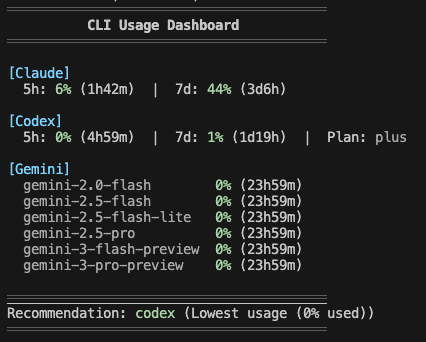
/claude-dashboard:setup-aliasAdd a check-ai shell alias to quickly check all AI CLI usage from your terminal. Supports macOS/Linux (zsh/bash) and Windows (PowerShell).
/claude-dashboard:setup-alias
After setup:
check-ai          # Pretty output
check-ai --json   # JSON output for scripting
/claude-dashboard:updateRepair or verify the statusLine shim. Usually unnecessary — after /plugin update, the
status line picks up the new version on its own. Use this if you have hooks disabled or the
status line stops updating.
/claude-dashboard:update
claude-dashboard also ships as a Claude Code mod (function-hook plugin, early access, tested on Claude Code 2.1.289). It is bundled in the same plugin (hooks/hooks.json → "modules": ["../dist/mod.js"]), so there is nothing extra to install. Mods are drawn only in the terminal and the desktop Code tab (not the VS Code panel, not claude -p).
| Command | What it does |
|---------|--------------|
| /claude-dashboard-pane [on\|off] | Open or close a dashboard pane beside the transcript (no argument flips it). Layout from modPane (default detailed). |
| /claude-dashboard-band [on\|off] | Draw the dashboard above the prompt and hide the status line for this session only (settings.json is untouched). Layout from modBand (default = your status line layout). |
{
  "modPane": "detailed",
  "modBand": "MC$R|BDO",
  "modBandDefault": true
}
modPane / modBand accept a display mode name (compact / normal / detailed) or a preset string. modBandDefault: true turns the band on at session start./claude-dashboard:setup asks how you want to use the mod dashboard (status line only, peek with pane, replace with band, or both) and writes these keys; rerunning setup keeps keys it does not ask about.~/.cache/claude-dashboard/band-<sessionId>), refreshed on every render (at most every 60s) and ignored after 180s. It is deleted on off and at session end, so if the mod stops the status line comes back by itself within 3 minutes.disabledWidgets follow your normal config. cacheHit, tokenBreakdown, and performance are hidden in the pane and band (the mod API has no per-request cache usage).dist/index.js, run as a subprocess./plugin listsettings.json has a statusLine entry pointing at
plugins/data/claude-dashboard-claude-dashboard/statusline.mjscache.ttlSeconds, default 300 seconds)Claude Code relocates its whole config directory — credentials, settings, and history — when CLAUDE_CONFIG_DIR is set. That is how two accounts run side by side:
# Personal Max account, kept separate from the default ~/.claude
CLAUDE_CONFIG_DIR=~/.claude-max claude
The status line follows the same variable, so each session reports the account that is actually rendering it. Leave it unset and the default ~/.claude is used, as before.
Notes:
CLAUDE_CONFIG_DIR separates settings.json and history.jsonl reads, but rate-limit API calls use whichever OAuth token the Keychain holds./claude-dashboard:setup and /claude-dashboard:update register the status line into the session's config dir ($CLAUDE_CONFIG_DIR if set, ~/.claude otherwise) — run them once per account. The dashboard's own display config ~/.claude/claude-dashboard.local.json is intentionally shared across accounts.Run setup with explicit language:
/claude-dashboard:setup normal ko  # Korean
/claude-dashboard:setup normal en  # English
API response cache is stored in ~/.cache/claude-dashboard/. To clear:
rm -rf ~/.cache/claude-dashboard/
Cache files are automatically cleaned up after 1 hour.
</details>npm install && npm run build
See CONTRIBUTING.md for details.
If you find this plugin useful, support development:
<div style="display: flex; gap: 20px; align-items: center;"> <a href="https://ko-fi.com/uppinote" target="_blank"> <img src="https://storage.ko-fi.com/cdn/kofi5.png" alt="Buy Me a Coffee at ko-fi.com" style="height:60px; width:217px;"> </a> <a href="https://www.buymeacoffee.com/uppinote" target="_blank"> <img src="https://cdn.buymeacoffee.com/buttons/v2/default-yellow.png" alt="Buy Me A Coffee" style="height:60px; width:217px;"> </a> </div>MIT

Ruflo 記憶系統的基底層外掛:AgentDB 控制器橋接(15 個 agentdb_* MCP 工具)、RuVector ONNX 嵌入(10 個 embeddings_* 工具,包含 RaBitQ 32x 量化)和 WASM HNSW 模式路由器(3 個 ruvllm_hnsw_* 工具)。作為 mod(ADR-445):可選的安全召回會進入提示,寫入守衛會把機密排除在記憶之外,還提供 /agentdb 和控制台顯示的狀態檔。

建立、格式化、最佳化及檢視互動式 Power BI 報表,並提供遵循 pbir CLI 的報表面板,顯示 Claude 讀取與修改的內容。


在提示列上方、狀態列與通知中顯示未讀 AMP 訊息,還能喚醒閒置的 Claude Code 工作階段來讀取。需要 Claude Code 2.1.287 或更新版本。

