
davideiffert@davideiffert
davideiffert/check-it
davideiffert/check-it
Check it 會依專案保存 Claude 做出的可見變更清單,每項都有可查看位置的連結、你應該在那裡看到的內容和勾選框。提示上方的一列會顯示還剩多少項待檢查,並提供開啟清單或詢問 Claude 要檢查什麼的按鈕。項目可以標記為已檢查、略過,或標記為「不正確」;後者會在提示末尾放入一則備註供你傳送。它新增一個工具和一段簡短指示,讓 Claude 為每個可見變更記錄一項,等到本輪結束後才顯示;對不可見的變更或沒有網址的情況不會列出任何內容。透過帶有 siteAddress 設定選項的外掛市集安裝,也可以使用 --plugin-dir 在本機執行。它以瀏覽器為主,已在 Claude Code 2.1.288 上測試,目前不再積極維護。
請先查看作者 README,確認 marketplace 與外掛名稱;指令可能隨儲存庫結構而變動。
claude plugin marketplace add davideiffert/check-it
claude plugin install check-it
Claude Code tells you what it changed. Check it tells you where to look.
After a long session, Claude says it's done. It changed six things. Which ones can you actually see, and where do you click? Check it keeps the list for you: every change you can see in a browser, with a link, what you should find there, and a box to tick. If something's off, one button tells Claude which one.
For the person checking the result, not the diff.
Build checks · Changelog · MIT license
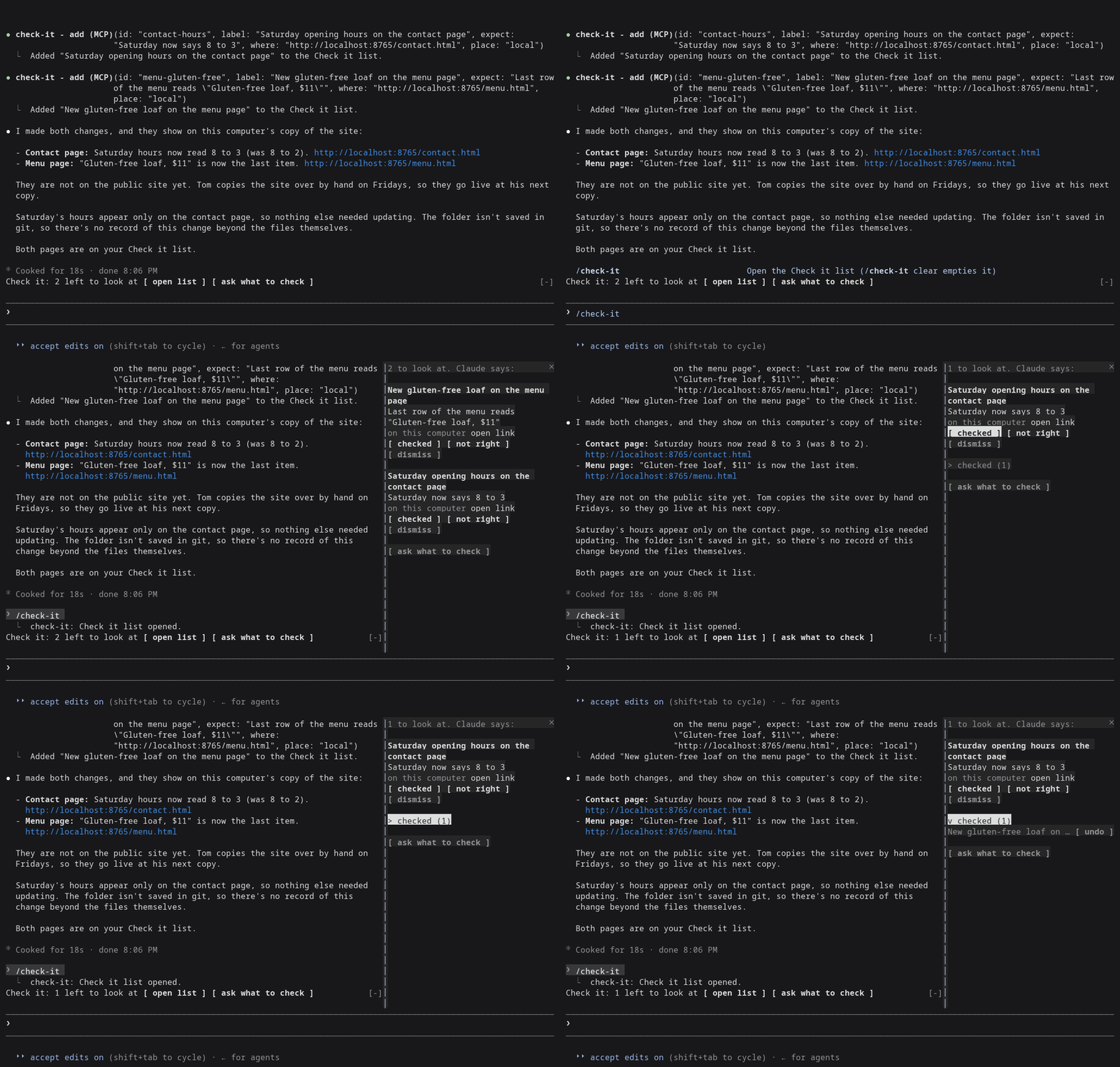
Claude Code 2.1.288, right after Claude changed the Saturday hours and the menu of a made-up bakery site from demo/.
Needs Claude Code 2.1.288 or later (claude --version shows yours).
claude plugin marketplace add davideiffert/check-it && claude plugin install check-it@check-it --config siteAddress=http://localhost:3000
Swap http://localhost:3000 for wherever your app or site runs right now,
on this computer or online. The command only installs Check it. It doesn't
start your app for you. Then start Claude Code as usual.
open list and ask what to check buttons. It stays hidden until the
first item arrives.open link opens the page in your browser.checked ticks it. Ticked items fold into one checked (N) row, where
you can undo a tick.not right puts Not right: <item> (<address>). at the end of your
prompt, after anything you already typed. Add a sentence and send it.
It never sends anything by itself.dismiss removes the item./check-it opens the list. /check-it clear empties it.ask what to check puts a request at the end of your prompt asking
Claude what you should look at. You decide whether to send it.Claude fills it. The plugin gives Claude one tool for adding an item and one short instruction: when a change alters what someone sees or does on a page, add one item per change, with the address where it shows right now. Changes nobody can see (tidying code, tests, settings) get no items. Something every page shares, like the footer, gets one item.
New items wait until Claude's turn ends, so nothing shows up while Claude is still halfway through the change. That's a delay, not a check: the list doesn't confirm the change exists. If you stop a turn, its items are dropped. Only the main conversation adds items. Helper agents Claude starts cannot.
If Claude can't name an address where a change shows (nothing is running, or it isn't built yet), it adds nothing and says so in its reply, naming what it needs.
The list is Claude's word for it. The tick is yours.
The list is kept per project and survives restarts. It holds 50 items, and the oldest ticked ones go first.
Measured on two demo sites, a plain one and one with a build step: 51 recorded sessions (31 and 20) using Claude Opus and Sonnet, plus 3 interactive ones.
127.0.0.1; since 0.1.2 that opens as
a link.Details are in docs/measurement-v0.md.
siteAddress
setting, the one setting worth filling in. Without it, and with nothing
running, Claude often has no address to give you and the list stays
empty. Set it with --config as above, or later in /config under
check-it./tui fullscreen the list
docks beside the conversation. On the normal screen it opens above the
prompt instead./theme.open link is a plain link, and
it only works for https: and http://localhost addresses. Other
addresses show as text.Almost nothing outside its own list. No network access, no model calls of
its own, no files. It runs one command, and only when you press open link in the terminal: your system's own opener (open on macOS,
xdg-open on Linux), with an http:// or https:// address the plugin
has already checked, to show the page in your browser. It adds one tool,
one short section of Claude's instructions, the line above the prompt, the
list and the /check-it command.
From the marketplace, as above. To try a local copy without installing:
git clone https://github.com/davideiffert/check-it
claude --plugin-dir ./check-it
Issues and pull requests are welcome. Before sending a change, run:
claude plugin validate .
claude plugin test .
For the type check, start Claude Code once with --plugin-dir . (it writes
the type declarations into .claude-plugin/types), then run
npx -p typescript@5 tsc -p ..
MIT. Made by David Eiffert.

了解快取的 /loop worker 與 CronCreate 背景自動化。ruflo 系列每個週期性工作都使用的基礎外掛。

作為 Claude Code mod 的 claude-reflect:每個簡短提示都會進行模型檢查,找出可重複使用的修正(任何語言皆可);提示列上方的橫條讓你按一次就將它們儲存到 CLAUDE.md。


Claude Code 裡的早期 crit:在面板中評論對話、差異或檔案,把審查送給 Claude,並在線程中閱讀 Claude 的回覆。