
theonly1me@theonly1me
theonly1me/claude-code-mods/tree/main/plugins/change-journal
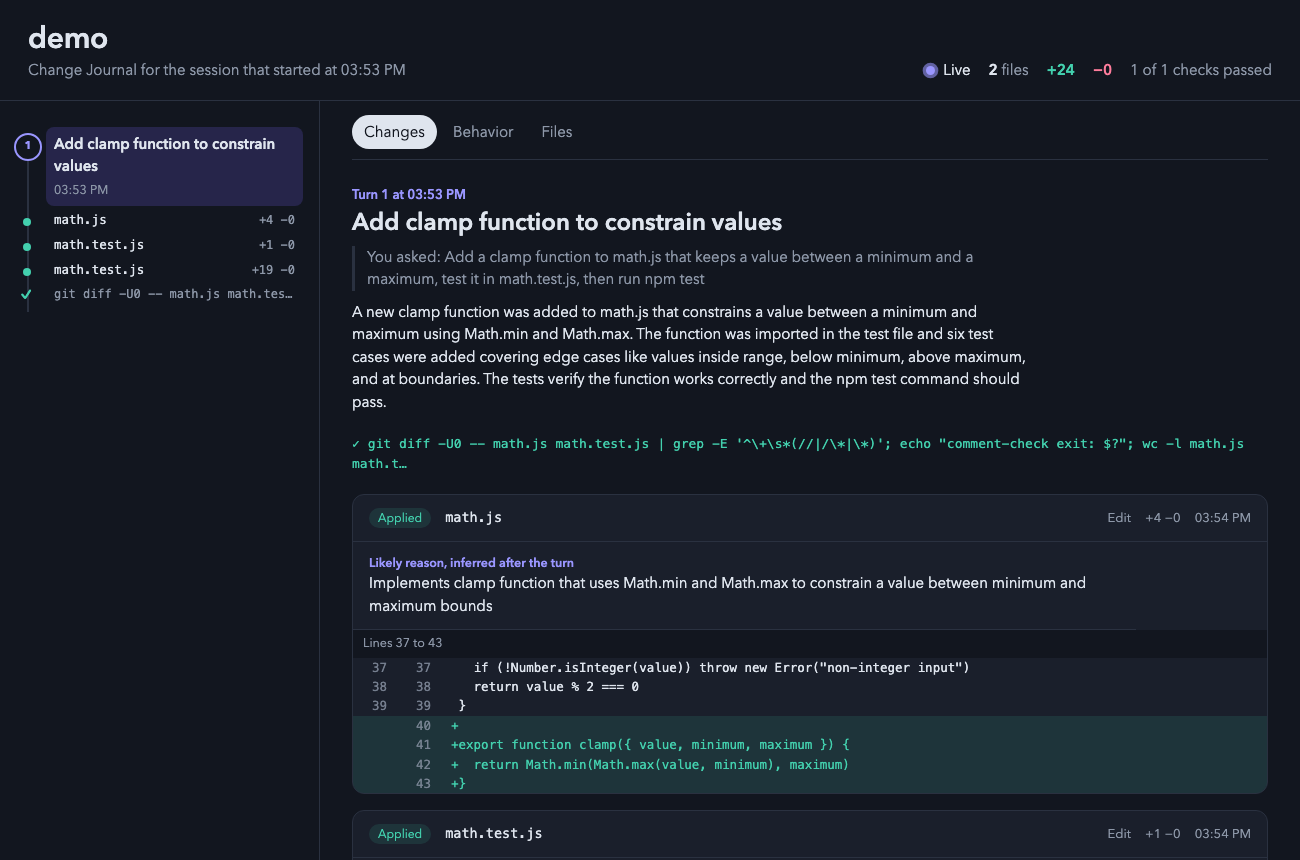
一個 Claude Code 外掛,開啟一個實時本機 HTML 頁面,顯示 Claude 所做的每一項變更,包括差異、編輯原因、檢查和前後行為流。
theonly1me/claude-code-mods/tree/main/plugins/change-journal
你瀏覽器中的實時頁面,顯示 Claude 工作時所做的每一項變更:差異、每次編輯的原因、它執行的檢查,以及每個轉折前後的程式碼行為。

claude plugin marketplace add theonly1me/claude-code-mods
claude plugin install change-journal@claude-code-mods
註冊市場一次。安裝後在開啟的工作階段中執行 /reload-plugins。需要 Claude Code 2.1.289 或更高版本;無需建置步驟或執行時相依性。
頁面在工作階段的首次編輯時在瀏覽器中開啟,每 1.5 秒自動更新。它不需要伺服器。
頁面隨著新變更發生而跟蹤。當你選擇某個東西時,它停止跟蹤直到你按下「跟蹤新變更」。
在 Edit 和 Write 之外進行的變更(sed 命令、格式化程式或你自己的編輯)在每個轉折後顯示為外部變更。測試命令顯示通過或失敗標記。
✎ 3 files +40 −12。/changes 在終端中查看最新的四個轉折及其編輯。窗格開啟並顯示鍵。o 開啟頁面。命令:
/changes:開啟包含最新四個轉折及其編輯的窗格。/changes open:在瀏覽器中開啟頁面。/changes path:列印頁面所在的位置。
標題下的提示行總是命名現在有效的鍵。
| 鍵 | 它做什麼 |
| --- | --- |
| 1 到 9 | 顯示列表下的該編輯:其原因和第一個改變的行。再次按數字隱藏它。 |
| o | 開啟頁面。顯示編輯時,頁面開啟該編輯的轉折。 |
| c | 複製頁面路徑。 |
| x | 關閉窗格。 |
| Tab、Enter | 移至下一行或按鈕並按下。 |
| Esc | 將鍵返回給提示列。窗格保持開啟。 |
| ctrl+x tab | 再次將鍵返回給窗格。 |
在頁面上,點選軌道上的圓環或點跳轉到一個轉折或編輯。按「跟蹤新變更」返回最新變更。
在 /plugin 中變更這些:
autoOpen(開啟):在工作階段的首次編輯時開啟頁面。liveSummaries(開啟):在每個有編輯的轉折後,詢問輔助模型標題、解釋、行為流和缺失的原因。這會使用額外的權杖。helperModel(claude-sonnet-5-5):用於這些摘要的模型。helperEffort(medium):輔助模型的思考方式(low、medium 或 high)。頁面及其資料保留在你的機器上 ~/.claude/change-journal/<project>/<session>/。看起來像秘密的檔案(.env、密鑰、認證)列出而無其內容,差異中的權杖被編輯。啟用摘要時,每個差異的簡短摘錄傳送到你設定的 Claude 提供商。
請參閱 marketplace README 了解設定、隱私、更新和移除。
請先查看作者 README,確認 marketplace 與外掛名稱;指令可能隨儲存庫結構而變動。
claude plugin marketplace add theonly1me/claude-code-mods
claude plugin install change-journal
A live page in your browser that shows every change Claude makes while it works: the diff, the reason for each edit, the checks it ran, and how the code behaved before and after each turn.
claude plugin marketplace add theonly1me/claude-code-mods
claude plugin install change-journal@claude-code-mods
Register the marketplace once. Run /reload-plugins in an open session after installing. Requires Claude Code 2.1.289 or later; no build step or runtime dependencies.
The page opens in your browser on the first edit of a session and updates itself every second and a half. It needs no server.
The page follows new changes as they happen. When you select something, it stops following until you press "Follow new changes".
Changes made outside Edit and Write (a sed command, a formatter, or your own edits) show up after each turn as outside changes. Test commands appear with a pass or fail mark.
✎ 3 files +40 −12./changes to see the latest turns in the terminal. The pane opens with the keys.o to open the page.Commands:
/changes: open the pane with the latest four turns and their edits./changes open: open the page in your browser./changes path: print where the page lives.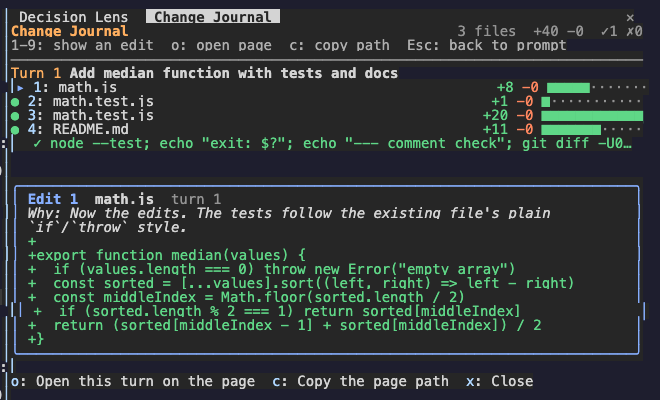
The hint row under the title always names the keys that work now.
| Key | What it does |
| --- | --- |
| 1 to 9 | Show that edit under the list: its reason and its first changed lines. Press the number again to hide it. |
| o | Open the page. With an edit shown, the page opens on that edit's turn. |
| c | Copy the page path. |
| x | Close the pane. |
| Tab, Enter | Move to the next row or button, and press it. |
| Esc | Give the keys back to the prompt. The pane stays open. |
| ctrl+x tab | Give the keys to the pane again. |
On the page, click a ring or a dot on the rail to jump to a turn or an edit. Press "Follow new changes" to go back to the newest change.
Change these in /plugin:
autoOpen (on): open the page on the first edit of a session.liveSummaries (on): after each turn with edits, ask the helper model for a title, an explanation, the behavior flows, and missing reasons. This uses extra tokens.helperModel (claude-sonnet-5-5): the model for those summaries.helperEffort (medium): how hard the helper model thinks (low, medium, or high).The page and its data stay on your machine in ~/.claude/change-journal/<project>/<session>/. Files that look like secrets (.env, keys, credentials) are listed without their content, and tokens in diffs are redacted. When summaries are on, a short excerpt of each diff goes to your configured Claude provider.
See the marketplace README for configuration, privacy, updates, and removal.

克勞德程式碼模組,可以對工作樹進行指紋識別,並記住在同一程式碼上通過和失敗的測試,因此該模型會重新執行不穩定的測試,而不是更改工作程式碼。

在對話開始時檢查外掛安裝狀態,指出設定問題。

# catalyst-probes