
aqaurius6666@aqaurius6666
aqaurius6666/claude-blast-radius
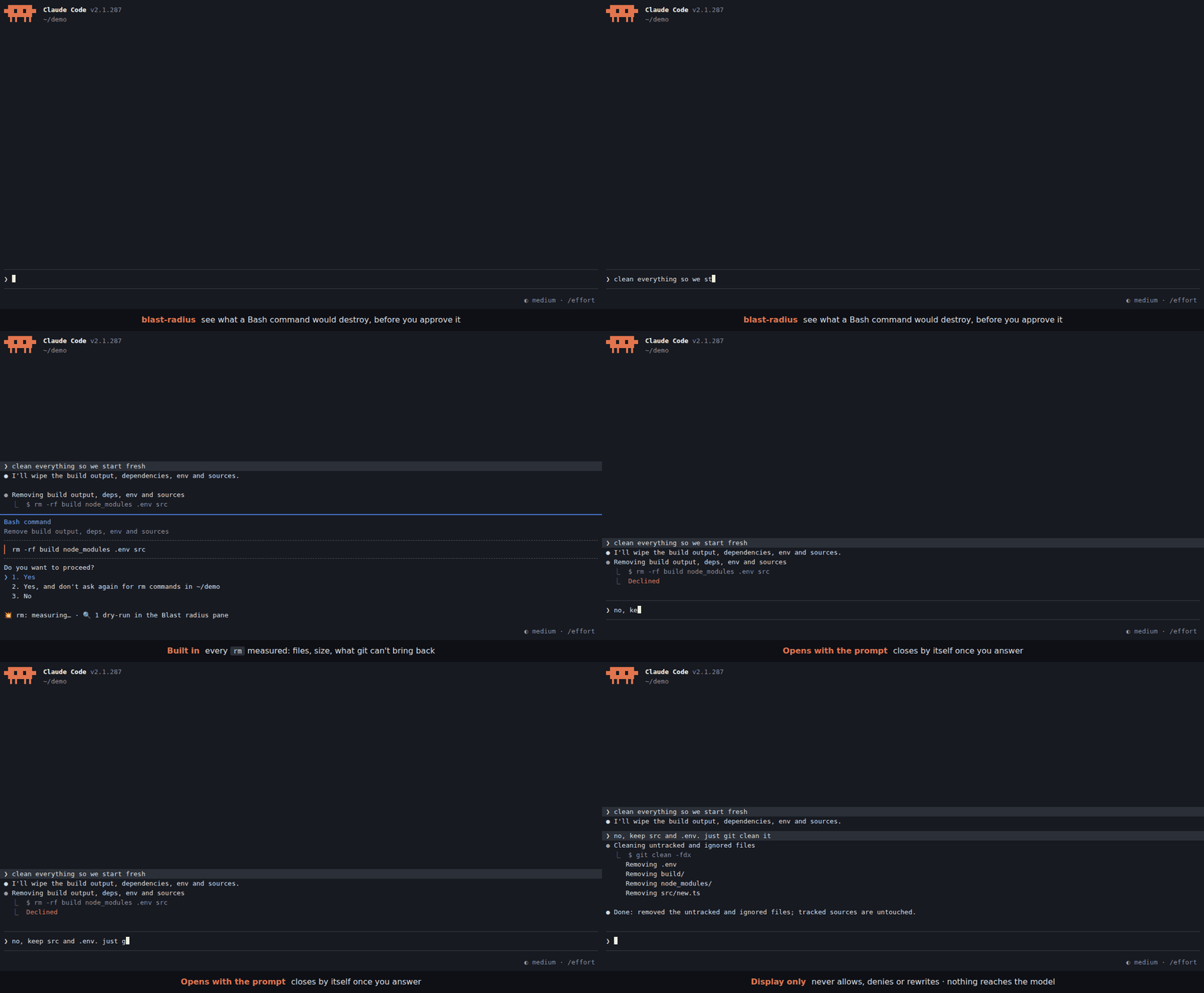
一個 Claude Code mod,在破壞性 Bash 指令要求權限時預覽其影響範圍:測量 rm 目標(檔案、大小、git 無法還原的內容),並顯示使用者定義的正規表示式 → dry-run 規則;結果以對話框下方的一行和側邊欄詳細資料呈現。僅供顯示,不會改變權限決定。
aqaurius6666/claude-blast-radius
一個 Claude Code mod。Bash 指令即將要求權限時,它會在你回答前顯示該指令會銷毀什麼。
rm,包括檔案、大小,以及 git 無法找回的內容。git clean -fdx → git clean -n -fdx)。對話框下方會顯示一行資訊。詳細資料(每個路徑和完整 dry-run 輸出)會送到 Blast radius 側邊欄;側邊欄會和提示一起開啟,你回答後關閉。任何內容都不會進入模型上下文,權限決定也絕不會改變。
這個 mod 原樣傳遞權限決定。它從不允許、拒絕或改寫呼叫;沒有顯示資訊也不代表安全,因為解析器可能漏掉 find -delete、bash -c、別名、函式、heredoc 和指令碼。
請先查看作者 README,確認 marketplace 與外掛名稱;指令可能隨儲存庫結構而變動。
claude plugin marketplace add aqaurius6666/claude-blast-radius
claude plugin install blast-radius
A Claude Code mod. When a Bash command is about to ask for permission, it shows what the command would destroy, before you answer.
rm is measured: files, size, and how much git can't bring back.git clean -fdx → git clean -n -fdx).One line goes under the dialog. Details (per path, full dry-run output) go to the Blast radius side pane, which opens with the prompt and closes once you answer it. Nothing reaches the model's context, and the permission decision is never changed.
1. Turn on function hooks. The mod is built on them. Add this to your shell rc (~/.zshrc, ~/.bashrc) and open a new terminal:
export CLAUDE_CODE_ENABLE_FUNCTION_HOOKS=1
# inside tmux, herdr or another multiplexer, also:
export CLAUDE_CODE_NO_FLICKER=1
Without CLAUDE_CODE_NO_FLICKER=1, a multiplexer gets the main-screen layout, where the permission dialog draws over the pane.
2. Install.
claude plugin marketplace add aqaurius6666/claude-blast-radius
claude plugin install blast-radius@blast-radius
3. Start Claude Code (or run /reload-plugins in a session already open), and check it loaded:
/blast-radius
The Blast radius pane opens on the right with Nothing yet: opens when a permission prompt has an rm or matches a rule. That's it: you are set up. From now on the pane opens and closes by itself; this one, opened by hand, stays until you close it.
4. See it work. In a throwaway directory, ask Claude to delete something:
mkdir -p /tmp/br-try/build && cd /tmp/br-try && touch build/a.js build/b.js && claude
> delete the build folder
When the permission dialog opens, a line appears under it:
💥 rm -r: ⚠ 2 not in git · 2 files · 4 KB
No line? The mod only speaks when Claude Code asks. If an allow rule or auto mode approves
rmwithout asking, there is no dialog to annotate. To always be asked forrm, add to~/.claude/settings.json:{ "permissions": { "ask": ["Bash(rm *)"] } }Still nothing? See Troubleshooting.
💥 rm -r: ⚠ 1,117 not in git (1,100 gitignored) · 1,204 files · 48 MB
💥 rm -r: ⛔ deletes $HOME · ⚠ 312,004 not in git · ≥240,118 files · ≥12 GB
💥 rm: all in git · 2 files · 4 KB
Worst news first:
| Part | Meaning |
| --- | --- |
| ⛔ deletes /, $HOME, the project, .git history | the target is (or contains) one of these |
| ⚠ N not in git | modified, untracked or gitignored files, or files outside any repo: gone for good |
| (M gitignored) | the part of N that is gitignored: build output, but also .env files |
| all in git | everything is committed or staged: git checkout brings it back |
| outside project | a target outside the session's working directory |
| ≥ | a probe hit its 3 s limit; the real number is bigger |
| 🔍 N dry-runs | your rules matched; their output is in the pane |
| details: /blast-radius | the pane could not be drawn (narrow terminal): run it to see details |
rm or matches a rule, on a terminal 144+ columns wide (110 once you have opened it yourself with /blast-radius). Narrower, the line ends in details: /blast-radius./blast-radius opens it and shows the last previewed command. Opened this way, it stays until you close it./blast-radius off closes it and stops it opening by itself (kept across sessions). The line under the dialog stays. /blast-radius on undoes it.Rules live in any settings.json (user ~/.claude/settings.json, project .claude/settings.json or local .claude/settings.local.json) under pluginConfigs.blast-radius.options. List rule names in rules, then give each a .match and a .preview:
{
  "pluginConfigs": {
    "blast-radius": {
      "options": {
        "rules": ["kdel", "tfd", "gclean"],
        "kdel.match": "^kubectl delete (.+)$",
        "kdel.preview": "kubectl delete $1 --dry-run=server -o name",
        "tfd.match": "^terraform destroy",
        "tfd.preview": "terraform plan -destroy -no-color",
        "gclean.match": "^git clean (.+)$",
        "gclean.preview": "git clean -n $1"
      }
    }
  }
}
Settings are read on every prompt: edits apply without a reload. A broken rule shows as ⚠ config: … at the top of the pane.
match is a JavaScript regex, tested against each command of a chain or pipe on its own: in cd app && kubectl delete pod a | tee log it sees cd app, kubectl delete pod a and tee log. VAR=x and sudo prefixes are dropped first.preview fills $0-$9 from the match, then splits into words the way the shell would (quotes kept). It runs in the directory a cd earlier in the chain left, 10 s at most.Ready-made rules, each covered by a test, are in examples/rules.json. Copy the ones you want:
| Command | Preview |
| --- | --- |
| rm -rf a b | ls -la a b |
| kubectl delete … | kubectl delete … --dry-run=server -o name |
| kubectl apply … | kubectl diff … |
| kubectl drain NODE | pods on NODE |
| helm uninstall REL … | helm get manifest REL … |
| terraform destroy / apply | terraform plan [-destroy] |
| git clean … | git clean -n … |
| git reset --hard | git diff --stat HEAD |
| git push -f | upstream commits the push drops (HEAD..@{u}, as of the last fetch) |
| git branch -D B | commits of B on no remote |
| git stash drop / clear | git stash list |
| find … -delete | find … -print |
| rsync … --delete … | rsync --dry-run --itemize-changes … |
| aws s3 rm / mv / sync | same with --dryrun |
| docker … prune | docker system df |
⚠ A preview runs without asking, every time its rule matches a prompt. Make it read-only. The mod refuses a preview when, after filling in, it would chain commands (
;|&), still holds$VARor$(..)(so a captured$(curl ..)never runs), or starts with a shell or wrapper (sh,bash,env,sudo,xargs,python, ...). It runs by argv, never through a shell. It cannot know whether your program writes.
The mod passes the permission decision through untouched. It never allows, denies or rewrites a call.
No line does not mean safe. The parser reads the command like a human skimming it. It misses find -delete, bash -c, aliases, functions, heredocs and scripts. $VAR, $(..) and xargs rm targets are reported as unresolved and never expanded, because expanding them would run them.
| Symptom | Fix |
| --- | --- |
| /blast-radius is an unknown command | Function hooks are off: echo $CLAUDE_CODE_ENABLE_FUNCTION_HOOKS must print 1 in the shell that starts claude. Then check claude plugin list shows blast-radius@blast-radius as enabled. Restart Claude Code after either fix. |
| No line under the dialog | The command did not ask (allowed by a rule or auto mode): add Bash(rm *) to permissions.ask, see step 4. For your own rules, check the regex against the single command, not the whole chain. |
| Line ends in details: /blast-radius | The terminal is under 144 columns: widen it or run /blast-radius. |
| Dialog drawn over the pane | You are in a multiplexer: export CLAUDE_CODE_NO_FLICKER=1 and restart. |
| Pane never opens by itself | You ran /blast-radius off once: run /blast-radius on. |
| ⚠ config: … in the pane | A rule is missing .match / .preview or its regex does not compile. |
Update or remove:
claude plugin update blast-radius@blast-radius     # restart to apply
claude plugin uninstall blast-radius@blast-radius
sequenceDiagram
  participant E as Engine
  participant M as blast-radius
  participant H as Host (du, find, git)
  E->>M: tool.check (Bash)
  M->>E: next(e)
  E-->>M: verdict
  alt ask + command has rm
    M-->>E: verdict (unchanged, dialog opens)
    M->>E: ui.notice "measuring…"
    M->>H: stat / du -sk / find -type f / git status, ls-files
    M->>E: ui.notice "💥 rm: …"
  else allow / deny / no rm
    M-->>E: verdict
  end
cd X && rm Y, quotes, escapes, sudo, redirects, one-level globs.Run from a checkout for one session:
CLAUDE_CODE_ENABLE_FUNCTION_HOOKS=1 claude --plugin-dir /path/to/claude-blast-radius
Checks:
bun test                      # tests/*.spec.ts: parser, probes, rules
claude plugin test .          # tests/*.test.ts, against the engine
bun x tsc -p .                # types
claude plugin validate .      # manifests
Types come from /plugin-types into .claude/types/ (git-ignored, regenerate per Claude Code version).
Layout: hooks/parse.ts (command → chain/pipe segments, rm targets), hooks/probe.ts (targets → impact, host injected), hooks/rules.ts (settings → rules → preview argv), hooks/format.ts (impact → line), hooks/register.tsx (the hook and the pane), types/index.d.ts (pane state).

面向 ruflo 的 AgentBBS 跨主機代理程式聯邦(ADR-164)。第 1 階段提供房間協調:federation_bbs_register / federation_bbs_publish / federation_bbs_watch / federation_bbs_human_join。第 2 階段(v3.40.0)加入經簽署的跨主機聯邦:federation_bbs_identity(持續儲存的 Ed25519 節點身分)、federation_bbs_peer_add(以 nodeId + 公開金鑰釘選對等節點)、federation_bbs_peers(稽核/解除釘選)、federation_bbs_serve(唯讀提取端點),以及 federation_bbs_sync(提取已釘選的對等節點,合併所有通過驗證的內容)。每個合併後的信封都會根據已釘選的金鑰進行 Ed25519 驗證;未簽署、歸屬錯誤、過大或超出跳數限制的信封會被丟棄並計數。傳輸採用 HTTP 提取,可在任何網路(Tailscale、LAN、VPN、迴圈位址)上運作,不要求 tailnet。透過宣告訊息(ClaimIssued/Released/Handoff/Ack)協調工作所有權。agentbbs 位於 optionalDependencies 中;缺少該套件時,每個處理器都會優雅降級為 {degraded:true}(ADR-150 模式)。作為 mod(ADR-445 模式),它包含一個只允許收緊限制的工具防護、一個本機斜線指令,以及控制台會顯示的狀態檔案。

pii-guard 外掛(Claude Mods 前端)

Claude Code mod,會攔住有風險的 Bash 指令(rm -r、強制推送、遷移),在執行前顯示它們會刪除的內容,60 秒沒有回答後取消。
