
Digital-Threads@Digital-Threads
Digital-Threads/aimux/tree/master/mod
Digital-Threads/aimux/tree/master/mod




並排執行多個 Claude Code / Codex / Gemini 訂閱:共用一個大腦——skills、agents、memory、settings,登入資訊彼此隔離,並在單一檢視畫面中查看每個訂閱即時的 5h/7d 限額。

你有多個 Claude Code 訂閱(個人、工作、客戶),分別位於不同的 ~/.claude-* 目錄。你得手動維護符號連結、重複設定,還要用 bash 函式在它們之間切換。
aimux 對待 AI CLI 設定的方式,就像 tmux 對待終端機一樣:一個共用大腦,多個彼此隔離的工作階段。
npm install -g @digital-threads/aimux
~/.claude 和額外目錄(例如 ~/.claude-work)npm install -g aimux
aimux init # auto-detects all ~/.claude* dirs
aimux status # verify profiles, auth, symlinks
aimux run w # launch work profile (prefix matching)
~/.claude(一個訂閱)npm install -g aimux
aimux init # creates config with main profile
aimux profile add work # add a new profile
aimux auth login work # OAuth for the new account
aimux profile update w -m 'opus[1m]'
aimux run w
aimux profile add myapi --api
# Configure API endpoint (leave blank to use default):
#   Base URL:                          https://api.your-provider.com/v1
#   Auth token:                        [hidden]
#   Default model [claude-sonnet-5-5]:
#   Opus model    [claude-opus-5-5]:
#   Sonnet model  [claude-sonnet-5-5]:
#   Haiku model   [claude-haiku-4-5]:
# ✓ Credentials saved to ~/.aimux/profiles/myapi/.env (chmod 600)
aimux run myapi
請參閱依 profile 設定環境變數,了解宣告式替代方案(.env 檔案或 env: 區塊);進階使用者和 CI 會採用這種方式。
# Install Claude CLI first, then:
claude auth login       # creates ~/.claude
npm install -g @digital-threads/aimux
aimux init
aimux profile add work
aimux auth login work
aimux run               # interactive picker (↑↓ + Enter)
aimux run w             # prefix match → work
aimux run o -m claude-sonnet-5-5  # one-time model override
aimux run w --resume    # flags pass through to Claude CLI
aimux run --auto        # launch whichever subscription has the most headroom left
aimux status            # dashboard
aimux usage             # token usage by profile for the last 7 days
aimux usage --all       # all known transcript usage

# Set a default model per profile. Prefer a family alias: `opus[1m]` always means the
# newest Opus, so a new release is picked up without touching aimux. A full id such
# as `claude-opus-5-5` pins that exact version until you change it. Quote names with
# brackets, or the shell will try to expand them.
aimux profile update w -m 'opus[1m]'
aimux profile update w -m claude-opus-5-5   # pin one version
aimux profile update w --unset-model        # let the CLI choose its own default

# Set a fallback model, tried automatically when the primary is overloaded/unavailable
aimux profile update w --fallback-model claude-sonnet-5-5
aimux profile update w --unset-fallback-model   # remove it
aimux use)aimux run 會啟動一次性的工作階段。如果你更想啟用某個 profile,讓普通的
claude / codex 使用它——就像 nvm use 或 pyenv shell 一樣——先啟用一次
shell integration:
# add to ~/.zshrc or ~/.bashrc (fish: ~/.config/fish/config.fish)
eval "$(aimux shell-init)"
接著:
aimux use work     # activate 'work' in this shell (persistent until you switch)
claude             # runs under 'work', on its model — no `aimux run` needed
codex              # same; the CLI adapter sets CODEX_HOME for you
aimux use api      # switch profiles — stale ANTHROPIC_*/tokens are cleaned up
aimux use          # no name → interactive picker
每個 shell 都彼此獨立,因此不同終端機可以同時持有不同的 active profile。切換只會將
環境變數匯出到目前的 shell,絕不會改變全域狀態。aimux run 仍可用於一次性啟動,而且
無論目前 shell 啟用了哪個 profile,它總是執行你指定的 profile。
aimux split)aimux split # one tmux pane per logged-in claude subscription, in this directory
aimux split work client # just these two
每個窗格都會執行完整的 aimux run <profile>,窗格邊框會標出對應的 profile;如果某個
執行失敗,窗格會保留並顯示錯誤。關閉視窗就會像關閉一般終端機一樣結束這些窗格——對話
已經儲存,之後可用 aimux run <profile> --resume 接著其中一個繼續。在 tmux 中,它會
開啟新視窗而不是巢狀 tmux;那個視窗由你決定保留或關閉。需要 tmux(sudo apt install tmux,
或 brew install tmux)。
對話記錄是共用的,因此工作階段可以在另一個訂閱下繼續,只有登入帳號會改變。當一個
透過 aimux run 啟動的 claude 工作階段因目前視窗用盡而停止時,aimux 會提供選項,
讓它在剩餘空間最多的地方繼續:
⚠ work hit its 5-hour limit (resets 23:10).
Continue this session on personal (5h 10%, 7d 16%)? [Y/n]
按 Enter 後,同一個工作階段會在那裡恢復,並保留啟動時使用的 flags。aimux 會從該
工作階段自己的對話記錄讀取達到限制的情況,因此一般結束不會產生額外消耗;只有在
確實達到限制時才會檢查其他訂閱。aimux split 窗格中也能使用。
透過 aimux run 啟動的 claude 工作階段,或位於 aimux split 窗格中的工作階段,會在
提示列上方的橫條中顯示所有訂閱,目前使用的訂閱排在最前:

/exit 已經出現在提示列中:按 Enter,aimux
會把對話轉移到該訂閱,不再詢問。/aimux 會列印完整表格,並顯示每個視窗的重設時間。這是一個 Claude Code mod(Claude Code 2.1.287 或更新版本),只會載入 aimux 啟動的
工作階段中;設定 AIMUX_NO_MOD=1 可將它關閉。腳本也可以透過 aimux status --json
取得相同的數字。
| Command | Description |
|---------|-------------|
| aimux init | 自動偵測 Claude 目錄、建立設定、遷移 profiles |
| aimux init --source <path> | 使用明確的 source directory 初始化 |
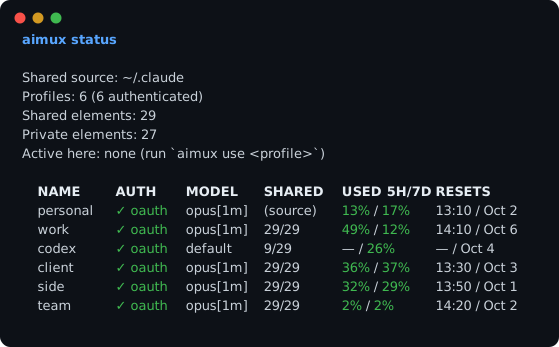
| aimux status | TUI 儀表板——profiles、驗證狀態、即時 5h/7d 限額用量和重設時間(claude + codex)、設定任一選項時的 auto-mode 規則、符號連結健康度。--watch [s] 會持續顯示並重新讀取限額;--json 將它列印給腳本;--max-age <s> 會重用最近的讀取結果 |
| aimux status --no-limits | 不執行速率限制探測的相同儀表板(離線/更快) |
| aimux usage | 依 profile 顯示 token 用量(Claude 對話記錄 + codex rollouts),包括在 aimux 外啟動的工作階段 |
| aimux usage --profile work --since 24h | 顯示一個 profile 在最近時間範圍內的用量 |
| aimux run [profile] | 使用正確的環境和模型啟動 AI CLI |
| aimux run | 互動式選擇器——歷史記錄會預先選取最近使用的 profile |
| aimux run w | 前綴比對——如果沒有歧義則啟動 work |
| aimux run work -m claude-sonnet-5-5 | 使用模型覆寫啟動 |
| aimux run --auto | 探測每個訂閱的即時限額,並啟動剩餘空間最大的那個(維持在同一個 CLI 內) |
| aimux split [profiles...] | 並排開啟多個訂閱,每個使用一個 tmux 窗格(預設:所有已登入的 claude 訂閱) |
| aimux use [profile] | 將目前 shell 切換到某個 profile(持續生效)——之後普通的 claude/codex 會使用它。需要在 rc 中執行 eval "$(aimux shell-init)" |
| aimux shell-init | 列印啟用 aimux use 的 shell 函式(新增到 ~/.zshrc/~/.bashrc/fish 設定) |
| aimux agents | 多 profile agent 檢視——在一個 TUI 中查看和管理所有 profile 的 claude 背景工作階段 |
| aimux profile add <name> | 建立帶有符號連結的新 profile |
| aimux profile add <name> --api | 建立第三方 API profile(互動式 endpoint + token 提示) |
| aimux profile add <name> --cli codex | 為另一個 AI CLI(例如 Codex)建立 profile |
| aimux handoff <sessionId> --to <profile> | 透過摘要 handoff 在另一個 profile/CLI 下繼續工作階段 |
| aimux profile update <name> | 更新模型/cli 設定 |
| aimux profile update <name> --fallback-model <model> | 設定主要模型過載或無法使用時採用的 fallback model |
| aimux profile update <name> --unset-model | 移除預設模型,讓 CLI 使用自己的(最新)預設值 |
| aimux profile update <name> --unset-fallback-model | 移除 fallback model |
| aimux profile update <name> -e KEY=VALUE | 在 profile 的 .env 檔案中設定環境變數 |
| aimux profile update <name> --unset-env KEY | 從 profile 的 .env 檔案中移除環境變數 |
| aimux profile list | 列出所有 profile(與 aimux status 相同的表格;--no-limits 會跳過探測) |
| aimux profile remove <name> | 移除 profile 並清理 |
| aimux profile clone <src> <name> | 使用私有檔案複製 profile |
| aimux rebuild [profile] | 同步符號連結,並顯示本機共用檔案衝突 |
| aimux doctor | 健康檢查——損壞的符號連結、缺少的共用項目、衝突 |
| aimux auth login <profile> | 為某個 profile 啟動 OAuth 流程 |
| aimux auth status | 顯示各 profile 的驗證檔案狀態 |
| aimux setup-shell | 自動安裝 shell 補全(bash/zsh/fish) |
| aimux migrate isolate | 一次性遷移:將每個 profile 的 jobs/、daemon/、projects/ 符號連結轉換成真正的私有目錄,讓每個 profile 擁有自己的 supervisor 和工作階段。安全——不會刪除資料。加上 --dry-run 可預覽。 |
所有 profile 指令都支援前綴比對:aimux run w → work,aimux profile update o → own。
~/.claude/          ← source of truth (your main profile)
  agents/
  skills/
  commands/
  memory/
  settings.json
  .credentials.json  ← private, stays here

~/.aimux/
  config.yaml        ← aimux config
  profiles/
    work/
      agents/ → ~/.claude/agents      ← symlink (shared)
      skills/ → ~/.claude/skills      ← symlink (shared)
      memory/ → ~/.
請先查看作者 README,確認 marketplace 與外掛名稱;指令可能隨儲存庫結構而變動。
claude plugin marketplace add Digital-Threads/aimux
claude plugin install aimux
Run multiple Claude Code / Codex / Gemini subscriptions side by side: one shared brain — skills, agents, memory, settings — separate logins, and every subscription's live 5h/7d limits in a single view.
You have multiple Claude Code subscriptions (personal, work, client) each in separate ~/.claude-* directories. You maintain symlinks manually, duplicate settings, and juggle bash functions to switch between them.
aimux treats your AI CLI configs like tmux treats terminals: one shared brain, multiple isolated sessions.
npm install -g @digital-threads/aimux
~/.claude + extra directories (~/.claude-work, etc.)npm install -g aimux
aimux init # auto-detects all ~/.claude* dirs
aimux status # verify profiles, auth, symlinks
aimux run w # launch work profile (prefix matching)
~/.claude (one subscription)npm install -g aimux
aimux init # creates config with main profile
aimux profile add work # add a new profile
aimux auth login work # OAuth for the new account
aimux profile update w -m 'opus[1m]'
aimux run w
aimux profile add myapi --api
# Configure API endpoint (leave blank to use default):
#   Base URL:                          https://api.your-provider.com/v1
#   Auth token:                        [hidden]
#   Default model [claude-sonnet-5-5]:
#   Opus model    [claude-opus-5-5]:
#   Sonnet model  [claude-sonnet-5-5]:
#   Haiku model   [claude-haiku-4-5]:
# ✓ Credentials saved to ~/.aimux/profiles/myapi/.env (chmod 600)
aimux run myapi
See Per-profile environment variables for the declarative alternative (.env file / env: block) used by power users and CI.
# Install Claude CLI first, then:
claude auth login       # creates ~/.claude
npm install -g @digital-threads/aimux
aimux init
aimux profile add work
aimux auth login work
aimux run               # interactive picker (↑↓ + Enter)
aimux run w             # prefix match → work
aimux run o -m claude-sonnet-5-5  # one-time model override
aimux run w --resume    # flags pass through to Claude CLI
aimux run --auto        # launch whichever subscription has the most headroom left
aimux status            # dashboard
aimux usage             # token usage by profile for the last 7 days
aimux usage --all       # all known transcript usage

# Set a default model per profile. Prefer a family alias: `opus[1m]` always means the
# newest Opus, so a new release is picked up without touching aimux. A full id such
# as `claude-opus-5-5` pins that exact version until you change it. Quote names with
# brackets, or the shell will try to expand them.
aimux profile update w -m 'opus[1m]'
aimux profile update w -m claude-opus-5-5   # pin one version
aimux profile update w --unset-model        # let the CLI choose its own default

# Set a fallback model, tried automatically when the primary is overloaded/unavailable
aimux profile update w --fallback-model claude-sonnet-5-5
aimux profile update w --unset-fallback-model   # remove it
aimux use)aimux run launches a one-off session. If you'd rather activate a profile so
plain claude / codex use it — like nvm use or pyenv shell — enable the
shell integration once:
# add to ~/.zshrc or ~/.bashrc (fish: ~/.config/fish/config.fish)
eval "$(aimux shell-init)"
Then:
aimux use work     # activate 'work' in this shell (persistent until you switch)
claude             # runs under 'work', on its model — no `aimux run` needed
codex              # same; the CLI adapter sets CODEX_HOME for you
aimux use api      # switch profiles — stale ANTHROPIC_*/tokens are cleaned up
aimux use          # no name → interactive picker
Each shell is independent, so different terminals can hold different active
profiles at once. The switch only exports env vars into the current shell — it
never changes global state. aimux run still works for one-off launches, and it
always runs the profile you name, whichever one the shell has active.
aimux split)aimux split # one tmux pane per logged-in claude subscription, in this directory
aimux split work client # just these two
Each pane runs a full aimux run <profile>, labelled with its profile on the pane
border; a pane whose run fails stays open with its error. Closing the window ends the
panes, as in any terminal — the conversations are saved, and aimux run <profile> --resume picks one up again. Inside tmux it opens a new window instead of nesting
tmux, and that window is yours to keep or close. Needs tmux (sudo apt install tmux,
or brew install tmux).
Transcripts are shared, so a session can carry on under another subscription — only
the login changes. When a claude session started with aimux run stops because its
window is spent, aimux offers to continue it where there is the most room left:
⚠ work hit its 5-hour limit (resets 23:10).
Continue this session on personal (5h 10%, 7d 16%)? [Y/n]
Press Enter and the same session resumes there, with the flags you started it with.
aimux reads the hit from the session's own transcript, so an ordinary exit costs
nothing; the other subscriptions are only checked when a limit was actually reached. It
works inside aimux split panes too.
A claude session started with aimux run — or in an aimux split pane — shows every
subscription in a band above the prompt, the one it runs on first:
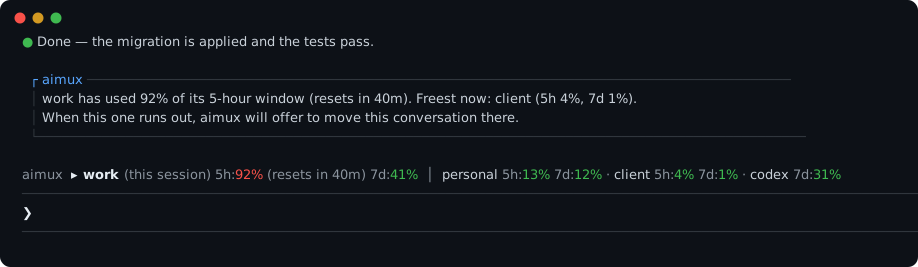
/exit is already in the prompt:
press Enter and aimux carries the conversation over to that subscription without
asking again./aimux prints the whole table, each window with its reset time.It is a Claude Code mod (Claude Code 2.1.287 or newer), loaded only into the sessions
aimux starts; AIMUX_NO_MOD=1 turns it off. The same figures are available to scripts
as aimux status --json.
| Command | Description |
|---------|-------------|
| aimux init | Auto-detect Claude dirs, create config, migrate profiles |
| aimux init --source <path> | Initialize with explicit source directory |
| aimux status | TUI dashboard — profiles, auth, live 5h/7d limit usage and reset times (claude + codex), auto-mode rules when any are set, symlink health. --watch [s] keeps it on screen and re-reads the limits; --json prints them for scripts; --max-age <s> reuses a reading that recent |
| aimux status --no-limits | Same dashboard without the rate-limit probe (offline / faster) |
| aimux usage | Show token usage by profile (Claude transcripts + codex rollouts), including sessions started outside aimux |
| aimux usage --profile work --since 24h | Show usage for one profile over a recent window |
| aimux run [profile] | Launch AI CLI with correct env and model |
| aimux run | Interactive picker — history pre-selects last used profile |
| aimux run w | Prefix matching — launches work if unambiguous |
| aimux run work -m claude-sonnet-5-5 | Launch with model override |
| aimux run --auto | Probe every subscription's live limits and launch the one with the most headroom (stays within the same CLI) |
| aimux split [profiles...] | Open several subscriptions side by side, one tmux pane each (default: every logged-in claude subscription) |
| aimux use [profile] | Switch the current shell to a profile (persistent) — plain claude/codex then use it. Requires eval "$(aimux shell-init)" in your rc |
| aimux shell-init | Print the shell function that enables aimux use (add to ~/.zshrc/~/.bashrc/fish config) |
| aimux agents | Multi-profile agent view — see and manage claude background sessions across all profiles in one TUI |
| aimux profile add <name> | Create new profile with symlinks |
| aimux profile add <name> --api | Create a 3rd-party API profile (interactive endpoint + token prompt) |
| aimux profile add <name> --cli codex | Create a profile for another AI CLI (e.g. Codex) |
| aimux handoff <sessionId> --to <profile> | Continue a session under another profile/CLI via summary handoff |
| aimux profile update <name> | Update model/cli settings |
| aimux profile update <name> --fallback-model <model> | Set a fallback model, used when the primary is overloaded/unavailable |
| aimux profile update <name> --unset-model | Remove the default model, so the CLI uses its own (newest) default |
| aimux profile update <name> --unset-fallback-model | Remove the fallback model |
| aimux profile update <name> -e KEY=VALUE | Set an env var in the profile .env file |
| aimux profile update <name> --unset-env KEY | Remove an env var from the profile .env file |
| aimux profile list | List all profiles (same table as aimux status; --no-limits skips the probe) |
| aimux profile remove <name> | Remove profile and clean up |
| aimux profile clone <src> <name> | Clone profile with private files |
| aimux rebuild [profile] | Sync symlinks and surface local shared-file conflicts |
| aimux doctor | Health check — broken symlinks, missing shared entries, conflicts |
| aimux auth login <profile> | Launch OAuth flow for a profile |
| aimux auth status | Show auth file status per profile |
| aimux setup-shell | Auto-install shell completions (bash/zsh/fish) |
| aimux migrate isolate | One-time migration: convert per-profile jobs/, daemon/, projects/ symlinks into real private dirs so each profile gets its own supervisor and sessions. Safe — no data is deleted. Add --dry-run to preview. |
All profile commands support prefix matching: aimux run w → work, aimux profile update o → own.
~/.claude/          ← source of truth (your main profile)
  agents/
  skills/
  commands/
  memory/
  settings.json
  .credentials.json  ← private, stays here

~/.aimux/
  config.yaml        ← aimux config
  profiles/
    work/
      agents/ → ~/.claude/agents      ← symlink (shared)
      skills/ → ~/.claude/skills      ← symlink (shared)
      memory/ → ~/.claude/memory      ← symlink (shared)
      plugins/                        ← real dir (shared content, per-profile metadata)
        marketplaces/ → ~/.claude/plugins/marketplaces   ← symlink (shared)
        cache/        → ~/.claude/plugins/cache           ← symlink (shared)
        known_marketplaces.json       ← real file (paths point inside this profile)
        installed_plugins.json        ← real file (paths point inside this profile)
      .credentials.json               ← real file (private)
      .claude.json                    ← real file (private)
    own/
      ...same pattern...
When you run aimux run work, it sets CLAUDE_CONFIG_DIR=~/.aimux/profiles/work and launches the CLI. Claude sees a complete config directory — shared content via symlinks, private auth locally.
Plugins are shared too, but Claude validates that a marketplace's installLocation
lives inside the active config directory. So each profile gets a real plugins/
directory: the heavy content (marketplaces/, cache/) is symlinked to the shared
~/.claude/plugins, while known_marketplaces.json and installed_plugins.json are
real, path-rewritten copies. ~/.claude stays the source of truth — install or update
plugins from your main profile (or with CLAUDE_CONFIG_DIR=~/.claude claude plugin …)
and every profile picks them up on its next run. A plugin installed from inside a
profile is merged back into the shared source automatically.
aimux isn't claude-only. A profile's cli field selects which AI CLI it runs, so you
can keep claude, Codex, and Gemini subscriptions side by side — same shared brain,
isolated auth — and even hand a live conversation from one to the other when a limit hits.
aimux profile add codework --cli codex   # a Codex profile
aimux profile add gem --cli gemini       # a Gemini profile (~/.gemini)
aimux auth login codework                # runs `codex login` under an isolated CODEX_HOME
aimux run codework                        # launches Codex with the right model flag
aimux agents                              # claude + codex sessions in one view (CLI-badged)
CLAUDE_CONFIG_DIR /
CODEX_HOME / GEMINI_CLI_HOME), so subscriptions never collide.shared_sources maps each CLI to its source
(claude → ~/.claude, codex → ~/.codex); the legacy shared_source stays as the
claude alias.private; Codex shares a
knowledge allowlist (skills, rules, memories) and keeps auth.json /
config.toml / sessions/ private; Gemini shares GEMINI.md / skills / commands
/ extensions / memories and keeps auth + settings.json + history private.GEMINI_CLI_HOME at the profile's parent and the profile dir IS gemini's .gemini.
Gemini resumes by per-project index (-r latest), not by session id, so cross-Gemini
native resume isn't wired into the session list yet.Hit a subscription limit mid-session? Continue it under another CLI:
aimux handoff <sessionId> --to codework
The two CLIs' transcripts are mutually unreadable, so this is a summary handoff, not
a native resume: aimux reads the source transcript, summarizes it with the target
profile (self-contained — the target CLI does the summarizing), then launches the target
seeded with that summary. Same-CLI continuation (claude↔claude, codex↔codex) still uses
native resume (aimux run <profile> --resume <id>). Note: the conversation context
carries over, not the model — the target continues with its own model.
Many providers expose an Anthropic-compatible endpoint, so they run on the claude CLI
itself — just a different base URL + token. A provider profile is therefore a claude
profile: it shares the full claude brain (skills, plugins, settings, memory, transcripts)
and you can even --resume a claude session under it natively (same CLI, same model swap).
One command, prompts only for the token:
aimux profile add ds --provider deepseek   # fills base URL + model mapping
aimux run ds
Built-in presets: deepseek, kimi, glm, qwen, minimax, mimo. Base URLs are verified;
model names drift — update with aimux profile update <name> -e ANTHROPIC_MODEL=….
For anything else (local models via Ollama/LM Studio, a proxy, Bedrock/Vertex), use the
generic aimux profile add <name> --api and point ANTHROPIC_BASE_URL at it (see below).
Costs shown by aimux usage are list-price estimates (Claude, codex/gpt-5, and the
Anthropic-compatible providers) and will drift as prices change.
Some Claude Code modes (3rd-party proxies, self-hosted gateways, Bedrock, Vertex) are activated by environment variables rather than OAuth. aimux injects per-profile env into the spawned claude process (and into aimux auth login <profile>) from two sources, merged in this order:
<profile>/.env — a dotenv file inside the profile directory. Best for secrets. Written with chmod 600 when aimux creates it; aimux run warns if it becomes group/other-readable.env: block under the profile in config.yaml — best for non-secret toggles you want versioned. Overrides .env on key conflict.The fastest way to set up an API profile is the interactive prompt:
aimux profile add myapi --api      # prompts for Base URL, hidden token, models
aimux profile update myapi -e ANTHROPIC_MODEL=claude-opus-5-5   # edit later
…which writes something like:
# ~/.aimux/profiles/myapi/.env — do not commit
ANTHROPIC_BASE_URL=https://api.your-provider.com/v1
ANTHROPIC_AUTH_TOKEN=sk-your-token...
ANTHROPIC_MODEL=claude-sonnet-5-5
ANTHROPIC_DEFAULT_OPUS_MODEL=claude-opus-5-5
ANTHROPIC_DEFAULT_SONNET_MODEL=claude-sonnet-5-5
ANTHROPIC_DEFAULT_HAIKU_MODEL=claude-haiku-4-5
The .env parser supports KEY=value, export KEY=value, comments, and single/double-quoted values (with \n/\t escapes inside double quotes). It does not do ${VAR} interpolation or multi-line values — it's a secrets loader, not a full dotenv-expand. .env is always private (never symlinked to the shared source).
# ~/.aimux/config.yaml
version: 1
shared_source: /home/user/.claude

profiles:
  main:
    cli: claude
    path: /home/user/.claude
    is_source: true
  work:
    cli: claude
    model: opus[1m]            # follows the newest Opus
    path: /home/user/.aimux/profiles/work
  myapi:
    cli: claude
    model: claude-sonnet-5-5
    path: /home/user/.aimux/profiles/myapi   # secrets live in this dir's .env
    # Optional non-secret env injected into the spawned CLI (overrides .env).
    # env:
    #   ANTHROPIC_DEFAULT_OPUS_MODEL: claude-opus-5-5

private:
  - .credentials.json
  - .env                  # API credentials — never symlinked, never committed
  - .claude.json
  - policy-limits.json
  - mcp-needs-auth-cache.json
  - remote-settings.json
  - settings.local.json
  - stats-cache.json
  - statsig
  - telemetry
  - state                 # MCP protocol verdicts, per install
  - session-env           # per-session environment
  - backups               # copies of the private .claude.json
  - remote                # Remote Control daemon + its binaries
  - security              # Agent SDK venv and logs
  - shell-snapshots
  - cache                 # fetched model catalog, per account
The defaults above are always applied — listing extra entries adds to them. Claude
Code keeps growing new runtime directories, so if aimux doctor reports a conflict
on one, add it here and run aimux rebuild.
MIT

Ruflo 記憶系統的基底層外掛:AgentDB 控制器橋接(15 個 agentdb_* MCP 工具)、RuVector ONNX 嵌入(10 個 embeddings_* 工具,包含 RaBitQ 32x 量化)和 WASM HNSW 模式路由器(3 個 ruvllm_hnsw_* 工具)。作為 mod(ADR-445):可選的安全召回會進入提示,寫入守衛會把機密排除在記憶之外,還提供 /agentdb 和控制台顯示的狀態檔。

建立、格式化、最佳化及檢視互動式 Power BI 報表,並提供遵循 pbir CLI 的報表面板,顯示 Claude 讀取與修改的內容。


在提示列上方、狀態列與通知中顯示未讀 AMP 訊息,還能喚醒閒置的 Claude Code 工作階段來讀取。需要 Claude Code 2.1.287 或更新版本。

