3dnow@3dnow
3dnow/claude-mods/tree/main/weektoken

리셋 전에 한도를 다 쓰게 될지 보여 주도록 Claude Code 속도 제한 사용량을 윈도우 경과량과 나란히 표시하고, 시계보다 앞서거나 뒤처지는지 알려 줍니다. 5시간, 7일 및 Fable 같은 모델별 주간 할당량을 다룹니다.
3dnow/claude-mods/tree/main/weektoken
리셋 전에 한도를 다 쓰게 될까요? WeekToken은 Claude Code 속도 제한에서 사용한 양을 윈도우가 지난 양 옆에 표시하고 시계보다 앞서거나 뒤처지는지 알려 줍니다. 5시간 윈도우, 7일 윈도우 및 Fable 같은 모델별 주간 할당량을 지원합니다. 기능으로는 단순한 백분율이 아닌 속도 기반 점수, 모델별 할당량, 예측과 소모 기록, 프롬프트 위 밴드, 속도 링과 소모 차트가 있는 전체 /weektoken 패널이 있습니다. 설정은 필요 없으며 Claude Code 언어에 맞춰 영어와 중국어를 지원합니다. 데이터는 세션 자체의 속도 제한, ~/.claude.json의 cachedUsageUtilization, 수동 새로 고침에서 선택적으로 실행하는 로컬 claude -p /usage 호출, 선택적인 WeekToken macOS 앱 기록 파일에서 가져옵니다. Claude Code 2.1.287 이상과 Claude 구독이 필요합니다.
먼저 작성자의 README에서 marketplace와 플러그인 이름을 확인하세요. 저장소 구조에 따라 명령어가 달라질 수 있습니다.
claude plugin marketplace add 3dnow/claude-mods
claude plugin install weektoken
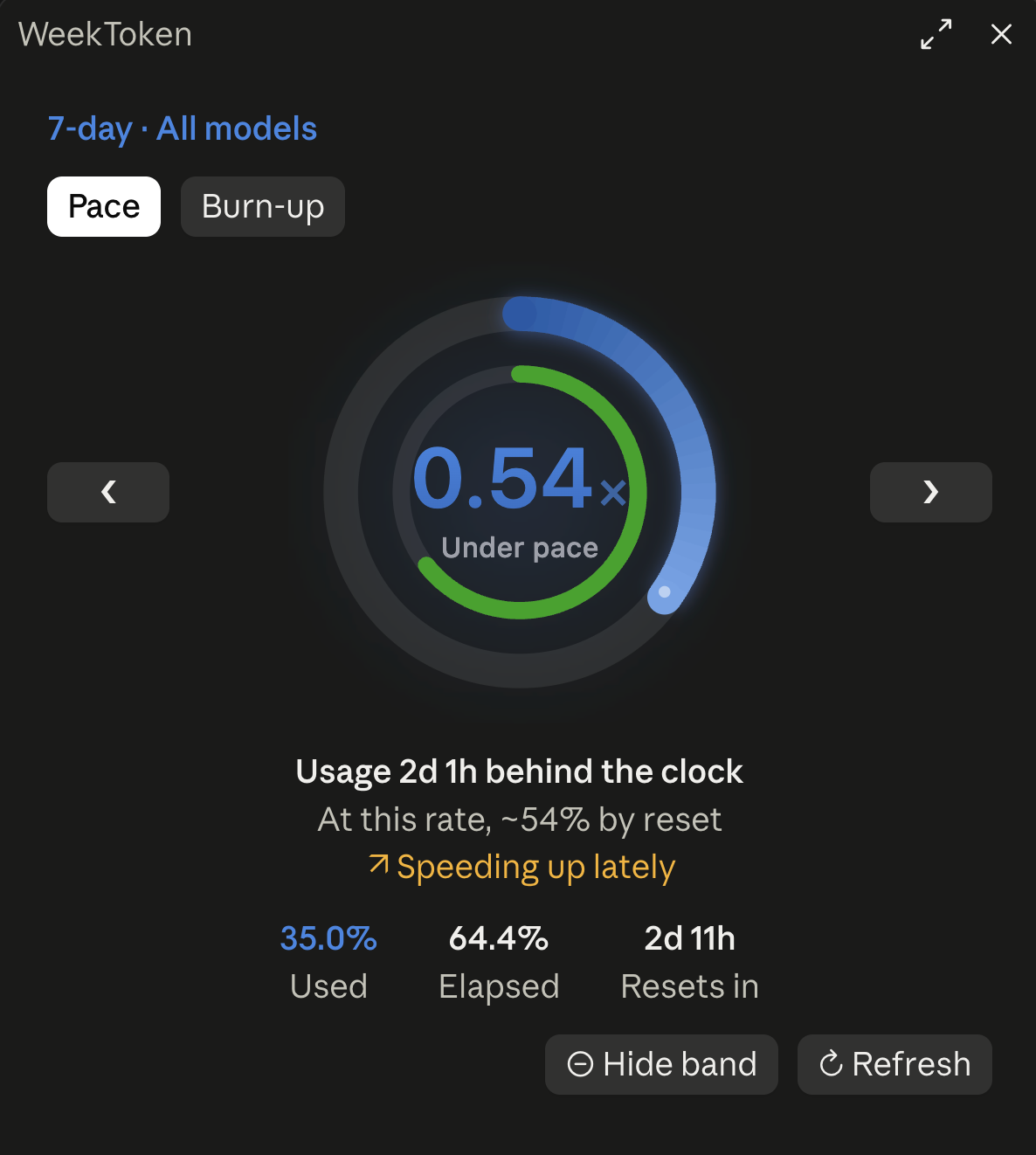
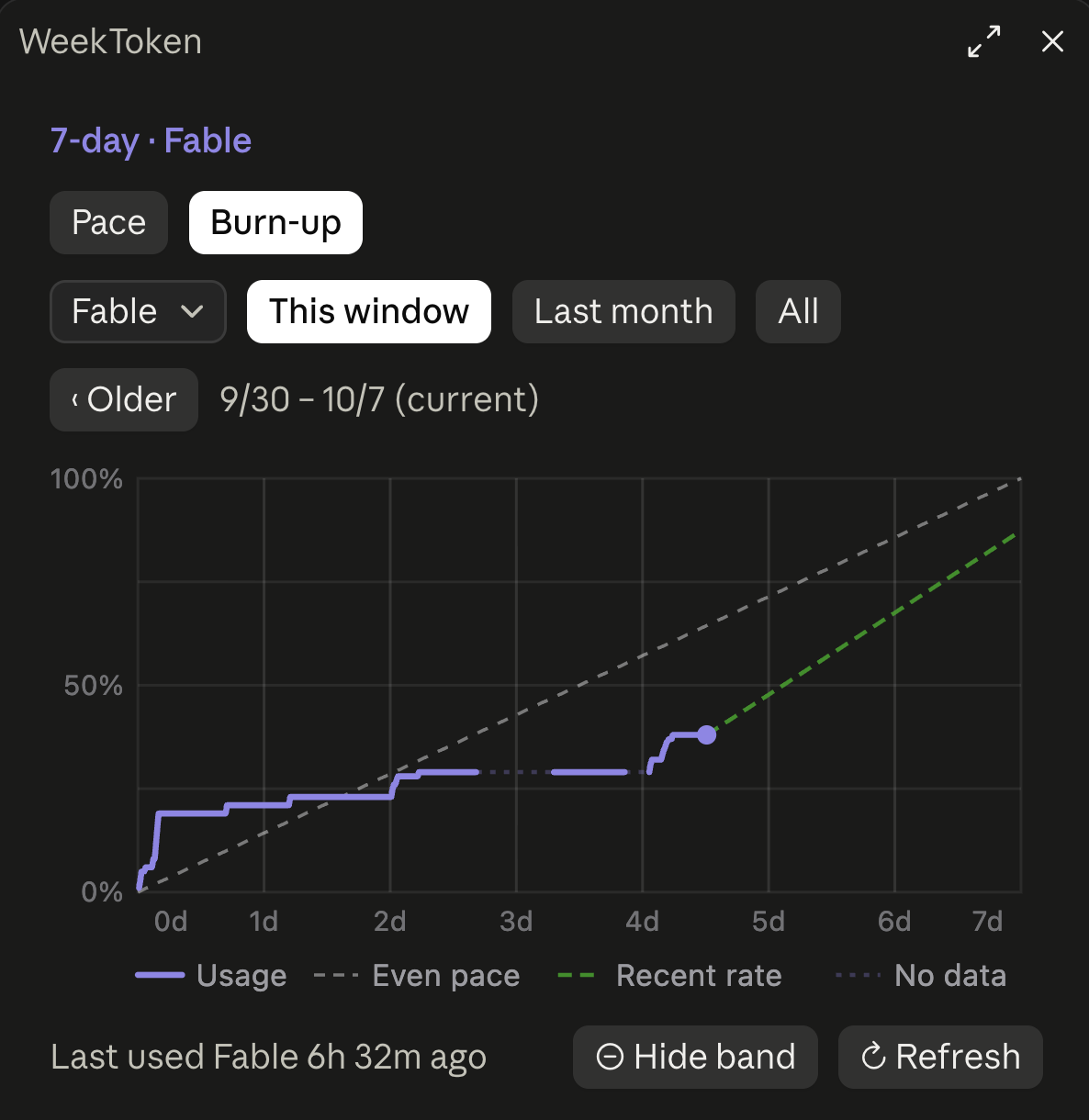
Will you run out before the reset? WeekToken puts what you have used of Claude Code's rate limits next to how much of the window has passed, and tells you whether you are ahead of the clock or behind it. It covers the 5-hour window, the 7-day window and per-model weekly quotas such as Fable.
| /weektoken pace | Burn-up history |
| --- | --- |
|  |
|  |
|
In the terminal, the band sits above the prompt and /weektoken docks beside the conversation:
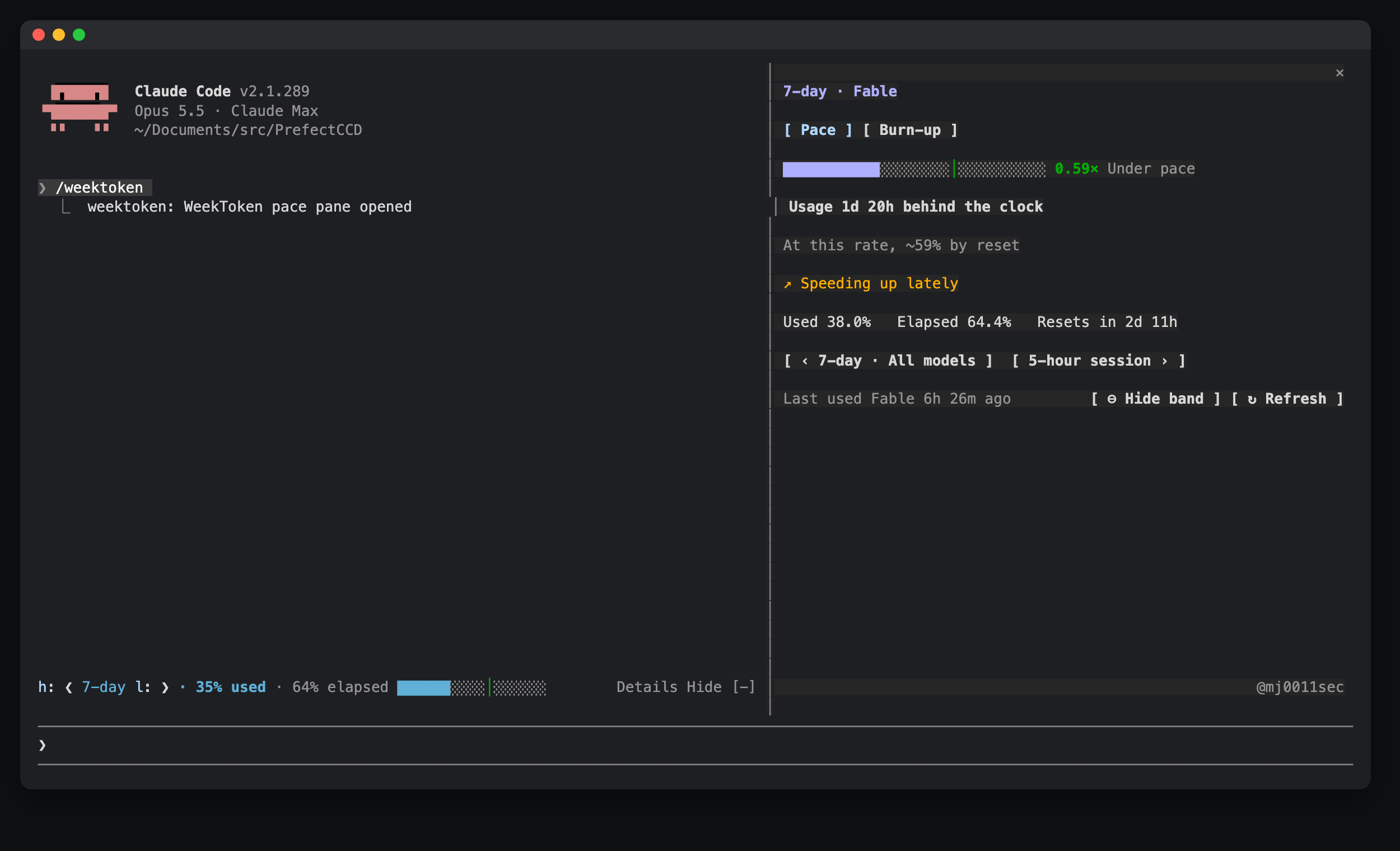
A band above the prompt: ❮ 7-day ❯ · 64% used · 71% elapsed, a progress bar that stretches with the band, plus Details and Hide (in the desktop app, Hide is the close button at the band's right end).
/weektoken show, or ⊕ Show band at the bottom of the pane.The /weektoken pane:
/usage could not run.Colors follow pace, not the raw percentage: the over-pace thresholds are Claude Code's own rate-limit warning calibration (five_hour: 0.9/0.72; seven_day: 0.25/0.15, 0.5/0.35, 0.75/0.6) and tighten as the window goes on.
| Source | Content |
|---|---|
| The session's own rate limits | The 5-hour and 7-day windows, updated after every reply |
| cachedUsageUtilization in ~/.claude.json | Claude Code's own usage cache, including per-model quotas (Fable and others) |
| Local claude -p --no-session-persistence /usage (only when you press ↻ Refresh) | Fresh per-model quotas; also the 5-hour and 7-day windows when there is no local reading from the last 10 minutes (a new session before its first reply) |
| ~/.weektoken/samples.jsonl (optional) | History from the WeekToken macOS app, imported read-only |
Samples are kept in the mod's own cross-session store, up to 8000; the oldest go first. Sessions open at the same time merge their samples and keep one copy of each reading. Without history to import from the WeekToken macOS app, history starts when you install the mod, since the API only reports current values.
A quota you are not using does not change, so old data still gives a valid pace.
| Command | Does |
|---|---|
| /weektoken | Opens the pace pane |
| /weektoken hide | Hides the band (kept across sessions) |
| /weektoken show | Shows it again |
Nothing to configure. Two environment variables override the defaults; set them in your shell profile (e.g. ~/.zshrc) and start a new session:
| Variable | Effect |
|---|---|
| WEEKTOKEN_LANG | zh or en forces the interface language. By default it follows Claude Code's language setting, then the system language |
| WEEKTOKEN_HISTORY | Path of the WeekToken macOS app's history file; an empty string turns the import off |
| CLAUDE_MODS_DISABLE | all, or a comma list containing weektoken, turns the mod off entirely |
Mods run with the same access as Claude Code itself and are not sandboxed. This is everything WeekToken does besides drawing its own band and pane.
WeekToken itself makes no network calls, and nothing it reads is sent anywhere. The only request that leaves your machine is made by Claude Code, not by the mod: when you press ↻ Refresh, the mod runs Claude Code's own /usage command (below), and Claude Code looks up your usage at Anthropic's usage endpoint (/api/oauth/usage) with the login it already has. No model is called and no quota is used; checked with claude --debug-file.
Every command is fixed text, and none goes through a shell.
| Command | When | Why |
| --- | --- | --- |
| claude -p --no-session-persistence /usage | Only when you press ↻ Refresh | The only fresh source for per-model quotas such as Fable. The mod looks for claude on your PATH, then in ~/.local/bin, ~/.claude/local, /opt/homebrew/bin and /usr/local/bin. It saves no session. |
| defaults read -g AppleLanguages | At session start, and when you change Claude Code's language | Reads the macOS language when Claude Code's own language setting is not set (macOS only). |
| tail -n 8000 ~/.weektoken/samples.jsonl | At session start and every 10 minutes, only if the file exists | Imports history from the WeekToken macOS app. |
| perl, with one fixed pattern and no shell | Only when ~/.claude.json is over 4 MiB and can't be read directly | Extracts just the cachedUsageUtilization entry from that file and prints it back to the mod; nothing else is read or sent. |
~/.claude.json, Claude Code's own file. Only its cachedUsageUtilization entry is used: Claude Code's usage cache, which includes per-model quotas. The file also holds account details; those are not used or kept. It is read at session start, every 5 minutes when the file has changed, and on Refresh.~/.weektoken/samples.jsonl, or the file named by WEEKTOKEN_HISTORY, if it exists.HOME and PATH (to find the files and claude above), LANG, LC_ALL and LC_MESSAGES (the language), WEEKTOKEN_LANG, WEEKTOKEN_HISTORY and CLAUDE_MODS_DISABLE. It reads no credentials.language setting.In the mod's own store on your machine: samples (up to 8000) and their version stamp, when each model was last used, whether the band is shown and which quota it shows, the quota selected in the pane, the modification time of the imported history file, and whether the welcome notice was shown. The interface language is detected each session, not stored.
| Hook | What it does |
| --- | --- |
| session.start | Registers /weektoken, loads the stored samples, reads the sources above and starts the 1-, 5- and 10-minute timers |
| session.measure | Records the session's 5-hour and 7-day figures when they change |
| turn.complete | Records the time and model of each reply, to tell when a quota was last used |
| command.run, /weektoken only | Answers its own command: opens the pane, or shows or hides the band |
| ui.render, AbovePrompt | Draws the band, then whatever other plugins or Claude Code draw there, below it |
| ui.render, the weektoken pane only | Draws the /weektoken pane |
| ui.press | Notes presses on its own pane and passes every press on unchanged |
| ui.focus | Passes the event on unchanged. On its own pane in the desktop app, when a click only moved the focus to a button (the first click on an unfocused pane), it runs that button's action |
| config.set, language only | Passes the change on unchanged, then detects the interface language again |
It changes no settings or permissions, and it leaves other plugins' events as they are.
"env": { "CLAUDE_CODE_ENABLE_FUNCTION_HOOKS": "1" } to ~/.claude/settings.json firstclaude plugin validate .
claude plugin test
mj0111 · @mj0011sec on X

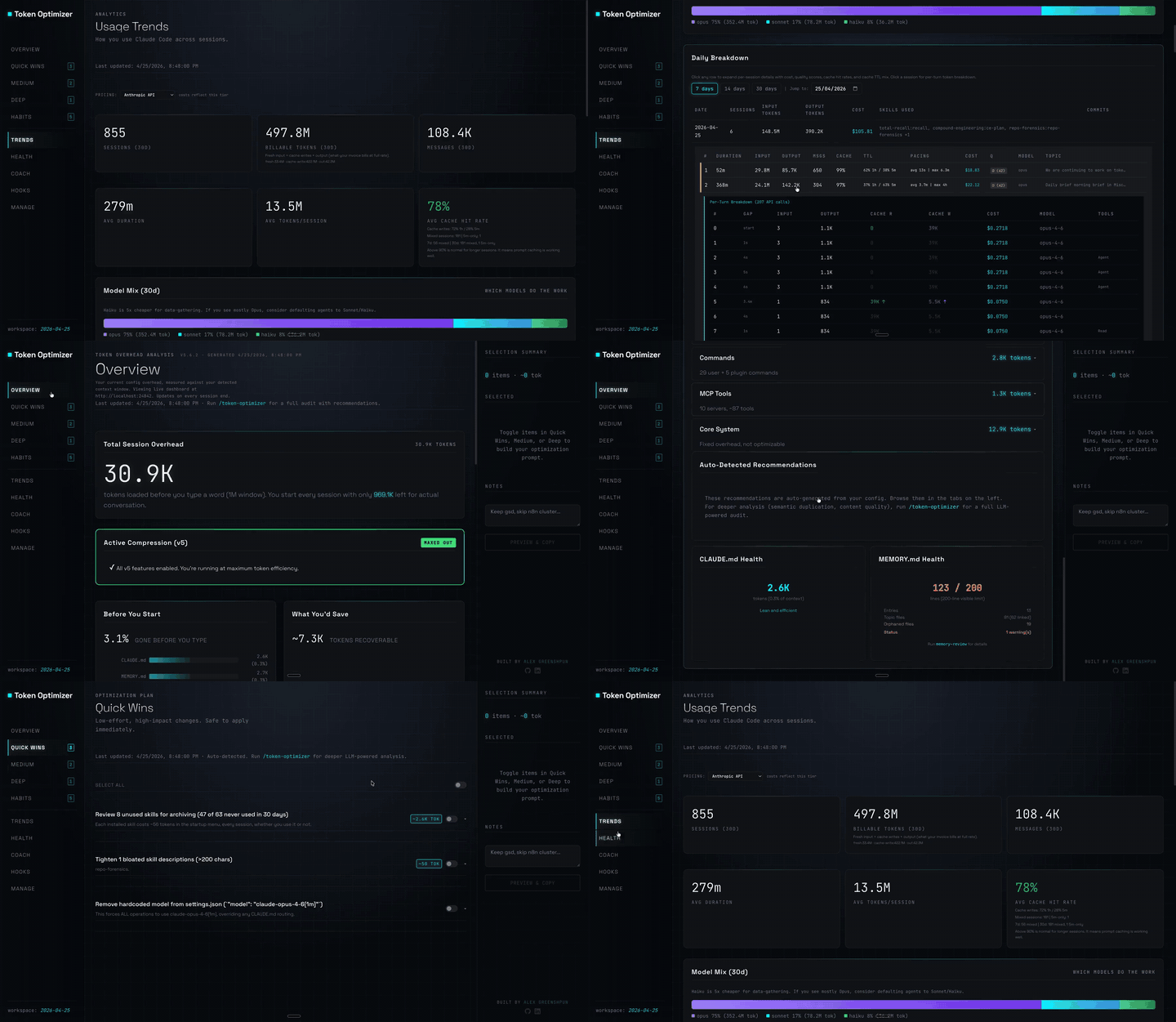
Claude Code plugin that compresses tool output, checkpoints before compaction, scores context quality, and reports token/cost savings on a local dashboard; ships hooks and a localhost daemon.

Claude Code mod입니다. 플랜 사용량이 부족해지면 실행 중인 모든 agent에게 마무리를 지시해, 파일을 반쯤 편집한 채 인계도 못 하고 끊기는 일을 막습니다.

세션 예산을 설정하고 한도에 가까워지면 알림을 보내며 추가 지출을 제한합니다.