
ccdwyer@ccdwyer
ccdwyer/transit-map
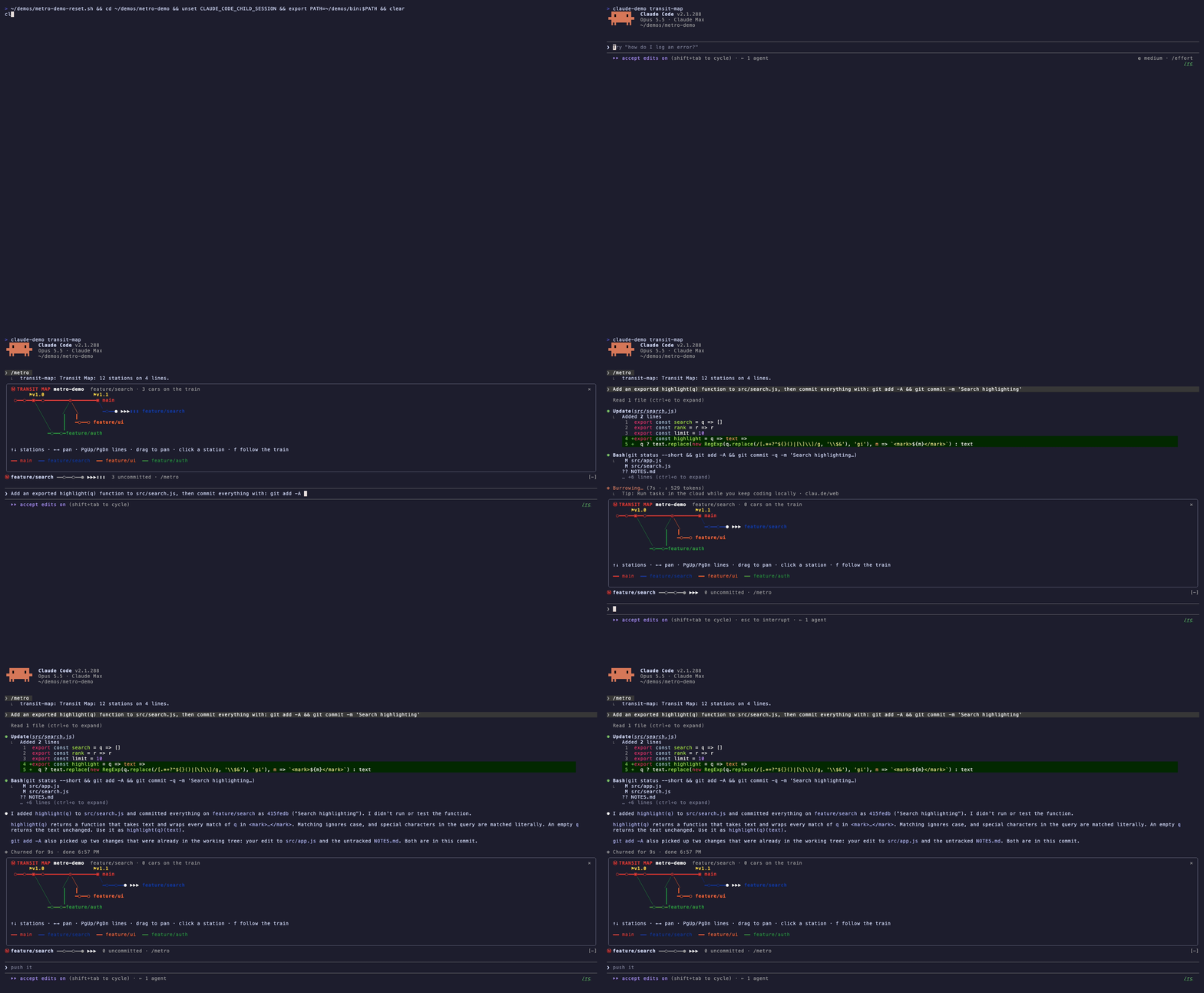
git 기록을 Vignelli 스타일 지하철 노선도로 그리는 Claude Code 모드입니다. 브랜치는 색상 노선, 커밋은 역, 작업 트리는 열차로 표시하며 플러그인 마켓플레이스에서 설치합니다.
ccdwyer/transit-map
Transit Map은 저장소의 git 기록을 Claude Code 안에 Vignelli 스타일 지하철 노선도로 그립니다. 브랜치는 굵고 평면적인 색상 노선이 되며(간선 main/master는 항상 빨간색), 커밋은 ○ 역, 병합은 ◎ 환승역, 태그는 ▣ 종착역으로 표시되고 위에 라벨이 붙습니다. 원격에만 있는 브랜치는 점선으로 그립니다. 작업 트리는 HEAD 바로 뒤에 서 있는 열차이며, 커밋하지 않은 파일마다 차량 하나(최대 60개)가 붙고 Claude가 편집하면 노란색으로 켜집니다. 지도는 실시간입니다. Claude가 커밋하면 새 역이 나타나고 브랜치를 전환하면 열차가 다른 노선으로 미끄러져 이동합니다. /metro는 창에서 지도를 열고 이동, 역 단위 탐색, 노선 스크롤, 커밋 상세 정보, 열차 따라가기 제어와 마우스 오버 툴팁을 제공합니다. 처음 연 뒤에는 프롬프트 위에 한 줄 스트립이 나타나 현재 노선, 열차, ahead/behind 수를 보여 줍니다. /metro strip off로 숨길 수 있습니다. 모든 브랜치에서 최신 120개 커밋을 표시하고, 겹치는 끝점은 역 옆 라벨로 접으며, 10개를 넘는 노선은 회색 +N more lines 차선으로 묶습니다. 서브에이전트 커밋을 포함해 매 턴 새로 고치고, 모바일처럼 상호작용할 수 없는 화면에서는 일반 시간표로 대체합니다. /plugin marketplace add ccdwyer/claude-mods, /plugin install transit-map@ccdwyer-mods를 실행한 뒤 /reload-plugins로 설치합니다. session.start, command.run{command=metro}, tool.call, turn.complete, ui.message, Pane과 AbovePrompt용 ui.render에 연결하고, 명령 등록, git 프로세스 실행, 세션 cwd, 상태 읽기/설정, UI 열기/해결에는 엔진 함수를 호출합니다. tool.call hook은 git 명령과 편집 뒤 다시 그릴 수 있도록 결과만 관찰합니다. git과 함께 전부 로컬에서 실행되며 네트워크로 아무것도 보내지 않습니다(PRIVACY.md 참조). MIT 라이선스입니다.
먼저 작성자의 README에서 marketplace와 플러그인 이름을 확인하세요. 저장소 구조에 따라 명령어가 달라질 수 있습니다.
claude plugin marketplace add ccdwyer/transit-map
claude plugin install transit-map
/metro draws the repo as a subway map with tags and four lines; after Claude commits, a new station appears and the train runs empty. Watch the MP4
A Claude Code mod that draws your git history as a Vignelli-style subway map.
main, master) is always red.○ stations, merges are ◎ interchanges, and tags are ▣ termini with their name above.╍.▶▶▶ past HEAD on your current line, with one car ▮ per uncommitted file (up to 60). Cars light up yellow when Claude edits that file./metro opens the map in a pane:
| Key | Action |
|---|---|
| ← →, or drag | pan |
| ↑ ↓ | walk the stations |
| PgUp PgDn | scroll lines into view |
| click or Enter | show a commit's hash, author, subject and files |
| f | follow the train |
Hover over a station to see its subject.
After you open the map once, a one-row strip above the prompt shows the line you're on, your train and ahead/behind counts. /metro strip off hides it.
The map shows the newest 120 commits across all branches, plus HEAD's own history if you've checked out something older. A branch that shares another's tip (one you just created, or a merged remote) has no line of its own; its name rides beside the station. Past 10 lines, the rest share a grey +N more lines lane. The map refreshes after each turn, so commits a subagent made appear too. Surfaces without interactive regions, such as mobile, get a plain timetable instead.
/plugin marketplace add ccdwyer/claude-mods
/plugin install transit-map@ccdwyer-mods
/reload-plugins
Events this mod hooks, as claude plugin validate reads the module:
session.startcommand.run{command=metro}tool.callturn.completeui.messageui.render{component=Pane, requestId=transit-map}ui.render{component=AbovePrompt}Engine calls it makes: $.command.register, $.process.run (via git), $.session.cwd (via repoRoot), $.state.get, $.state.set, $.ui.open, $.ui.resolve.
A tool.call hook sits in the middle of every tool call: it can see the call, refuse it, or add context to its result. This mod only observes the result, to redraw the map after git commands and edits.
It runs entirely on your machine, using local git only. It sends nothing over the network. Full policy: PRIVACY.md.
MIT

neural-trader(v2.7+) 기반의 신경망 트레이딩 전략입니다. 자체 학습 LSTM/Transformer/N-BEATS 모델, Rust/NAPI 백테스트, 112+ MCP 도구, 스웜 협업, 포트폴리오 최적화를 제공합니다.

claude-seo를 위한 선택적 mods companion입니다. Claude Code 안에서 mod(function-hook 플러그인)로 실행되므로 skill이 요청만 할 수 있는 일을 강제할 수 있습니다.

Claude Code용 Repowise 플러그인입니다. Graph, Git, Docs, Decisions, Code Health의 5개 코드 지능 계층을 제공하고 MCP 도구, slash commands, 자동 skills로 Claude가 아키텍처, 소유자, 핫스팟과 결함 위험을 이해하도록 합니다. spinner 힌트, margin notes, 변경 리뷰, /lens 패널이 있는 Claude Code mod인 Lens도 포함합니다.