---
title: "sideline"
url: "https://claudemods.dev/ko/builds/sideline-c16260"
source: "https://github.com/artberri/sideline/tree/main/plugin"
source_type: "github"
repo: "https://github.com/artberri/sideline/tree/main/plugin"
author: "artberri"
author_handle: "artberri"
stars: 0
category: "워크플로 및 CI"
categories: ["workflow"]
tags: ["git", "hooks", "pane", "statusline", "transcript", "tui"]
permission_level: 2
scan_complete: true
install: "claude plugin marketplace add artberri/sideline\nclaude plugin install sideline@artberri"
added: "2026-10-23T09:49:18.669Z"
updated: "2026-10-23T09:43:13Z"
locale: "ko"
content_locale: "en"
---
# sideline
Keeps Claude Code's conversation clean, and puts the details to the side
## Description
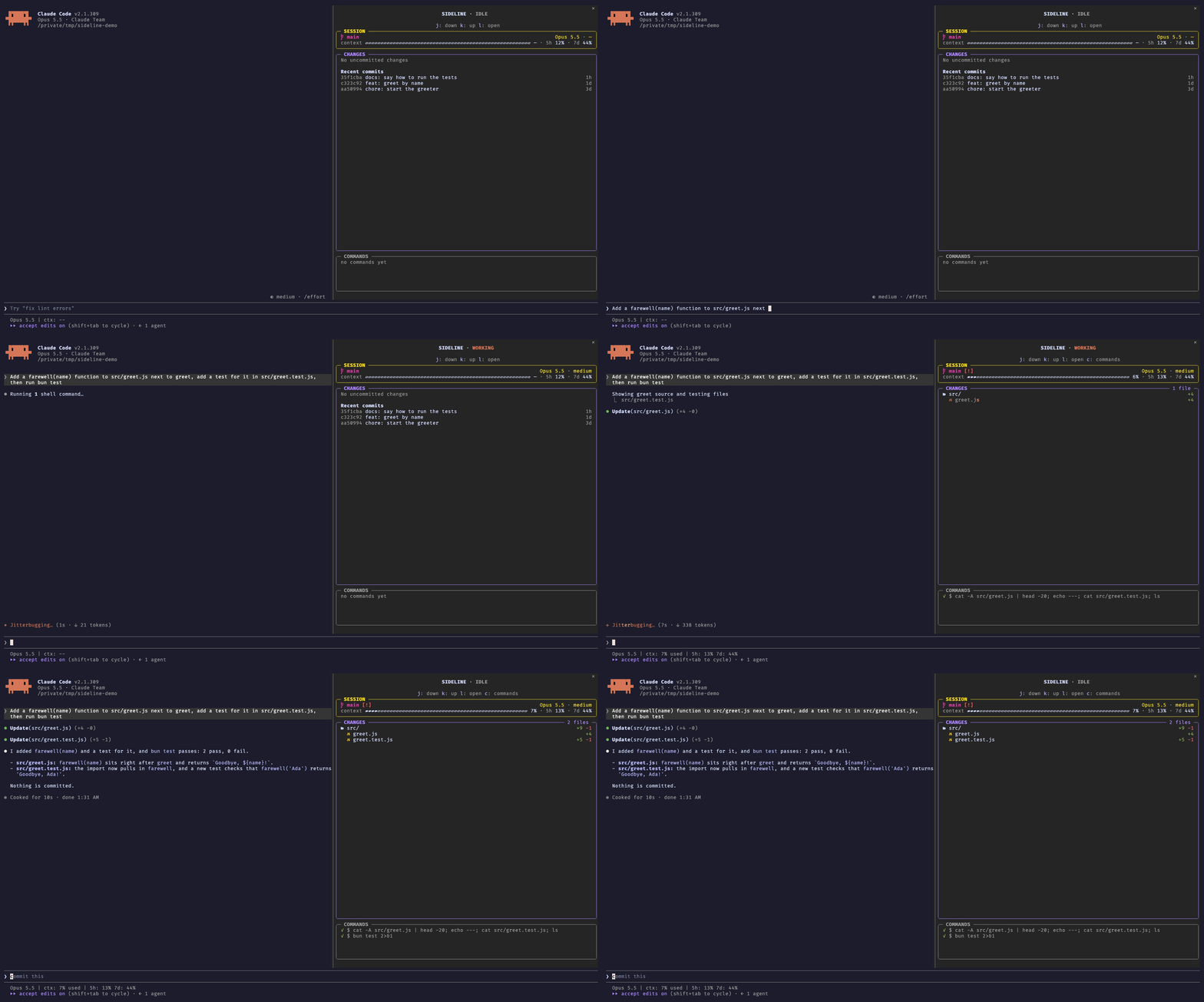
sideline is a Claude Code mod that declutters the conversation by folding long shell commands, edit diffs and finished tool chatter out of the transcript, while keeping the details in a docked pane beside the session. The pane shows a SESSION box (branch, model, effort, context bar, usage), a CHANGES box (changed-file tree with diff counts, shimmer on the active edit, recent commits when clean), and a COMMANDS box (latest shell commands with running/done/failed status). It installs from the artberri marketplace (`claude plugin marketplace add artberri/claude-plugins`, then `claude plugin install sideline@artberri`), requires Claude Code 2.1.308+, and works in the terminal fullscreen layout and Claude Code Desktop; VS Code and mobile are not yet supported. It is read-only, makes no network requests, adds nothing to what Claude sees, and every display change can be turned off via options or ctrl+o.
## Install
```
claude plugin marketplace add artberri/sideline
claude plugin install sideline@artberri
```
## Original README
sideline
Keeps Claude Code's conversation clean, and puts the details to the side



> [!NOTE]
> sideline is a Claude Code **mod** and needs **Claude Code 2.1.308 or newer**. In the terminal its pane docks beside
> the conversation in the fullscreen layout (`/tui fullscreen`); it opens by itself on a terminal at least 144 columns
> wide, and `/sideline` toggles it at any width. Claude Code Desktop docks it on its own. VS Code and the mobile app
> aren't supported yet: the pane doesn't open there by itself, and `/sideline` opens a version that isn't laid out
> for them and can't be clicked. The transcript tidying doesn't depend on the pane.
---
Claude's conversation fills up with things you rarely read: whole shell scripts, every edit's diff, "Ran 1 shell
command" lines. sideline clears them out, so the conversation reads as what Claude said and did, and keeps the details a
glance away, in a pane at its side:
- a described shell command shows its description, not the whole script;
- an edit is one line with its counts, `Update(src/greet.js) (+4 -0)`, not the diff;
- finished "Ran 1 shell command" and "Read 2 files" lines go.
ctrl+o still shows everything, and each of these can be turned off.
The pane stacks a `SIDELINE · IDLE / WORKING / WAITING` title and the key hints over three boxes:
- **SESSION**: the branch with [Starship](https://starship.rs)-style git status symbols, the model and effort, a
context bar, and your 5-hour and 7-day usage.
- **CHANGES**: a tree of the changed files with `+N -N` counts, a shimmer on the file Claude is editing, and each
file's diff a click (or `l`) away. With nothing changed, it lists the recent commits, and each opens as its own tree
and diffs. It scrolls with the wheel and the keys.
- **COMMANDS**: the latest shell commands Claude ran, `●` running, `✓` done, `✗` failed; click one to read it whole.
## Install
sideline is in the [artberri marketplace](https://github.com/artberri/claude-plugins). Add it once, then install:
```sh
claude plugin marketplace add artberri/claude-plugins
claude plugin install sideline@artberri
```
or, inside a Claude Code session, `/plugin marketplace add artberri/claude-plugins` and
`/plugin install sideline@artberri`.
The pane opens by itself on a wide enough terminal and in Claude Code Desktop. `/sideline` toggles it (`/sideline open`
and `/sideline close` do one or the other); once you close it, it stays closed for the session until you open it
again. The transcript stays tidy either way.
Focus it with ctrl+x tab (the `abovePrompt:focus` keybinding), then use the keys in its hint line: `j`/`k` to move,
`l` to open, `h` to go back, `c` for the commands box.
## Options
Set them in `/config`, or under `pluginConfigs` → `sideline` → `options` in your settings.
| Option | Default | What it does |
| -------------------- | ------- | ------------------------------------------------------------------------------------------------- |
| `glyphs` | `auto` | `auto` uses Nerd Font icons when a Nerd Font is installed; `nerd` or `plain` forces one set. |
| `background` | (empty) | A `#hex` colour to paint the pane with, such as your terminal's background. |
| `transcriptDiffs` | `hide` | `hide` folds an edit's diff into its counts; `show` keeps Claude Code's diffs. |
| `transcriptCommands` | `hide` | `hide` shows a described command's description and drops finished group lines; `show` keeps them. |
| `sessionBox` | `show` | `hide` drops the SESSION box and puts the branch line back in CHANGES. |
| `commandRows` | `5` | How many commands the COMMANDS box shows, 0 to 20; `0` hides it. |
The file icons need [Nerd Fonts](https://www.nerdfonts.com) 3.0 or later; with an older one, or none, set `glyphs` to
`plain`.
## What it can see and do
sideline only watches and reads, and nothing it sees leaves your machine. Every hook passes its event on unchanged: it
never approves, refuses or edits a tool call or a prompt, and adds nothing to what Claude sees.
| It sees | Through |
| ---------------------------------------------------------- | ------------------------------------------------------------------------------------------------------- |
| each tool call's name and input, and whether it failed | `tool.call` |
| when a main turn starts and ends, and its model and effort | `turn.start`, `turn.step`, `turn.complete` |
| context and rate-limit readings | `session.measure`, `$.session.usage()` |
| the repo's status, diffs and recent commits | read-only `git` (`status`, `diff`, `diff-tree`, `show`, `log`, `rev-parse`, with `--no-optional-locks`) |
| untracked files' sizes and times, to count their lines | `stat` |
| your OS and installed fonts, to choose its icons | `uname -s`, `fc-list` or the macOS Fonts folders |
It never writes a file, commits, stages or pushes, makes no network requests, calls no model and has no dependencies;
everything it keeps is session state in Claude Code. What it hides in the transcript (long commands, diffs, finished
count lines) is display only: the full command is in the `COMMANDS` box, permission prompts still show it whole,
ctrl+o shows everything, and the `transcriptCommands` and `transcriptDiffs` options turn the hiding off.
`claude plugin validate` on the plugin's folder prints exactly what it hooks and calls.
### What it sends
Nothing, to anywhere. Its only way out of Claude Code is `$.process.run`, and it runs just these fixed, local
commands, none of which reaches the network:
- `git`, read-only, to draw the changes, diffs and commits (the full list is below);
- `uname -s`, once per session, to draw Claude Code's own row dot (`⏺` on macOS, `●` elsewhere);
- `fc-list :charset=e0a0 file`, once per session with `glyphs` on `auto`, to find a Nerd Font. Without `fc-list`, as on
a stock macOS, it reads the file names in `$HOME/Library/Fonts` and `/Library/Fonts` instead (`$.fs.list`).
It runs no shell.
Each `git` command starts `git --no-optional-locks -C `, runs with `GIT_OPTIONAL_LOCKS=0` and a 10-second
timeout, and is one of these:
```sh
status --porcelain=v2 --branch -z --untracked-files=all # the changed files and the branch
rev-parse --show-toplevel # the repo's root
rev-parse --verify --quiet refs/stash # whether there is a stash
diff HEAD --numstat -z # tracked files' line counts
diff --no-index --numstat -z -- /dev/null # an untracked file's line counts
log -n50 --format=%h%x00%s%x00%ct%x00 # the recent commits, with nothing changed
diff HEAD -- # a changed file's diff
diff --no-index -- /dev/null # an untracked file's diff
diff-tree -r --root --no-commit-id -m --first-parent --numstat -z # a commit's line counts
diff-tree -r --root --no-commit-id -m --first-parent --name-status -z # a commit's files
show --format= -m --first-parent -- # a file's diff in a commit
```
`` is the session's working folder or its repo's root; `` and `` are paths `git status`
(or, in a commit, `diff-tree`) listed; `` is a hash `git log` listed. Nothing you or Claude type goes into a
command.
From the conversation it reads only what the table above lists: `turn.step` gives it the model and effort of each
main request, never the messages, and `tool.call` gives it each tool call's name, input and outcome, which it draws in
the pane (a shell command in `COMMANDS`, an edited file's shimmer in `CHANGES`). None of it goes into a command or
leaves Claude Code.
It reads two things from your disk besides `git`'s output, and neither goes into a command or leaves Claude Code:
- `$.fs.stat`: an untracked file's size and modification time, which only decide whether `git` counts that file's
lines again; they're kept only for the session.
- `$.fs.list`: the file names in the two macOS Fonts folders, once per session with `glyphs` on `auto`, checked for
one containing `Nerd`. Only the answer, Nerd Font icons or plain ones, is kept; the names aren't.
Everything these commands print is drawn in the pane and nowhere else.
## Troubleshooting
**The pane doesn't appear.** Check `claude --version` is 2.1.308 or later, then run `/reload-plugins` and `/sideline`.
Below 144 columns Claude Code doesn't open a pane nobody asked for, so `/sideline` is needed there. Look in the
transcript for a dim line starting `sideline:`: it names the hook that failed; please
[open an issue](https://github.com/artberri/sideline/issues) with it.
**The pane doesn't open in VS Code or the mobile app.** That's on purpose: sideline isn't laid out for them yet, so it
only opens on its own in the terminal and in Claude Code Desktop.
**Icons draw as boxes or blanks.** The file icons need Nerd Fonts 3.0 or later: update your Nerd Font, or set
`glyphs` to `plain`.
**The pane is grey.** Claude Code draws docked panes on its own grey; set `background` to your terminal's background
colour, for example `#1e1e3f`.
**I want to see the full command or diff in the conversation.** ctrl+o shows everything; set `transcriptCommands` or
`transcriptDiffs` to `show` to keep them there.
## Contributing
See [CONTRIBUTING.md](https://github.com/artberri/sideline/blob/main/CONTRIBUTING.md). sideline learned from
[claude-code-filetree](https://github.com/data-goblin/claude-code-filetree) and
[claude-flightdeck](https://github.com/scasella/claude-flightdeck); see [ACKNOWLEDGEMENTS.md](https://github.com/artberri/sideline/blob/main/ACKNOWLEDGEMENTS.md).
## Licence
[MIT](https://github.com/artberri/sideline/blob/main/LICENSE)