
abhibansal60@abhibansal60
abhibansal60/claude-mods/tree/main/ship-state
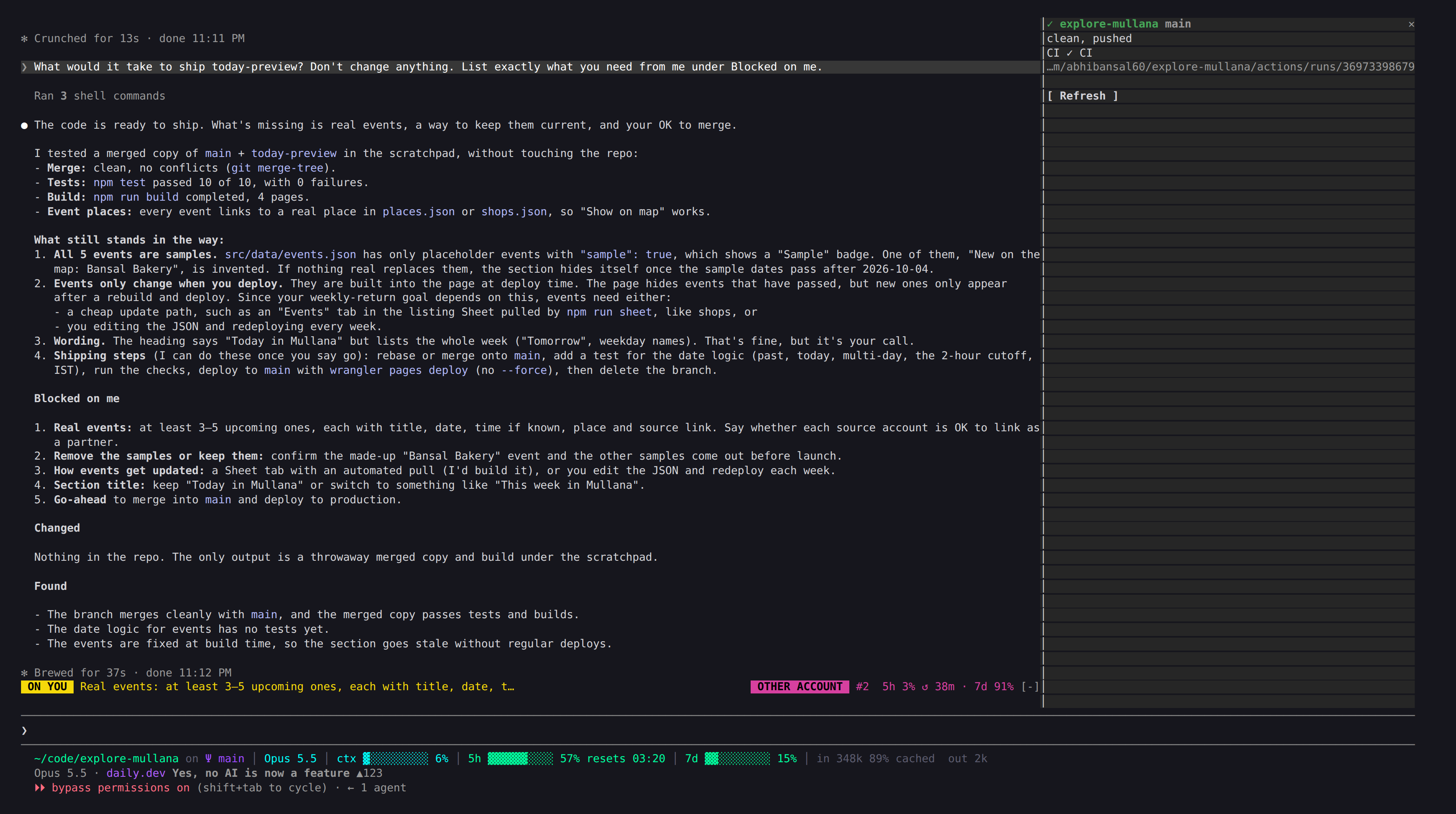
abhibansal60/claude-mods/tree/main/ship-state
이 세션이 건드린 각 저장소의 브랜치, 커밋되지 않은 파일, 푸시되지 않은 커밋, 마지막 CI 실행, HEAD의 커밋 상태(Vercel 배포), 로컬 버전에 대한 PyPI 상태를 보여 줍니다. 답변이 “완료”라고 했는데 저장소가 배포되지 않았다면 토스트를 보여 줍니다.
먼저 작성자의 README에서 marketplace와 플러그인 이름을 확인하세요. 저장소 구조에 따라 명령어가 달라질 수 있습니다.
claude plugin marketplace add abhibansal60/claude-mods
claude plugin install ship-state
Claude Code mods (plugins of function hooks) built from how I actually use Claude Code: two accounts rotated with cswap, many parallel sessions in herdr, and checking results rather than diffs.
Set up the claude-mods Claude Code plugins from https://github.com/abhibansal60/claude-mods.
1. Read README.md and each mod's hooks/register.tsx (or .ts) on GitHub so you know what each one runs.
2. Check what I have, read-only: `claude --version`, `which cswap herdr gh git`, `gh auth status`, and the plugins in ~/.claude/settings.json.
3. Tell me which mods fit my machine: twin-meter and browser-guard need cswap; herdr-fleet needs herdr; ship-state needs git and gh. Skip the ones whose tools are missing.
4. Ask me before changing anything. Then run `claude plugin marketplace add abhibansal60/claude-mods` and `claude plugin install <mod>@claude-mods --scope user` for each mod I pick.
5. Tell me to restart Claude Code, and how to see each mod: the one-line band above the prompt, `/ship-state`, `/herdr-fleet`, `/browser-guard`.
claude plugin marketplace add abhibansal60/claude-mods
claude plugin install on-me@claude-mods --scope user
claude plugin install twin-meter@claude-mods --scope user
claude plugin install ship-state@claude-mods --scope user
claude plugin install browser-guard@claude-mods --scope user
claude plugin install herdr-fleet@claude-mods --scope user
Then restart Claude Code. Update later with claude plugin marketplace update claude-mods.
Needs: twin-meter and browser-guard use cswap, herdr-fleet uses herdr, ship-state uses git and gh.
| Mod | Where | What it shows or does |
|---|---|---|
| on-me | Band, left | One line: a yellow ON YOU tag and the first item from the last answer's Blocked on me part (or "answer my question"), +N for more; a cyan CLAUDE tag and the current tool call while Claude works. Nothing when nothing waits on you. |
| twin-meter | Band, right edge | A magenta OTHER ACCOUNT tag with #2 5h 3% ↺ 45m · 7d 91% for your other cswap accounts (the status line already shows the active one). Turns into a cyan SWITCH tag when the active account passes 60% and another has room. |
| ship-state | Pane, /ship-state | Each repo the session touched: branch, uncommitted files, unpushed commits, last CI run, commit statuses on HEAD (Vercel deploys) and PyPI against the local version. A toast when an answer says "done" but a repo is not shipped. |
| browser-guard | Hook on Chrome tools | Pairs each cswap account with a Chrome browser on first use, then stops Chrome actions from the wrong profile. /browser-guard lists pairs, /browser-guard reset forgets them. |
| herdr-fleet | Pane, /herdr-fleet | Every herdr agent with status, folder, title and last words, "◉ you are here" on this pane, a focus button, a toast when another agent is blocked. Stops Bash commands that would close this pane or herdr. |
Each mod is a plugin: .claude-plugin/plugin.json, hooks/hooks.json, hooks/register.tsx, a types/index.d.ts contract for its $.state, and pure parsers in hooks/parse.ts with tests in tests/.
claude plugin validate ./<mod>
claude plugin test ./<mod>
To work on a mod live, run claude --plugin-dir ./<mod>: saving a file reloads it.

캐시를 인식하는 /loop worker와 CronCreate 백그라운드 자동화입니다. ruflo 제품군의 모든 반복 작업을 위한 기반 플러그인입니다.

Claude Code mod로서의 claude-reflect입니다. 짧은 프롬프트마다 모델 검사를 수행해 재사용 가능한 수정 사항(모든 언어)을 찾고, 프롬프트 위 밴드를 한 번 누르면 CLAUDE.md에 저장합니다.


Claude Code 안의 초기 crit입니다. 패널에서 대화, diff 또는 파일에 댓글을 달고 리뷰를 Claude에 보낸 뒤 스레드에서 Claude의 답변을 읽을 수 있습니다.