dukechain2333@dukechain2333
dukechain2333/red-alert/tree/main/plugin
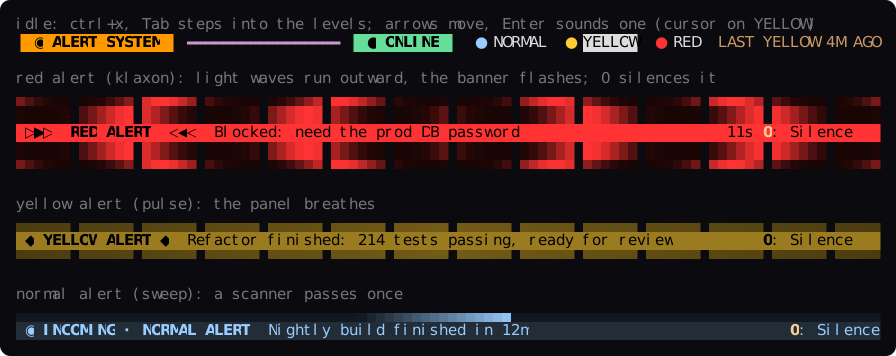
Claude Code용 소리 알림입니다. 서버 스피커로 일반/노란색/빨간색 알림을 재생하고 LCARS 상태 밴드와 알림 애니메이션을 표시합니다.
dukechain2333/red-alert/tree/main/plugin
서버 스피커에서 소리 알림을 재생하는 Claude Code mod입니다. Claude는 알림 도구를 사용해 알림 수준을 선택하며, 수준 이름과 소리, ‘언제 사용할지’ 설명은 TOML 설정에서 가져옵니다. 백그라운드 Python 데몬은 표준 라이브러리만 사용해 systemd 사용자 서비스로 실행되고 127.0.0.1:1701에서 HTTP API를 제공하며, 수동 알림용 CLI도 제공합니다. Claude Code에서는 LCARS 스타일의 프롬프트 위 밴드가 시스템 상태와 설정된 수준을 보여 주고, 소리가 재생되는 동안 경고 배너에 klaxon, pulse, sweep 애니메이션을 표시합니다. 0 키로 음소거할 수 있으며 /alert 콘솔과 하위 명령(status, stop, mute, unmute, start)을 제공합니다. 각 수준은 임의의 소리(URL 또는 파일), 지속 시간, 우선순위, 색상, 애니메이션, 볼륨, 쿨다운, 데스크톱 알림을 지원합니다. ./install.sh로 설치하거나 플러그인 마켓플레이스로 설치할 수 있습니다(claude plugin install red-alert@red-alert).
먼저 작성자의 README에서 marketplace와 플러그인 이름을 확인하세요. 저장소 구조에 따라 명령어가 달라질 수 있습니다.
claude plugin marketplace add dukechain2333/red-alert
claude plugin install red-alert
Audible alerts for Claude Code. Claude decides when its work deserves your attention and sounds an alert through your server's speakers: a chirp for a milestone, a yellow alert when a big task is done, a red alert klaxon when it's blocked and needs you. A Claude Code mod shows whether the alert system is online and animates every alert in the terminal.
alert tool whose
levels and their "when to use" descriptions come from your config, so
Claude picks among the levels you define.0), and a console pane and
/alert command for sounding alerts by hand.┌───────────────────────── your server ─────────────────────────┐
│ │
│ Claude Code ── red-alert mod ──HTTP──▶ red-alert daemon ──▶ 🔊│
│ (terminal) · alert tool 127.0.0.1:1701 │
│ · status band · levels from TOML │
│ · /alert console · systemd user unit │
│ · desktop notification│
│ red-alert CLI / curl / scripts ──HTTP──▶ │
└───────────────────────────────────────────────────────────────┘
| Level | Sound | Sounds for | Claude uses it when… |
| --- | --- | --- | --- |
| normal | TNG communicator chirp | once (0.5 s) | a small milestone or FYI: a long build or test run finished, a progress checkpoint |
| yellow | computer alert | twice (4.7 s) | a significant body of work is complete and ready for review |
| red | TNG red alert klaxon | 12 s (of 21 s) | it is blocked, needs a decision, credentials or approval, or something failed badly |
pw-play) or PulseAudio
(paplay); ffplay, mpv and mpg123 also work.git clone https://github.com/dukechain2333/red-alert.git
cd red-alert
./install.sh
red-alert test # plays every level in turn
install.sh installs, for your user only:
| What | Where |
| --- | --- |
| daemon and CLI | ~/.local/share/red-alert/, ~/.local/bin/red-alert |
| config (kept if it exists) | ~/.config/red-alert/config.toml |
| systemd user service, started now and at boot | ~/.config/systemd/user/red-alert.service |
| Claude Code mod | ~/.claude/skills/red-alert/ (loads as red-alert@skills-dir) |
The service starts at boot because the installer enables lingering
(loginctl enable-linger), which starts your user's services without a
login. Sounds are downloaded once, on first start, to ~/.cache/red-alert/.
Options: --no-service (files only), --no-mod (no Claude Code mod),
--link-mod (symlink the mod to the checkout while you develop it).
The repository is also a plugin marketplace:
claude plugin marketplace add dukechain2333/red-alert
claude plugin install red-alert@red-alert
You still need the daemon: ./install.sh --no-mod.
Start a new Claude Code session after installing. Then:
Claude raises alerts by itself. The mod adds the
mcp__red-alert__alert tool and a short system-prompt note: Claude calls
it once, as the last step of a turn where one of the levels fits, or right
before it stops to ask you something, whether or not you seem to be at the
keyboard. To change how often it alerts, tell it ("only red
alerts today", "no alerts for this task") or edit the level descriptions.
The tool never asks for permission, since all it does is play a sound on
your own machine.
The band above the prompt shows the alert system's state (● ONLINE,
○ OFFLINE or ◐ MUTED 25M), your levels and the last alert. The levels
are a menu: press ctrl+x, release, then Tab to step into the band (the
cursor lands on the first level), move with ←/→, and press Enter to
sound that alert by hand, for the level's duration. Esc takes you back to
the prompt. The levels get no number keys on purpose: a bare digit typed
into an empty prompt presses the band's buttons, so you couldn't start a
message with "1." without sounding an alert. (ctrl+x tab is Claude
Code's abovePrompt:focus action; rebind it in ~/.claude/keybindings.json
if you like.)
When an alert sounds, the band turns into an animated banner that runs for
as long as the sound plays, with a countdown when the level has a
duration:
Alerts raised elsewhere (another session, the CLI, a script) animate too, with their source shown, so every open session sees them.
Press 0 to silence an alert. While a banner is up, typing 0 into
the empty prompt stops the sound and takes the banner down; you don't need
to focus anything first. (A bare digit at an empty prompt goes to the
band's buttons, as with Claude Code's own surveys; 0 in a message you are
typing is just a 0.) After the sound ends, a red or yellow banner from
this session stays lit until you press 0 (now Dismiss). Typing your
next prompt also clears an alert that Claude raised, and silences it if
it's still sounding.
Sound an alert by hand with /alert <level> [duration] [message]:
/alert red 30s Meeting in 5 minutes sounds the red alert for 30 seconds
(2m works too), /alert yellow sounds yellow for its configured time.
/alert runs even while Claude is working.
The alert console (/alert with no arguments) has the system status, a Manual alert form and the alert log.
Type an optional message, press Enter, then the level's number (1–9)
to sound it. Other keys: 0 silence, m mute 30 min, u unmute,
r refresh, x close.
Other /alert subcommands: status, stop, mute [minutes] (0 =
until unmuted), unmute, start (starts the systemd service).
▐ LCARS 1701 ▌ ━━━━━━━━━━━━━━━━━━━━━━━━━━━━━━━━━━━━━━━━━━━━━━━━━ ▐ ALERT CONDITION ▌

SYSTEM     ● ONLINE  http://127.0.0.1:1701 · v0.2.0 · bridge · up 3h · auto (pw-play)
CONDITION  GREEN · STANDING BY

▐ MANUAL ALERT ▌ ━━━━━━━━━━━━━━━━━━━━━━━━━━━━━━━━━━━━━━━━━━━━━━━━━━━━━━━━━━━━━━━━━━━━━━
Message  Lunch is ready_
1: Sound ▐ NORMAL   ▌ p10  sweep  once  A light ping: a small milestone or an FYI…
2: Sound ▐ YELLOW   ▌ p50  pulse  4.7s  A significant body of work is complete…
3: Sound ▐ RED      ▌ p90  klaxon 12s   The user is needed now: you are blocked…

▐ LOG ▌ ━━━━━━━━━━━━━━━━━━━━━━━━━━━━━━━━━━━━━━━━━━━━━━━━━━━━━━━━━━━━━━━━━━━━━━━━━━━━━━
21:04:11  RED     stopped    Need the prod DB password  · claude-code:shop
20:51:37  YELLOW  played     Checkout refactor done, 214 tests pass  · claude-code:shop
20:12:02  NORMAL  played     Nightly build finished  · cli@bridge

[ Silence ] [ Mute 30m ] [ Unmute ] [ Refresh ] [ Close ]
Set these in /config (or claude plugin configure red-alert):
| Setting | Default | |
| --- | --- | --- |
| url | http://127.0.0.1:1701 | where the daemon listens |
| token | empty | the daemon's server.token, if you set one |
| pollSeconds | 5 | how often the band checks the daemon and picks up alerts raised elsewhere |
| permissionPromptLevel | off | sound this level whenever Claude Code waits on a permission prompt, the one wait Claude cannot announce itself (e.g. red) |
| idleBand | true | show the status strip while no alert is up |
Edit ~/.config/red-alert/config.toml, then run red-alert reload.
Claude Code picks up the change on its own: the mod rebuilds the alert tool
from the daemon's levels.
[[levels]]
name = "deploy"                     # what Claude passes as the level
priority = 40                       # higher wins when alerts overlap
sound = "~/sounds/fanfare.ogg"      # https:// URL or a file path
style = "pulse"                     # sweep | pulse | klaxon
color = "#33CC99"
volume = 70                         # 0-100
duration = 8                        # sound for 8 s: cut a longer sound, loop a
                                    # shorter one; 0 plays it once (the default)
cooldown_seconds = 30               # ignore repeats within 30 s
notify = true                       # also show a desktop notification
description = "A deployment or release finished successfully."
duration is how long the alert sounds, up to 300 seconds. A 21-second
klaxon with duration = 12 stops after 12 seconds; a 2-second doorbell with
duration = 6 rings three times. Leave it out (or set 0) to play the sound
once, in full. An alert raised by hand or through the API can override it.
Claude reads each description to decide which level to use, so write it as
advice on when to use the level. Overlapping alerts: a higher-priority
alert cuts off a lower one that is still playing, and a lower one is skipped
while a higher one plays. See config.example.toml
for every option, including audio.player (choose a player or give your
own command line) and server.token.
red-alert send LEVEL [MESSAGE...]   sound an alert (-d SECONDS, --title, --source, --json)
red-alert status                    is the daemon up? what is playing?
red-alert levels                    the configured levels
red-alert history [-n 20]           recent alerts
red-alert test [LEVEL]              play one level, or all of them in turn
red-alert stop [ID]                 silence the alert that is playing
red-alert mute [MINUTES]            mute (default 30; 0 = until unmuted)
red-alert unmute
red-alert reload                    re-read the config
red-alert serve                     run the daemon in the foreground
The CLI finds the daemon through the config file, $RED_ALERT_URL or --url
(and $RED_ALERT_TOKEN or --token). It exits with 3 when the daemon is
unreachable.
curl -s localhost:1701/health
curl -s -X POST localhost:1701/alert -H 'Content-Type: application/json' \
     -d '{"level": "yellow", "message": "Backup finished", "source": "cron"}'
Endpoints: GET /health, GET /levels, GET /history, POST /alert,
POST /stop, POST /mute, POST /unmute, POST /reload. See
docs/API.md.
Any Claude Code session that can run shell commands can use the CLI. Put
this in your CLAUDE.md:
## Alerts
This machine runs red-alert. When you finish a significant task, or right
before you stop to ask me something, run exactly one of:
- `red-alert send normal "<what finished>"`: small milestone or FYI
- `red-alert send yellow "<summary>"`: a big task is done and ready for review
- `red-alert send red "<what you need>"`: you are blocked and need me now
The simplest setup is an SSH tunnel, which keeps the daemon on localhost:
ssh -N -L 1701:127.0.0.1:1701 you@your-server
To expose the daemon on the network instead, set server.host = "0.0.0.0"
and a server.token in the config, restart the service, and set the
mod's url and token to match.
red-alert status says offline. Run systemctl --user status red-alert
and journalctl --user -u red-alert -e.played. The player reached the sound
server; check the default output and its volume with wpctl status (or
pactl info). Try pw-play some.wav yourself.failed. red-alert history shows the reason. Usually a sound
could not be downloaded (red-alert levels flags uncached sounds) or no
player could decode it: install ffmpeg or set audio.player.audio.player at a player that writes to ALSA directly.red-alert/<version>), which works. If
it changes, download the files yourself and point sound at them../uninstall.sh # keeps ~/.config/red-alert
./uninstall.sh --purge # also removes the config and cached sounds
python3 -m unittest discover -s tests       # daemon tests (a fake player, no sound)
claude plugin validate plugin               # the mod's manifest and hooks
claude plugin test plugin                   # the mod's tests (mocked daemon and clock)
To type-check the mod, run /plugin-types plugin/.claude/types in Claude
Code, then npx -p typescript tsc -p plugin.
Layout: red_alert.py (daemon and CLI), config.example.toml,
systemd/, install.sh, plugin/ (the Claude Code mod: hooks/register.tsx
hooks and UI, hooks/frames.ts animation frames, hooks/api.ts API types,
types/index.d.ts its state contract), tests/.
The default sounds are fetched from TrekCore when the daemon first starts. They are not part of this repository. Star Trek and its sounds belong to their respective owners; swap in your own sounds if you need to. The UI borrows the look of LCARS, the Star Trek computer interface.

Claude Code용 Cuelume 사운드 두 가지를 제공합니다. 긴 턴이 끝나면 준비 완료를, 권한 프롬프트가 기다리면 주의를 알립니다.

세션에서 사용자의 처리를 기다리는 항목, 에이전트의 질문, Claude가 기록한 문제, PR의 검사와 리뷰를 모아 주는 Claude Code mod입니다. 프롬프트 위와 `/inbox` 패널에 표시하고 세션의 현재 상태도 보여 줍니다.

OffiCraft는 자신의 Mac에서 실행되는 AI 스튜디오입니다. 항상 실행되는 AI 멤버를 몇 명 고용해 일을 통째로 맡기고 웹 콘솔에서 진행 상황을 확인하다가 승인이 필요할 때 한마디로 답합니다. 컴퓨터의 Claude Code 또는 Codex가 실행됩니다.