이 mod 소개
고정 상태 표시줄에서 5시간 및 7일 요금제 기간의 사용량을 보여줍니다.
커뮤니티 작성자가 관리하는 프로젝트입니다. 기능, 버전 요구 사항, 설정 방법은 아래 원본 README를 확인하세요. 이 사이트는 권한 스캔 결과를 제공합니다. 설치 전에 소스와 외부 의존성을 확인하세요.
고정 상태 표시줄에서 5시간 및 7일 요금제 기간의 사용량을 보여줍니다.
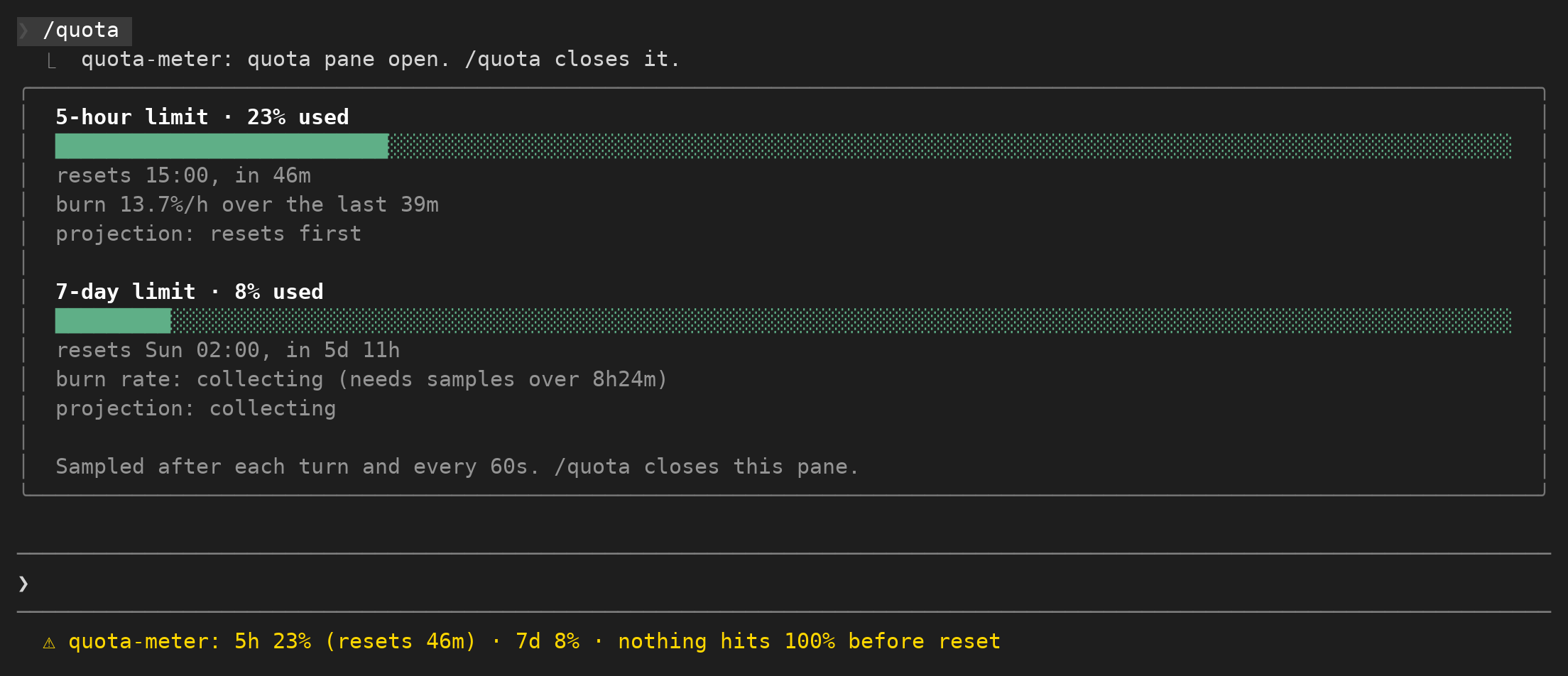
고정 상태 표시줄에서 5시간 및 7일 요금제 기간의 사용량을 보여줍니다.
커뮤니티 작성자가 관리하는 프로젝트입니다. 기능, 버전 요구 사항, 설정 방법은 아래 원본 README를 확인하세요. 이 사이트는 권한 스캔 결과를 제공합니다. 설치 전에 소스와 외부 의존성을 확인하세요.
먼저 작성자의 README에서 marketplace와 플러그인 이름을 확인하세요. 저장소 구조에 따라 명령어가 달라질 수 있습니다.
claude plugin marketplace add Arunjay4213/claude-mods
claude plugin install quota-meter
Your Claude subscription has usage windows: a 5-hour one, a 7-day one, and on a Claude gateway a spend limit.
Claude Code reports how full each one is, but only inside a notice that appears when you are already close.
quota-meter keeps that reading on screen the whole session, adds a countdown to the reset, and works out how long the current pace can keep going.
A pinned line under the prompt, from the moment the session starts:
5h 15% (resets 1h23m) · 7d 6% · nothing hits 100% before reset
The tail is the useful part. It is one of three things:
5h full in ~2h05m - at the recent pace that window fills before it resets.nothing hits 100% before reset - every window resets before the pace could fill it.collecting burn rate - no window has been watched long enough yet to have a rate worth quoting. A window that is still collecting is simply left out of the tail; it never hides a window that does have a rate.When the account reports no windows at all the line reads no plan limits reported yet.
That is the normal state for an API-key session and for the first few seconds of any session, before Claude has answered once.
A pane, opened and closed with /quota, one block per window:
5-hour limit · 15% used
██████████░░░░░░░░░░░░░░░░░░░░░░░░░░░░░░░░░░░░░░░░░░░░░░░░░░░░░░░
resets 15:00, in 1h23m
burn 24.4%/h over the last 2m
projection: resets first

7-day limit · 6% used
████░░░░░░░░░░░░░░░░░░░░░░░░░░░░░░░░░░░░░░░░░░░░░░░░░░░░░░░░░░░░░
resets Sun 02:00, in 5d 12h
burn 0.0%/h over the last 2m
projection: steady, not rising
The bar is drawn to the pane's own width, so it fits whether the pane is docked beside the transcript (110 columns and up, in the fullscreen layout) or sitting inline above the prompt on a narrow terminal. The reset is given as a clock time and as a countdown, because one of the two is always the one you wanted.
claude plugin marketplace add Arunjay4213/claude-mods
claude plugin install quota-meter@claude-mods
Mods are early access, so the hooks module only loads when function hooks are switched on.
Add this to ~/.claude/settings.json:
{
  "env": { "CLAUDE_CODE_ENABLE_FUNCTION_HOOKS": "1" }
}
or set CLAUDE_CODE_ENABLE_FUNCTION_HOOKS=1 on the command line for one run.
To try it straight from a checkout, without installing:
CLAUDE_CODE_ENABLE_FUNCTION_HOOKS=1 claude --plugin-dir plugins/quota-meter
$.session.usage() reports the windows the last API response carried, each as { kind, percentUsed, resetsAt }.
The mod reads it after every finished turn and on a 60 second tick, and keeps each reading as { atMs, percentUsed } in $.store.
(last percent - first percent) / (last time - first time), expressed as percent per hour.
A straight slope is the right shape here because the readings inside one window are a step function that only rises, so a fit through the middle of it would understate the current position.collecting in both surfaces rather than showing a number it does not have.
The reason for the wait is that the API reports usage as a whole percent.
A 7-day window that ticks from 6% to 7% during a 16 minute span reads as 3.8% per hour, which projects a full window in a day; the same single tick spread over 8.4 hours reads as the small movement it actually was.
Percent values are rounded to whole numbers before anything is computed from them, because the API sometimes reports 7.000000000000001.(100 - percentUsed) / burn.
If the window resets before that time arrives, the mod says resets first instead of a time you will never reach.
If the rate is zero or falling, it says steady, not rising.$.store, so restarting Claude Code inside the same window keeps the rate you had built up.Nothing here is estimated or filled in. If a figure is missing from the API it is reported as missing.
rateLimits is empty off a subscription, so the meter shows no plan limits reported yet and the pane says the same. There is nothing to read.no plan limits reported yet until Claude answers once.collecting for it and projects only from the 5-hour window. The pane always prints the span a rate was measured over, so you can see how much to trust it.spend_limit has no fixed length, so its readings are kept for seven days, and it can read above 100% once the limit is passed. The bar stops at full; the percent does not./quota toggles: the second run closes it, as /diff does..claude-plugin/plugin.json name, version, description
hooks/hooks.json names the module
hooks/register.tsx the hooks: sampling, the status line, the command, the pane
hooks/quota.ts the numbers and the wording, with no engine calls in them

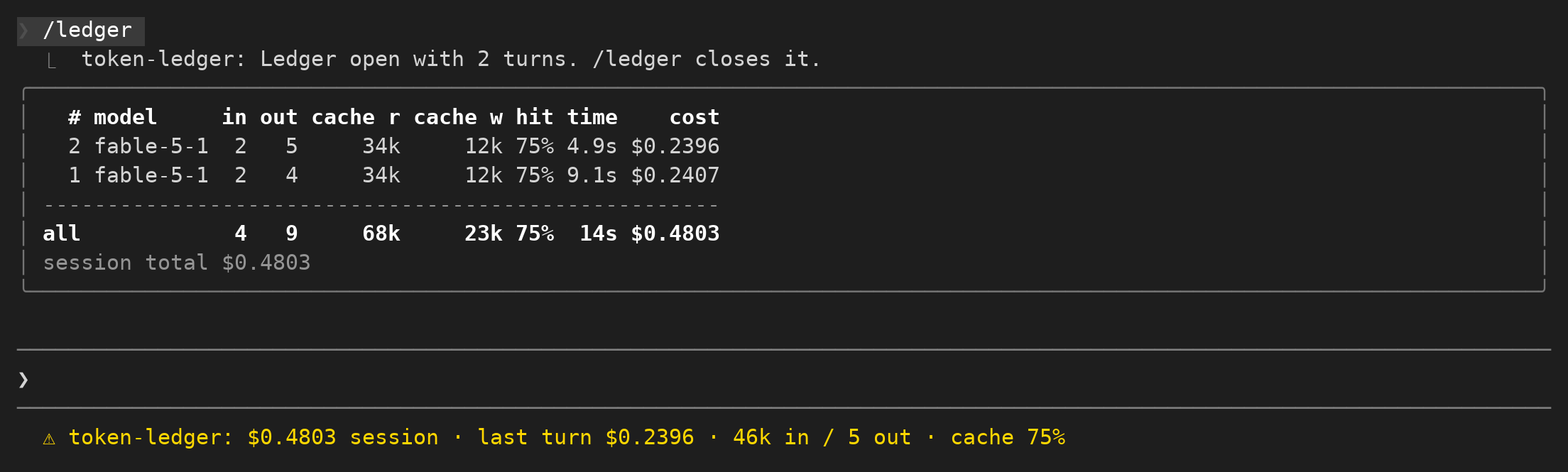
세션 지출, 최근 턴의 토큰, 캐시 적중률을 기록하고 사용량 표를 제공합니다.
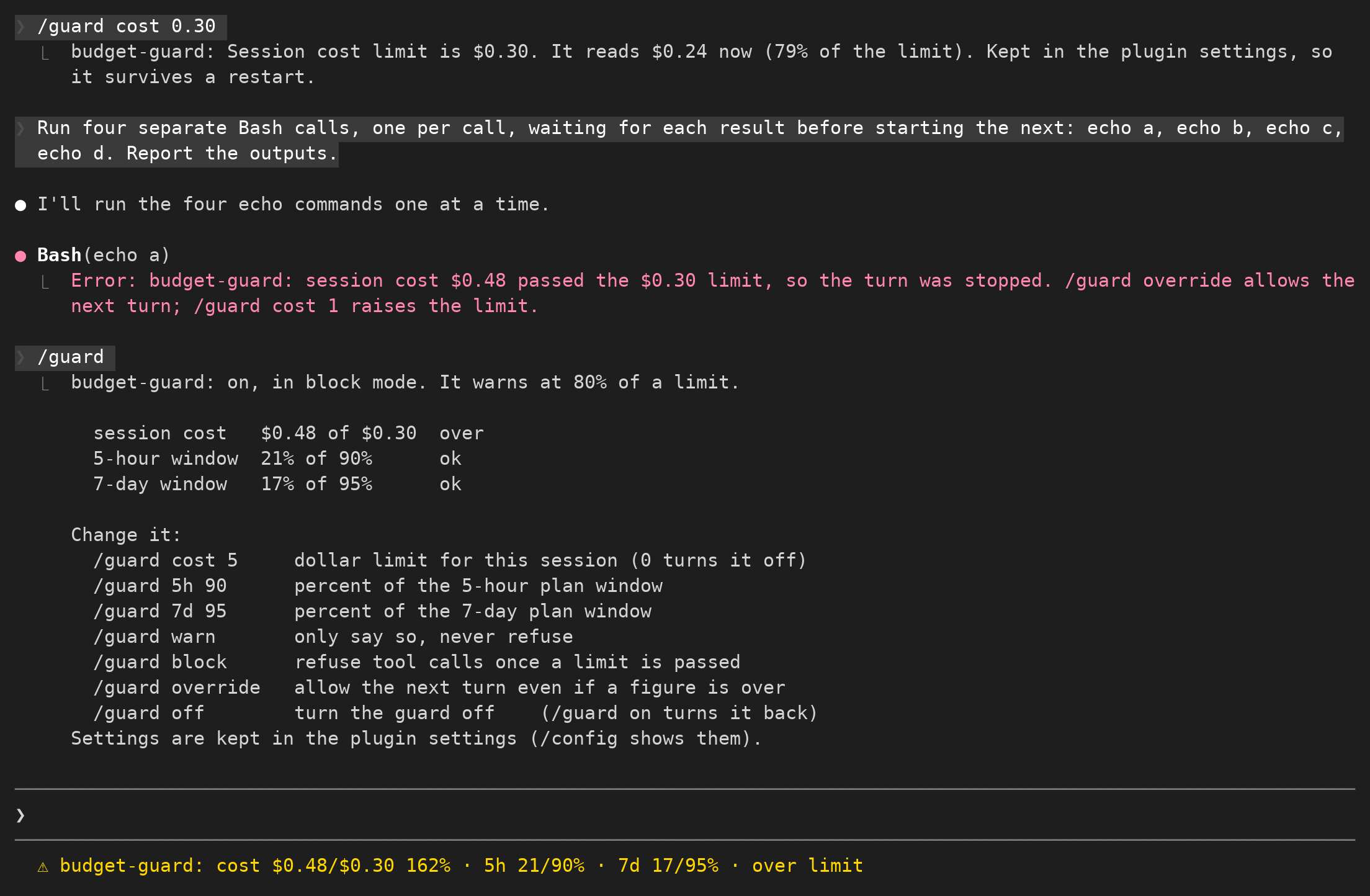
세션 예산을 설정하고 한도에 가까워지면 알림을 보내며 추가 지출을 제한합니다.

token-weather-usage:One line above the prompt: context weather, tokens, a bar per recent prompt, then your 5-hour and 7-day limits
