
ohosgor@ohosgor
ohosgor/podside
ohosgor/podside
podside는 대화 옆에 실시간 Kubernetes pod 목록을 그리는 Claude Code mod입니다. 네임스페이스별로 그룹화해 pod 상태를 한눈에 보여 주고, 한 번의 키 입력으로 로그와 describe 출력을 읽게 하며, Ask Claude를 통해 선택한 pod의 describe 출력과 최근 로그를 Claude에 보내 진단할 수 있습니다. 창이 열려 있는 동안 선택한 pod가 모든 프롬프트의 컨텍스트로 첨부됩니다. 설계상 읽기 전용이며 자체 kubeconfig로 kubectl get, logs, describe, version과 config 읽기만 실행하고 다른 네트워크 요청은 하지 않으며, 기본 제공 도움말을 숨겼는지만 저장합니다. Claude Code v2.1.287+와 PATH의 kubectl이 필요하고 /plugin marketplace add ohosgor/podside 및 /plugin install podside@podside로 설치할 수 있습니다.
먼저 작성자의 README에서 marketplace와 플러그인 이름을 확인하세요. 저장소 구조에 따라 명령어가 달라질 수 있습니다.
claude plugin marketplace add ohosgor/podside
claude plugin install podside
A Kubernetes pod pane that lives beside Claude Code.
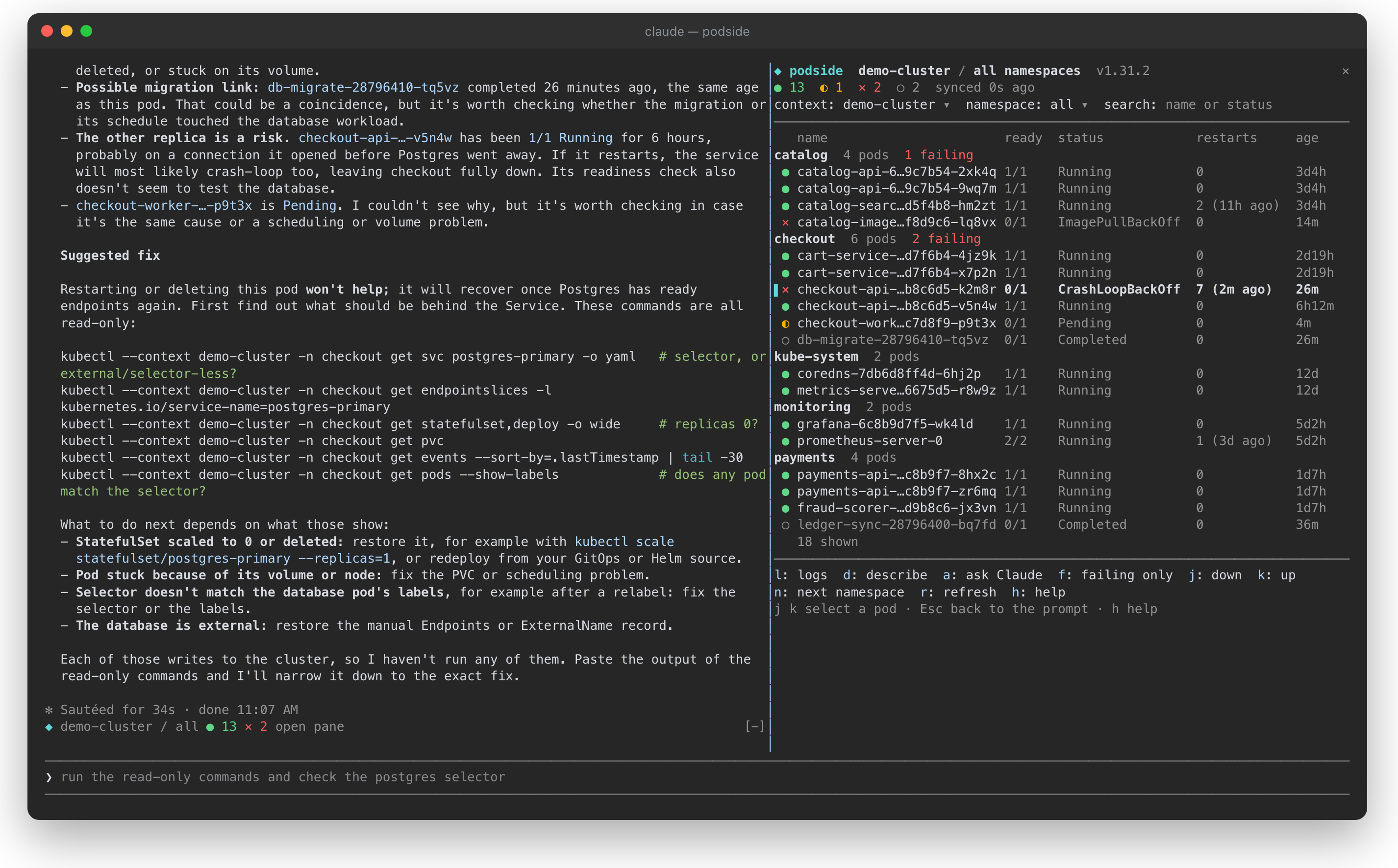
podside is a Claude Code mod: it draws a live pod list next to your conversation, lets you read logs and describe output with one key, and tells Claude which pod you are looking at, so you can just ask "why is this pod failing?".
It is inspired by the keyboard-first flow of k9s, but it is a separate project with no affiliation to k9s.
<sub>A demo cluster. Pressing <code>a</code> on the crash-looping <code>checkout-api</code> pod sent its describe output and logs to Claude, which traced the crash to a database Service with no ready endpoints and suggested read-only commands to confirm it.</sub>
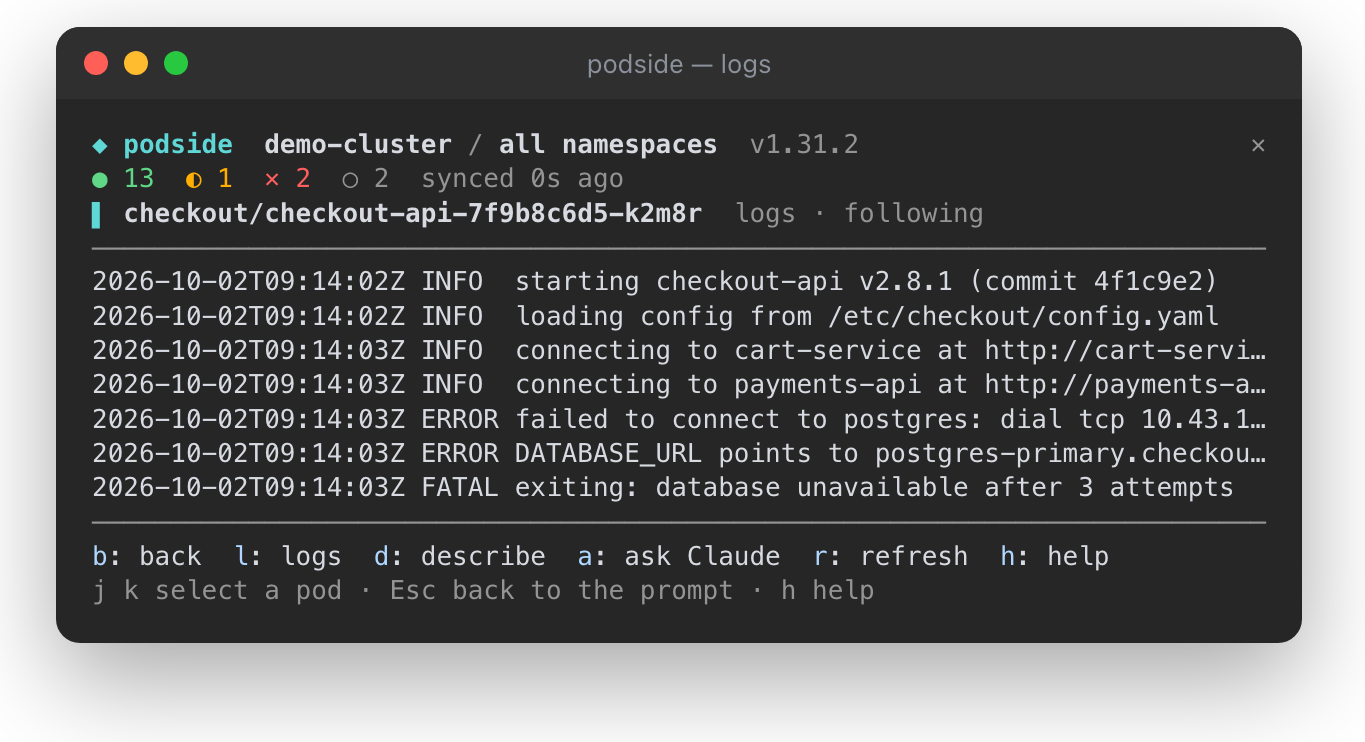
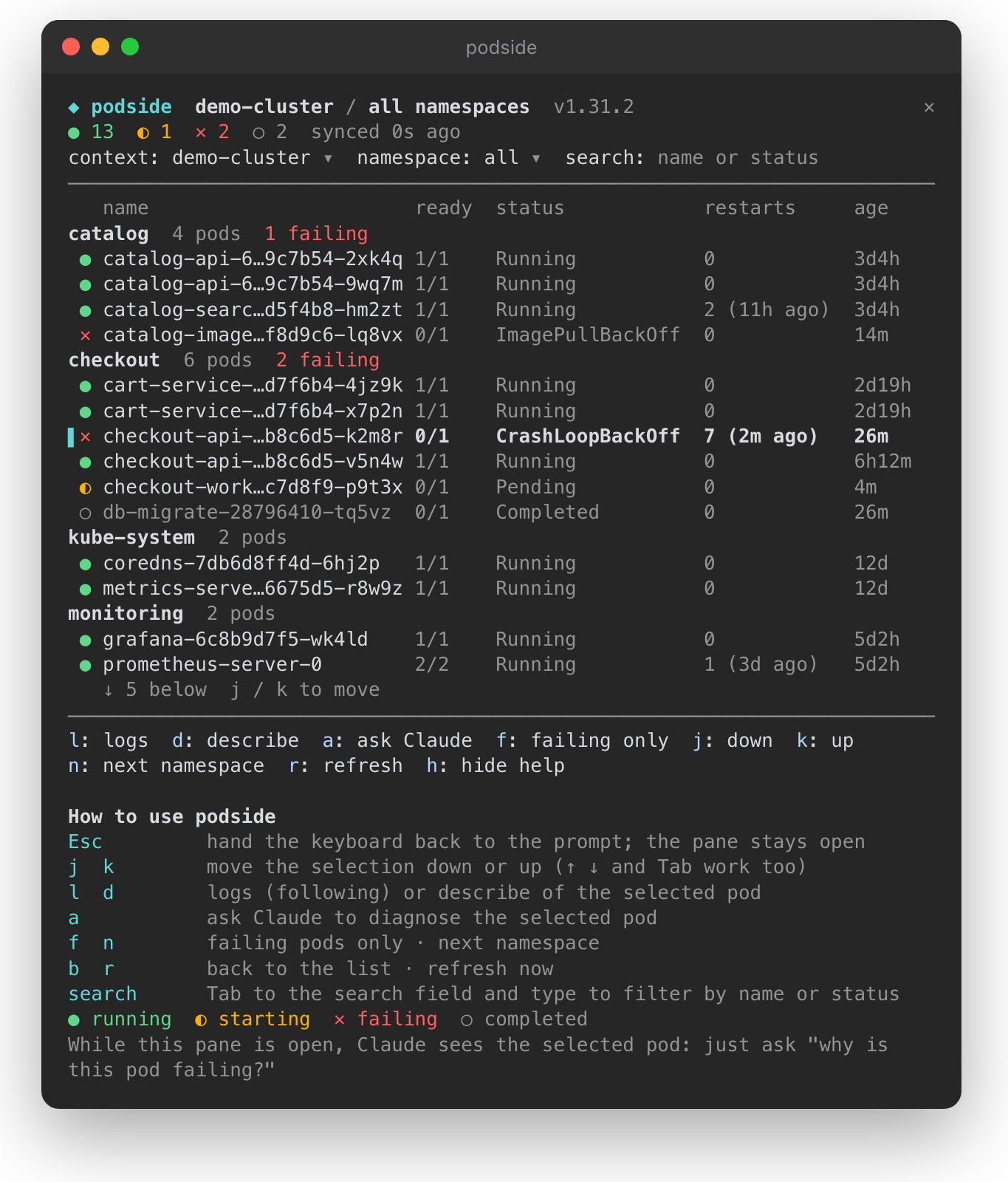
● running, ◐ starting, ✕ failing, ○ completed, with totals in the top bardescribe output and recent logs to Claude for a diagnosiskubectl get, logs, describe, version and config reads. It never writes to your cluster, and its context switcher passes --context instead of touching your kubeconfig.| Logs of the selected pod, following | The pane with its built-in help |
| --- | --- |
|  |
|  |
|
Requires Claude Code v2.1.287 or later and kubectl on your PATH.
/plugin marketplace add ohosgor/podside
/plugin install podside@podside
Or from your shell:
claude plugin marketplace add ohosgor/podside
claude plugin install podside@podside
/podside              # all namespaces
/podside my-namespace # one namespace
The pane takes the keyboard when it opens. Esc hands it back to the prompt; click the pane or press ctrl+x then Tab to return.
| Key | Action |
| --- | --- |
| j k | Move the selection down / up (↑ ↓ and Tab work too) |
| l | Logs of the selected pod |
| d | Describe the selected pod |
| a | Ask Claude about the selected pod |
| b | Back to the list |
| f | Toggle failing pods only |
| n | Next namespace |
| r | Refresh now |
| h | Show or hide the built-in help |
The context, namespace and search fields at the top are reachable with Tab. A short guide sits at the bottom of the pane on first use; h hides it and podside remembers that.
git clone https://github.com/ohosgor/podside
claude --plugin-dir ./podside   # hot-reloads on save
claude plugin validate ./podside
claude plugin test ./podside
The hooks module is hooks/register.tsx; its tests are in register.test.tsx and run against a stubbed kubectl.
A mod runs inside Claude Code with your permissions. podside's own calls are limited to the kubectl reads listed above, $.prompt.submit for "Ask Claude", and drawing its pane. You can list everything it hooks and calls without running it:
claude plugin validate .
kubectl, with your own kubeconfig: config get-contexts, config current-context, config view --minify, version, get ns, get pods, logs and describe pod. It talks to your cluster through kubectl and makes no other network requests.a, the pod's describe output and its last 120 log lines are sent as a prompt. Nothing is sent while the pane is closed or no pod is selected.h), in Claude Code's local plugin store. Pod data lives only in the session's memory.
neural-trader(v2.7+) 기반의 신경망 트레이딩 전략입니다. 자체 학습 LSTM/Transformer/N-BEATS 모델, Rust/NAPI 백테스트, 112+ MCP 도구, 스웜 협업, 포트폴리오 최적화를 제공합니다.

claude-seo를 위한 선택적 mods companion입니다. Claude Code 안에서 mod(function-hook 플러그인)로 실행되므로 skill이 요청만 할 수 있는 일을 강제할 수 있습니다.

Claude Code용 Repowise 플러그인입니다. Graph, Git, Docs, Decisions, Code Health의 5개 코드 지능 계층을 제공하고 MCP 도구, slash commands, 자동 skills로 Claude가 아키텍처, 소유자, 핫스팟과 결함 위험을 이해하도록 합니다. spinner 힌트, margin notes, 변경 리뷰, /lens 패널이 있는 Claude Code mod인 Lens도 포함합니다.