
hacksurvivor@hacksurvivor
hacksurvivor/claude-mods/tree/main/mods/nightshift

Claude Code 안의 Codex: Claude 사용 한도가 끝나면 채팅을 이어받고, Codex의 실시간 음성으로 대화하며, Claude가 요청할 수 있는 이미지를 만들고, Claude의 브라우저 창에서 탐색합니다.
hacksurvivor/claude-mods/tree/main/mods/nightshift
Claude Code 안의 Codex입니다. Nightshift는 같은 창에서 OpenAI Codex를 한 번 클릭으로 사용할 수 있게 하는 Claude Code 모드입니다.
/codex <prompt>는 모드와 관계없이 Codex로 한 메시지에 답합니다.Claude Code 2.1.286 이상(mods), PATH에 있는 Codex CLI 0.159 이상과 로그인 상태(codex login)가 필요합니다. ChatGPT plan이면 작동하며 OpenAI API key는 필요하지 않습니다. Node.js 22 이상이 필요합니다. 음성에는 macOS가 필요합니다.
Claude Code에 설치:
/plugin marketplace add hacksurvivor/claude-mods
/plugin install nightshift@hacksurvivor
/reload-plugins
먼저 작성자의 README에서 marketplace와 플러그인 이름을 확인하세요. 저장소 구조에 따라 명령어가 달라질 수 있습니다.
claude plugin marketplace add hacksurvivor/claude-mods
claude plugin install nightshift
Codex inside Claude Code. Nightshift is a Claude Code mod that puts OpenAI's Codex one click away in the same window:
/codex <prompt> answers one message with Codex, whatever the mode.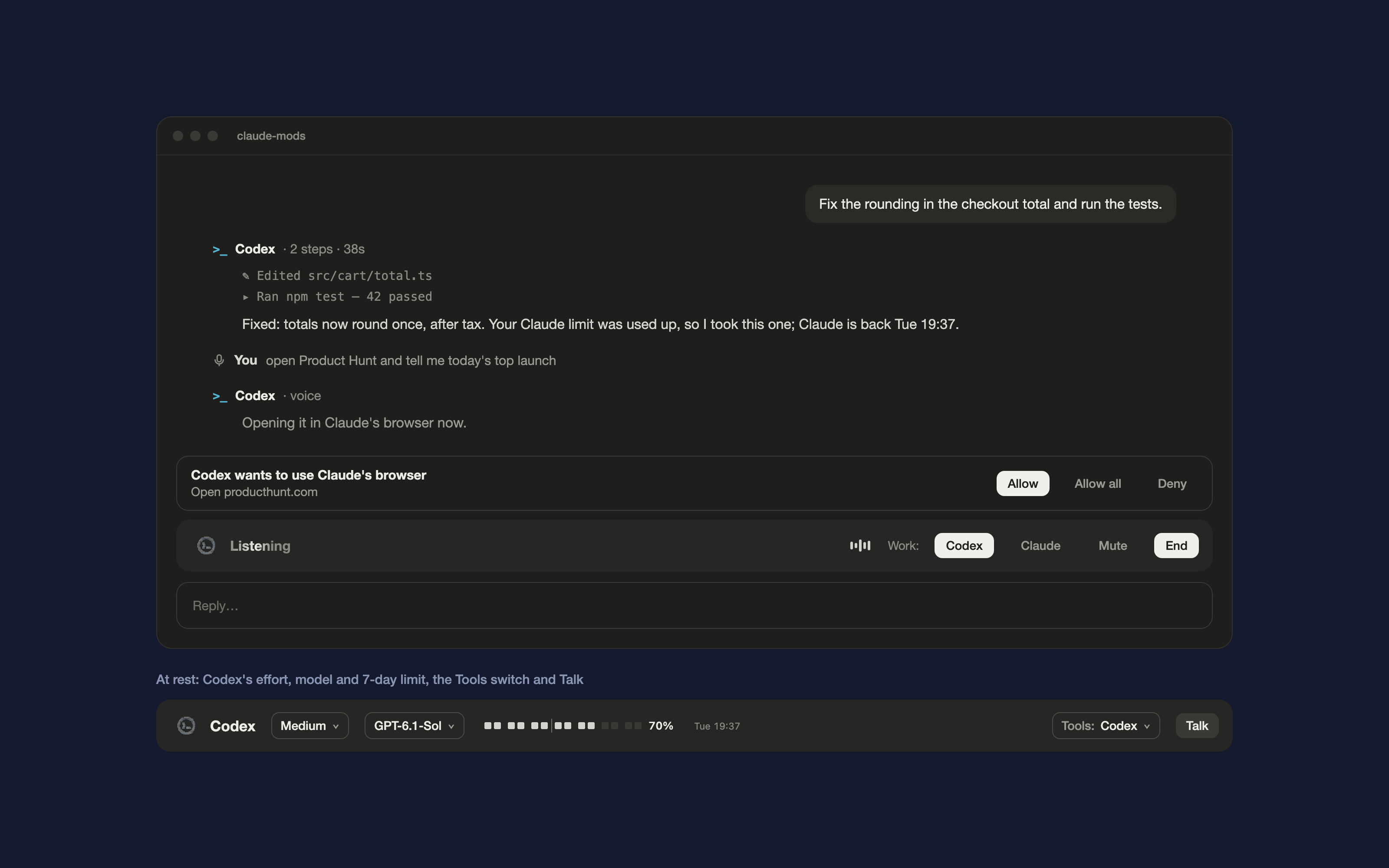
PATH, signed in (codex login). A ChatGPT plan works; no OpenAI API key is needed.PATH, for Nightshift's two small helper scripts.In Claude Code:
/plugin marketplace add hacksurvivor/claude-mods
/plugin install nightshift@hacksurvivor
/reload-plugins
/nightshift auto | codex | claude: Codex only when Claude's limit is used up (the default), Codex for every message, or never./nightshift effort <level>, /nightshift model <name>, /nightshift tools claude | codex | auto./codex <prompt>: one message to Codex. Start it with $imagegen for an image.Nightshift is open about everything it does on your machine and what leaves it:
PATH through your login shell: codex exec in the project folder with Codex's workspace-write sandbox, and codex app-server for voice. Codex then works with your own Codex login and settings./codex; the brief Claude writes when it calls the codex tool; and during Talk, your voice, which Codex's voice helper streams to OpenAI. The microphone is used only while Talk is on.~/.codex/sessions (never your messages there), the model list in ~/.codex/models_cache.json, the default model and effort in ~/.codex/config.toml, and the images Codex saves in ~/.codex/generated_images, to show them (it makes small JPEG previews with macOS sips). It never reads ~/.codex/auth.json or any credential.hooks/voice.mjs (the voice bridge) and hooks/browser-mcp.mjs (the browser bridge Codex uses). They talk to Nightshift over Unix sockets in your private temp folder ($TMPDIR). Neither opens a network port.All on your computer. Nothing is downloaded or installed, and no package manager runs.
| Program | When | Why |
| --- | --- | --- |
| codex exec --json … and codex exec resume …, through /bin/zsh -lc 'exec codex "$@"' | When Codex picks up the chat, for /codex, and when Claude calls the codex tool | To have Codex do the work. The login shell finds codex on your PATH the way your terminal does. The arguments are fixed apart from the prompt, the Codex model and effort, images you attach, and the settings that connect Codex to the browser bridge. |
| node hooks/voice.mjs, through /bin/zsh -lc 'exec node "$@"' | While Talk is on | The voice bridge. It runs codex app-server and the voice helper that ships with the Codex CLI. |
| node hooks/browser-mcp.mjs | Started by Codex during runs Nightshift begins | The browser bridge: Codex's way into Claude's browser pane. |
| /bin/zsh -c with ls, grep and tail | At session start, after each Codex run, and every 5 minutes | To read the newest usage-limit line from ~/.codex/sessions, for the 7-day meter. |
| /bin/zsh -c with cat and awk | At session start | To read Codex's model list and the two settings it uses (default model and effort) from ~/.codex. |
| /bin/zsh -c with stat, and sips with base64 | After a Codex run that made images | To find the PNGs Codex saved for that run and make small JPEG previews (in a temporary file deleted right after). |
| /usr/bin/getconf DARWIN_USER_TEMP_DIR | When a bridge starts | To find your private temp folder for the bridges' sockets. |
Nightshift's own requests ($.http.fetch) go only to http://localhost, over Unix sockets in your private temp folder, to its two bridges. They never leave your computer:
GET /next (the next step Codex asks for) and POST /result (its result).POST /mute, POST /end, POST /route (Codex or Claude does the work) and POST /speak (Claude's answer, for the voice to read out).Data leaves your computer only through the Codex CLI, to OpenAI, as listed above.
While a Codex run or a call that Nightshift started is going, Nightshift calls the tools of Claude's browser pane (navigate, get_page_text, read_page, find, computer, form_input, tabs_context, tabs_create) on Codex's behalf: one call for each step Codex asks for, asked or not as described above. Before Codex's first step and each page it opens, Nightshift also calls tabs_context to see whether you can watch: if the pane isn't open, it opens Codex's page with preview_start, which shows the pane; if the pane is hidden behind something else, it shows a toast saying ⌘⇧B brings it back. It calls no other tools.
/codex <prompt>: your prompt, and Codex answers it.When Claude answers again after Codex covered for it, Nightshift adds one note to Claude's context. The note says how many messages Codex answered and which files it changed.
session.start: registers /nightshift, /codex and the codex tool, and reads your settings and Codex's limits.prompt.submit: adds the note above when Claude takes back over from Codex. Everything else passes through unchanged.turn.start, turn.step, turn.complete: when Codex covers for Claude, or a voice exchange is kept, turn.step answers the turn itself instead of Claude. Otherwise the turn goes to Claude unchanged. turn.complete sends Claude's answer to the voice for work you passed to Claude, and retries a limit-hit message with Codex.tool.call: answers Nightshift's own codex tool. When Tools is set to Codex, it refuses calls to Claude's browser tools (mcp__Claude_Browser__*, mcp__claude-in-chrome__*) and computer-use tools (mcp__computer-use__*), telling Claude to use Codex instead. Every other tool call passes through unchanged.tool.describe: only when Tools is set to Codex. It describes those same browser and computer-use tools as off and moves them behind tool search, and adds to the codex tool's description that it takes that work.ui.render: draws the strip, Codex's replies, voice rows, image cards and the Allow row. It changes nothing else.command.run: serves /nightshift and /codex.Nightshift uses your Codex login only by running the Codex CLI. It never reads, stores or sends a credential, so there is no key or token to configure.
>_ header are OpenAI's; parts of the Codex CLI's art and shimmer are ported under Apache-2.0 (see NOTICE).Apache-2.0. See LICENSE and NOTICE.

Claude Code용 도메인 주도 설계 스캐폴딩 플러그인. 함수 훅 Guard로 DDD 메모리에 비밀을 쓰는 작업을 차단한다.

Claude에 register_assumption 도구를 제공하고 이번 턴의 가정, 결정 및 고려했지만 하지 않은 항목을 프롬프트 위에 표시합니다.

채팅 채널, routine, heartbeat, learning loop를 갖춘 상시 실행 Claude Code agent plugin인 hermitd의 test wrapper mod입니다.