ClaudeMods
☰
KO
● — 명 접속 중 · 조회 — 회
후원프로젝트 제출
GitHub 저장소 · 작성자 Anton Martyniuk

Microsoft, AI 에이전트용 기성 .NET 스킬 99개를 조용히 공개

Microsoft의 오픈 소스 dotnet/skills 리포지토리를 홍보하는 X 게시물 — Claude Code, Codex, Copilot, Cursor에서 작동하는 14개 플러그인과 99개 스킬 — 다섯 개 추천 플러그인의 짧은 둘러보기와 자신만의 Claude 스킬 작성에 관한 작성자 블로그 가이드 링크 포함.

A
Anton Martyniuk@AntonMartyniuk

1/

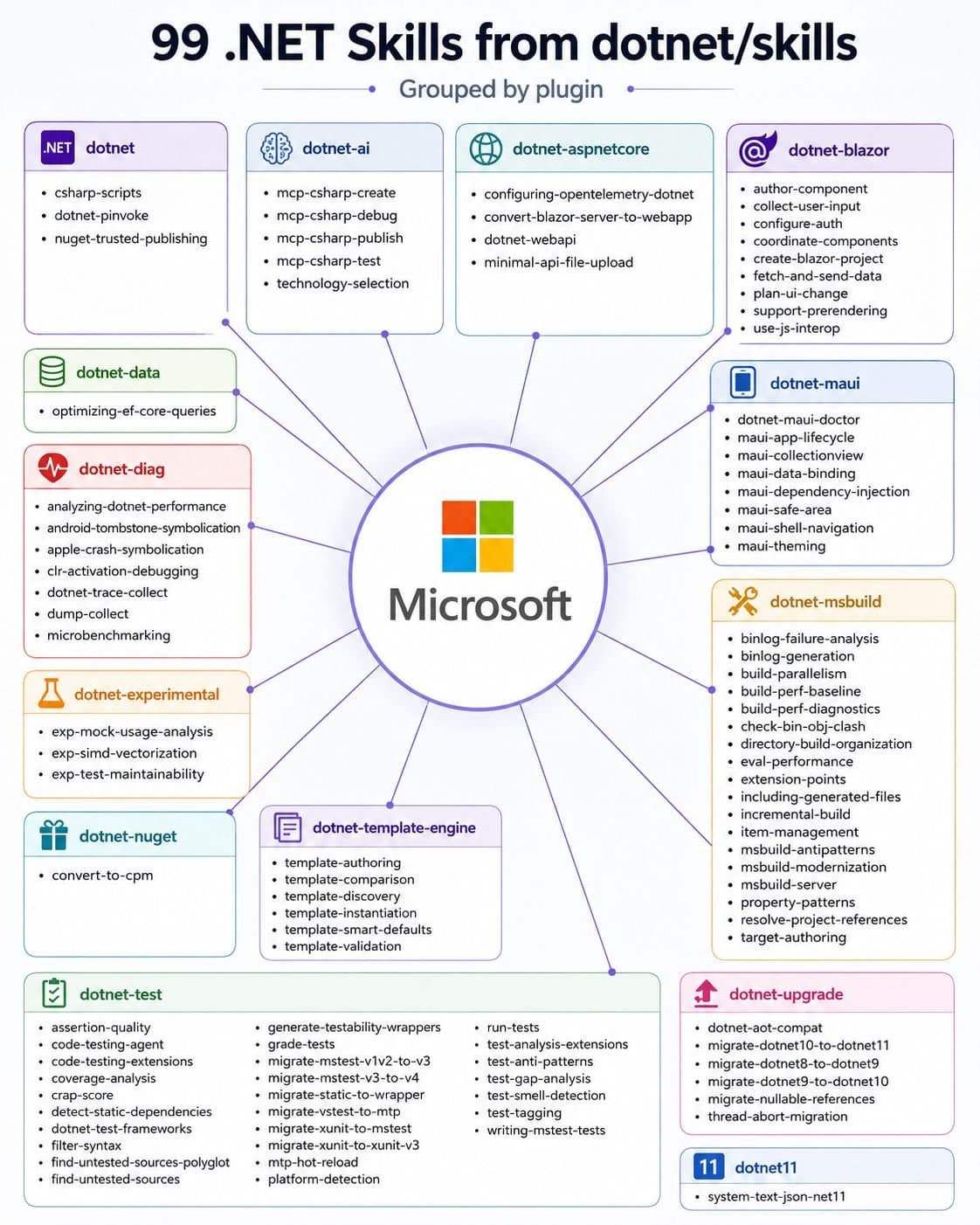
Microsoft quietly published 99 ready-made .NET skills for AI Agents. Most .NET developers have no idea they exist 👇 These skills are official and open source. They work in Claude Code, Codex, GitHub Copilot and Cursor. A skill is a folder with instructions. Your AI agent loads it only when a task needs it. You write the steps once, and the agent follows them every time. Microsoft keeps them in the dotnet/skills repo: 14 plugins, 99 skills. A plugin is a group of related skills. You install a plugin and get all its skills at once. Here are 5 I'd install first, in this order: 𝟭. 𝗱𝗼𝘁𝗻𝗲𝘁-𝘂𝗽𝗴𝗿𝗮𝗱𝗲 Moves a project from .NET 8 to 10 and turns on nullable reference types. 𝟮. 𝗱𝗼𝘁𝗻𝗲𝘁-𝗱𝗮𝘁𝗮 The optimizing-ef-core-queries skill catches N+1 queries, picks the right tracking mode and removes common EF Core performance traps. 𝟯. 𝗱𝗼𝘁𝗻𝗲𝘁-𝗮𝘀𝗽𝗻𝗲𝘁 Builds Web API endpoints and file-upload endpoints in Minimal APIs the right way. 𝟰. 𝗱𝗼𝘁𝗻𝗲𝘁-𝘁𝗲𝘀𝘁 The biggest plugin: 22 skills to run tests, filter them and move between test frameworks. 𝟱. 𝗱𝗼𝘁𝗻𝗲𝘁-𝗮𝗶 Builds, debugs and tests MCP servers with the C# SDK. These skills know .NET. They don't know YOUR project. They can't tell where you keep your entities, that you don't use repositories, or that your handlers return Result<T>. Your own skills fill this gap: → Microsoft's skills handle general .NET tasks → Your skills handle your house rules and conventions Use both, and your AI agent knows the framework and your style. 2 tips before you install: → Don't install all 99. Every skill adds its description to the agent's context, so pick the plugins that match your stack → Name the skill in your prompt instead of letting the agent guess which one to use In my article, I explain the full setup: → What a skill is and what's inside one → How to write a description so the skill triggers at the right time → How to turn your conventions into skills: rich entities, no repositories, full features → How to use the Skill Creator to bundle your real code files → How to install Microsoft's dotnet/skills in 4 steps 👉 Read the full step-by-step guide here: ↳ https://antondevtips.com/blog/creating-claude-skills-for-dotnet-apps?utm_source=twitter&utm_medium=social&utm_campaign=newsletter&utm_content=12-11-2026
이미지1

2/

📌 You don't read my newsletter. I explain .NET and Architecture based on my 13+ years of experience. For each topic, I present the pros, cons, and trade-offs, and you get a checklist for when to use each approach and when not to. AI won't teach you this! Every Tuesday, I send an article to 28,000 people learning to master .NET. 📌 This week's blog on New Features in .NET 11 and C# 15 (you need to read this): https://antondevtips.com/blog/new-features-in-dotnet-11-and-csharp-15?utm_source=twitter&utm_medium=social&utm_campaign=newsletter&utm_content=12-11-2026 👉 Join us (and share with your friends and colleagues) → https://antondevtips.com?utm_source=twitter&utm_medium=social&utm_campaign=newsletter&utm_content=12-11-2026

번역 완료

이 mod 소개

Microsoft는 AI 에이전트용 기성 .NET 스킬 99개를 조용히 공개했습니다.

대부분의 .NET 개발자는 그것들이 존재한다는 사실을 모릅니다 👇

이 스킬들은 공식이며 오픈 소스입니다.

Claude Code, Codex, GitHub Copilot, Cursor에서 작동합니다.

스킬은 지침이 담긴 폴더입니다.

AI 에이전트는 작업에 필요할 때만 이를 로드합니다.

단계를 한 번 작성하면 에이전트는 매번 그 단계를 따릅니다.

Microsoft는 이를 dotnet/skills 리포지토리에 보관합니다: 14개 플러그인, 99개 스킬.

플러그인은 관련 스킬의 그룹입니다. 플러그인을 설치하면 모든 스킬을 한 번에 얻습니다.

먼저 설치하고 싶은 5개를 이 순서로 소개합니다:

  1. dotnet-upgrade 프로젝트를 .NET 8에서 10으로 이동하고 nullable 참조 형식을 켭니다.

  2. dotnet-data optimizing-ef-core-queries 스킬은 N+1 쿼리를 잡아내고, 올바른 추적 모드를 선택하며, 흔한 EF Core 성능 함정을 제거합니다.

  3. dotnet-aspnet Minimal API에서 Web API 엔드포인트와 파일 업로드 엔드포인트를 올바른 방식으로 구축합니다.

  4. dotnet-test 가장 큰 플러그인: 테스트를 실행하고, 필터링하고, 테스트 프레임워크 사이를 이동하는 22개 스킬.

  5. dotnet-ai C# SDK로 MCP 서버를 구축, 디버그, 테스트합니다.

이 스킬들은 .NET을 압니다.

하지만 당신의 프로젝트는 모릅니다.

엔티티를 어디에 두는지, 리포지토리를 사용하지 않는지, 핸들러가 Result<T>를 반환하는지 알 수 없습니다.

당신의 스킬이 이 간극을 메웁니다: → Microsoft의 스킬은 일반 .NET 작업을 처리합니다 → 당신의 스킬은 당신의 하우스 규칙과 관례를 처리합니다

둘 다 사용하면 AI 에이전트는 프레임워크와 당신의 스타일을 모두 알게 됩니다.

설치 전 2가지 팁: → 99개를 모두 설치하지 마세요. 모든 스킬은 설명을 에이전트의 컨텍스트에 추가하므로, 당신의 스택에 맞는 플러그인을 고르세요 → 에이전트가 어느 것을 사용할지 추측하게 두지 말고 프롬프트에서 스킬을 지정하세요

제 글에서는 전체 설정을 설명합니다:

→ 스킬이 무엇이고 그 안에 무엇이 있는지 → 스킬이 적절한 시점에 트리거되도록 설명을 작성하는 방법 → 관례를 스킬로 바꾸는 방법: 풍부한 엔티티, 리포지토리 없음, 전체 기능 → Skill Creator를 사용해 실제 코드 파일을 묶는 방법 → Microsoft의 dotnet/skills를 4단계로 설치하는 방법

전체 단계별 가이드는 여기에서 읽어보세요: https://antondevtips.com/blog/creating-claude-skills-for-dotnet-apps

설치

설치 방법은 원본 출처를 확인하세요.

원문 / README

Microsoft quietly published 99 ready-made .NET skills for AI Agents.

Most .NET developers have no idea they exist 👇

These skills are official and open source.

They work in Claude Code, Codex, GitHub Copilot and Cursor.

A skill is a folder with instructions.

Your AI agent loads it only when a task needs it.

You write the steps once, and the agent follows them every time.

Microsoft keeps them in the dotnet/skills repo: 14 plugins, 99 skills.

A plugin is a group of related skills. You install a plugin and get all its skills at once.

Here are 5 I'd install first, in this order:

𝟭. 𝗱𝗼𝘁𝗻𝗲𝘁-𝘂𝗽𝗴𝗿𝗮𝗱𝗲 Moves a project from .NET 8 to 10 and turns on nullable reference types.

𝟮. 𝗱𝗼𝘁𝗻𝗲𝘁-𝗱𝗮𝘁𝗮 The optimizing-ef-core-queries skill catches N+1 queries, picks the right tracking mode and removes common EF Core performance traps.

𝟯. 𝗱𝗼𝘁𝗻𝗲𝘁-𝗮𝘀𝗽𝗻𝗲𝘁 Builds Web API endpoints and file-upload endpoints in Minimal APIs the right way.

𝟰. 𝗱𝗼𝘁𝗻𝗲𝘁-𝘁𝗲𝘀𝘁 The biggest plugin: 22 skills to run tests, filter them and move between test frameworks.

𝟱. 𝗱𝗼𝘁𝗻𝗲𝘁-𝗮𝗶 Builds, debugs and tests MCP servers with the C# SDK.

These skills know .NET.

They don't know YOUR project.

They can't tell where you keep your entities, that you don't use repositories, or that your handlers return Result<T>.

Your own skills fill this gap: → Microsoft's skills handle general .NET tasks → Your skills handle your house rules and conventions

Use both, and your AI agent knows the framework and your style.

2 tips before you install: → Don't install all 99. Every skill adds its description to the agent's context, so pick the plugins that match your stack → Name the skill in your prompt instead of letting the agent guess which one to use

In my article, I explain the full setup:

→ What a skill is and what's inside one → How to write a description so the skill triggers at the right time → How to turn your conventions into skills: rich entities, no repositories, full features → How to use the Skill Creator to bundle your real code files → How to install Microsoft's dotnet/skills in 4 steps

👉 Read the full step-by-step guide here: ↳ https://antondevtips.com/blog/creating-claude-skills-for-dotnet-apps?utm_source=twitter&utm_medium=social&utm_campaign=newsletter&utm_content=12-11-2026

📌 You don't read my newsletter.

I explain .NET and Architecture based on my 13+ years of experience. For each topic, I present the pros, cons, and trade-offs, and you get a checklist for when to use each approach and when not to. AI won't teach you this!

Every Tuesday, I send an article to 28,000 people learning to master .NET.

📌 This week's blog on New Features in .NET 11 and C# 15 (you need to read this): https://antondevtips.com/blog/new-features-in-dotnet-11-and-csharp-15?utm_source=twitter&utm_medium=social&utm_campaign=newsletter&utm_content=12-11-2026

👉 Join us (and share with your friends and colleagues) → https://antondevtips.com?utm_source=twitter&utm_medium=social&utm_campaign=newsletter&utm_content=12-11-2026
배지 받기

내 프로젝트인가요? 이 배지를 README나 웹사이트에 넣으면 이 페이지로 연결됩니다.

Featured on ClaudeMods
크기
테마
Markdown
HTML

비슷한 프로젝트