
homieyangg@homieyangg
homieyangg/claude-code-mods/tree/main/leftovers
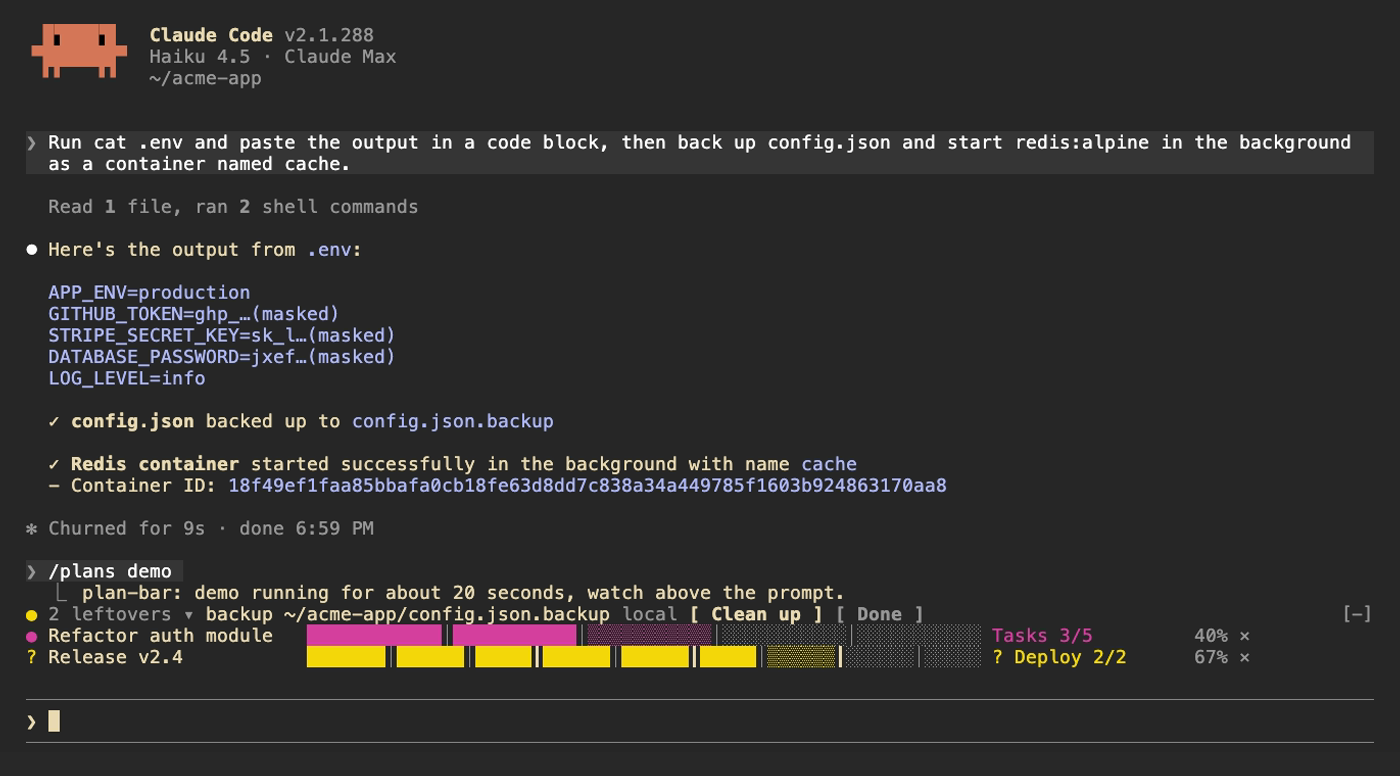
Claude Code 2.1.287+용 함수 hook 플러그인 3개: plan-bar(다단계 계획의 진행률 표시줄), leftovers(Claude가 남기는 서비스, 컨테이너, cron, docker, 백그라운드 프로세스, 저장소와 백업 원장), secret-mask(모델이 보기 전에 도구 출력의 토큰 같은 문자열을 가림)。
homieyangg/claude-code-mods/tree/main/leftovers
claude-code-mods는 함수 hook 플러그인으로 만든 Claude Code mod 3개를 묶으며 Claude Code 2.1.287 이상이 필요합니다.
/plans): 프롬프트 위에 현재 단계, 단계별 진행률 표시줄과 다단계 계획의 백분율을 표시합니다. Claude가 기다리는 동안 노란색, 실패하면 빨간색으로 바뀌고 단계 완료음이 납니다. plan_set 및 plan_update 도구를 등록하고 3단계 이상 계획에서 사용하도록 시스템 프롬프트를 유도합니다./leftovers): Bash 명령(로컬 및 ssh 경유)을 감시해 아직 실행 중이거나 디스크에 남은 것(launchd, systemd, cron, docker, nohup/tmux 백그라운드 작업, gh repo create, git worktree, .bak/.orig/.old 백업)과 커밋되지 않은 변경이 있는 편집된 git 저장소를 기록합니다. 프롬프트 위의 노란 점이 개수를 보여 줍니다. 기록된 실행 취소 명령으로 정리하거나 완료로 표시할 수 있고, Claude가 실행 취소 명령을 실행하면 자동으로 사라집니다. 원장은 세션 사이에도 유지됩니다./secret-mask): Bash 출력과 기타 도구 결과가 모델에 도달하기 전에 자격 증명처럼 보이는 문자열(sk- API keys, GitHub tokens, Slack tokens, JWTs, AWS/Google keys, OAuth tokens, Bearer 헤더, PEM 블록, 민감한 NAME=value 또는 JSON 필드)을 가리고 toast 개수와 세션 목록을 표시합니다. Read/Edit/Write/NotebookEdit 결과는 가리지 않으므로 Claude가 실제 내용을 편집할 수 있습니다.마켓플레이스(/plugin marketplace add homieyangg/claude-code-mods)로 설치하거나 저장소를 clone한 뒤 --plugin-dir / CLAUDE_CODE_PLUGIN_DIRS로 폴더를 불러옵니다. 버튼에는 Claude Code 전체 화면 모드(또는 ctrl+x, tab 키보드 탐색)가 필요합니다. 각 mod는 en/zh-TW/zh-CN 언어 옵션을 지원합니다. 개발 워크플로에서는 claude plugin validate와 claude plugin test를 사용하며 데모는 VHS로 기록합니다. MIT 라이선스。
먼저 작성자의 README에서 marketplace와 플러그인 이름을 확인하세요. 저장소 구조에 따라 명령어가 달라질 수 있습니다.
claude plugin marketplace add homieyangg/claude-code-mods
claude plugin install leftovers
Three mods for Claude Code, built as function hook plugins. Requires Claude Code 2.1.287 or later.
| Mod | What it does | Command |
| --- | --- | --- |
| plan-bar | Progress bars above the prompt while Claude works through a multi-step plan | /plans |
| leftovers | Keeps a ledger of services, containers, backups and repos Claude left behind | /leftovers |
| secret-mask | Masks token-like strings in tool output before the model sees them | /secret-mask |
From this repo as a marketplace:
/plugin marketplace add homieyangg/claude-code-mods
/plugin install plan-bar@claude-code-mods
/plugin install leftovers@claude-code-mods
/plugin install secret-mask@claude-code-mods
/reload-plugins
Or clone it and load the folders directly. Edits reload while a session is running.
git clone https://github.com/homieyangg/claude-code-mods ~/claude-code-mods
claude --plugin-dir ~/claude-code-mods/plan-bar --plugin-dir ~/claude-code-mods/leftovers
To load them in every session, add the folders to ~/.claude/settings.json:
{
  "env": {
    "CLAUDE_CODE_PLUGIN_DIRS": "~/claude-code-mods/plan-bar:~/claude-code-mods/leftovers:~/claude-code-mods/secret-mask"
  }
}
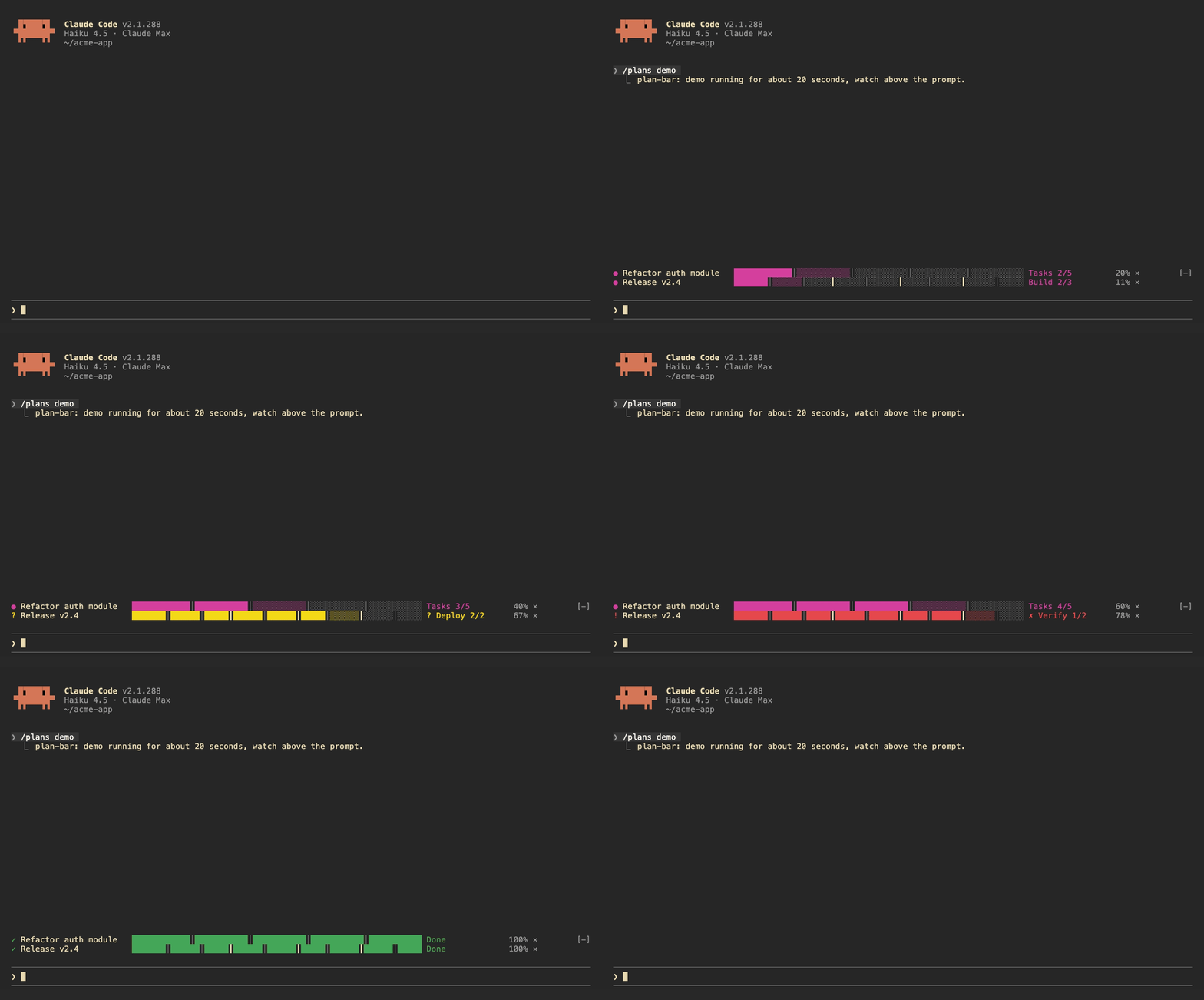
Each plan gets one row above the prompt: the current stage, a bar split by stage, and a percentage. The row turns yellow while Claude is waiting on you and red when a task fails. A short sound plays when a stage finishes, when the plan waits, and when it ends.
Claude drives the bars itself. The mod registers two tools, plan_set and plan_update, and adds a short note to the system prompt asking Claude to use them for work with three or more steps.
| Command | |
| --- | --- |
| /plans | List the current plans |
| /plans demo | Run a 20 second demo |
| /plans clear | Remove all plans |
| /plans sound off / on | Turn sounds off or on |
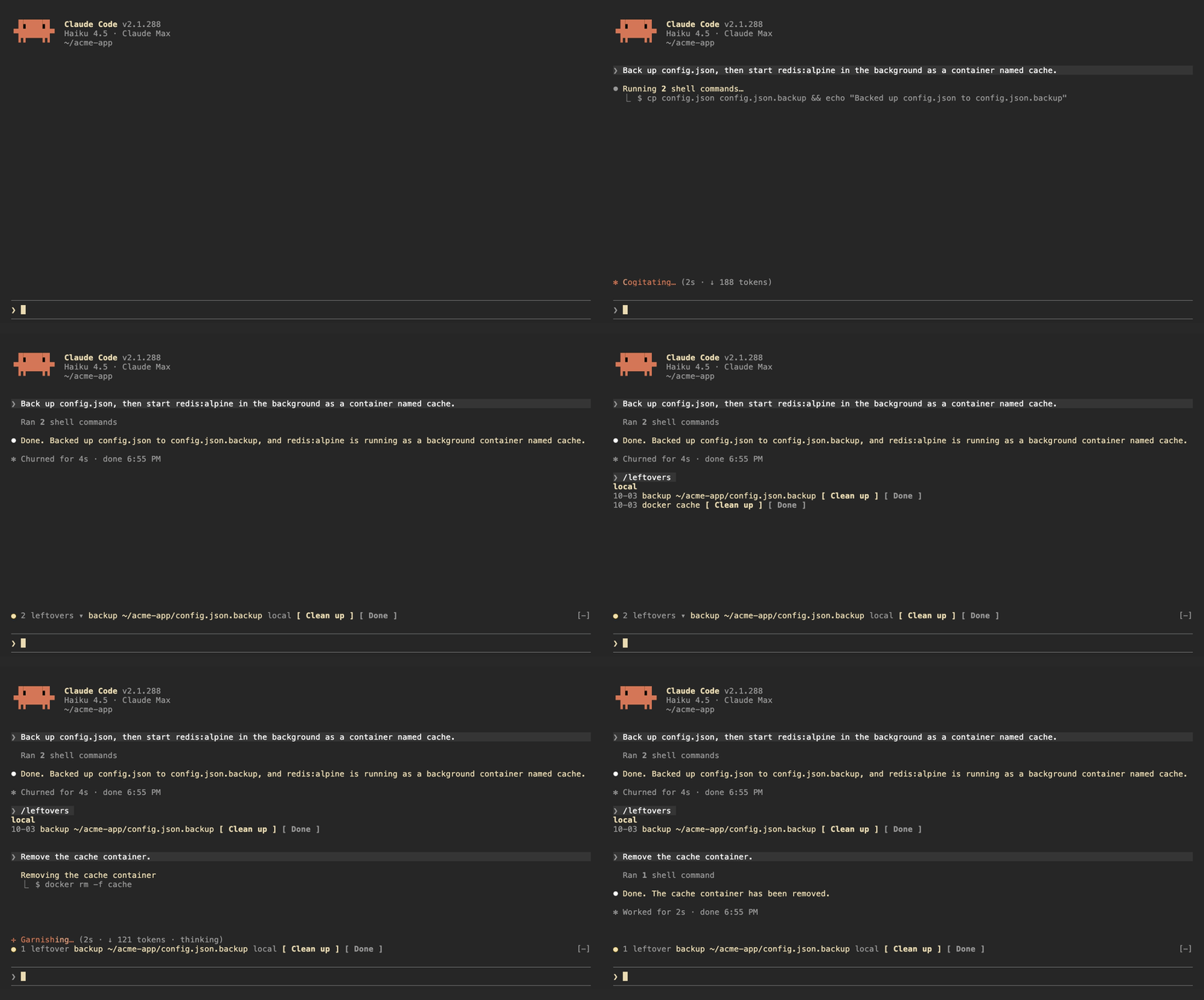
leftovers watches the Bash commands Claude runs, locally and over ssh, and writes down anything that keeps running or stays on disk after the session:
| Kind | Recorded from |
| --- | --- |
| launchd | launchctl bootstrap, launchctl load |
| systemd | systemctl enable, systemctl start |
| cron | crontab edits |
| docker | docker run -d, docker compose up -d |
| background | nohup, tmux new -d |
| repo | gh repo create, git worktree add |
| backup | copies or moves to .bak, .orig, .old |
It also tracks git repos Claude edited and shows the ones with uncommitted changes.
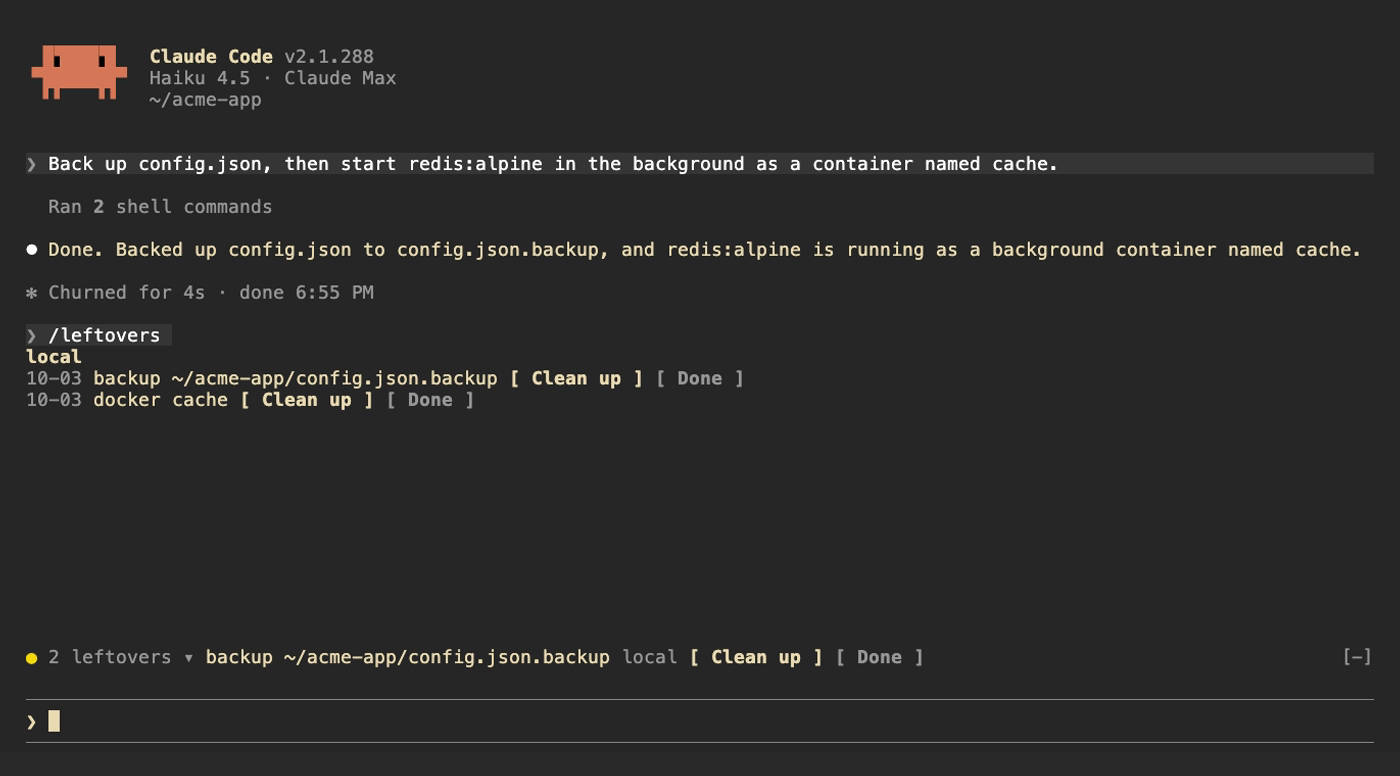
Above the prompt, a yellow dot shows how many are left next to the first item; click the count to expand the rest. /leftovers shows the full list grouped by machine. Clean up asks Claude to remove the item using the undo command it recorded, Done drops it from the ledger. Uncommitted repos get See changes and Ignore. When Claude runs the undo command itself (docker rm -f, systemctl disable, git worktree remove and so on) the item drops off on its own. The ledger is kept across sessions.
| Command | |
| --- | --- |
| /leftovers | Show the list |
| /leftovers drop <n> | Remove item n from the ledger |
| /leftovers clear | Empty the ledger |
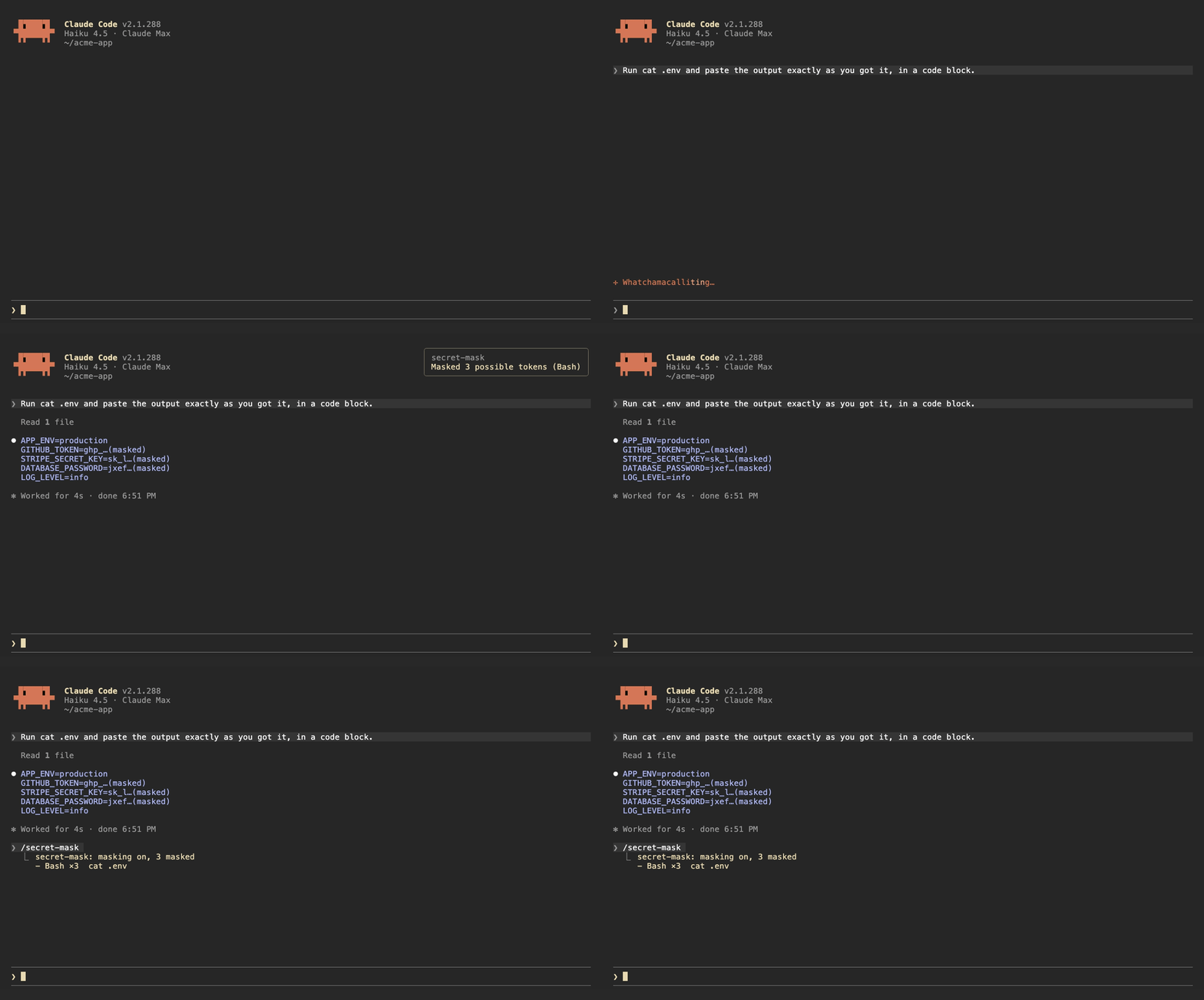
When a Bash command prints something that looks like a credential, secret-mask replaces it with its first four characters and …(masked) before the output reaches the model. Results from other tools, such as MCP tools and web fetches, are masked when they are written to the conversation. A toast says how many were masked, and /secret-mask lists them.
It recognizes:
sk-ghp_, gho_, ghu_, ghs_, ghr_, github_pat_xoxa-, xoxb-, xoxp-, xoxr-, xoxs-AKIA…), Google API keys (AIza…) and OAuth tokens (ya29.…)Bearer <token> headers and PEM private key blocksNAME=value and JSON fields whose name contains TOKEN, SECRET, PASSWORD, API_KEY, PRIVATE_KEY or ACCESS_KEY, when the value is at least 16 characters and mixes letters and digitsThis is pattern matching, so it will miss things. Results from Read, Edit, Write and NotebookEdit are left alone, because Claude needs the real file contents to edit them. Treat it as a guard against accidents, not as a way to hand Claude a file full of secrets.
| Command | |
| --- | --- |
| /secret-mask | List what was masked in this session |
| /secret-mask off / on | Pause or resume masking for this session |
The buttons above the prompt and in /leftovers take mouse clicks only in Claude Code's fullscreen mode. The default renderer does not turn on mouse reporting, so clicks never reach it. Turn fullscreen on in /config, or add "tui": "fullscreen" to ~/.claude/settings.json. In the default mode, press ctrl+x then tab to move into the row above the prompt, tab to pick a button and Enter to press it.
Each mod has a language option: en (default), zh-TW or zh-CN. Change it in /config, or in ~/.claude/settings.json:
{
  "pluginConfigs": {
    "leftovers@claude-code-mods": { "options": { "language": "zh-TW" } }
  }
}
Use leftovers@inline as the key when the mod is loaded with --plugin-dir or CLAUDE_CODE_PLUGIN_DIRS.
/plugin install notes that the option is not set yet. You can ignore that; it falls back to en.
claude plugin validate ./leftovers
claude plugin test ./leftovers
The demo recordings are made with VHS. media/tapes/setup-demo.sh builds a separate Claude Code config in ~/.claude-demo and a sample project in ~/acme-app; log in once with CLAUDE_CONFIG_DIR=~/.claude-demo claude auth login, then run media/tapes/record.sh plan-bar leftovers secret-mask hero.
MIT

캐시를 인식하는 /loop worker와 CronCreate 백그라운드 자동화입니다. ruflo 제품군의 모든 반복 작업을 위한 기반 플러그인입니다.

Claude Code mod로서의 claude-reflect입니다. 짧은 프롬프트마다 모델 검사를 수행해 재사용 가능한 수정 사항(모든 언어)을 찾고, 프롬프트 위 밴드를 한 번 누르면 CLAUDE.md에 저장합니다.


Claude Code 안의 초기 crit입니다. 패널에서 대화, diff 또는 파일에 댓글을 달고 리뷰를 Claude에 보낸 뒤 스레드에서 Claude의 답변을 읽을 수 있습니다.