
jamubc@jamubc
jamubc/toolbox/tree/main/plugins/instantnotes
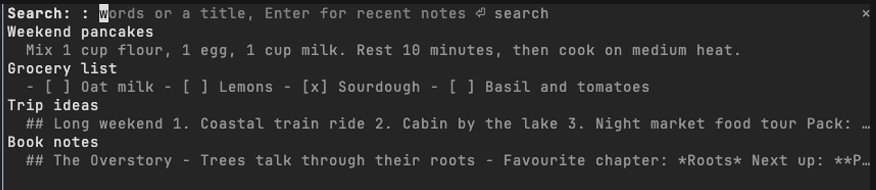
InstantNotes MCP 서버 또는 로컬 `instantnotes mcp`를 통해 터미널 패널에서 InstantNotes 노트를 검색하고 읽고 기록하는 Claude Code 플러그인입니다.
jamubc/toolbox/tree/main/plugins/instantnotes
instantnotes는 jamubc가 만든 Claude Code 플러그인으로, InstantNotes 라이브러리를 Claude Code 옆 패널로 가져옵니다. /plugin marketplace add jamubc/toolbox 및 /plugin install instantnotes@toolbox로 설치합니다. 명령은 최근 노트가 있는 패널을 여는 /notes, 전체 라이브러리를 검색하는 /notes <words>, 새 노트를 저장하는 /note <text>(첫 줄이 제목이 됨)입니다. 패널에서는 입력하면서 필터링하고, 노트를 Markdown으로 열고, 프롬프트에서 노트를 언급해 Claude가 MCP를 통해 읽게 하고, 노트 텍스트를 붙여 넣거나 복사하고, 새 노트를 만들 수 있습니다. 실행 중인 instantnotes MCP 서버를 통해 또는 요청마다 instantnotes mcp를 실행해 InstantNotes에 접근하며, ~/.claude.json, .mcp.json, /Applications/InstantNotes.app, ~/Applications 또는 PATH에서 프로그램을 찾습니다. Settings › Agents에서 Access를 활성화한 InstantNotes 0.9.0+가 필요합니다. 노트를 프롬프트에 추가할 때만 Claude에 전달되며, 플러그인은 로컬 프로그램과만 통신하고 네트워크에는 연결하지 않습니다.
먼저 작성자의 README에서 marketplace와 플러그인 이름을 확인하세요. 저장소 구조에 따라 명령어가 달라질 수 있습니다.
claude plugin marketplace add jamubc/toolbox
claude plugin install instantnotes
Your InstantNotes library, directly in Claude Code. Search, read and capture notes without leaving the terminal.
Every note you have, one command away.
Add the marketplace:
/plugin marketplace add jamubc/toolbox
Install the plugin:
/plugin install instantnotes@toolbox
| Command | What it does |
| --- | --- |
| /notes | Opens a pane with your recent notes. |
| /notes <words> | Opens the pane searching for those words or a title. |
| /note <text> | Saves the text as a new note. The first line becomes the title. |
In the pane:
b goes back.u) puts a reference to the note in your prompt, so Claude can read it through the InstantNotes MCP server. paste into prompt (p) puts the note's text itself there. copy (c) copies it.r) reads one again.The plugin uses what InstantNotes › Settings › Agents sets up, in this order:
instantnotes MCP server Claude Code already runs, once you ran the claude mcp add instantnotes … command from that page. This is the fast path: the server stays up, and every request is a call to it.instantnotes mcp run by the plugin, one request at a time. It finds the program from what claude mcp add wrote in ~/.claude.json or the project's .mcp.json (the exact program and library you use), from /Applications/InstantNotes.app or ~/Applications/InstantNotes.app, or on your PATH.When none of these can start, the pane says so and lists the steps.
<details> <summary>Setup details</summary> <br>/config → InstantNotes program names the program when the plugin cannot find it. /config → Notes library names a library other than the one the app or claude mcp add uses; the attachments folder is read beside it.~/.local/share/com.instantnotes.app on Linux, ~/Library/Application Support/com.instantnotes.app on macOS.hooks/register.tsx draws the pane and answers /notes and /note.hooks/library.ts finds the program and library from your configuration, and shapes text for the pane.tools/call, through the connected server or one instantnotes mcp process, so the plugin follows the same rules as any agent./clear and /compact leave the search and the open note in the pane./note, or the field in the pane).instantnotes program or the MCP server you connected, never the network. ~/.claude.json is read only to find that server's command line.claude --plugin-dir plugins/instantnotes # load it; edits hot-reload
claude plugin validate plugins/instantnotes
claude plugin test plugins/instantnotes

캐시를 인식하는 /loop worker와 CronCreate 백그라운드 자동화입니다. ruflo 제품군의 모든 반복 작업을 위한 기반 플러그인입니다.

Claude Code mod로서의 claude-reflect입니다. 짧은 프롬프트마다 모델 검사를 수행해 재사용 가능한 수정 사항(모든 언어)을 찾고, 프롬프트 위 밴드를 한 번 누르면 CLAUDE.md에 저장합니다.


Claude Code 안의 초기 crit입니다. 패널에서 대화, diff 또는 파일에 댓글을 달고 리뷰를 Claude에 보낸 뒤 스레드에서 Claude의 답변을 읽을 수 있습니다.