ClaudeModsClaude Code mod 디렉터리
☰
● 0 명 접속 중 · 조회 0 회
+ 프로젝트 제출
← 프로젝트 목록으로
X 게시물 · 멀티 에이전트 및 오케스트레이션 / 개발 및 디버깅 / 대시보드 및 HUD / 워크플로 및 CI

Claude Code 검색 효율 측정기 — Claude Code 플러그인 · ClaudeMods

이 작품 신고본인의 작품인가요? 소유권 확인

ClaudeMods에서 이 Claude Code 플러그인의 원본 소스와 필요한 권한을 확인하세요. 작성자가 첫 Claude Code Mod를 자체 제작: Claude가 코드베이스에서 찾는 난이도를 보여주는 측정 바와 다음 검색을 더 빠르게 하는 버튼 포함.

JJJ Englert@JJEnglert

1/

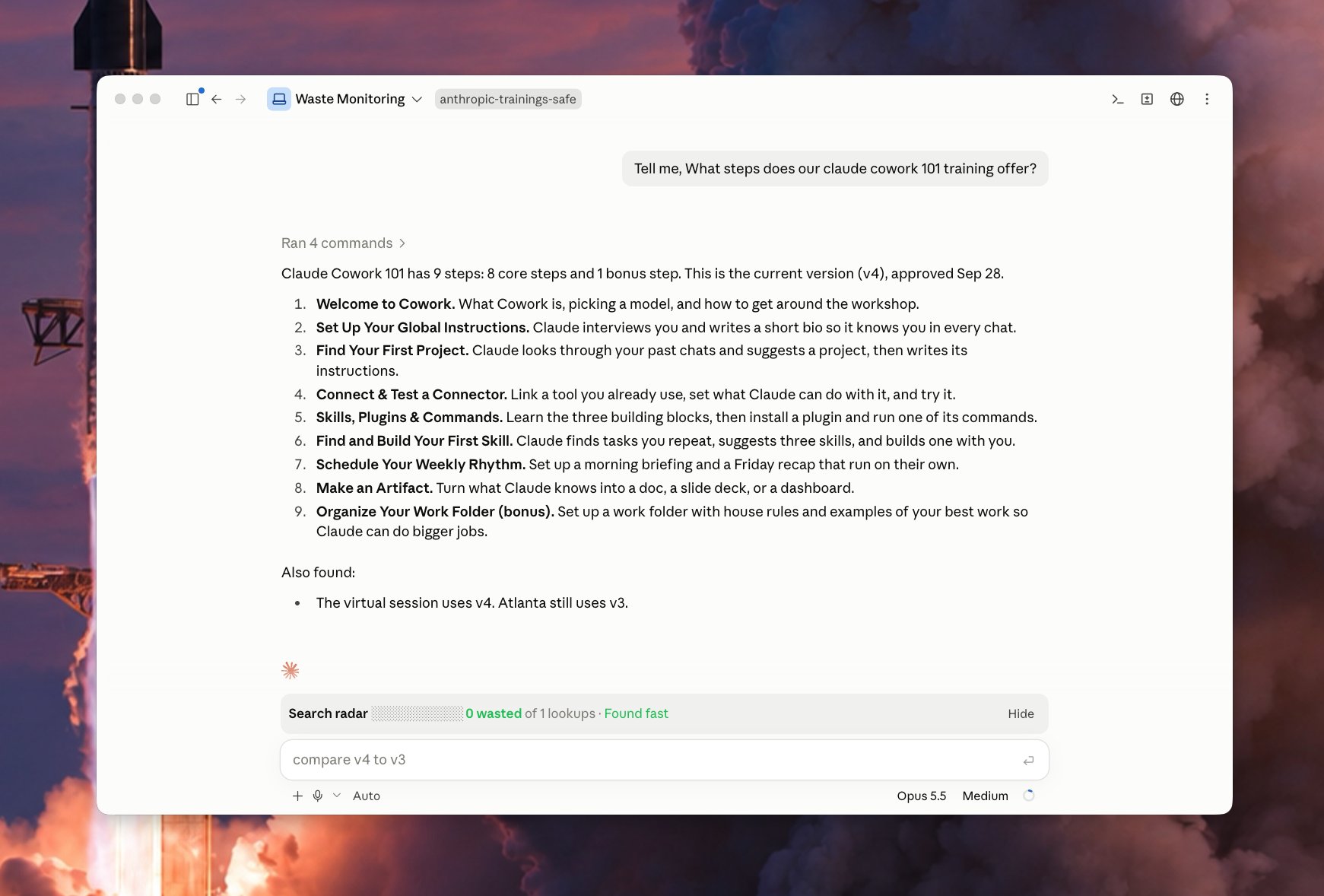
I just built my first Claude Code Mod! 🔥 I built a meter that shows how easily Claude finds things in my code. It comes with a button that makes the next search faster. What it does Every time you ask Claude something, the bar watches Claude look through your files. It counts the wasted searches: a) searches that found nothing b) the same search done twice c) files Claude opened but didn't need Green means Claude found it fast. Yellow means some waste. Red means Claude got lost. It also tells you which folder caused the most trouble. The fix button Click Patch the waste and a helper Claude starts in the background. It writes a short note in your project that says "the thing you need is here." Next time, Claude reads that note and goes straight to the right spot. The helper only writes notes. It never changes your code. It works on its own, so your main chat stays clean. Why it matters Think of your codebase as a library. The bar shows when Claude wandered the shelves. The button adds a sign to the shelf, so the next visit is quick. Over time, the bar shows which parts of your code need better notes.

원본 게시물 이미지1
번역 완료

이 mod 소개

작성자가 첫 Claude Code Mod를 출시: 실시간 측정 바로, 각 질문 시 Claude가 파일을 탐색하는 과정을 관찰하고 세 가지 유형의 낭비 검색을 집계한다—아무것도 찾지 못한 검색, 반복 실행된 동일 검색, 열었지만 필요 없는 파일. 녹색은 빠른 위치 파악, 노란색은 낭비, 빨간색은 Claude가 길을 잃음을 의미하며, 어떤 폴더가 가장 문제인지 지적한다. 또한 "Patch the waste" 버튼이 있어 클릭하면 백그라운드에서 보조 Claude를 시작해 프로젝트에 "필요한 것이 여기 있다"와 같은 짧은 힌트만 작성하고, 코드는 절대 수정하지 않으며, 메인 대화에 영향을 주지 않고 독립적으로 실행된다. 시간이 지나면 측정 바는 어떤 코드 영역에 더 나은 주석이 필요한지 보여줄 수 있다.

설치

설치 방법은 원본 출처를 확인하세요.

원문 / README

I just built my first Claude Code Mod! 🔥

I built a meter that shows how easily Claude finds things in my code. It comes with a button that makes the next search faster.

What it does

Every time you ask Claude something, the bar watches Claude look through your files. It counts the wasted searches: a) searches that found nothing b) the same search done twice c) files Claude opened but didn't need

Green means Claude found it fast.

Yellow means some waste.

Red means Claude got lost.

It also tells you which folder caused the most trouble.

The fix button

Click Patch the waste and a helper Claude starts in the background.

It writes a short note in your project that says "the thing you need is here."

Next time, Claude reads that note and goes straight to the right spot.

The helper only writes notes. It never changes your code.

It works on its own, so your main chat stays clean.

Why it matters

Think of your codebase as a library. The bar shows when Claude wandered the shelves.

The button adds a sign to the shelf, so the next visit is quick.

Over time, the bar shows which parts of your code need better notes.
원본 출처 보기 ↗

비슷한 프로젝트

