
hacksurvivor@hacksurvivor
hacksurvivor/claude-mods/tree/main/mods/grudge
거부한 모든 UI 모양을 프로젝트 규칙으로 바꾸고 스크린샷과 함께 저장하는 Claude Code mod입니다. 승인된 미리 보기 없이 Claude가 UI 파일을 편집하면 경고합니다.
hacksurvivor/claude-mods/tree/main/mods/grudge
Grudge를 사용하면 스크린샷이나 댓글로 UI 모양을 거부한 뒤 Claude에게 이를 스크린샷과 함께 보관할 하나의 프로젝트 규칙으로 바꾸도록 요청할 수 있습니다. 규칙은 Undo 옵션과 함께 Claude의 답변 아래에 표시됩니다. UI를 편집하기 전에 Claude에는 프로젝트 규칙과 두 가지 습관이 전달됩니다. UI를 새로 만들기 전에 실제 참고 자료를 찾고, 새로운 모양을 만들기 전에 미리 보기를 보여 주는 것입니다. 세션에서 승인된 미리 보기 없이 만든 UI 변경도 표시합니다. "looks right" 같은 승인이나 미리 보기 변형 선택도 규칙이 됩니다. 명령은 /grudge로 규칙 목록 보기, /grudge forget N으로 하나 삭제, /grudge add <rule>로 하나 추가, /grudge off와 /grudge on으로 일시 중지 및 재개입니다. 세션 트랜스크립트에서 스크린샷을 복사하려면 Claude Code 2.1.286+와 PATH에 있는 Python 3이 필요합니다. /plugin marketplace add hacksurvivor/claude-mods로 설치한 다음 /plugin install grudge@hacksurvivor와 /reload-plugins를 실행합니다. 입력한 메시지와 Claude가 편집하는 파일 경로를 읽고, 스크린샷 이미지를 ~/.claude/projects에서 ~/.claude/grudge/<project>/로 복사합니다. 자체적으로 아무것도 보내지 않습니다. Apache-2.0 라이선스입니다.
먼저 작성자의 README에서 marketplace와 플러그인 이름을 확인하세요. 저장소 구조에 따라 명령어가 달라질 수 있습니다.
claude plugin marketplace add hacksurvivor/claude-mods
claude plugin install grudge
A Claude Code mod that holds a grudge against every look you reject, so Claude never brings it back.
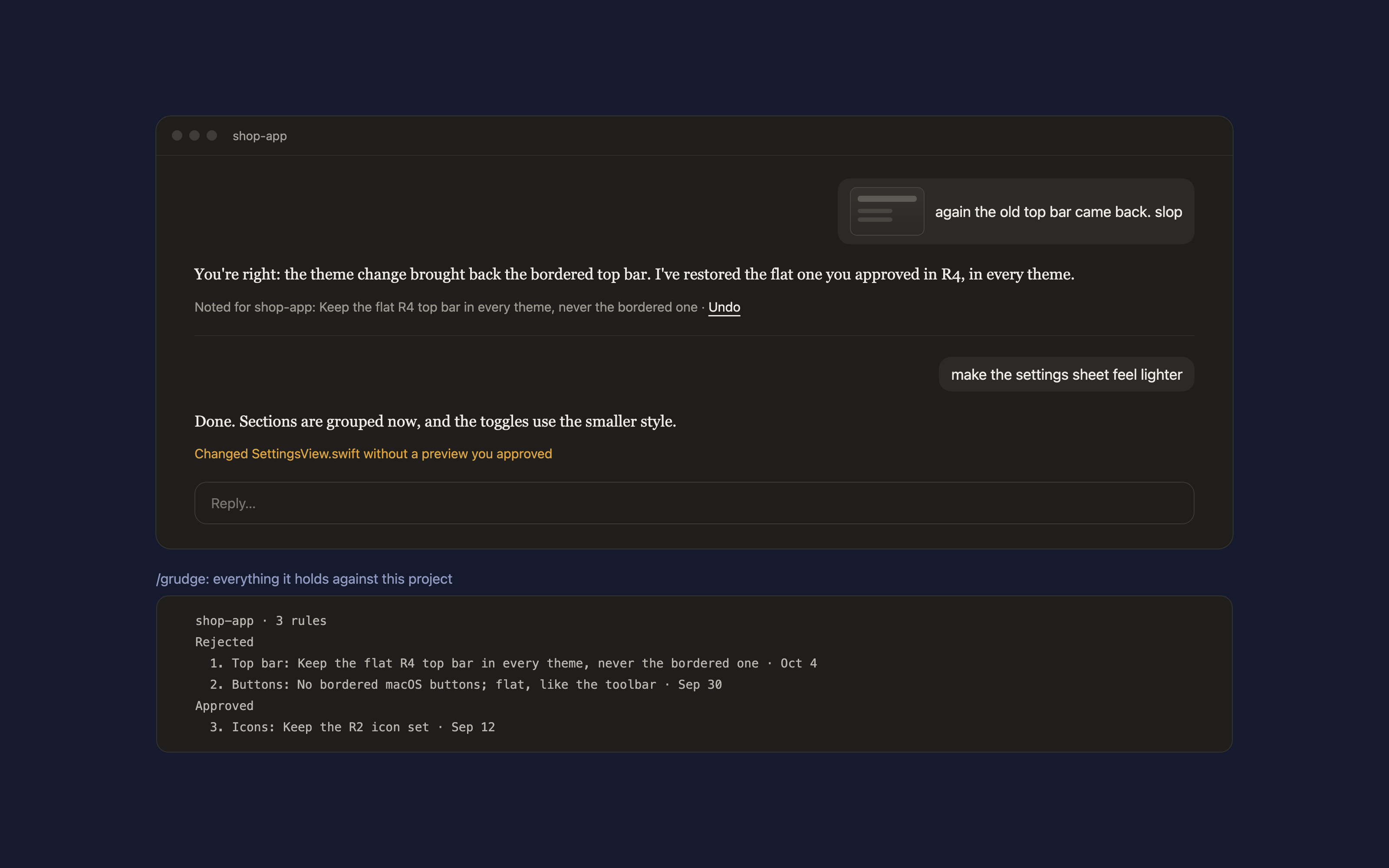
You reply "this is slop" with a screenshot, or "again the old top bar". Grudge asks Claude to turn that into one rule for the project, written after it has looked at your screenshot, and keeps the screenshot with it. A line under Claude's reply shows what was noted, with Undo:
Noted for shop-app: keep the R4 top bar in every theme · Undo
The next time Claude edits a UI file in that project, it is handed every rule first, along with two habits: look for real references before inventing UI, and show a preview before a new look. When Claude changes UI files without a preview you approved in the session, the reply says so:
Changed SettingsView.swift without a preview you approved
Approvals count too. "Looks right" or picking variant "A" after a preview keeps that look as a rule, so later changes don't quietly undo it.
/grudge lists the project's rules, numbered./grudge forget 2 drops one; /grudge add <rule> writes one yourself./grudge off pauses it for the session, /grudge on resumes it.PATH, to copy a screenshot out of the session's transcript.In Claude Code:
/plugin marketplace add hacksurvivor/claude-mods
/plugin install grudge@hacksurvivor
/reload-plugins
bin/shot.py with Python when you reject a look with a screenshot. It reads this session's transcript in ~/.claude/projects and copies that message's images into ~/.claude/grudge/<project>/. Nothing else.~/.claude/grudge/.See PRIVACY.md.
Apache-2.0

캐시를 인식하는 /loop worker와 CronCreate 백그라운드 자동화입니다. ruflo 제품군의 모든 반복 작업을 위한 기반 플러그인입니다.

Claude Code mod로서의 claude-reflect입니다. 짧은 프롬프트마다 모델 검사를 수행해 재사용 가능한 수정 사항(모든 언어)을 찾고, 프롬프트 위 밴드를 한 번 누르면 CLAUDE.md에 저장합니다.


Claude Code 안의 초기 crit입니다. 패널에서 대화, diff 또는 파일에 댓글을 달고 리뷰를 Claude에 보낸 뒤 스레드에서 Claude의 답변을 읽을 수 있습니다.