
yzwooyi@yzwooyi
yzwooyi/claude-glance/tree/main/glance
yzwooyi/claude-glance/tree/main/glance
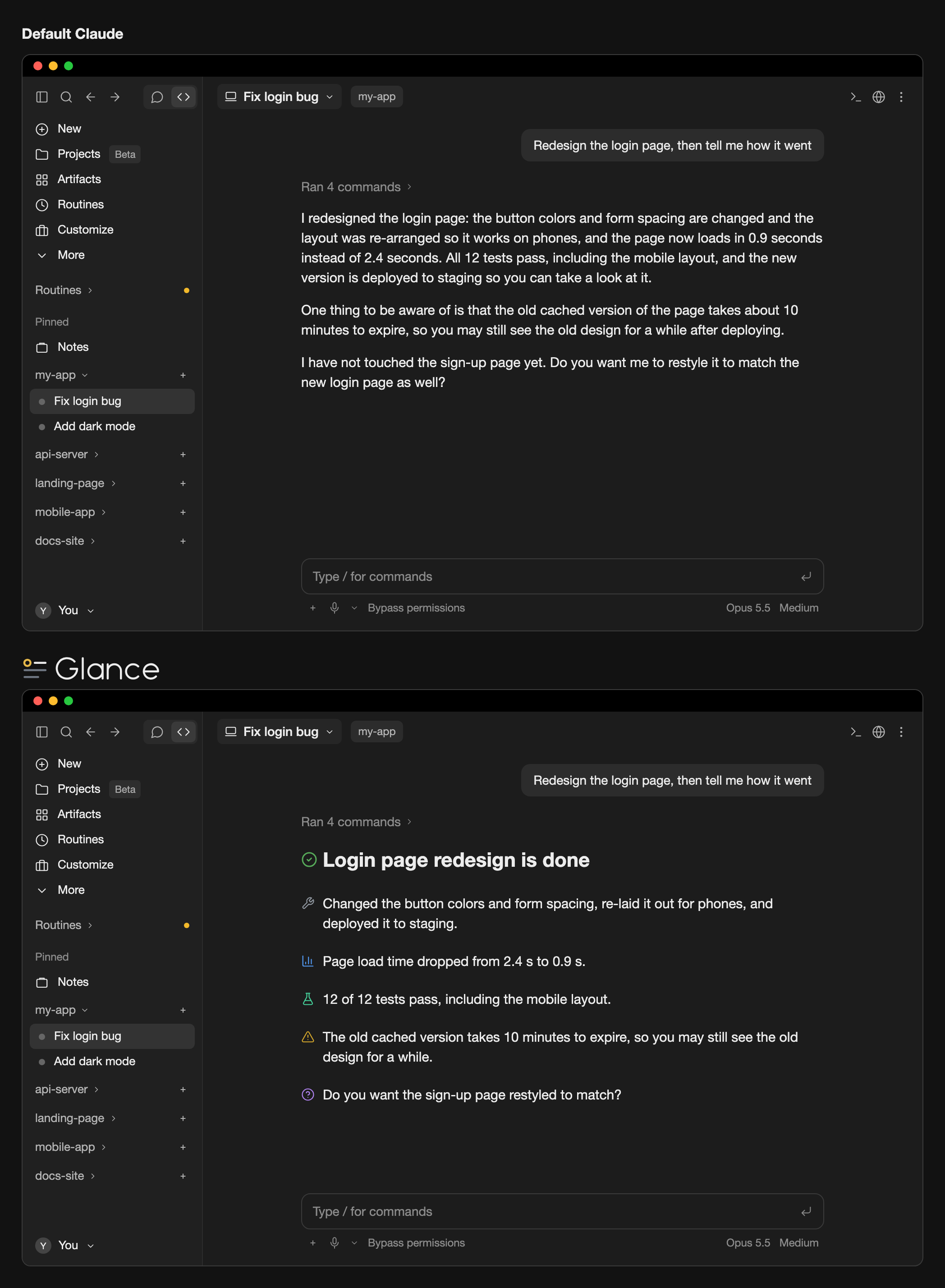
Glance는 Claude Code 데스크톱 앱 플러그인입니다. /output-style용 답변 스타일(glance-en 또는 glance-zh)로 Claude가 짧은 문단을 쓰고 24개 마커 중 하나로 핵심을 태그하게 하며, 데스크톱 선 아이콘은 UI에서 그 마커를 색상 선 아이콘으로 그립니다. 화면 렌더링에만 영향을 주고 대화 텍스트는 바꾸지 않으며 터미널, 코드 블록, 문장 중간 마커도 건드리지 않습니다. 설치하려면 Claude Code 2.1.286+와 ~/.claude/settings.json에 CLAUDE_CODE_ENABLE_FUNCTION_HOOKS=1을 추가해야 합니다.
먼저 작성자의 README에서 marketplace와 플러그인 이름을 확인하세요. 저장소 구조에 따라 명령어가 달라질 수 있습니다.
claude plugin marketplace add yzwooyi/claude-glance
claude plugin install glance
Two things working together: a reply style that makes Claude write short paragraphs and mark each key point (conclusion, warning, verified result, and so on) with one of 24 markers, and desktop line icons that draw those markers as colored line icons, with a highlight line like # ✅ **Conclusion** drawn as a large heading. You need both enabled: install the plugin, then pick glance-en or glance-zh in /output-style.
It only changes what is shown on screen, never the conversation text itself; the terminal, code blocks, and markers in the middle of a sentence are left alone.
Requires Claude Code 2.1.286 or later (the version bundled with the desktop app is fine).
claude plugin marketplace add yzwooyi/claude-glance
claude plugin install glance@claude-glance --scope user
~/.claude/settings.json and add one line inside "env" (create env if it isn't there):"env": { "CLAUDE_CODE_ENABLE_FUNCTION_HOOKS": "1" }
To update later: claude plugin update glance@claude-glance, then start a new session.
| marker | meaning | |---|---| | 🔴 | Red line / serious pitfall | | ⚠️ | Needs attention | | ✅ | Verified (actually tested) | | 📊 | Measured numbers | | 💡 | Conclusion / recommendation | | ❓ | I can't answer / you decide | | 🔧 | What I changed | | ⏳ | Waiting on a result / has a due date | | 👉 | You do this by hand | | 📎 | Deliverable (file / link) | | 🛡️ | Money / security path | | 📤 | Shipped (in effect) | | 🔍 | What I found | | 💬 | Why / how it works | | 🧪 | Tests | | 🐛 | Bug / error | | ⚙️ | Settings / config | | 📁 | File / location | | 🎨 | Design / look | | 💰 | Quota / cost | | 📅 | Date / point in time | | 🤖 | Subagents | | 🔗 | External link | | ↩️ | Revert / undo |
The plugin ships two reply styles that tell Claude when to use each of the 24 markers. After installing, pick one: in the terminal run /output-style (or open /config and change Output style); in the desktop app choose it under Output style in settings. Choose glance-en (English replies) or glance-zh (Chinese replies). Without one of these styles Claude won't use the markers, so there is nothing to draw.
To have Claude use these 24 markers without switching reply style, add this to ~/.claude/CLAUDE.md:
## Key-point markers in replies
Put one emoji at the start of a paragraph for a real conclusion, finding, or warning, one per point; none on transitional sentences. Use only these 24:
🔴 red line / serious pitfall · ⚠️ needs attention · ✅ verified by actual testing · 📊 measured numbers · 💡 conclusion / recommendation · ❓ you decide
🔧 what I changed · ⏳ waiting on a result / due date · 👉 you do this by hand · 📎 deliverable (file / link) · 🛡️ money / security · 📤 shipped
🔍 what I found · 💬 why / how it works · 🧪 tests · 🐛 bug / error · ⚙️ settings · 📁 file location
🎨 design / look · 💰 quota / cost · 📅 date · 🤖 subagents · 🔗 external link · ↩️ revert / undo
Write the single most important conclusion on its own line as `# ✅ **Conclusion**` (at most 1–3 such lines per reply).

캐시를 인식하는 /loop worker와 CronCreate 백그라운드 자동화입니다. ruflo 제품군의 모든 반복 작업을 위한 기반 플러그인입니다.

Claude Code mod로서의 claude-reflect입니다. 짧은 프롬프트마다 모델 검사를 수행해 재사용 가능한 수정 사항(모든 언어)을 찾고, 프롬프트 위 밴드를 한 번 누르면 CLAUDE.md에 저장합니다.


Claude Code 안의 초기 crit입니다. 패널에서 대화, diff 또는 파일에 댓글을 달고 리뷰를 Claude에 보낸 뒤 스레드에서 Claude의 답변을 읽을 수 있습니다.