
nogu66@nogu66
nogu66/claude-code/tree/main/git-ops
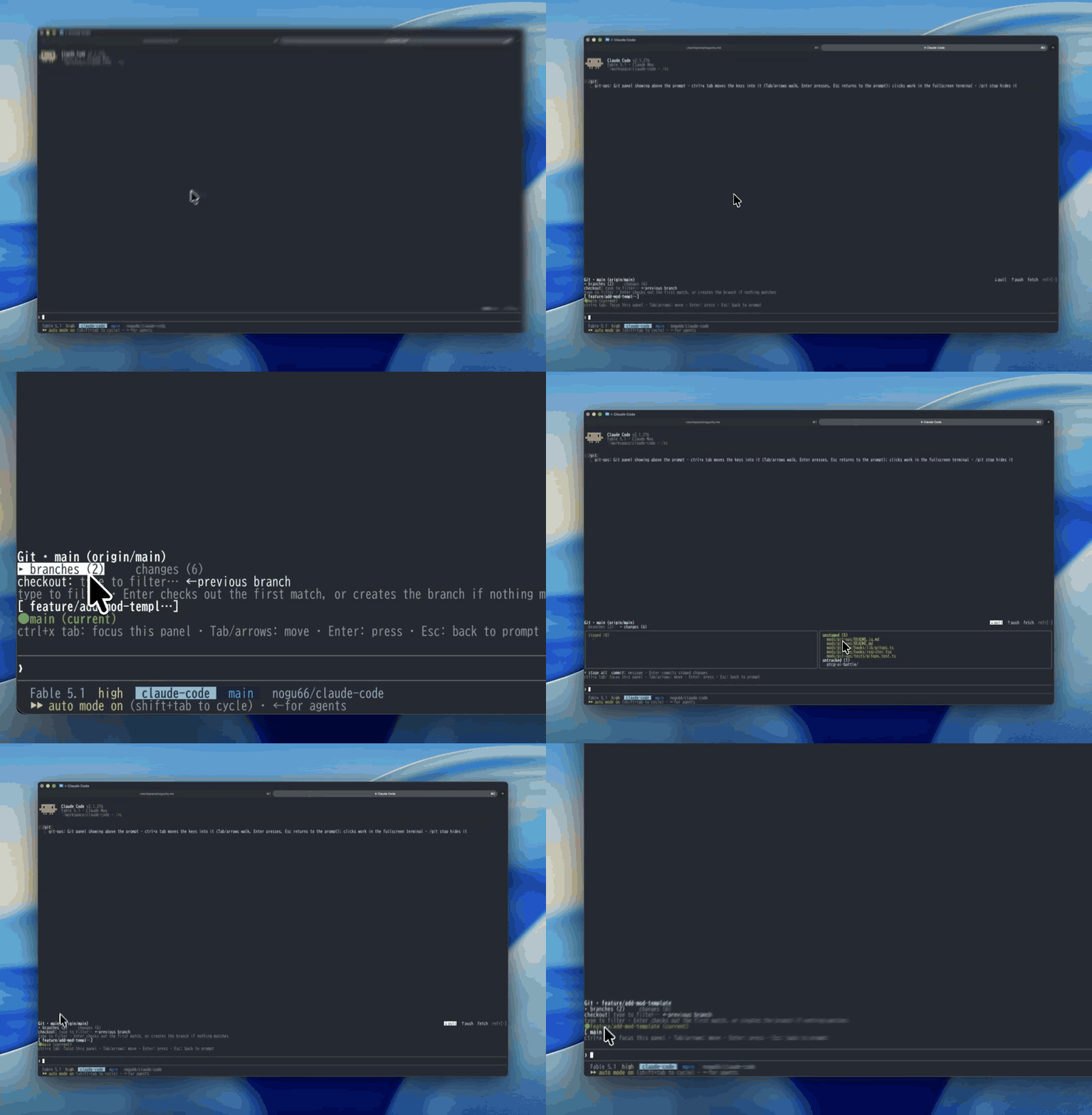
Claude Mod(Claude Code 함수 훅 플러그인)입니다. /git은 프롬프트 위에 일상적인 git 작업용 클릭 패널을 표시합니다. 버튼(또는 필터링 후 Enter, 숫자 키)으로 브랜치를 고르고 확인하면 전환되며, pull/push/fetch, 전체 스테이징과 커밋도 버튼으로 실행합니다. 강제 push, reset, rebase는 제공하지 않습니다.
nogu66/claude-code/tree/main/git-ops
Claude Mod(함수 훅으로 만든 Claude Code 플러그인)입니다. /git은 프롬프트 위쪽 띠에 클릭할 수 있는 git 패널을 그립니다. 버튼으로 브랜치를 고르고 확인하면 전환됩니다. git 명령을 입력하지 않아도 pull / push / fetch, 전체 스테이징과 커밋을 실행할 수 있습니다.

Git · main (origin/main, ahead 4)              ↓ pull  ↑ push  fetch  refresh
▸ branches (12)     changes (13)
checkout: type to filter…            ← previous branch
[ feat/sandbox-rewrite ]       [ feature/seo-optimization ]
[ fix/sandbox-trailing-slash ] ● main (current)
[ feat/github-link-card ]      [ pensive-lamport ]
$.process.run을 통해 일반 git을 호출합니다(shell 문자열이 아니라 argv 배열을 사용합니다). 따라서 별도의 인증이나 설정이 필요하지 않습니다. 현재 작업 디렉터리에서 git이 확인하는 원격 저장소, 자격 증명, 업스트림 추적 설정이 그대로 사용됩니다.
안전한 일상 작업으로 의도적으로 제한되어 있습니다. 상태 확인, 브랜치 목록, checkout(기존 또는 새 브랜치), pull, push, fetch, 전체 스테이징, 커밋을 지원합니다. 강제 push, reset, rebase, clean은 없습니다. 패널 버튼 하나로 파괴적인 작업을 실행할 수 있게 하지 않습니다.
CLAUDE_CODE_ENABLE_FUNCTION_HOOKS=1로 활성화한 함수 훅 지원 Claude Code 빌드. 함수 훅은 early-access 단계라 API가 바뀔 수 있으며, 지원하지 않는 빌드에서는 이 플러그인의 hooks 모듈을 무시합니다.PATH에 있는 git과 작업 디렉터리인 git 저장소./plugin marketplace add nogu66/claude-code
/plugin install git-ops@nogu-marketplace
설치하지 않고 시험해 볼 수도 있습니다.
git clone https://github.com/nogu66/claude-code.git
cd claude-code/git-ops
claude --plugin-dir .        # .claude/settings.json here turns function hooks on
그다음 어떤 git 저장소에서든 /git을 실행하세요.
/git(또는 /git show)로 패널을 표시하고, /git stop으로 숨깁니다.
먼저 패널로 키 입력 포커스를 옮기세요. 패널을 열어도 키 입력은 일반 프롬프트에 남습니다. 필터 상자에 입력할 문자나 숫자 단축키는 패널에 전달되지 않습니다. **ctrl+x tab**을 눌러 포커스를 옮긴 다음 Tab/화살표로 이동하고, Enter로 실행하며, Esc로 프롬프트로 돌아갑니다. 마우스 클릭은 터미널이 보고하는 위치(전체 화면 레이아웃)에서만 작동합니다.
↓ pull, ↑ push, fetch, refresh를 표시합니다. 현재 브랜치에 설정된 기존 업스트림을 대상으로 합니다.branches (n)과 changes (n)입니다. 한 번에 본문 하나만 그려 띠를 짧게 유지합니다.branches 탭—다른 브랜치로 빠르게 이동하도록 만들어졌습니다.
● name (current) 레이블로 표시됩니다.1–9, 전환 가능한 첫 9개 브랜치)를 누릅니다./ 구간 접두사, 부분 문자열 순). 아래 줄에는 Enter가 할 일이 표시됩니다. Enter → checkout <best match>, 일치하는 항목이 없으면 Enter → create new branch <name>입니다.← previous branch—git checkout -을 실행합니다.Check out <branch>? · [ OK ] / [ cancel ], 단축키 y / n). 커밋하지 않은 변경이 있으면 경고도 표시합니다.changes 탭—왼쪽에는 스테이징됨(초록), 오른쪽에는 스테이징되지 않음(노랑)과 추적되지 않음이 표시됩니다. 아래에는 + stage all(git add -A)과 Enter로 git commit -m을 실행하는 commit 상자가 있습니다.checkout은 먼저 묻습니다. 그 밖의 모든 작업—pull, push, fetch, 전체 스테이징, 커밋—은 클릭하거나 Enter를 누르는 즉시 실행됩니다. git 명령을 직접 입력한 것과 같습니다. push는 컴퓨터 밖으로 연결됩니다.
패널 없이 같은 argv 빌더를 사용합니다.
| Command | Runs |
|---|---|
| /git status | git status |
| /git branch | git branch |
| /git checkout <branch> | git checkout <branch> |
| /git checkout -b <branch> | git checkout -b <branch> |
| /git back | git checkout - |
| /git pull · /git push · /git fetch | the same, no flags |
| /git stage | git add -A |
| /git commit <message> | git commit -m <message> |
| /git help | prints this list |
텍스트 하위 명령은 확인 없이 즉시 실행됩니다.
refresh를 클릭한 후에 새로 고칩니다. 다른 곳에서 git을 실행해도 새로 고치지 않습니다(예: Bash 도구 호출).-와 공백만 방어합니다(따라서 git 플래그로 해석되지 않음). 그 밖의 잘못된 값은 git 자체가 거부합니다.next(e)로 연결하므로 겹쳐 표시할 수 있지만 이 조합은 테스트되지 않았습니다.bun test # pure logic in hooks/lib/gitops.ts — no $ or UI to mock
claude plugin validate . # lists the hooked events and $ calls
hooks/register.tsx—$를 다루는 유일한 파일입니다. /git을 등록하고 git을 실행하며 AbovePrompt 패널을 그린 뒤 메모리의 UI 상태를 보관합니다.hooks/lib/gitops.ts—순수 함수입니다. 명령 파싱, git argv 빌더, 브랜치/상태 출력 파싱, 브랜치 필터링, Enter 대상 결정, 열 레이아웃을 담당합니다.tests/gitops.test.ts—위 기능의 테스트입니다.정확한 타입이 필요하면 함수 훅을 켠 세션에서 /plugin-types를 실행하세요. .claude/types/claude-code.d.ts에 기록됩니다.
MIT
먼저 작성자의 README에서 marketplace와 플러그인 이름을 확인하세요. 저장소 구조에 따라 명령어가 달라질 수 있습니다.
claude plugin marketplace add nogu66/claude-code
claude plugin install git-ops
A Claude Mod (a Claude Code plugin built on function hooks): /git draws a clickable git
panel in the band above the prompt. Pick a branch with a button, confirm, and it checks out —
plus pull / push / fetch, stage-all and commit, without typing a git command.
Git · main (origin/main, ahead 4)              ↓ pull  ↑ push  fetch  refresh
▸ branches (12)     changes (13)
checkout: type to filter…            ← previous branch
[ feat/sandbox-rewrite ]       [ feature/seo-optimization ]
[ fix/sandbox-trailing-slash ] ● main (current)
[ feat/github-link-card ]      [ pensive-lamport ]
It shells out to plain git through $.process.run (an argv array, never a shell string), so
it needs no auth or config of its own: whatever git already resolves in the current working
directory — remotes, credentials, upstream tracking — is what runs.
Deliberately limited to safe, everyday operations: status, branch listing, checkout (existing or new branch), pull, push, fetch, stage-all, commit. No force-push, reset, rebase or clean — a panel button shouldn't put a destructive operation one click away.
CLAUDE_CODE_ENABLE_FUNCTION_HOOKS=1.
Function hooks are early-access and their API can change; builds without them simply ignore
this plugin's hooks module.git on PATH, and a git repository as the working directory./plugin marketplace add nogu66/claude-code
/plugin install git-ops@nogu-marketplace
Or try it without installing:
git clone https://github.com/nogu66/claude-code.git
cd claude-code/git-ops
claude --plugin-dir .        # .claude/settings.json here turns function hooks on
Then run /git inside any git repository.
/git (or /git show) shows the panel; /git stop hides it.
Move the keys into the panel first. Opening the panel leaves your keystrokes with the normal
prompt — text meant for the filter box, or a digit hotkey, never reaches the panel. Press
ctrl+x tab to focus it; then Tab/arrows move, Enter presses, Esc returns to the prompt.
Mouse clicks only work where the terminal reports them (the fullscreen layout).
↓ pull, ↑ push,
fetch, refresh on the right. They act on the current branch's existing upstream.branches (n) and changes (n). Only one body is drawn at a time, which keeps the
band short.branches tab — built for getting to another branch quickly:
● name (current) label instead;1–9, the
first nine switchable branches);/-segment
prefix, then substring), and the line beneath says what Enter will do —
Enter → checkout <best match>, or Enter → create new branch <name> when nothing matches;← previous branch — git checkout -;Check out <branch>? · [ OK ] / [ cancel ], hotkeys y / n), with a warning when
there are uncommitted changes.changes tab — staged (green) on the left, unstaged (yellow) and untracked on the right;
below them + stage all (git add -A) and a commit box (Enter runs git commit -m).Checkout asks first. Everything else — pull, push, fetch, stage all, commit — runs the moment
you click or press Enter, exactly as if you had typed the git command. push reaches outside
your machine.
The same argv builders, without the panel:
| Command | Runs |
|---|---|
| /git status | git status |
| /git branch | git branch |
| /git checkout <branch> | git checkout <branch> |
| /git checkout -b <branch> | git checkout -b <branch> |
| /git back | git checkout - |
| /git pull · /git push · /git fetch | the same, no flags |
| /git stage | git add -A |
| /git commit <message> | git commit -m <message> |
| /git help | prints this list |
Text subcommands run immediately, without the confirmation step.
refresh click — not when git runs elsewhere
(for instance in a Bash tool call).- and whitespace
(so a name can't be read as a git flag); git itself rejects anything else invalid.next(e) so
they stack, but that combination isn't tested.bun test # pure logic in hooks/lib/gitops.ts — no $ or UI to mock
claude plugin validate . # lists the hooked events and $ calls
hooks/register.tsx — the only file that touches $: registers /git, runs git, draws the
AbovePrompt panel, and holds its in-memory UI state.hooks/lib/gitops.ts — pure functions: command parsing, git argv builders, branch/status
output parsing, branch filtering and the Enter-target decision, column layout.tests/gitops.test.ts — tests for the above.For exact types, run /plugin-types in a session with function hooks on; it writes
.claude/types/claude-code.d.ts.
MIT

캐시를 인식하는 /loop worker와 CronCreate 백그라운드 자동화입니다. ruflo 제품군의 모든 반복 작업을 위한 기반 플러그인입니다.

Claude Code mod로서의 claude-reflect입니다. 짧은 프롬프트마다 모델 검사를 수행해 재사용 가능한 수정 사항(모든 언어)을 찾고, 프롬프트 위 밴드를 한 번 누르면 CLAUDE.md에 저장합니다.


Claude Code 안의 초기 crit입니다. 패널에서 대화, diff 또는 파일에 댓글을 달고 리뷰를 Claude에 보낸 뒤 스레드에서 Claude의 답변을 읽을 수 있습니다.