
briangtn@briangtn
briangtn/claude-gfm-render
GitHub Flavored Markdown의 알림, 작업 목록, 취소선, Mermaid 다이어그램을 Claude 답변 안에 직접 렌더링하는 Claude Code mod. 터미널, 데스크톱, VS Code, 모바일 화면을 지원한다.
briangtn/claude-gfm-render
claude-gfm-render는 Claude Code용 함수 훅 mod로, AssistantMessage의 ui.render에 연결해 터미널에서 원래 일반 텍스트로 보일 GFM 구문을 그린다. 알림(> [!NOTE] [!TIP] [!IMPORTANT] [!WARNING] [!CAUTION]), 작업 목록(- [ ] / - [x]), 취소선(~~text~~), Mermaid 플로차트·시퀀스·상태·클래스·ER·xychart 다이어그램을 렌더링한다. 터미널에서는 함께 제공되는 84 KB ASCII 렌더러가 다이어그램을 Unicode 아트로 바꾼다. 데스크톱, VS Code, 모바일에서는 node가 실행하는 renderer/svg.mjs가 테마에 맞는 SVG로 변환한다. 코드 펜스와 인라인 코드는 절대 다시 쓰지 않으며 ctrl+o를 누르면 원본 메시지가 계속 표시된다. GFM.md도 함께 제공되며 SessionStart 훅이 Claude의 컨텍스트에 추가하므로 Claude가 스스로 GFM을 작성할 수 있다. promptHint 옵션으로 이 동작을 끌 수 있다. Claude Code 2.1.286 및 2.1.287에서 빌드하고 테스트했으며 MIT 라이선스이고 빌드 단계가 필요 없다. git clone과 claude --plugin-dir로 설치하거나 CLAUDE_CODE_PLUGIN_DIRS를 ~/.claude/settings.json에 추가한다.
먼저 작성자의 README에서 marketplace와 플러그인 이름을 확인하세요. 저장소 구조에 따라 명령어가 달라질 수 있습니다.
claude plugin marketplace add briangtn/claude-gfm-render
claude plugin install gfm-render


Alerts, task lists, strikethrough and Mermaid diagrams, drawn inside Claude Code's replies.



Install · Before / after · What it handles · How it works
</div>Claude writes GitHub Flavored Markdown all day: > [!WARNING] callouts, - [ ] checklists, ```mermaid diagrams. The terminal shows them as raw text. This mod draws them, without touching the message itself (ctrl+o still shows the original).
git clone https://github.com/briangtn/claude-gfm-render.git ~/perso/claude-gfm-render
claude --plugin-dir ~/perso/claude-gfm-render
To load it in every session, terminal and desktop app alike, add it to ~/.claude/settings.json:
{
  "env": {
    "CLAUDE_CODE_PLUGIN_DIRS": "~/perso/claude-gfm-render"
  }
}
[!NOTE] Mods (function hooks) are an early-access API of Claude Code and may change between releases. Built and tested on Claude Code 2.1.286 and 2.1.287. No build step: the mod is plain files, and the folder is watched, so an edit reloads it in the running session.
Drawing GFM is half the job: Claude also has to write it. The mod ships GFM.md, a short note on what the transcript can draw (alerts, task lists, strikethrough, the Mermaid types that render), which a SessionStart hook adds to Claude's context at startup, after /clear and after a compaction. No CLAUDE.md to edit.
To turn it off and keep only the rendering, in ~/.claude/settings.json:
{
  "pluginConfigs": {
    "gfm-render": { "options": { "promptHint": false } }
  }
}
Real claude sessions (100 columns, captured with tmux); before is the same reply without the mod.
Alerts get a little more room, captured in the Claude desktop app (dark theme):
<img src="docs/screenshots/desktop-alerts-dark.png" alt="Alerts in the Claude desktop app">Mermaid becomes a real SVG that follows the light or dark scheme. Below, the mod's own output rendered by Chrome (not a capture of the app):
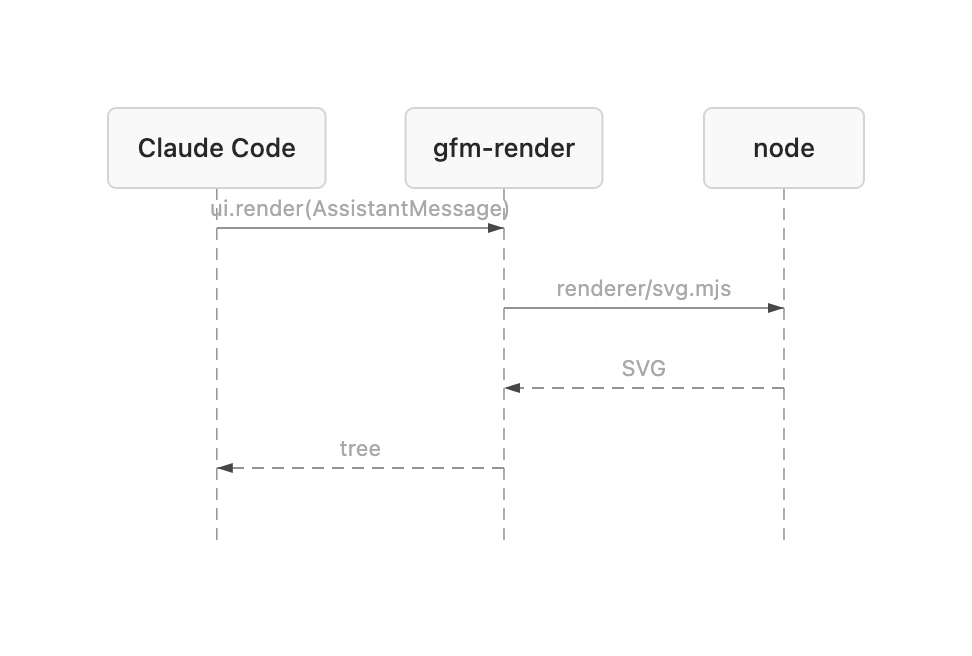
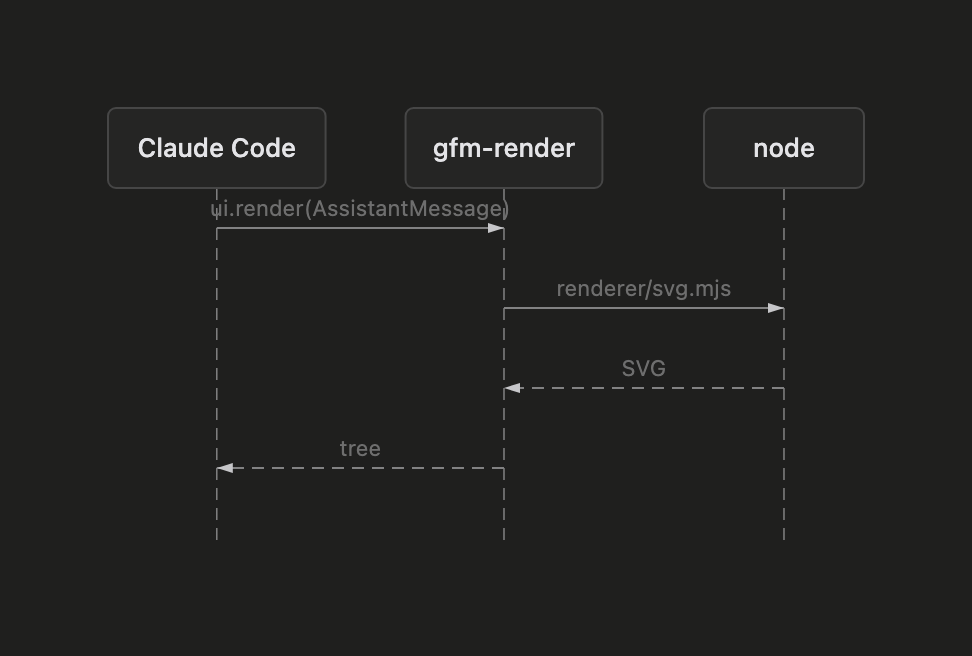
<picture> <source media="(prefers-color-scheme: dark)" srcset="docs/screenshots/desktop-flow-dark.png"> <img alt="Flowchart SVG" src="docs/screenshots/desktop-flow-light.png"> </picture> <details> <summary><b>Sequence diagram, light and dark</b></summary> <br>| Light | Dark |
| ------------------------------------------------------------------- | ----------------------------------------------------------------- |
| |  |
|
| | Markdown | Terminal | Desktop · VS Code · mobile |
| :---: | ----------------------------------------------------------------------------------------- | :-------------: | :------------------------: |
| 💬 | Alerts > [!NOTE] [!TIP] [!IMPORTANT] [!WARNING] [!CAUTION], any markdown inside | ✅ colored box | ✅ colored box |
| ☑️ | Task lists - [ ] / - [x] (also *, +, 1.) | ✅ ☐ / ☑ | ➖ native |
| ~~S~~ | Strikethrough ~~text~~ | ✅ | ➖ native |
| 🔀 | Mermaid flowchart / graph | ✅ Unicode art | ✅ SVG |
| 🧭 | Mermaid sequence, state, class, ER, xychart | ✅ Unicode art | ✅ SVG |
| 🔒 | Code fences and inline code | never rewritten | never rewritten |
| 📝 | Everything else (headings, tables, links, emphasis…) | native | native |
| Case | What you get |
| ---------------------------------------------------------------------------------------------------- | ------------------------------------------------------------------- |
| Mermaid gantt, pie, mindmap, gitGraph, journey, timeline, quadrantChart, sankey, C4… | the code block, as written |
| Mermaid with a syntax error, or wider than the terminal even with tighter spacing | the code block |
| Mermaid on desktop without node on the session's PATH | the Unicode art in a code block |
| Single-line Mermaid (graph TD; A-->B) | may fail to parse: write one statement per line |
| An alert nested in a list item or in another blockquote (> > [!NOTE]) | a plain blockquote |
| A reply still streaming in | the native rendering until the alert or the closing ``` arrives |
| A single reply block over 10,000 characters | the native rendering of that block |
| Footnotes, emoji shortcodes, #123 / @user autolinks, $math$, raw HTML | left to the native renderer |
| Your own messages and tool output | untouched: only Claude's replies are drawn |
Known glitch: in the terminal, an edge label leaving a {decision} node can show a stray ├ (beautiful-mermaid's ASCII layout, visible in the flowchart above).
The mod hooks ui.render on AssistantMessage: every text block of a reply goes through it, gets split into markdown, alert and Mermaid segments, and comes back as a tree the surface draws. A block with nothing to draw goes to the native renderer untouched.
graph LR
  A[Reply block] --> B{GFM inside?}
  B -->|no| N[Native renderer]
  B -->|alert| C[Colored box]
  B -->|mermaid| D{Surface}
  D -->|terminal| E[Unicode art, in process]
  D -->|desktop| F[SVG via node]
Mermaid is rendered by beautiful-mermaid, split in two because a hooks module may not import a file over 1 MiB and has no eval, while the ELK layout engine the SVG needs weighs 1.6 MB:
hooks/vendor/mermaid-ascii.js, the ASCII renderer alone (84 KB), imported by the mod.renderer/svg.mjs run by node, once per diagram, then cached.npm test # claude plugin test .
npm run validate # claude plugin validate .
npm run build:vendor # rebuild both Mermaid bundles with bun
| File | Role |
| -------------------- | ----------------------------------------------------------------------------------------- |
| hooks/register.tsx | the ui.render hook and the SVG process call |
| hooks/gfm.ts | splits a reply into blocks; task-list and strikethrough rewrites |
| hooks/mermaid.ts | Unicode art sized to the terminal, SVG theming |
| hooks/gfm.test.tsx | tests, run on every surface |
| renderer/svg.mjs | Mermaid on stdin, SVG on stdout |
| GFM.md | what Claude is told it can write, loaded by the SessionStart hook in hooks/hooks.json |
Issues and PRs welcome, especially screenshots from other terminals and the desktop app's light theme.
MIT. Vendored bundles keep their own licenses: beautiful-mermaid (MIT) and elkjs (EPL-2.0), in renderer/.

문서 생성, 드리프트 감지, API 문서 자동화 플러그인이며 비밀이 포함된 문서 쓰기나 worker 디스패치를 거부하는 function-hook 가드로도 동작합니다.

A Claude Code plugin mod providing a /databricks-pane that presents Databricks workspace, Unity Catalog, compute, jobs, pipelines, apps and dashboards as a tree following the databricks CLI, with live highlights, profile switching, and CLI argument copy.


붙여넣은 이미지를 단순한 `[Image #n]` 태그 대신 프롬프트 위에 썸네일로 미리 보여 주는 Claude Code 모드입니다.

