anerco@anerco
Anerco/effort-cycle-mod
Anerco/effort-cycle-mod
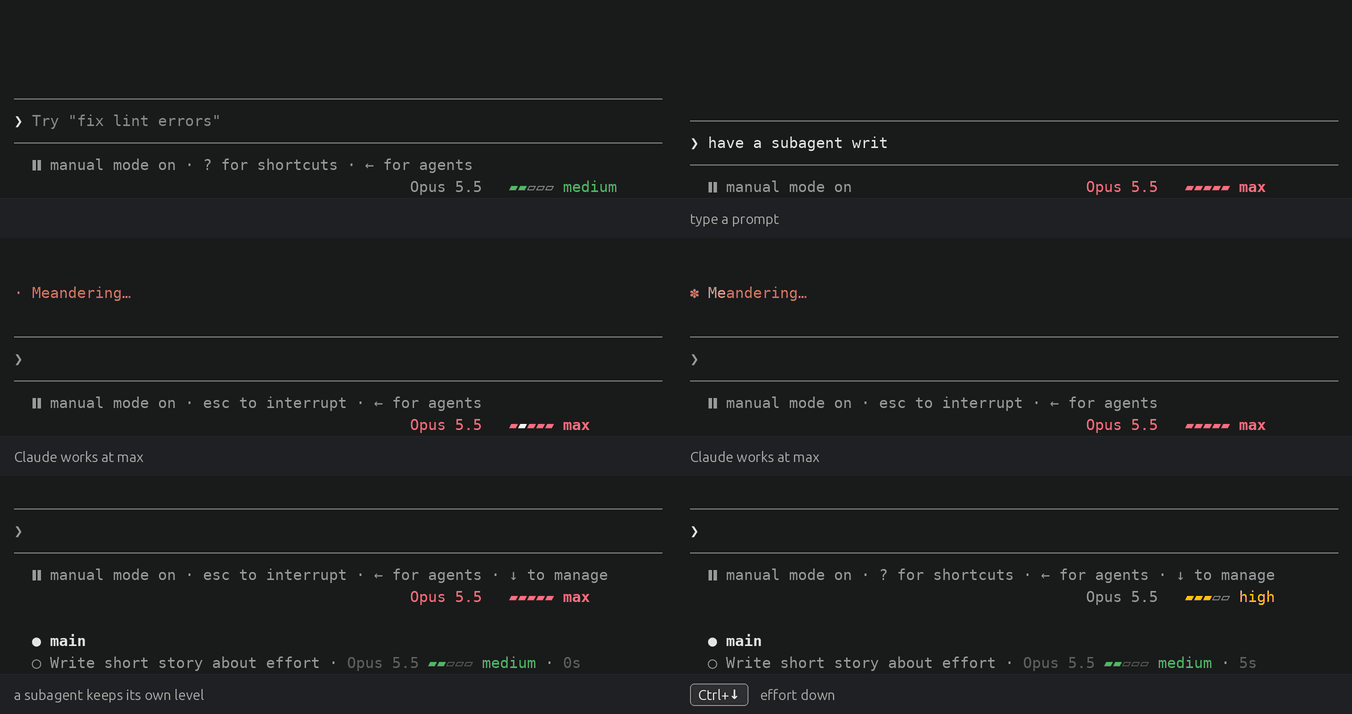
effort-cycle을 사용하면 에이전트별로 Claude Code의 노력 수준을 변경할 수 있습니다. Ctrl+↑ 및 Ctrl+↓는 메인 스레드 또는 현재 보이는 하위 에이전트의 수준(low, medium, high, xhigh, max)을 단계별로 조정하며, 바닥글에 색상 미터로 표시되고 호버 시 클릭 가능한 ‹ ›와 작업 목록의 하위 에이전트별 행이 표시됩니다. /config 토글이 포함되어 있으며 설정은 pluginConfigs 아래에 저장되고 텔레메트리나 네트워크 요청은 없습니다.
먼저 작성자의 README에서 marketplace와 플러그인 이름을 확인하세요. 저장소 구조에 따라 명령어가 달라질 수 있습니다.
claude plugin marketplace add Anerco/effort-cycle-mod
claude plugin install effort-cycle@anerco
Per-agent effort levels for Claude Code: step them from the keyboard, see them at a glance.
Opus 5.5 ▰▰▰▱▱ high./config toggles choose which levels the keys step through./plugin marketplace add Anerco/plugins
/plugin install effort-cycle@anerco
There is nothing to bind: the keys work right away. The tasks list's rows need
python3 on your PATH (on macOS, from xcode-select --install or Homebrew).
macOS: Ctrl+↑ and Ctrl+↓ are Mission Control's shortcuts by default. Use
Option+↑ and Option+↓ instead, with your terminal set to send Option as Meta
(Terminal.app: Use Option as Meta key; iTerm2: Left Option key set to
Esc+; Ghostty: macos-option-as-alt = true).
Updates: in /plugin, choose Marketplaces → anerco → Enable auto-update.
Or run claude plugin update effort-cycle@anerco and restart Claude Code.
Built and tested against Claude Code 2.1.291. effort-cycle is a mod (a plugin of function hooks), an early-access API that changes between releases.
| Control | What it does |
| --- | --- |
| Ctrl+↑ | One level up for the agent in view, stopping at max |
| Ctrl+↓ | One level down, stopping at low |
| ‹ and › in the footer | Point at the footer's label, then click ‹ to step down or › to step up |
| /effort, Alt+P | Claude Code's own controls still work, and take over from the plugin's pick |
The agent in view is the main thread, or the subagent whose transcript you opened from the tasks list. A pick lasts for the session. The footer shows the agent's model and level, led by its type in a subagent's transcript:
Opus 5.5   ▰▰▰▱▱ high                 main thread
Opus 5.5 ‹ ▰▰▰▱▱ high   ›             pointer on the label
Explore · Opus 5.5   ▰▰▱▱▱ medium     a subagent's transcript
The colors follow your theme, from gray at low to red at max. At max the model's name turns red too, and a light sweeps the bar while Claude works. Each Agent call in the transcript gets a line with its agent's level.
Each subagent's row in the tasks list under the prompt shows its model and level, in the footer's colors:
◯ Fix the parser · Opus 5.5 ▰▰▰▱▱ high · Reading the failing test · 53m 11s · ↓ 499.8k tokens
◯ Find the config · Sonnet 5.5 ▰▰▱▱▱ medium · Searching settings · 2m 4s · ↓ 31.2k tokens
The rows take no clicks; open a subagent's transcript to step it. Claude Code redraws them every five seconds, or in about 0.4 s with Tasks list rows: update at once on (Settings).
The main thread starts at the level Claude Code gives its model:
CLAUDE_CODE_EFFORT_LEVEL if it is set, else a level your settings save for
the model (as /effort and Alt+P save one), else the model's default: medium
on Opus 5.5 and Sonnet 5.5, xhigh on Opus 4.7, high on the rest.
A subagent starts at its definition's effort, else the main thread's level.
Its meter is empty (—) until its first model request says which, a moment
after it starts; a press before then shows wait.
The plugin adds these toggles to /config:
| Toggle | Default | What it does | | --- | --- | --- | | Effort keys: include low | on | The keys and ‹ › step through low | | Effort keys: include medium | on | … through medium | | Effort keys: include high | on | … through high | | Effort keys: include xhigh | on | … through xhigh | | Effort keys: include max | on | … through max | | Tasks list rows: update at once | off | Rows follow a change in about 0.4 s, not up to 5 s |
A level that is off is skipped for every model. Update at once narrows the
terminal by one column and back on each change, so the right edge flickers
briefly; it needs python3 (details).
The values are saved in ~/.claude/settings.json under pluginConfigs.
/effort and Alt+P do.— until its first model request. One started before
the plugin loaded shows no model either, until its next request.set -g mouse on. Without them, use the keys./diff lists
more than eight files they scroll it instead; close it to step again.
Rebinding app:diffFileListUp and app:diffFileListDown moves them too.python3. A subagentStatusLine in your
own settings replaces the plugin's. On Windows they show only where Claude
Code runs commands through Git Bash.See docs/how-it-works.md for what the plugin hooks, the tasks list's row files, Remote Control and development.
No telemetry, no network requests. effort-cycle reads your settings,
CLAUDE_CODE_EFFORT_LEVEL and the session's model and agents, and keeps levels
in the session. For the tasks list it writes subagent levels under
~/.claude/subagent-rows/sessions/ (deleted after a week) and sets one variable,
EFFORT_CYCLE_ROWS.

캐시를 인식하는 /loop worker와 CronCreate 백그라운드 자동화입니다. ruflo 제품군의 모든 반복 작업을 위한 기반 플러그인입니다.
universal-modder는 MIT 라이선스의 Claude Code 플러그인으로, 게임 엔진을 식별하고, 실제 코드를 읽고, 모드를 구축하고, fal로 에셋을 생성하고, 게임 내에서 테스트하며, 쇼케이스 비디오를 생성할 수 있습니다.

Claude Code mod로서의 claude-reflect입니다. 짧은 프롬프트마다 모델 검사를 수행해 재사용 가능한 수정 사항(모든 언어)을 찾고, 프롬프트 위 밴드를 한 번 누르면 CLAUDE.md에 저장합니다.
