
isr431@isr431
isr431/desk-pet

isr431/desk-pet
Claude Code 세션 옆에 살며 Claude의 동작에 반응하는 작은 애니메이션 반려동물입니다. 긴 세션도 틈틈이 바라볼 재미가 있습니다.

axolotl、quokka、tiny robot、dog、cat 중 하나를 고르세요. 각각 모든 반응을 다르게 표현합니다.
| When | Your pet | |---|---| | A turn starts | 깨어나 몸을 폅니다 | | Claude reads files | 작은 책을 읽습니다 | | Claude edits code | 망치를 두드리거나 뜨개질합니다 | | Claude runs a shell command | 미니 키보드를 정신없이 칩니다 | | Claude searches or fetches the web | 쌍안경으로 살핍니다 | | Tests pass | 색종이 속에서 춤춥니다 | | Tests fail | 바위 뒤에 숨었다가 고개를 내밉니다 | | A turn runs 5+ minutes | 하품하고 실을 가지고 놀며 모래성을 쌓습니다 | | Claude needs your input | 응답할 때까지 손을 흔듭니다 | | A turn finishes | 작은 트로피나 봉투를 가져옵니다 | | Context compaction | 상자를 쌓으며 방을 정리합니다 | | Nothing happening | 숨 쉬고 눈을 깜빡입니다 |
반려동물의 픽셀 방에는 벽지, 커튼 달린 창문, 펜던트 조명, 나무 바닥과 러그가 있습니다. 현지 시간에 따라 새벽(5–7)에는 분홍빛 해돋이, 아침(7–11)과 정오(11–14)에는 푸른 하늘과 구름, 오후(14–17)에는 황금빛, 저녁(17–20)에는 노을, 밤(20–5)에는 조명이 켜진 별밤이 나타납니다. 창의 햇빛은 바닥을 가로지르고 유휴 아이콘도 시간에 따라 바뀝니다. 터미널에서는 반 블록 픽셀(48 열, 12 행)로, Claude desktop app에서는 애니메이션 SVG로 그립니다.
Side panel(기본값)은 대화 옆에 이름과 동작, 설정 버튼을 표시하고 /desk-pet show로 다시 열 수 있으며 144열 이상인 터미널에서 자동으로 열립니다. Above the prompt는 메시지 상자 위의 전체 너비 카드입니다.
Claude Code에서 저장소를 플러그인 마켓플레이스로 추가하고 설치하세요.
/plugin marketplace add isr431/desk-pet
/plugin install desk-pet@desk-pet
claude plugin marketplace add isr431/desk-pet
claude plugin install desk-pet@desk-pet
새 세션에서 반려동물이 나타나며 /desk-pet으로 설정을 엽니다. Desk Pet은 function-hooks 플러그인이고 Claude Code 2.1.286 이상이 필요합니다. function-hooks API는 early access라서 이후 릴리스에서 바뀔 수 있습니다.
claude --plugin-dir /path/to/desk-pet
Pet은 axolotl、quokka、robot、dog、cat 중 고르고, Position은 side panel 또는 above the prompt, Sound는 기본 꺼짐, Reactions는 기본 켜짐입니다. /desk-pet은 반응별 미리보기를, /desk-pet cat은 전환을, /desk-pet show는 패널 재표시를 제공합니다. /config는 Desk Pet: … 행과 panel、above 값을 보여 줍니다. /desk-pet demo는 모든 반응을 순서대로 재생합니다.
npm test、pytest、go test、cargo test、vitest、jest、rspec 같은 shell 명령에서 테스트를 감지하며 0이 아닌 종료는 실패입니다. Needs input에는 권한 프롬프트, MCP elicitations, AskUserQuestion과 계획 승인이 포함됩니다. notification event로 감지하고 프롬프트를 보내거나 기다리던 도구가 끝나면 손 흔들기를 멈춥니다. 긴 명령을 승인한 뒤 종료까지 흔드는 제한이 있습니다. 서브에이전트의 반응도 포함되지만 깨우기、지루함、종료 선물은 주 대화 턴에서만 발생합니다.
Privacy policy는 데이터 처리를 설명합니다. Desk Pet은 Claude의 동작을 보고 그릴 뿐 네트워크 요청, 파일 읽기, 명령 실행을 하지 않으며 세션 사이에 자체 데이터를 보관하지 않습니다. 훅은 이벤트를 변경 없이 전달합니다.
| Hook | What it reads | Why | |---|---|---| | session.start | nothing | 애니메이션과 패널을 시작하고 /desk-pet 등록 | | prompt.submit | nothing, not even your prompt's text | 답장하면 Needs input 손 흔들기 중지 | | turn.start, turn.complete | whether the turn ended with an answer, and whether it was a subagent's | 깨우기, 5분 뒤 지루함, 종료 선물 | | tool.call | 도구 이름, 파일 이름(내용은 안 읽음), 검색 질의, URL 호스트, shell 명령 앞 약 38자, 실패 여부 | 반응과 캡션, 테스트 결과 판정 | | session.compact | whether it was a subagent's, or a background precompute | 정리 반응 | | classic.Notification | notification type only(permission_prompt 또는 elicitation_dialog) | Needs input 흔들기 시작 | | classic.PermissionDenied | nothing | 거부 시 흔들기 중지 | | command.run | what you typed after /desk-pet | 명령 | | ui.render | the surface and the space available | 그리기 |
캡션은 화면에만 표시되고 $.state 메모리에 보관되어 다시 그리는 데 쓰입니다. 디스크에 쓰거나 전송하지 않습니다. 설정은 요청받았을 때만 바꾸며 desk-pet.pet、desk-pet.position、desk-pet.sound、desk-pet.react_…와 pluginConfigs에만 기록합니다. 다른 설정, 권한, 환경 변수는 건드리지 않습니다. Sound는 코드로 합성한 짧은 차임입니다. Above the prompt에서는 ctrl+x ctrl+a로 카드를 접을 수 있습니다.
claude plugin validate .
claude plugin test .
픽셀 아트는 hooks/art.ts에 있으며 엔진 호출 없는 TypeScript라 Node에서 미리보기를 렌더링할 수 있습니다.
MIT
먼저 작성자의 README에서 marketplace와 플러그인 이름을 확인하세요. 저장소 구조에 따라 명령어가 달라질 수 있습니다.
claude plugin marketplace add isr431/desk-pet
claude plugin install desk-pet
A small animated pet that lives beside your Claude Code session and reacts to what Claude is doing, so long sessions are more fun to glance at.
Pick an axolotl, quokka, tiny robot, dog or cat. Each one has its own take on every reaction.
| When | Your pet | |---|---| | A turn starts | wakes up and stretches | | Claude reads files | reads a tiny book | | Claude edits code | hammers (quokka, robot, dog) or knits (axolotl, cat) | | Claude runs a shell command | types furiously at a mini keyboard | | Claude searches or fetches the web | peers through binoculars | | Tests pass | dances in a shower of confetti | | Tests fail | hides behind a rock, then peeks out | | A turn runs 5+ minutes | gets bored: yawns, plays with yarn, builds a sandcastle | | Claude needs your input | waves until you respond | | A turn finishes | brings you a little trophy or envelope | | Context compaction | tidies its room, stacking boxes | | Nothing happening | breathes and blinks |
Your pet lives in a little pixel room (wallpaper, a curtained window, a pendant lamp, a wooden floor and a rug) that follows your local time of day: a pink sunrise at dawn (5–7), blue skies and drifting clouds in the morning (7–11) and at noon (11–14), golden light in the afternoon (14–17), a sunset in the evening (17–20), and a starry night with the lamp glowing (20–5). Sunlight through the window falls across the floor and shifts with the sun, and the caption's idle icon changes with the hour. It's drawn with half-block pixels in the terminal (48 columns by 12 rows) and as an animated SVG in the Claude desktop app.
You choose where it sits:
/desk-pet show brings it back. A terminal opens the panel by itself only when it's at least 144 columns wide.In Claude Code, add this repository as a plugin marketplace, then install the plugin:
/plugin marketplace add isr431/desk-pet
/plugin install desk-pet@desk-pet
Or from a shell:
claude plugin marketplace add isr431/desk-pet
claude plugin install desk-pet@desk-pet
Start a new session and your pet appears. Run /desk-pet to pick your pet and settings.
Desk Pet is a function-hooks plugin. It needs Claude Code 2.1.286 or newer. The function-hooks API is early access, so a future release may change it.
To try it from a local checkout without installing:
claude --plugin-dir /path/to/desk-pet
You can change these in three places:
/desk-pet opens a settings pane with a preview button for each reaction./desk-pet cat (or axolotl, quokka, robot, dog) switches pets./desk-pet show reopens the side panel./config in the terminal lists every setting as a "Desk Pet: …" row. Pet and position are typed there as text (axolotl, quokka, robot, dog, cat; panel, above); anything else falls back to the default./desk-pet demo plays every reaction in turn, which is handy for a screenshot or a GIF.
npm test, pytest, go test, cargo test, vitest, jest, rspec and similar). A non-zero exit counts as a failure.AskUserQuestion and plan approval. Permission prompts and MCP elicitations are noticed through Claude Code's notification event, the same one that drives desktop notifications. The pet stops waving when you send a prompt or when the tool call it was waiting on finishes. One known gap: after you approve a long-running command, the pet keeps waving until that command ends, because the hooks API has no event for the moment a prompt is answered.Privacy policy: the disclosure below describes the mod’s data handling.
Desk Pet only watches what Claude is doing and draws a pet. It makes no network requests, reads no files, runs no commands, and keeps no data of its own between sessions.
Hooks. Every hook looks, then passes the event on unchanged. None of them approves, blocks or rewrites anything.
| Hook | What it reads | Why |
|---|---|---|
| session.start | nothing | starts the animation, opens the side panel and registers /desk-pet |
| prompt.submit | nothing, not even your prompt's text | stops the "needs input" wave as soon as you reply |
| turn.start, turn.complete | whether the turn ended with an answer, and whether it was a subagent's | wake-up, boredom after 5 minutes, the end-of-turn gift |
| tool.call | the tool's name, plus a file's name (never its contents), a search pattern or query, a URL's host, the first ~38 characters of a shell command, and whether the call failed | picks the reaction and its caption, and spots test runs and whether they passed |
| session.compact | whether it was a subagent's, or a background precompute | the tidying-up reaction |
| classic.Notification | the notification's type only (permission_prompt or elicitation_dialog) | starts the "needs input" wave |
| classic.PermissionDenied | nothing | stops the wave when a prompt is refused |
| command.run | what you typed after /desk-pet | the command |
| ui.render | the surface and the space available | draws the pet |
Captions appear on your screen only. The current caption is held in memory for the session ($.state) so the panel can redraw it. It is never written to disk or sent anywhere.
Settings it writes. Desk Pet changes a setting only when you ask: a button in the /desk-pet settings pane, or /desk-pet cat (or another pet). Each write is to one of Desk Pet's own settings (desk-pet.pet, desk-pet.position, desk-pet.sound or a desk-pet.react_… switch), which Claude Code saves in your settings file under pluginConfigs, exactly as /config would. It never touches any other setting, permission or environment variable.
Sound. Off by default. When on, it plays a short chime that it synthesizes in code.
In the "above the prompt" position, press ctrl+x ctrl+a to collapse the card in the terminal.
claude plugin validate .
claude plugin test .
The pixel art lives in hooks/art.ts. It's plain TypeScript with no engine calls, so you can import it under Node to render previews.
MIT

Claude Code 프롬프트 위에 사는 픽셀 포켓몬입니다. Claude가 하는 모든 것에 반응합니다.


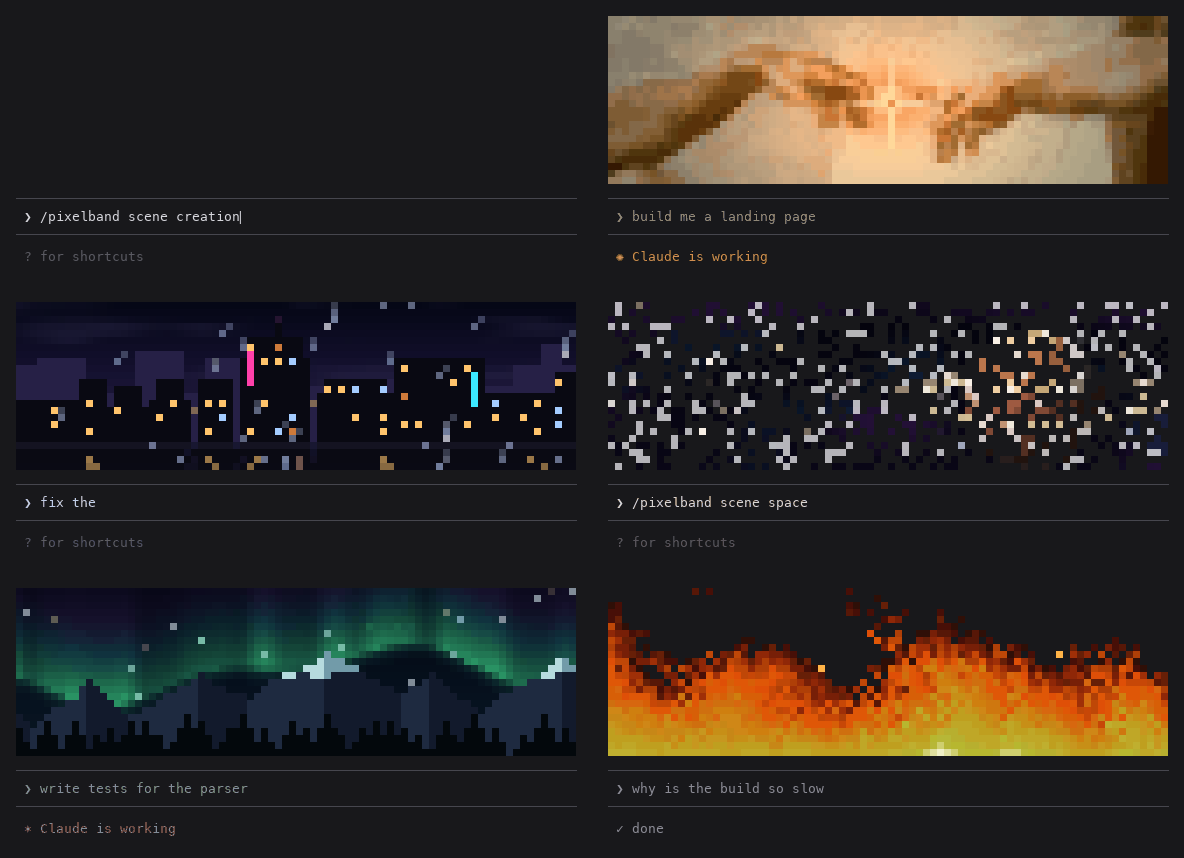
Claude가 작업하는 동안 반응하는 애니메이션 픽셀 아트를 Claude Code 프롬프트 위에 표시합니다. 일곱 장면 또는 자신의 이미지/GIF를 사용할 수 있으며 token을 쓰지 않습니다.

같은 TUI 안에서 Claude Code의 답변, 도구 행, 턴 푸터를 다시 그려 색상 명령, 코드 카드, diff 카드, 테두리 없는 표와 하위 에이전트 배너를 제공한다.