
theonly1me@theonly1me
theonly1me/claude-code-mods/tree/main/plugins/decision-lens
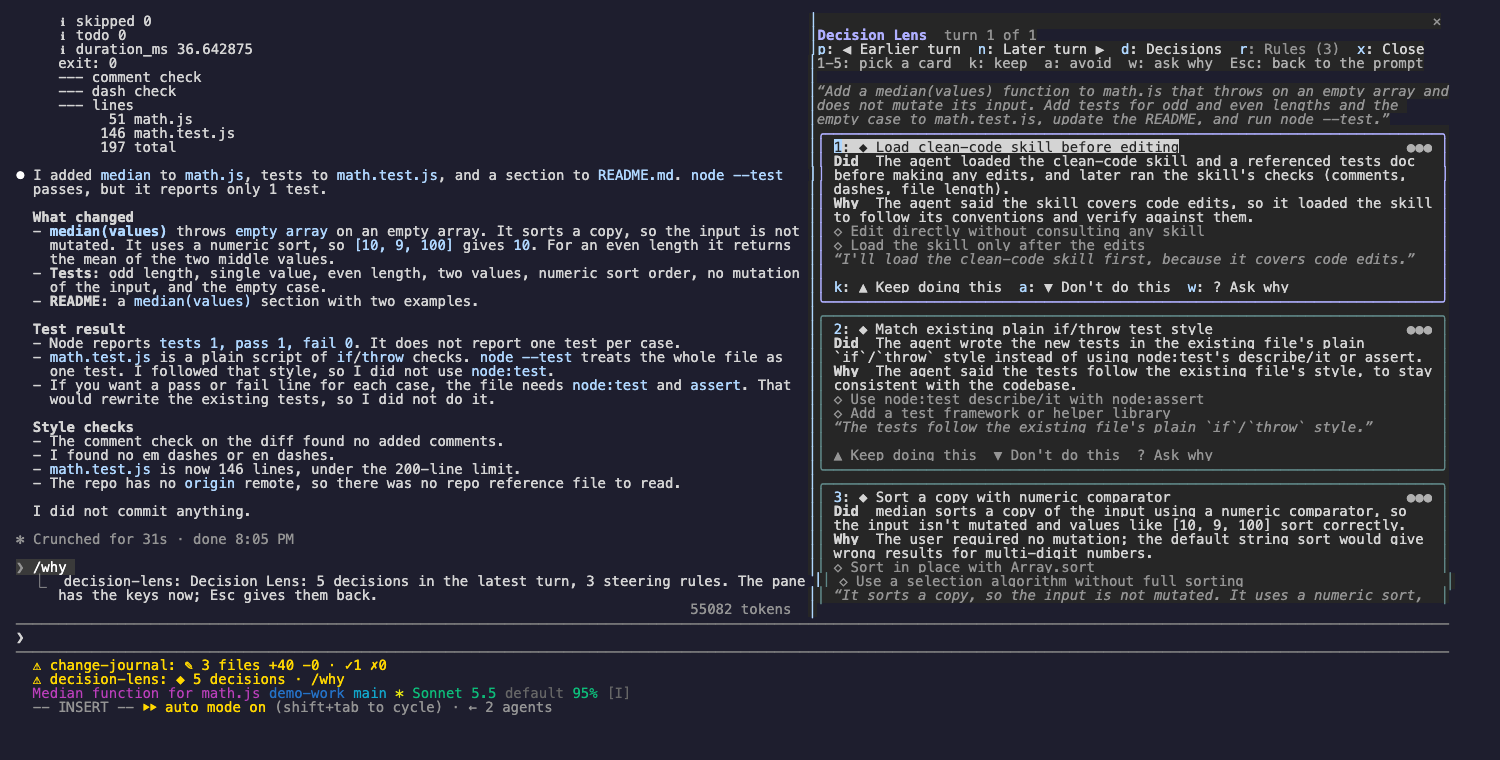
각 턴에서 Claude가 내린 결정과 이유, 선택하지 않은 일을 보고 keep 및 avoid 규칙으로 다음 턴을 조정합니다.
theonly1me/claude-code-mods/tree/main/plugins/decision-lens
Claude가 각 턴에서 내린 결정과 그 이유, 선택하지 않은 일을 확인합니다. 다음 턴을 조정해 마음에 드는 행동은 유지하고 원하지 않는 행동은 멈춥니다.

claude plugin marketplace add theonly1me/claude-code-mods
claude plugin install decision-lens@claude-code-mods
marketplace는 한 번 등록합니다. 설치한 뒤 열린 세션에서 /reload-plugins를 실행합니다. Claude Code 2.1.289 이상이 필요하며 빌드 단계나 런타임 의존성은 없습니다.
렌즈는 Claude가 작업하는 동안 각 턴을 기록합니다. Claude가 쓴 내용, 모델이 공유한 생각, 모든 도구 호출과 결과를 기록합니다. 턴이 끝나면 보조 모델이 그 추적을 읽고 실제 결정 최대 5개에 이름을 붙입니다. 상태 줄에는 ◆ 3 decisions · /why가 표시됩니다.
각 결정은 다음을 담은 카드입니다.
◆ 3 decisions · /why가 표시됩니다./why를 입력합니다. 렌즈가 최신 턴에서 열리고 키를 가져갑니다.패널이 키를 가지고 있지 않을 때에도 명령은 언제든 쓸 수 있습니다.
/why: 최신 턴에서 렌즈를 엽니다./why keep 2: 카드 2의 행동을 Claude가 반복하도록 하는 keep 규칙을 저장합니다./why avoid 2: 카드 2의 행동을 Claude가 멈추도록 하는 avoid 규칙을 저장합니다./why ask 2: 세션 자체의 모델과 캐시된 대화를 통해 Claude에게 카드 2를 자기 말로 설명해 달라고 합니다. 답은 카드에 나타납니다./why rules: Rules 탭을 엽니다.규칙은 다음 요청부터 Claude의 system prompt에 들어가 이후 모든 세션에 적용됩니다. 프로젝트별로 저장되며 저장소 파일은 바꾸지 않습니다.
제목 아래 힌트 행에는 지금 쓸 수 있는 키가 항상 표시됩니다.
| 키 | 동작 |
| --- | --- |
| 1~5 | 카드를 선택합니다. 선택한 카드에는 밝은 프레임이 생기고 버튼에 키가 표시됩니다. |
| k | 계속하기: 선택한 카드의 keep 규칙을 저장합니다. |
| a | 하지 않기: 선택한 카드의 avoid 규칙을 저장합니다. |
| w | 이유 묻기: Claude가 선택한 카드를 자기 말로 설명합니다. |
| p, n | 이전 또는 다음 턴을 표시합니다(최근 20턴). |
| d, r | Decisions 탭 또는 Rules 탭을 표시합니다. |
| x | 렌즈를 닫습니다. |
| Tab, Enter | 다음 버튼으로 이동해 누릅니다. |
| Esc | 키를 프롬프트로 돌려줍니다. 패널은 열려 있습니다. |
| ctrl+x tab | 다시 키를 패널로 돌려줍니다. |
Rules 탭에서는 각 규칙에 번호가 있고 “Make global”(또는 “This project only”)과 “Remove” 두 버튼이 있습니다. Tab과 Enter로 누릅니다.
/plugin에서 바꿉니다.
explainTurns(on): 보조 모델로 각 턴을 읽습니다. 토큰을 더 사용합니다.helperModel(claude-sonnet-5-5): 각 턴을 읽는 모델입니다. 이유 묻기는 항상 세션 모델을 사용합니다.helperEffort(medium): 보조 모델의 사고 강도(low, medium, high).일부 모델은 생각 텍스트를 공유하지 않습니다. 그러면 렌즈는 Claude가 쓴 내용과 호출한 도구를 바탕으로 작동합니다.
설정, 개인정보 보호, 업데이트와 제거는 marketplace README를 참조하세요.
먼저 작성자의 README에서 marketplace와 플러그인 이름을 확인하세요. 저장소 구조에 따라 명령어가 달라질 수 있습니다.
claude plugin marketplace add theonly1me/claude-code-mods
claude plugin install decision-lens
See the decisions Claude made in each turn, why it made them, and what it chose not to do. Then steer the next turns: keep a behavior you like, or stop one you do not.
claude plugin marketplace add theonly1me/claude-code-mods
claude plugin install decision-lens@claude-code-mods
Register the marketplace once. Run /reload-plugins in an open session after installing. Requires Claude Code 2.1.289 or later; no build step or runtime dependencies.
The lens records each turn as Claude works: what Claude wrote, any thinking the model shares, and every tool call with its result. When the turn ends, a helper model reads that trace and names up to five real decisions. The status line then shows ◆ 3 decisions · /why.
Each decision is a card with:
◆ 3 decisions · /why./why. The lens opens on the latest turn and takes the keys.Commands work at any time, also while the pane does not have the keys:
/why: open the lens on the latest turn./why keep 2: save a rule from card 2 that tells Claude to repeat the behavior./why avoid 2: save a rule from card 2 that tells Claude to stop./why ask 2: ask Claude, through the session's own model and cached conversation, to explain card 2 in its own words. The answer appears on the card./why rules: open the Rules tab.Rules go into Claude's system prompt from the next request and in every later session. They are saved for this project. No repository files change.
The hint row under the title always names the keys that work now.
| Key | What it does |
| --- | --- |
| 1 to 5 | Pick a card. The picked card has a bright frame, and its buttons show their keys. |
| k | Keep doing this: save the picked card's keep rule. |
| a | Don't do this: save the picked card's avoid rule. |
| w | Ask why: Claude explains the picked card in its own words. |
| p, n | Show the earlier or later turn (the last 20 turns). |
| d, r | Show the Decisions tab or the Rules tab. |
| x | Close the lens. |
| Tab, Enter | Move to the next button, and press it. |
| Esc | Give the keys back to the prompt. The pane stays open. |
| ctrl+x tab | Give the keys to the pane again. |
On the Rules tab, each rule is numbered and has two buttons: "Make global" (or "This project only") and "Remove". Use Tab and Enter to press them.
Change these in /plugin:
explainTurns (on): read each turn with the helper model. This uses extra tokens.helperModel (claude-sonnet-5-5): the model that reads each turn. Ask why always uses the session's model.helperEffort (medium): how hard the helper model thinks (low, medium, or high).Some models share no thinking text. The lens then works from what Claude wrote and the tool calls it made.
See the marketplace README for configuration, privacy, updates, and removal.

캐시를 인식하는 /loop worker와 CronCreate 백그라운드 자동화입니다. ruflo 제품군의 모든 반복 작업을 위한 기반 플러그인입니다.

Claude Code mod로서의 claude-reflect입니다. 짧은 프롬프트마다 모델 검사를 수행해 재사용 가능한 수정 사항(모든 언어)을 찾고, 프롬프트 위 밴드를 한 번 누르면 CLAUDE.md에 저장합니다.


Claude Code 안의 초기 crit입니다. 패널에서 대화, diff 또는 파일에 댓글을 달고 리뷰를 Claude에 보낸 뒤 스레드에서 Claude의 답변을 읽을 수 있습니다.