
sivori@sivori
sivori/claude-mods/tree/main/plugins/commit-drift
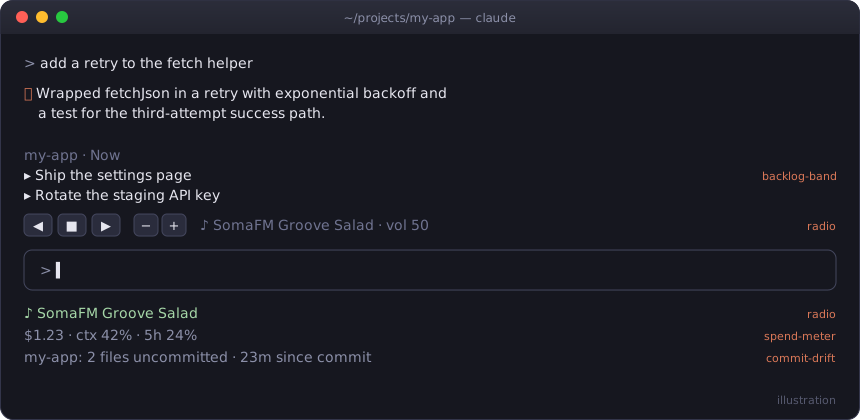
[Claude Code](https://claude.com/claude-code)를 위한 작은 mod입니다. 상태 표시줄, 프롬프트 위 밴드, 도킹 패널, 라디오를 제공하며 모두 function hooks 플러그인입니다.
sivori/claude-mods/tree/main/plugins/commit-drift
Claude Code를 위한 작은 mod입니다. 상태 표시줄, 프롬프트 위 밴드, 도킹 패널, 라디오를 제공하며 모두 function hooks 플러그인입니다.

claude plugin marketplace add sivori/claude-mods
claude plugin install radio@claude-mods        # 아래의 어느 mod나 가능
나중에 claude plugin marketplace update claude-mods로 업데이트합니다.
설치하지 않고 사용해 보려면 저장소를 복제하고 claude --plugin-dir ./plugins/<mod>를 실행합니다.
/tune은 Claude Code 안에서 인터넷 라디오를 스트리밍합니다: SomaFM, lo-fi, 클래식, 합창 음악입니다. (Claude Code에 기본 /radio가 있으므로 명령은 /tune입니다.) 모든 세션이 플레이어 하나를 공유하므로 두 세션에서 시작한 음악이 중복 재생되지 않습니다. 어느 세션에서든 방송국을 바꾸면 현재 스트림이 교체되고 상태 표시줄에는 모든 곳에서 재생 중인 내용이 표시됩니다. 재생 중에는 프롬프트 위에 버튼 행이 놓입니다: ◀ ■ ▶로 변경하거나 중지하고 − +로 볼륨을 조절합니다. 중지해도 행은 남으며 play 버튼으로 마지막 방송국을 재개할 수 있습니다.
/tune              전환(마지막 방송국 재개); /tune listen은 재생만
/tune groove       이름, 장르("jazz", "choral") 또는 번호로 선택
/tune next | prev | stop | list
/tune vol 30       vol +10 / vol -10도 가능
/tune band         버튼 숨기기 또는 표시
mpv(brew install mpv)로 재생하면 끊김 없이 볼륨을 바꿀 수 있습니다. 그렇지 않으면 ffmpeg의 ffplay를 사용하며 볼륨을 바꿀 때마다 스트림을 다시 시작합니다.
기본적으로 Claude Code를 닫은 뒤에도 /tune stop까지 음악이 계속 재생됩니다. /config에서 stopWithLastSession을 켜면 열린 세션이 없어질 때 중지하며, 세션이 충돌해도 감시자가 약 1분 안에 감지합니다.
상태 표시줄에 세션 비용, 컨텍스트 사용량, 5시간 속도 제한 사용량을 표시합니다($1.23 · ctx 42% · 5h 24%)。지출이 $5, $10, $25, $50, $100을 넘을 때마다 한 번씩 토스트를 표시합니다.
편집 중인 저장소에 대해 커밋하지 않은 파일 수와 마지막 커밋 이후 시간을 상태 표시줄에 표시합니다. 30분 이상 커밋되지 않은 트리에서 편집 turn을 마치면 최대 10분에 한 번 알려 줍니다.
활성 저장소의 BACKLOG.md에 있는 열린 ## Now 항목을 프롬프트 위에 표시합니다. /later <item>은 ## Next에 추가하고 /backlog-band는 밴드를 숨기거나 표시합니다. 다음 형식을 사용합니다:
## Now
- [ ] Blocking or imminent work

## Next
- [ ] The normal queue

## Someday
- [ ] Ideas

## Done
- [x] 2026-08-01 Completed
작업을 처음부터 다시 시작하지 않도록 합니다. 작업하는 동안 프롬프트, 편집한 파일, 만든 커밋을 기록합니다. 세션이 10분 동안 조용하면 모델에 두 줄 요약(완료한 일, 다음 단계)을 요청해 저장소별로 저장합니다. 다음에 그 저장소에서 Claude Code를 열면 첫 프롬프트 전에 요약이 표시됩니다:
↩ Last time in dash · yesterday 5:12pm
  Done: Added the spend chart and matched its colors.
  Next: Write a test for the empty-data case.
/recap은 지금 기록하고 /recap last는 지난번 내용을 가져옵니다. 아무것도 하지 않은 세션은 이전 요약을 그대로 둡니다. 요약이 기록되기 전에 종료하면 다음 세션이 기록된 활동과 Haiku를 사용해 요약을 작성합니다.
활성 저장소에서 가져온 일일 퀘스트 3개를 패널에 표시합니다. 해결할 TODO/FIXME 주석, 닫을 열린 GitHub issue(gh 필요), 통과시키지 못한 테스트 명령을 하나씩 선택합니다. 가능하면 종류별 하나씩 골라 하루 동안 같은 보드를 유지하고 다음 날 새로 만듭니다. TODO 줄이 사라지거나 issue가 닫히거나 테스트 명령이 통과하면 퀘스트가 자동으로 사라집니다. 사라질 때마다 토스트를 표시하고 세 개가 모두 사라지면 더 큰 알림을 표시합니다. 상태 표시줄에는 ⚔ quests 1/3이 표시됩니다.
/quests             보드 열기
/quests reroll      완료되지 않은 퀘스트를 새 퀘스트로 교체
/quests check       지금 issue를 다시 확인(그렇지 않으면 10분마다)
Art Institute of Chicago의 퍼블릭 도메인 회화를 보여 주는 도킹 패널입니다. 저장소를 따라 “날씨”가 바뀝니다. 트리가 깨끗하면 평온한 풍경, 변경이 쌓이거나 명령이 실패하면 흐린 날씨, 폭풍이면 난파선을 보여 줍니다. 그림은 20분마다 바뀌며 /commonplace next로 새 그림을 걸 수 있습니다.
이미지에는 kitty 그래픽 프로토콜을 지원하는 터미널(kitty, Ghostty)이 필요하며, 그 밖에서는 패널에 제목과 작가를 표시합니다. macOS sips로 이미지를 변환합니다. 그림은 ~/.cache/commonplace-pane/에 캐시되며 최신 30개를 보관하고 새 그림을 추가할 때마다 나머지를 삭제합니다. /config에는 선택적 설정 2개가 있습니다:
AIC-User-Agent 헤더로 보낼 이메일 또는 URL입니다.seed-*.jpg 그림 폴더입니다.각 mod는 plugins/<name>/에 있으며 .claude-plugin/plugin.json, hooks/hooks.json, hooks/register.ts(x) 모듈을 포함합니다. 확인하려면:
claude plugin validate plugins/<name>
claude plugin test plugins/<name>
MIT
먼저 작성자의 README에서 marketplace와 플러그인 이름을 확인하세요. 저장소 구조에 따라 명령어가 달라질 수 있습니다.
claude plugin marketplace add sivori/claude-mods
claude plugin install commit-drift
Small mods for Claude Code: status lines, a band above the prompt, a docked pane, and a radio. Each one is a plugin of function hooks.
claude plugin marketplace add sivori/claude-mods
claude plugin install radio@claude-mods        # or any mod below
Update later with claude plugin marketplace update claude-mods.
To try one without installing, clone the repo and run claude --plugin-dir ./plugins/<mod>.
/tune streams internet radio inside Claude Code: SomaFM, lo-fi, classical and choral. (The command is /tune because Claude Code has a built-in /radio.) All your sessions share one player, so music started in two sessions never plays twice. Switching stations in any session replaces the current stream, and the status line shows what's playing everywhere. While something plays, a row of buttons sits above the prompt: ◀ ■ ▶ to change or stop, − + for volume. Stopping keeps the row, with a play button that resumes the last station.
/tune              toggle (resumes the last station); /tune listen just plays
/tune groove       pick by name, genre ("jazz", "choral") or number
/tune next | prev | stop | list
/tune vol 30       also vol +10 / vol -10
/tune band         hide or show the buttons
Plays through mpv (brew install mpv), which changes volume without a gap; otherwise ffplay from ffmpeg, which restarts the stream on each volume change.
By default the music keeps playing after you close Claude Code, until /tune stop. Turn on stopWithLastSession in /config to have it stop once no session is open; a watchdog catches a crashed session too, within about a minute.
Session cost, context fill and 5-hour rate-limit use in the status line ($1.23 · ctx 42% · 5h 24%). It toasts once as spend passes $5, $10, $25, $50 and $100.
Uncommitted file count and time since the last commit in the status line, for whichever repo you're editing. After an editing turn on a tree that hasn't been committed for 30+ minutes, it nudges you (at most every 10 minutes).
Shows the open ## Now items of the active repo's BACKLOG.md above the prompt. /later <item> appends to ## Next, and /backlog-band hides or shows the band. It expects this format:
## Now
- [ ] Blocking or imminent work

## Next
- [ ] The normal queue

## Someday
- [ ] Ideas

## Done
- [x] 2026-08-01 Completed
So you never start cold. While you work it records your prompts, the files edited and the commits made. Once the session has been quiet for 10 minutes, it asks the model for a two-line recap (what got done, the next step) and saves it per repo. When you next open Claude Code in that repo, the recap sits above the prompt until your first message:
↩ Last time in dash · yesterday 5:12pm
  Done: Added the spend chart and matched its colors.
  Next: Write a test for the empty-data case.
/recap writes it now, and /recap last brings back the one from last time. A session that did nothing leaves the earlier recap in place. If you quit before the recap is written, the next session writes it from the recorded activity with Haiku.
Three daily quests in a pane, drawn from the active repo: a TODO/FIXME comment to resolve, an open GitHub issue to close (needs gh), and a test command that failed to get passing. It picks one of each kind when it can, keeps the same board all day, and draws a new one tomorrow. A quest clears by itself when the TODO line is gone, the issue is closed or the test command passes. Each cleared quest gets a toast, and clearing all three gets a bigger one. The status line shows ⚔ quests 1/3.
/quests             open the board
/quests reroll      swap the unfinished quests for new ones
/quests check       re-check the issues now (otherwise every 10 minutes)
A docked pane of public-domain paintings from the Art Institute of Chicago. Its "weather" follows your repo: calm landscapes while the tree is clean, overcast as changes pile up or commands fail, shipwrecks in a storm. The painting rotates every 20 minutes, and /commonplace next hangs a new one.
The images need a terminal with the kitty graphics protocol (kitty, Ghostty); elsewhere the pane shows the title and artist. It uses macOS sips to convert images. Paintings are cached in ~/.cache/commonplace-pane/, which keeps the newest 30 and deletes the rest after each new painting. Two optional settings live in /config:
AIC-User-Agent header, as the Art Institute asks of API clients.seed-*.jpg paintings to fall back on when the museum is unreachable.Each mod is plugins/<name>/ with .claude-plugin/plugin.json, hooks/hooks.json and a hooks/register.ts(x) module. To check one:
claude plugin validate plugins/<name>
claude plugin test plugins/<name>
MIT

diff 분석, 위험 점수, 변경 분류, 리뷰어 추천을 제공하는 고급 git 워크플로와 PR 작업용 function-hook 가드 mod입니다.

터미널 브라우저: Claude Code 내에서 직접 실행되는 브라우저입니다. 웹사이트 미리보기, HTML 문서 보기, 에이전트의 제어 허용
bg session이 git worktree에서 완성한 브랜치를 패널 버튼으로 main에 fast-forward합니다. 인계서는 매개변수만 담으며, mod가 단계를 도출하고 실행 전 점검과 실행 후 검증을 수행합니다.
