
mireabot@mireabot
mireabot/Clauisc/tree/main/plugins/clauisc
mireabot/Clauisc/tree/main/plugins/clauisc
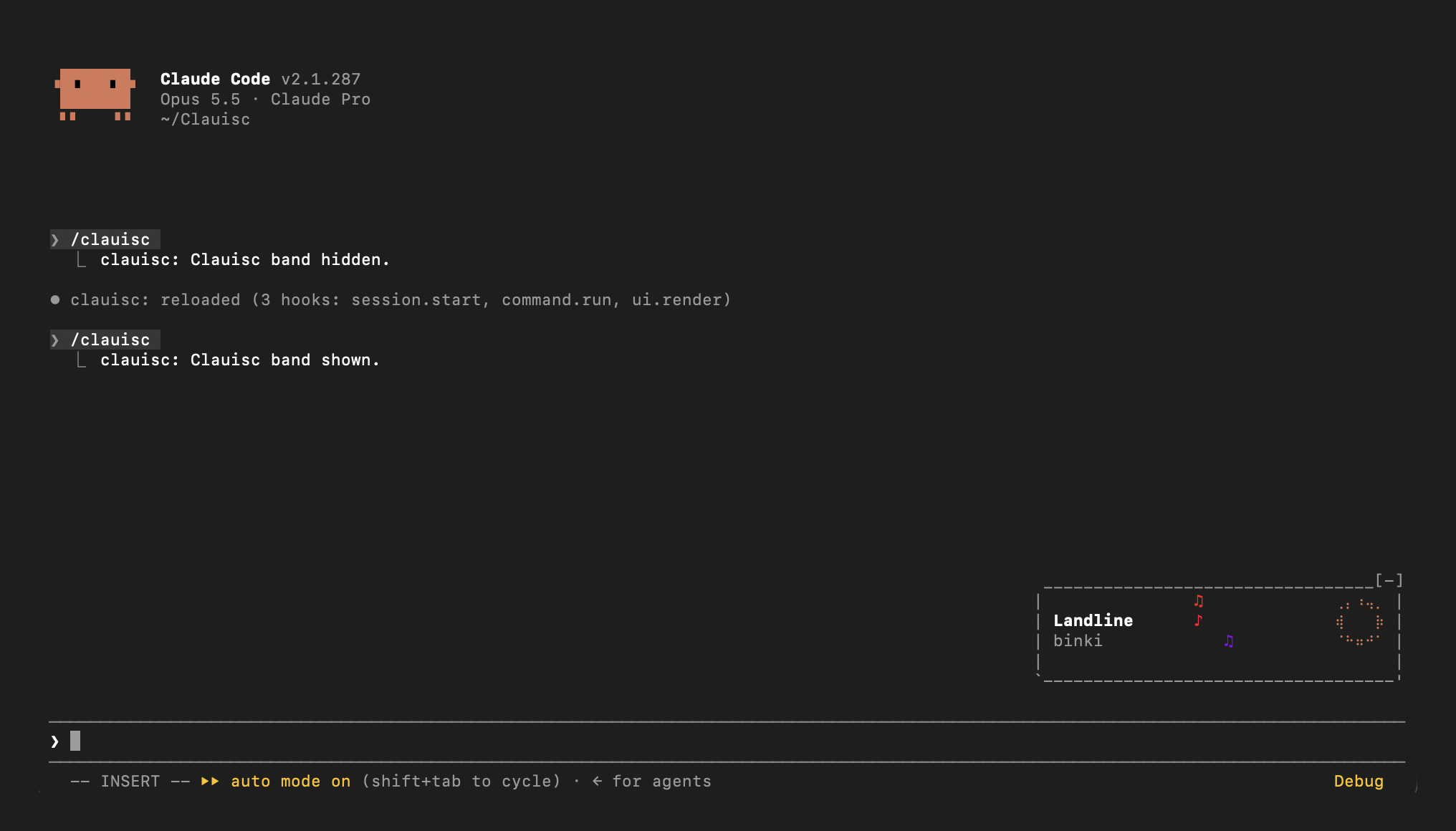
프롬프트 위 Apple Music 재생 중 밴드: 픽셀 앨범 아트, 제목, 아티스트, 통통 뛰는 Claude 봉제인형
먼저 작성자의 README에서 marketplace와 플러그인 이름을 확인하세요. 저장소 구조에 따라 명령어가 달라질 수 있습니다.
claude plugin marketplace add mireabot/Clauisc
claude plugin install clauisc
Apple Music, live in your Claude Code prompt. Clauisc is a Claude Code plugin that sits right-aligned just above your input line: the track, a progress ring, and music notes rising to the beat, framed like a little boombox.
Status: early. Running on macOS 26 with Apple Music. Reports and screenshots are welcome in Issues.
osascript.git clone https://github.com/mireabot/Clauisc.git ~/Clauisc
Try it in one session
claude --plugin-dir ~/Clauisc/plugins/clauisc
Load it in every session
~/Clauisc/install.sh            # adds the plugin to CLAUDE_CODE_PLUGIN_DIRS in ~/.claude/settings.json
~/Clauisc/install.sh --remove   # removes it again
install.sh backs up ~/.claude/settings.json to settings.json.bak before
changing it.
Update: git pull. A running session reloads the plugin when its files
change. If you installed before the plugin folder was renamed to
plugins/clauisc, run install.sh again.
Play something in Music and the band appears above your prompt.
| Command | Effect |
| --- | --- |
| /clauisc | Hide or show the band |
| /clauisc status | Report what Clauisc sees: which source answered, osascript's output, the track, timers, and whether the band was drawn |
| /clauisc width <n> | Set the frame's inside width (29–200 columns); remembered across sessions |
| /clauisc width | Show the current width |
| /clauisc width reset | Back to the default, 48 |
Run /clauisc status first; it checks Music right away and reports what it
found.
/clauisc status. timer ticks should climb by about one every 2 seconds; if it doesn't, backup polls shows the beat timer covering for it.band drawn: 0 times: Claude Code isn't loading the plugin. Check
claude --version, run claude plugin validate ~/Clauisc/plugins/clauisc,
and start with claude --debug --plugin-dir ~/Clauisc/plugins/clauisc to
see why.osascript -e 'tell application "Music" to get name of current track'Raster elements.
On each beat the ring and notes are repainted in place, without
redrawing the band.The frame width can be changed live: /clauisc width 40 narrows it, wider
values give the title more room. Each 2 columns moves both sides of the
notes by one.
Layout lives in plugins/clauisc/hooks/register.tsx,
drawing in plugins/clauisc/hooks/lib.ts:
| Name | What it controls |
| --- | --- |
| GAP | Columns between components |
| TEXT_PAD | Columns left of the title/artist stack |
| BAR_INNER | Default inside width of the frame (/clauisc width overrides it); the notes sit in its middle and the title stack fills the space to their left |
| RING_COLS, NOTES_COLS, BAND_ROWS | Component sizes |
| noteColor | How each note's color is picked |
| riseNotes | How notes start and rise |
| beatMs | How BPM maps to the beat |
Start Claude Code on the plugin folder:
claude --debug --plugin-dir ~/Clauisc/plugins/clauisc
An interactive session watches that folder: save a file and the plugin
reloads in place (its hooks run again, the band redraws), with no restart.
If a hook throws or a drawing is refused, the transcript shows one dim line
naming the hook and the reason; --debug writes every occurrence to the
debug log. /clauisc status shows the plugin's own view at any time.
You can also ask Claude in that same session to change the plugin: edits it makes reload when its turn ends.
cd ~/Clauisc/plugins/clauisc
claude plugin validate .   # what the engine will load, and anything it would refuse
claude plugin test .       # the tests; they mock osascript, so they run on any OS
Once the plugin has loaded, Claude Code writes its API types to
plugins/clauisc/.claude-plugin/types/ (git-ignored), so an editor or
tsc -p plugins/clauisc type-checks it.
.claude-plugin/marketplace.json   marketplace manifest
plugins/clauisc/
  .claude-plugin/plugin.json      plugin manifest
  hooks/register.tsx              hooks: polling, beat, band layout, /clauisc
  hooks/lib.ts                    AppleScript/JXA, parsing, ring and notes cells
  types/index.d.ts                state contract
  tests/band.test.tsx             tests
install.sh                        local install for every session
osascript, but Apple has restricted it before and a macOS
update could again; Clauisc then falls back to Music's AppleScript, which
only sees library songs.
Cognitum Music(cogmusic MCP)을 통한 AI 음악 생성입니다. 자신의 music.cognitum.one 계정으로 가사/프롬프트를 만들고 트랙을 생성하며 스템을 분리하고 MIDI를 추출하고 마스터링합니다. mod(ADR-445)로서 도구에 대한 강화 전용 가드, /music-mod와 콘솔에 표시되는 상태 파일도 제공합니다.

이 Claude Code 세션을 양방향 음성 통화로 연결합니다. 말하면서 코딩하게 하고 언제든 끼어들며 결과를 음성으로 들을 수 있습니다. 음성으로 yes라고 해도 승인되지 않으며 권한 프롬프트는 키보드에 남습니다. macOS 전용입니다.

osascript로 LRCLIB 데이터를 사용해 현재 재생 중인 Apple Music 또는 Spotify 트랙의 동기화 가사를 프롬프트 위에 보여 주고, 선택적으로 춤추는 마스코트도 표시하는 Claude Code 플러그인.