
davideiffert@davideiffert
davideiffert/check-it
davideiffert/check-it
Check it은 Claude가 만든 눈에 보이는 변경 사항을 프로젝트별 목록으로 유지하며, 각 항목에 확인할 위치의 링크, 그곳에서 찾아야 할 내용과 체크 상자를 제공합니다. 프롬프트 위의 한 줄에 검토할 항목이 몇 개 남았는지 표시하고 목록을 열거나 Claude에게 무엇을 확인할지 묻는 버튼을 제공합니다. 항목은 확인됨, 무시됨 또는 ‘올바르지 않음’으로 표시할 수 있으며, ‘올바르지 않음’으로 표시하면 보낼 수 있는 메모가 프롬프트 끝에 추가됩니다. 도구 하나와 짧은 지침을 추가해 Claude가 눈에 보이는 변경마다 한 항목을 기록하게 하고, 턴이 끝날 때까지 항목을 표시하지 않으며 보이지 않는 변경이나 주소가 없는 경우에는 아무것도 나열하지 않습니다. siteAddress 설정 옵션과 함께 플러그인 마켓플레이스에서 설치하거나 --plugin-dir로 로컬 실행할 수 있습니다. 브라우저 중심이며 Claude Code 2.1.288에서 테스트했지만 현재 적극적으로 유지 관리되지는 않습니다.
먼저 작성자의 README에서 marketplace와 플러그인 이름을 확인하세요. 저장소 구조에 따라 명령어가 달라질 수 있습니다.
claude plugin marketplace add davideiffert/check-it
claude plugin install check-it
Claude Code tells you what it changed. Check it tells you where to look.
After a long session, Claude says it's done. It changed six things. Which ones can you actually see, and where do you click? Check it keeps the list for you: every change you can see in a browser, with a link, what you should find there, and a box to tick. If something's off, one button tells Claude which one.
For the person checking the result, not the diff.
Build checks · Changelog · MIT license
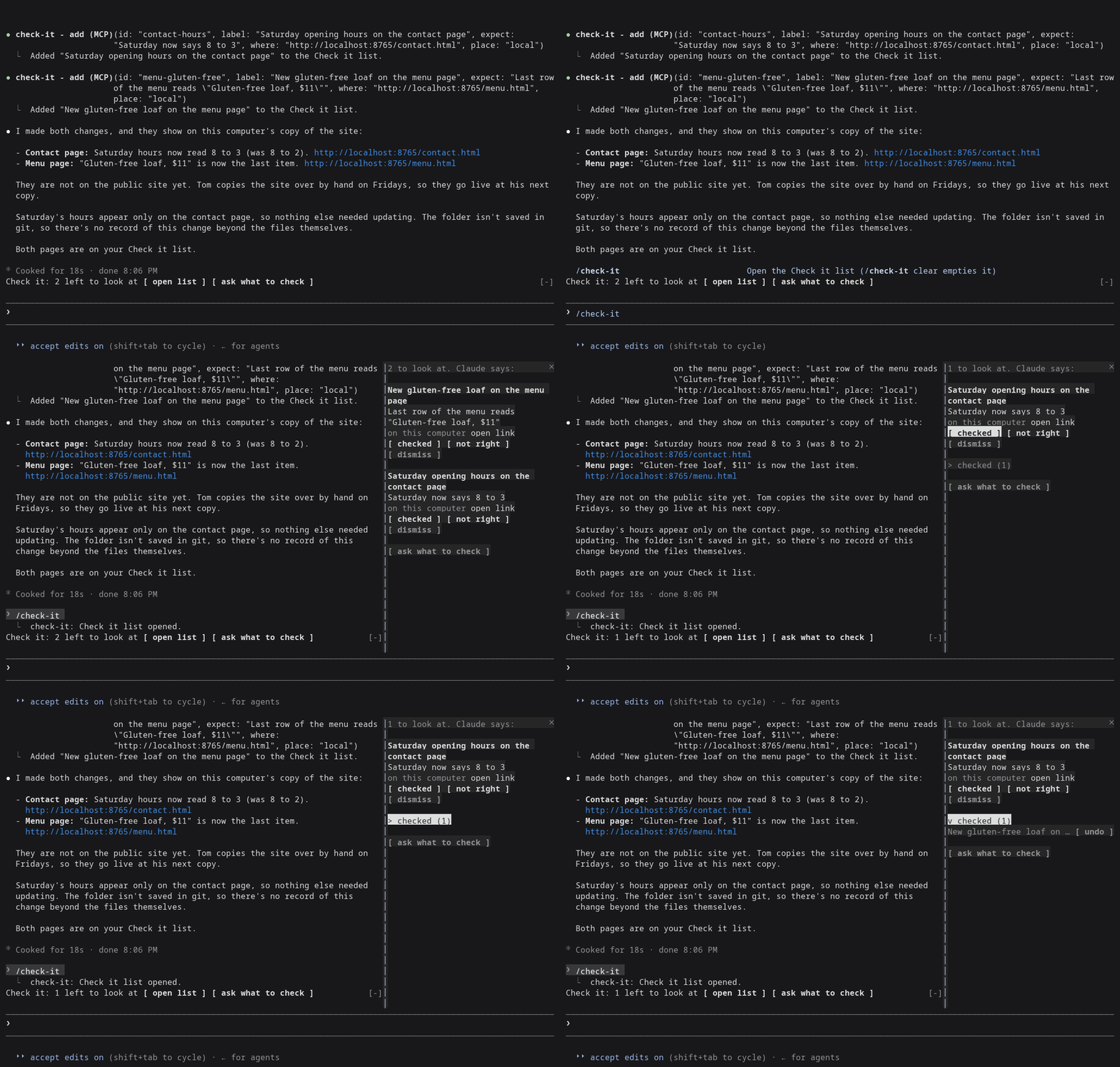
Claude Code 2.1.288, right after Claude changed the Saturday hours and the menu of a made-up bakery site from demo/.
Needs Claude Code 2.1.288 or later (claude --version shows yours).
claude plugin marketplace add davideiffert/check-it && claude plugin install check-it@check-it --config siteAddress=http://localhost:3000
Swap http://localhost:3000 for wherever your app or site runs right now,
on this computer or online. The command only installs Check it. It doesn't
start your app for you. Then start Claude Code as usual.
open list and ask what to check buttons. It stays hidden until the
first item arrives.open link opens the page in your browser.checked ticks it. Ticked items fold into one checked (N) row, where
you can undo a tick.not right puts Not right: <item> (<address>). at the end of your
prompt, after anything you already typed. Add a sentence and send it.
It never sends anything by itself.dismiss removes the item./check-it opens the list. /check-it clear empties it.ask what to check puts a request at the end of your prompt asking
Claude what you should look at. You decide whether to send it.Claude fills it. The plugin gives Claude one tool for adding an item and one short instruction: when a change alters what someone sees or does on a page, add one item per change, with the address where it shows right now. Changes nobody can see (tidying code, tests, settings) get no items. Something every page shares, like the footer, gets one item.
New items wait until Claude's turn ends, so nothing shows up while Claude is still halfway through the change. That's a delay, not a check: the list doesn't confirm the change exists. If you stop a turn, its items are dropped. Only the main conversation adds items. Helper agents Claude starts cannot.
If Claude can't name an address where a change shows (nothing is running, or it isn't built yet), it adds nothing and says so in its reply, naming what it needs.
The list is Claude's word for it. The tick is yours.
The list is kept per project and survives restarts. It holds 50 items, and the oldest ticked ones go first.
Measured on two demo sites, a plain one and one with a build step: 51 recorded sessions (31 and 20) using Claude Opus and Sonnet, plus 3 interactive ones.
127.0.0.1; since 0.1.2 that opens as
a link.Details are in docs/measurement-v0.md.
siteAddress
setting, the one setting worth filling in. Without it, and with nothing
running, Claude often has no address to give you and the list stays
empty. Set it with --config as above, or later in /config under
check-it./tui fullscreen the list
docks beside the conversation. On the normal screen it opens above the
prompt instead./theme.open link is a plain link, and
it only works for https: and http://localhost addresses. Other
addresses show as text.Almost nothing outside its own list. No network access, no model calls of
its own, no files. It runs one command, and only when you press open link in the terminal: your system's own opener (open on macOS,
xdg-open on Linux), with an http:// or https:// address the plugin
has already checked, to show the page in your browser. It adds one tool,
one short section of Claude's instructions, the line above the prompt, the
list and the /check-it command.
From the marketplace, as above. To try a local copy without installing:
git clone https://github.com/davideiffert/check-it
claude --plugin-dir ./check-it
Issues and pull requests are welcome. Before sending a change, run:
claude plugin validate .
claude plugin test .
For the type check, start Claude Code once with --plugin-dir . (it writes
the type declarations into .claude-plugin/types), then run
npx -p typescript@5 tsc -p ..
MIT. Made by David Eiffert.

캐시를 인식하는 /loop worker와 CronCreate 백그라운드 자동화입니다. ruflo 제품군의 모든 반복 작업을 위한 기반 플러그인입니다.

Claude Code mod로서의 claude-reflect입니다. 짧은 프롬프트마다 모델 검사를 수행해 재사용 가능한 수정 사항(모든 언어)을 찾고, 프롬프트 위 밴드를 한 번 누르면 CLAUDE.md에 저장합니다.


Claude Code 안의 초기 crit입니다. 패널에서 대화, diff 또는 파일에 댓글을 달고 리뷰를 Claude에 보낸 뒤 스레드에서 Claude의 답변을 읽을 수 있습니다.