
jamubc@jamubc
jamubc/toolbox/tree/main/plugins/channel
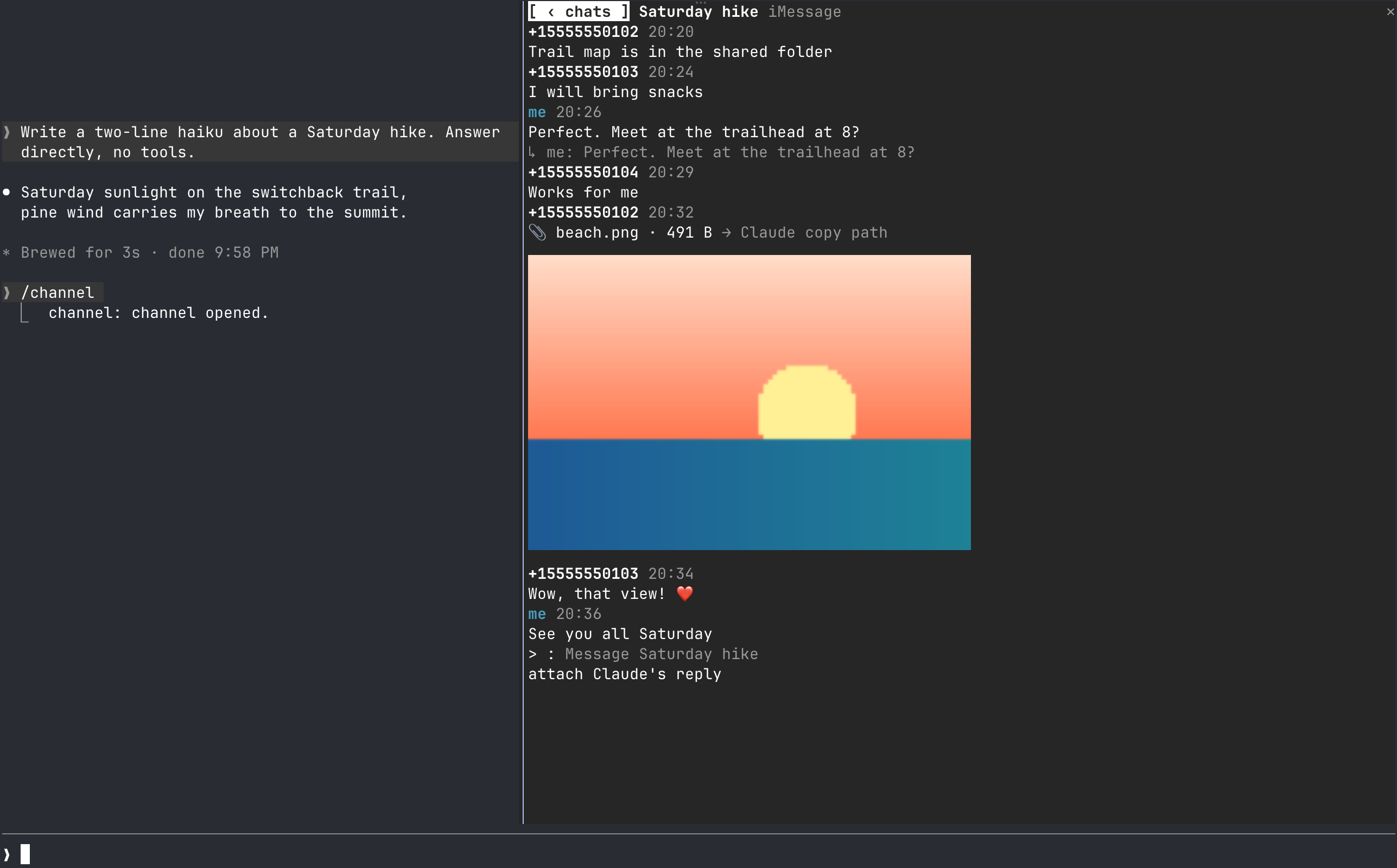
터미널을 떠나지 않고 Claude Code 옆 창에서 채팅을 읽고 답장하고 파일을 첨부하며 toast를 받습니다. iMessage를 지원하고 다른 서비스를 추가할 provider framework를 제공합니다.
jamubc/toolbox/tree/main/plugins/channel
Claude Code 세션 옆에 채팅 창을 고정하는 플러그인입니다. 대화를 읽고 답장하고 Claude가 만진 파일을 첨부하며 이미지를 인라인으로 미리 보고 새 메시지에 대한 조용한 집계 toast를 받을 수 있습니다. iMessage를 지원하며(macOS 13+, 읽기에는 Full Disk Access, 보내기에는 osascript 필요), 더 많은 서비스를 추가할 수 있는 계약 기반 provider framework를 제공합니다. /plugin marketplace add jamubc/toolbox 다음 /plugin install channel@toolbox로 설치하고 /channel로 창을 엽니다.
먼저 작성자의 README에서 marketplace와 플러그인 이름을 확인하세요. 저장소 구조에 따라 명령어가 달라질 수 있습니다.
claude plugin marketplace add jamubc/toolbox
claude plugin install channel
Your favourite chat, directly in Claude Code. Read, reply, get notified and more, without leaving the terminal.
It can all be done, inside Claude Code
Add the marketplace:
/plugin marketplace add jamubc/toolbox
Install the plugin:
/plugin install channel@toolbox
| Command | What it does |
| --- | --- |
| /channel | Opens the chat pane: a tab per service, and your twenty most recent conversations in each. |
In the pane:
All tab shows every conversation together.1 to 9 open the first nine./config → How picture previews are drawn forces one, or turns previews off.Notifications stay quiet: only one of your Claude sessions toasts, several messages in one chat fold into one toast, and a chat toasts at most once every 10 seconds. Every session still shows the unread count in its status line.
| Connection | Platform | Setup | What it can do | | --- | --- | --- | --- | | iMessage | macOS 13 or later, terminal | Full Disk Access | Read and send text and files; show replies, tapbacks, edits, unsends and members |
Turn a service off in /config under channel.
sqlite3 -readonly on ~/Library/Messages/chat.db, which requires Full Disk Access for your terminal. The pane lists the steps and names your terminal app.osascript. On your first send, macOS asks you to let your terminal control Messages.A service can start only the programs and call only the hosts listed here. Anything else is refused in hooks/core/fence.ts.
| Service | Programs it starts | Hosts it calls |
| --- | --- | --- |
| iMessage | /usr/bin/sqlite3, /usr/bin/osascript | none |
The pane itself starts /usr/bin/open when you press a file, and /usr/bin/sips to make a picture's or a PDF's preview. Previews are at most twelve temporary files in your TMPDIR, each overwritten in turn. The cells of a preview are averaged from the pixels they cover and encoded once per size, so redrawing the pane costs nothing more.
hooks/core/contract.ts is what every service implements: a small required core, plus optional capabilities (attachments, threads, reactions, edits, read state, typing, members, search). The pane offers only what a service has.hooks/core/registry.ts lists the services. Adding one is a folder under hooks/providers/ and a line there.hooks/core/account.ts runs one service with its own loop and backoff; inbox.ts merges them; notify.ts decides what toasts; hub.ts ties them together.hooks/ui/ draws the pane: list.tsx the conversations, conversation.tsx one chat, picture.ts thumbnails as pixels or cells, format.ts labels, colors and days. hooks/register.tsx is wiring only.tests/kit/ has a scriptable fake service and the conformance checks every provider must pass.claude --plugin-dir plugins/channel # load it; edits hot-reload
claude plugin validate plugins/channel
claude plugin test plugins/channel
tsc -p plugins/channel # after one load writes .claude-plugin/types/

세션에서 사용자의 처리를 기다리는 항목, 에이전트의 질문, Claude가 기록한 문제, PR의 검사와 리뷰를 모아 주는 Claude Code mod입니다. 프롬프트 위와 `/inbox` 패널에 표시하고 세션의 현재 상태도 보여 줍니다.

질문이나 계획이 답변을 기다릴 때, 그리고 턴이 끝나거나 실패할 때 데스크톱 알림을 보냅니다.

에이전트 세션 사이에서 동기화되는 리마인더 스택을 트랜스크립트 옆 패널에 두고, 같은 계정을 공유하는 CLI, Codex 스킬, 터미널 UI를 제공하는 Claude Code 플러그인입니다.