
theonly1me@theonly1me
theonly1me/claude-code-mods/tree/main/plugins/change-journal
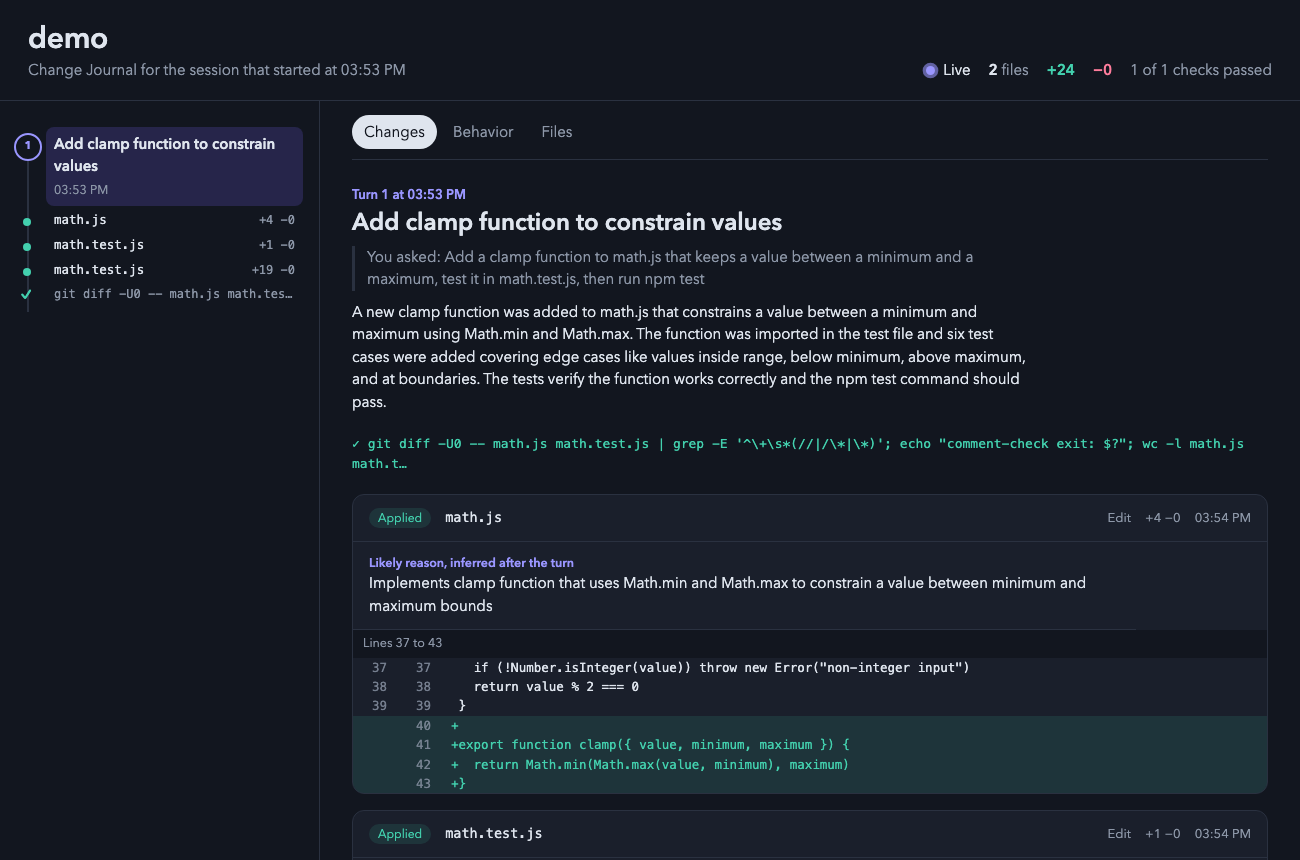
Claude가 수행한 모든 변경 사항을 표시하는 실시간 로컬 HTML 페이지를 여는 Claude Code 플러그인입니다. 차이점, 편집 이유, 확인, 각 턴 전후의 동작 흐름을 표시합니다.
theonly1me/claude-code-mods/tree/main/plugins/change-journal
브라우저의 라이브 페이지로 Claude가 작업하는 동안 수행한 모든 변경을 표시합니다: 차이점, 각 편집의 이유, 실행한 검사, 각 턴의 전후 코드 동작.

claude plugin marketplace add theonly1me/claude-code-mods
claude plugin install change-journal@claude-code-mods
마켓플레이스를 한 번 등록합니다. 설치 후 열려 있는 세션에서 /reload-plugins를 실행합니다. Claude Code 2.1.289 이상 필요; 빌드 단계 또는 런타임 종속성이 없습니다.
페이지는 세션의 첫 편집 시 브라우저에서 열리며 1.5초마다 자동 업데이트됩니다. 서버가 필요하지 않습니다.
페이지는 새 변경 사항이 발생할 때 따릅니다. 무언가를 선택하면 "새 변경 사항 팔로우"를 누를 때까지 팔로우를 중지합니다.
Edit 및 Write 외부에서 수행된 변경(sed 명령, 포매터 또는 자신의 편집)은 각 턴 후 외부 변경으로 표시됩니다. 테스트 명령은 통과 또는 실패 표시로 표시됩니다.
✎ 3 files +40 −12를 표시합니다./changes를 입력하여 터미널에서 최신 4개 턴 및 편집을 봅니다. 창이 열려 키가 표시됩니다.o를 눌러 페이지를 엽니다.명령:
/changes: 최신 4개 턴 및 편집을 포함한 창을 엽니다./changes open: 브라우저에서 페이지를 엽니다./changes path: 페이지 위치를 인쇄합니다.
제목 아래의 힌트 행은 항상 현재 작동하는 키를 표시합니다.
| 키 | 기능 |
| --- | --- |
| 1 ~ 9 | 목록 아래에 편집을 표시: 이유 및 첫 번째 변경 줄. 숫자를 다시 눌러 숨깁니다. |
| o | 페이지를 엽니다. 편집이 표시되면 해당 턴에서 페이지가 열립니다. |
| c | 페이지 경로를 복사합니다. |
| x | 창을 닫습니다. |
| Tab, Enter | 다음 행 또는 버튼으로 이동하여 누릅니다. |
| Esc | 키를 프롬프트에 반환합니다. 창은 열린 상태로 유지됩니다. |
| ctrl+x tab | 키를 창에 반환합니다. |
페이지에서 레일의 고리 또는 점을 클릭하여 턴이나 편집으로 이동합니다. "새 변경 사항 팔로우"를 눌러 최신 변경으로 돌아갑니다.
/plugin에서 다음을 변경합니다:
autoOpen(활성화): 세션의 첫 편집 시 페이지를 엽니다.liveSummaries(활성화): 편집이 있는 각 턴 후 헬퍼 모델에 제목, 설명, 동작 흐름 및 누락된 이유를 요청합니다. 이는 추가 토큰을 사용합니다.helperModel(claude-sonnet-5-5): 이 요약용 모델입니다.helperEffort(medium): 헬퍼 모델이 생각하는 정도(low, medium, high)입니다.페이지 및 데이터는 ~/.claude/change-journal/<project>/<session>/의 컴퓨터에 보관됩니다. 비밀처럼 보이는 파일(.env, 키, 자격증명)은 내용 없이 나열되고 차이점의 토큰은 편집됩니다. 요약이 활성화되면 각 차이점의 짧은 발췌가 설정된 Claude 제공자에게 전송됩니다.
설정, 개인 정보 보호, 업데이트 및 제거에 대해서는 marketplace README를 참조하세요.
먼저 작성자의 README에서 marketplace와 플러그인 이름을 확인하세요. 저장소 구조에 따라 명령어가 달라질 수 있습니다.
claude plugin marketplace add theonly1me/claude-code-mods
claude plugin install change-journal
A live page in your browser that shows every change Claude makes while it works: the diff, the reason for each edit, the checks it ran, and how the code behaved before and after each turn.
claude plugin marketplace add theonly1me/claude-code-mods
claude plugin install change-journal@claude-code-mods
Register the marketplace once. Run /reload-plugins in an open session after installing. Requires Claude Code 2.1.289 or later; no build step or runtime dependencies.
The page opens in your browser on the first edit of a session and updates itself every second and a half. It needs no server.
The page follows new changes as they happen. When you select something, it stops following until you press "Follow new changes".
Changes made outside Edit and Write (a sed command, a formatter, or your own edits) show up after each turn as outside changes. Test commands appear with a pass or fail mark.
✎ 3 files +40 −12./changes to see the latest turns in the terminal. The pane opens with the keys.o to open the page.Commands:
/changes: open the pane with the latest four turns and their edits./changes open: open the page in your browser./changes path: print where the page lives.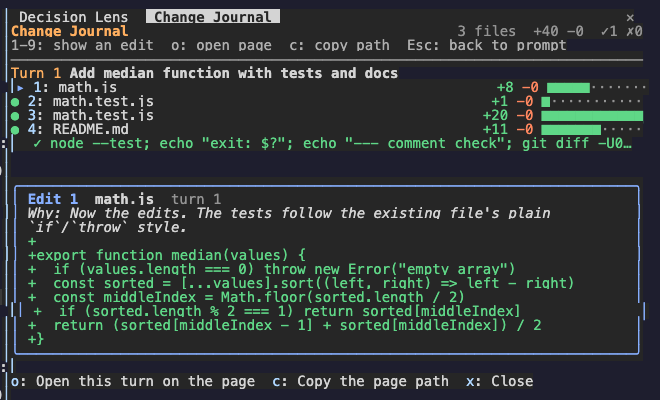
The hint row under the title always names the keys that work now.
| Key | What it does |
| --- | --- |
| 1 to 9 | Show that edit under the list: its reason and its first changed lines. Press the number again to hide it. |
| o | Open the page. With an edit shown, the page opens on that edit's turn. |
| c | Copy the page path. |
| x | Close the pane. |
| Tab, Enter | Move to the next row or button, and press it. |
| Esc | Give the keys back to the prompt. The pane stays open. |
| ctrl+x tab | Give the keys to the pane again. |
On the page, click a ring or a dot on the rail to jump to a turn or an edit. Press "Follow new changes" to go back to the newest change.
Change these in /plugin:
autoOpen (on): open the page on the first edit of a session.liveSummaries (on): after each turn with edits, ask the helper model for a title, an explanation, the behavior flows, and missing reasons. This uses extra tokens.helperModel (claude-sonnet-5-5): the model for those summaries.helperEffort (medium): how hard the helper model thinks (low, medium, or high).The page and its data stay on your machine in ~/.claude/change-journal/<project>/<session>/. Files that look like secrets (.env, keys, credentials) are listed without their content, and tokens in diffs are redacted. When summaries are on, a short excerpt of each diff goes to your configured Claude provider.
See the marketplace README for configuration, privacy, updates, and removal.

작업 트리의 지문을 채취하고 동일한 코드에서 어떤 테스트가 통과하고 실패했는지 기억하여 모델이 작업 코드를 변경하는 대신 불안정한 테스트를 다시 실행하는 Claude Code 모드입니다.

세션 시작 시 플러그인 설치 상태를 확인하고 설정 문제를 알려줍니다.

# catalyst-probes