
jamubc@jamubc
jamubc/toolbox/tree/main/plugins/browse
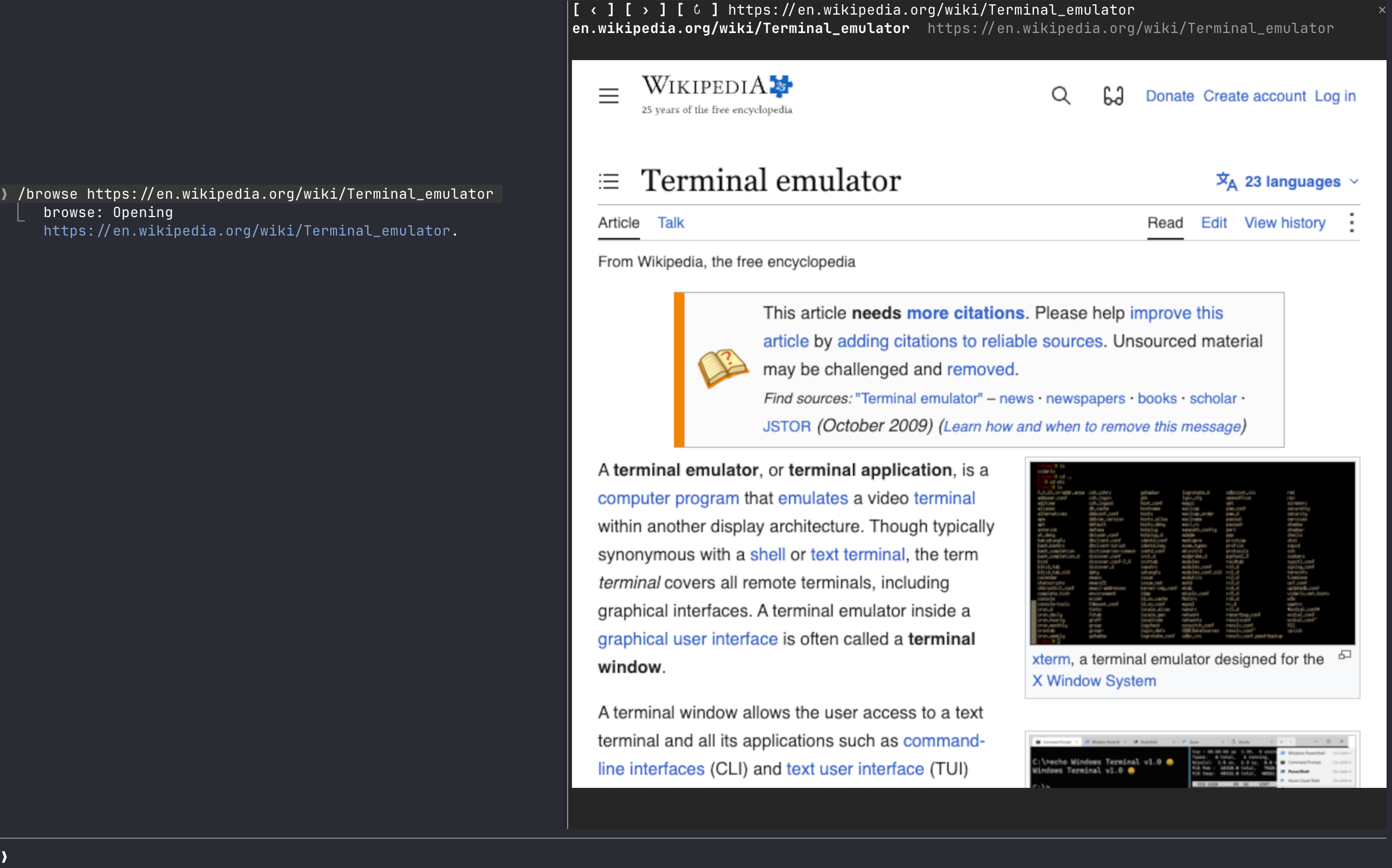
DevTools 프로토콜로 구동되는 프롬프트 옆 창의 웹 브라우저 /browse를 추가하는 Claude Code 플러그인입니다.
jamubc/toolbox/tree/main/plugins/browse
browse는 jamubc/toolbox marketplace에서 제공되는 Claude Code 플러그인으로 프롬프트 옆 창에 웹 브라우저를 엽니다. /plugin marketplace add jamubc/toolbox 후 /plugin install browse@toolbox로 설치합니다. /browse로 시작 페이지를 열고, /browse <address or words>로 이동하거나 DuckDuckGo를 검색하며, /browse close로 중지합니다. 실제 픽셀 렌더링은 kitty graphics protocol(kitty 또는 Ghostty)을 사용하고 다른 터미널에서는 색상 half-block으로 대체합니다. Claude 데스크톱 앱, VS Code 확장 및 모바일에는 표시하지 않습니다. Chrome/Chromium/Brave/Edge와 PATH의 Node.js 18+가 필요하며 macOS(테스트됨)와 Linux(테스트하지 않음)을 지원합니다. 아직 Windows는 지원하지 않고 자체 Chrome 프로필을 ~/.cache/claude-browse/chrome-profile에 보관합니다.
먼저 작성자의 README에서 marketplace와 플러그인 이름을 확인하세요. 저장소 구조에 따라 명령어가 달라질 수 있습니다.
claude plugin marketplace add jamubc/toolbox
claude plugin install browse
A Claude Code web browser.
Add the marketplace:
/plugin marketplace add jamubc/toolbox
Install the plugin:
/plugin install browse@toolbox
| Command | What it does |
| --- | --- |
| /browse | Opens the browser on a start page: type an address or a search and press Enter, or pick YouTube, DuckDuckGo, Wikipedia, Hacker News or GitHub. |
| /browse <address or words> | Opens the address, or searches DuckDuckGo. |
| /browse close, or the pane's ✕ | Closes the pane and stops the browser and its sound. |
| The address bar | Type an address or words and press Enter. It has the keys when the start page opens. |
| Click the page | Clicks there. Your keys then go to the page; Esc gives them back to the prompt. |
| Mouse wheel over the page | Scrolls the page. |
| /config → How the page is drawn | auto, always real pixels (kitty or Ghostty only) or always colored blocks (any terminal). |
| Where you run Claude Code | Picture | Sound | | --- | --- | --- | | kitty, Ghostty | Real pixels (kitty graphics protocol). Untested so far. | Yes | | Any other terminal: Terminal.app, iTerm2, Zed, VS Code's terminal, WezTerm, tmux, or over ssh | Colored half-blocks, two pixels per character. Video is recognizable but chunky, and small text cannot be read. | Yes, on the machine running Claude Code | | Claude desktop app, VS Code extension, mobile | Nothing. The pane says the browser only draws in the terminal, and no browser starts. | No |
| System | Status | | --- | --- | | macOS | Tested: YouTube with sound, clicks, keys, the wheel, closing. | | Linux | Should work; untested. Chrome is looked up on your PATH. | | Windows | Not supported yet. The pane says so. |
/config → Browser to draw in and Node.js 18+ to run it./config → How the page is drawn back to auto or colored blocks./browse says so.browser/browser.mjs runs Chrome headless and drives it over the DevTools protocol, with no dependencies.
hooks/register.tsx draws the pane, answers /browse, and forwards the wheel.hooks/pointer.tsx lies over the picture and passes on clicks and keys./clear and /compact leave the page up: /clear starts a new session in the same process, so the pane keeps what it was showing and writes it into the new one./browse <address> shows in the conversation as the command's reply, so Claude can read it. Pages, frames and what you type into the page stay between the pane and the local Chrome.~/.cache/claude-browse/chrome-profile: cookies and logins persist there between sessions, apart from your everyday Chrome profile. Delete that folder to forget them.
neural-trader(v2.7+) 기반의 신경망 트레이딩 전략입니다. 자체 학습 LSTM/Transformer/N-BEATS 모델, Rust/NAPI 백테스트, 112+ MCP 도구, 스웜 협업, 포트폴리오 최적화를 제공합니다.

An optional mods companion for claude-seo. It runs inside Claude Code as a mod (a function-hook plugin), so it can enforce things a skill can only ask for.

Claude Code용 Repowise 플러그인입니다. Graph, Git, Docs, Decisions, Code Health의 5개 코드 지능 계층을 제공하고 MCP 도구, slash commands, 자동 skills로 Claude가 아키텍처, 소유자, 핫스팟과 결함 위험을 이해하도록 합니다. spinner 힌트, margin notes, 변경 리뷰, /lens 패널이 있는 Claude Code mod인 Lens도 포함합니다.