
aqaurius6666@aqaurius6666
aqaurius6666/claude-blast-radius
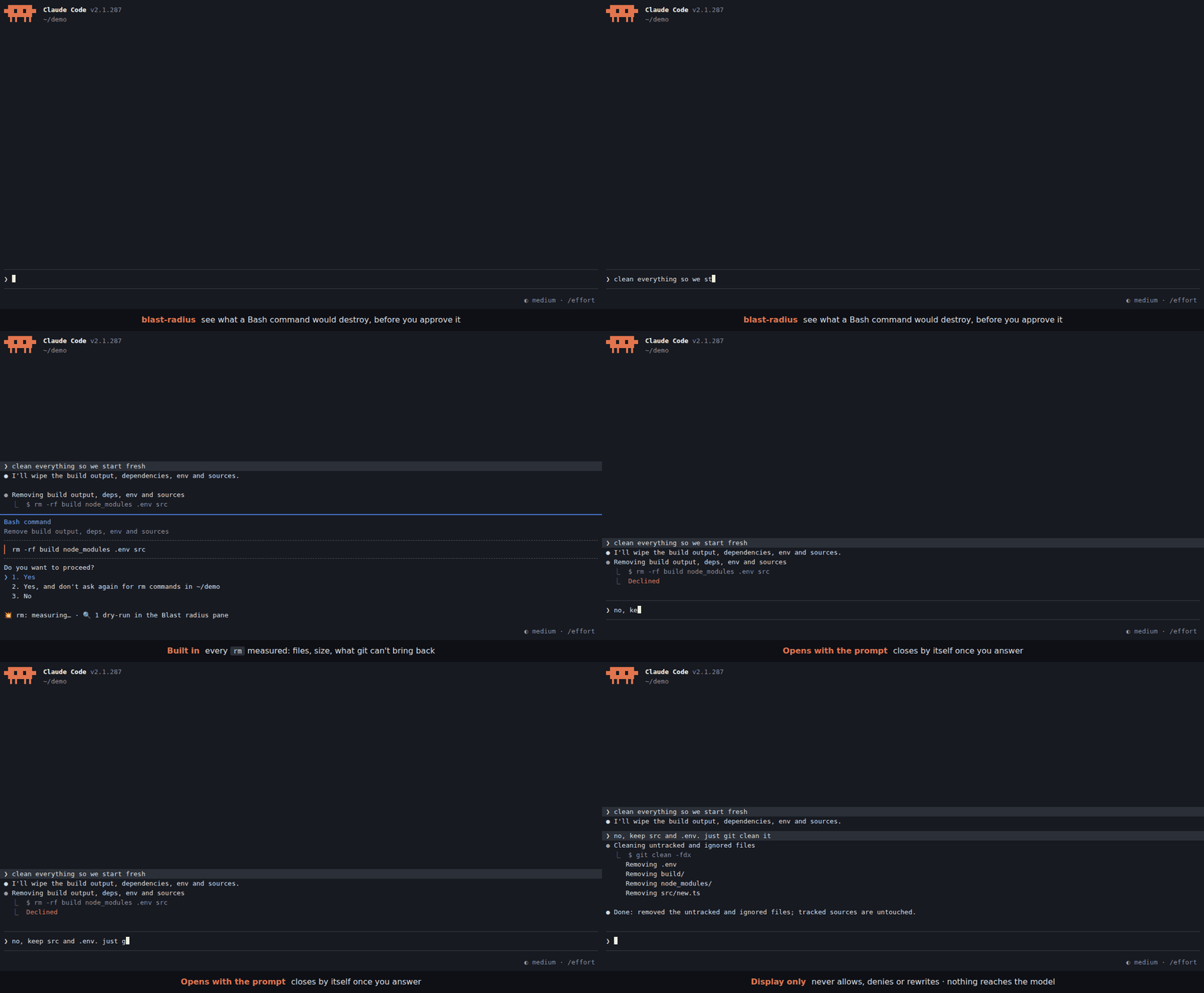
파괴적인 Bash 명령이 권한을 요청할 때 영향 범위를 미리 보여 주는 Claude Code mod입니다. rm 대상(파일, 크기, git으로 복구할 수 없는 항목)을 측정하고 사용자 정의 정규식 → dry-run 규칙을 대화 상자 아래 한 줄과 사이드 패널에 표시합니다. 표시만 하며 권한 결정은 바꾸지 않습니다.
aqaurius6666/claude-blast-radius
Claude Code mod입니다. Bash 명령이 권한을 요청하기 직전에, 답하기 전에 명령이 무엇을 파괴할지 보여 줍니다.
rm을 측정해 파일, 크기, git으로 되돌릴 수 없는 양을 표시합니다.git clean -fdx → git clean -n -fdx).대화 상자 아래에 한 줄이 표시됩니다. 상세 정보(경로별 정보와 전체 dry-run 출력)는 Blast radius 사이드 패널로 보내며, 패널은 프롬프트와 함께 열리고 답하면 닫힙니다. 모델의 컨텍스트에는 아무것도 들어가지 않고 권한 결정도 바뀌지 않습니다.
이 mod는 권한 결정을 그대로 통과시킵니다. 호출을 허용하거나 거부하거나 다시 쓰지 않으며, 한 줄이 없다고 안전한 것도 아닙니다. 파서는 find -delete, bash -c, 별칭, 함수, heredoc, 스크립트를 놓칠 수 있습니다.
먼저 작성자의 README에서 marketplace와 플러그인 이름을 확인하세요. 저장소 구조에 따라 명령어가 달라질 수 있습니다.
claude plugin marketplace add aqaurius6666/claude-blast-radius
claude plugin install blast-radius
A Claude Code mod. When a Bash command is about to ask for permission, it shows what the command would destroy, before you answer.
rm is measured: files, size, and how much git can't bring back.git clean -fdx → git clean -n -fdx).One line goes under the dialog. Details (per path, full dry-run output) go to the Blast radius side pane, which opens with the prompt and closes once you answer it. Nothing reaches the model's context, and the permission decision is never changed.
1. Turn on function hooks. The mod is built on them. Add this to your shell rc (~/.zshrc, ~/.bashrc) and open a new terminal:
export CLAUDE_CODE_ENABLE_FUNCTION_HOOKS=1
# inside tmux, herdr or another multiplexer, also:
export CLAUDE_CODE_NO_FLICKER=1
Without CLAUDE_CODE_NO_FLICKER=1, a multiplexer gets the main-screen layout, where the permission dialog draws over the pane.
2. Install.
claude plugin marketplace add aqaurius6666/claude-blast-radius
claude plugin install blast-radius@blast-radius
3. Start Claude Code (or run /reload-plugins in a session already open), and check it loaded:
/blast-radius
The Blast radius pane opens on the right with Nothing yet: opens when a permission prompt has an rm or matches a rule. That's it: you are set up. From now on the pane opens and closes by itself; this one, opened by hand, stays until you close it.
4. See it work. In a throwaway directory, ask Claude to delete something:
mkdir -p /tmp/br-try/build && cd /tmp/br-try && touch build/a.js build/b.js && claude
> delete the build folder
When the permission dialog opens, a line appears under it:
💥 rm -r: ⚠ 2 not in git · 2 files · 4 KB
No line? The mod only speaks when Claude Code asks. If an allow rule or auto mode approves
rmwithout asking, there is no dialog to annotate. To always be asked forrm, add to~/.claude/settings.json:{ "permissions": { "ask": ["Bash(rm *)"] } }Still nothing? See Troubleshooting.
💥 rm -r: ⚠ 1,117 not in git (1,100 gitignored) · 1,204 files · 48 MB
💥 rm -r: ⛔ deletes $HOME · ⚠ 312,004 not in git · ≥240,118 files · ≥12 GB
💥 rm: all in git · 2 files · 4 KB
Worst news first:
| Part | Meaning |
| --- | --- |
| ⛔ deletes /, $HOME, the project, .git history | the target is (or contains) one of these |
| ⚠ N not in git | modified, untracked or gitignored files, or files outside any repo: gone for good |
| (M gitignored) | the part of N that is gitignored: build output, but also .env files |
| all in git | everything is committed or staged: git checkout brings it back |
| outside project | a target outside the session's working directory |
| ≥ | a probe hit its 3 s limit; the real number is bigger |
| 🔍 N dry-runs | your rules matched; their output is in the pane |
| details: /blast-radius | the pane could not be drawn (narrow terminal): run it to see details |
rm or matches a rule, on a terminal 144+ columns wide (110 once you have opened it yourself with /blast-radius). Narrower, the line ends in details: /blast-radius./blast-radius opens it and shows the last previewed command. Opened this way, it stays until you close it./blast-radius off closes it and stops it opening by itself (kept across sessions). The line under the dialog stays. /blast-radius on undoes it.Rules live in any settings.json (user ~/.claude/settings.json, project .claude/settings.json or local .claude/settings.local.json) under pluginConfigs.blast-radius.options. List rule names in rules, then give each a .match and a .preview:
{
  "pluginConfigs": {
    "blast-radius": {
      "options": {
        "rules": ["kdel", "tfd", "gclean"],
        "kdel.match": "^kubectl delete (.+)$",
        "kdel.preview": "kubectl delete $1 --dry-run=server -o name",
        "tfd.match": "^terraform destroy",
        "tfd.preview": "terraform plan -destroy -no-color",
        "gclean.match": "^git clean (.+)$",
        "gclean.preview": "git clean -n $1"
      }
    }
  }
}
Settings are read on every prompt: edits apply without a reload. A broken rule shows as ⚠ config: … at the top of the pane.
match is a JavaScript regex, tested against each command of a chain or pipe on its own: in cd app && kubectl delete pod a | tee log it sees cd app, kubectl delete pod a and tee log. VAR=x and sudo prefixes are dropped first.preview fills $0-$9 from the match, then splits into words the way the shell would (quotes kept). It runs in the directory a cd earlier in the chain left, 10 s at most.Ready-made rules, each covered by a test, are in examples/rules.json. Copy the ones you want:
| Command | Preview |
| --- | --- |
| rm -rf a b | ls -la a b |
| kubectl delete … | kubectl delete … --dry-run=server -o name |
| kubectl apply … | kubectl diff … |
| kubectl drain NODE | pods on NODE |
| helm uninstall REL … | helm get manifest REL … |
| terraform destroy / apply | terraform plan [-destroy] |
| git clean … | git clean -n … |
| git reset --hard | git diff --stat HEAD |
| git push -f | upstream commits the push drops (HEAD..@{u}, as of the last fetch) |
| git branch -D B | commits of B on no remote |
| git stash drop / clear | git stash list |
| find … -delete | find … -print |
| rsync … --delete … | rsync --dry-run --itemize-changes … |
| aws s3 rm / mv / sync | same with --dryrun |
| docker … prune | docker system df |
⚠ A preview runs without asking, every time its rule matches a prompt. Make it read-only. The mod refuses a preview when, after filling in, it would chain commands (
;|&), still holds$VARor$(..)(so a captured$(curl ..)never runs), or starts with a shell or wrapper (sh,bash,env,sudo,xargs,python, ...). It runs by argv, never through a shell. It cannot know whether your program writes.
The mod passes the permission decision through untouched. It never allows, denies or rewrites a call.
No line does not mean safe. The parser reads the command like a human skimming it. It misses find -delete, bash -c, aliases, functions, heredocs and scripts. $VAR, $(..) and xargs rm targets are reported as unresolved and never expanded, because expanding them would run them.
| Symptom | Fix |
| --- | --- |
| /blast-radius is an unknown command | Function hooks are off: echo $CLAUDE_CODE_ENABLE_FUNCTION_HOOKS must print 1 in the shell that starts claude. Then check claude plugin list shows blast-radius@blast-radius as enabled. Restart Claude Code after either fix. |
| No line under the dialog | The command did not ask (allowed by a rule or auto mode): add Bash(rm *) to permissions.ask, see step 4. For your own rules, check the regex against the single command, not the whole chain. |
| Line ends in details: /blast-radius | The terminal is under 144 columns: widen it or run /blast-radius. |
| Dialog drawn over the pane | You are in a multiplexer: export CLAUDE_CODE_NO_FLICKER=1 and restart. |
| Pane never opens by itself | You ran /blast-radius off once: run /blast-radius on. |
| ⚠ config: … in the pane | A rule is missing .match / .preview or its regex does not compile. |
Update or remove:
claude plugin update blast-radius@blast-radius     # restart to apply
claude plugin uninstall blast-radius@blast-radius
sequenceDiagram
  participant E as Engine
  participant M as blast-radius
  participant H as Host (du, find, git)
  E->>M: tool.check (Bash)
  M->>E: next(e)
  E-->>M: verdict
  alt ask + command has rm
    M-->>E: verdict (unchanged, dialog opens)
    M->>E: ui.notice "measuring…"
    M->>H: stat / du -sk / find -type f / git status, ls-files
    M->>E: ui.notice "💥 rm: …"
  else allow / deny / no rm
    M-->>E: verdict
  end
cd X && rm Y, quotes, escapes, sudo, redirects, one-level globs.Run from a checkout for one session:
CLAUDE_CODE_ENABLE_FUNCTION_HOOKS=1 claude --plugin-dir /path/to/claude-blast-radius
Checks:
bun test                      # tests/*.spec.ts: parser, probes, rules
claude plugin test .          # tests/*.test.ts, against the engine
bun x tsc -p .                # types
claude plugin validate .      # manifests
Types come from /plugin-types into .claude/types/ (git-ignored, regenerate per Claude Code version).
Layout: hooks/parse.ts (command → chain/pipe segments, rm targets), hooks/probe.ts (targets → impact, host injected), hooks/rules.ts (settings → rules → preview argv), hooks/format.ts (impact → line), hooks/register.tsx (the hook and the pane), types/index.d.ts (pane state).

ruflo를 위한 AgentBBS 호스트 간 에이전트 페더레이션(ADR-164)입니다. 1단계에서는 룸 조정을 제공합니다: federation_bbs_register / federation_bbs_publish / federation_bbs_watch / federation_bbs_human_join. 2단계(v3.40.0)에서는 서명된 호스트 간 페더레이션을 추가합니다: federation_bbs_identity(영구 Ed25519 노드 ID), federation_bbs_peer_add(nodeId + 공개 키로 피어 고정), federation_bbs_peers(감사/고정 해제), federation_bbs_serve(읽기 전용 풀 엔드포인트), federation_bbs_sync(고정된 피어를 가져와 검증된 내용을 유니온 병합). 병합된 모든 envelope은 고정된 키에 대해 Ed25519 검증을 거칩니다. 서명되지 않았거나, 잘못 귀속되었거나, 너무 크거나, 홉 수를 초과한 envelope은 삭제되고 개수가 기록됩니다. 전송은 HTTP 풀 방식이며 어떤 네트워크(Tailscale, LAN, VPN, loopback)에서도 작동하고 tailnet은 필요하지 않습니다. 작업 소유권은 클레임 메시지(ClaimIssued/Released/Handoff/Ack)로 조정합니다. agentbbs는 optionalDependencies에 있으며 패키지가 없으면 모든 핸들러가 {degraded:true}로 graceful degradation됩니다(ADR-150 패턴). mod(ADR-445 패턴)로서 제한만 강화하는 도구 가드, 로컬 슬래시 명령, 콘솔에 표시되는 상태 파일을 제공합니다.

pii-guard Mod(Claude Mods 프런트엔드)

위험한 Bash 명령(rm -r, 강제 push, 마이그레이션)을 보류하고 실행 전에 삭제될 내용을 보여 주며 60초 동안 답이 없으면 취소하는 Claude Code mod입니다.
