
jamubc@jamubc
jamubc/toolbox/tree/main/plugins/atlas
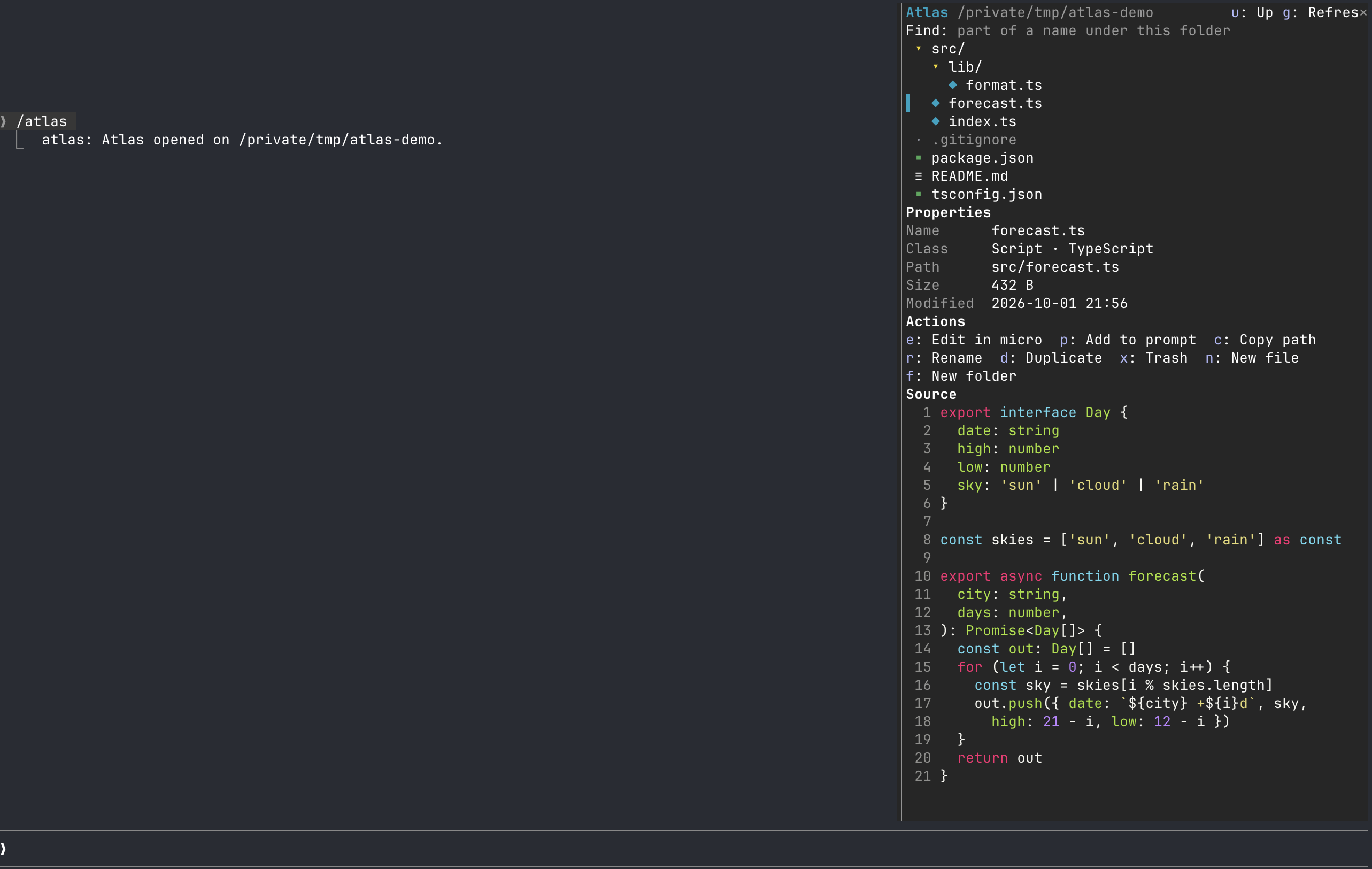
Claude Code 옆 패널에 파일 탐색기를 추가합니다. 트리 탐색기를 살펴보고 속성을 찾고 Claude Code를 떠나지 않고 수정할 수 있습니다.
jamubc/toolbox/tree/main/plugins/atlas
/atlas를 추가합니다. Claude Code 옆 패널에 파일 탐색기를 표시하고 git 표시, 이름 또는 텍스트 검색, micro를 사용한 파일 편집을 지원합니다.
먼저 작성자의 README에서 marketplace와 플러그인 이름을 확인하세요. 저장소 구조에 따라 명령어가 달라질 수 있습니다.
claude plugin marketplace add jamubc/toolbox
claude plugin install atlas
A file explorer in a pane beside Claude Code. Browse a tree explorer, find properties, and modify without leaving Claude Code.
Add the marketplace:
/plugin marketplace add jamubc/toolbox
Install the plugin:
/plugin install atlas@toolbox
| Command | function |
| --- | --- |
| /atlas | Opens the explorer where you left it last time in this project, or on the folder Claude Code started in. |
| /atlas <folder> | Opens the explorer there. |
| /atlas <file> | Shows the file in the tree and opens it in micro. |
| The trail | The path at the top is a trail of folders: click one to go back up to it. |
| Click a folder | Opens or closes it. |
| Click a file | Shows its Properties and Source: code with line numbers, Markdown rendered, a PNG as a picture in kitty and Ghostty. |
| Git marks | Files git sees as changed, added, untracked, deleted or renamed carry M, A, ?, D, R in color; a folder holding one carries •. The header counts them. |
| Find | Type part of a name and press Enter; text searches inside files instead (ripgrep, else grep) and a hit opens the file at that line. |
| Key | Action |
| e | Edit in micro |
| p | Add the file to your prompt as @path |
| c | Copy the path |
| a | Open with the system's own app (open, xdg-open) |
| r / d | Rename / duplicate |
| x | Move to the Trash, after you confirm |
| n / f | New file / new folder, in the selected folder |
| o | Open the selected folder as the root |
| u / g | Go up a folder / refresh |
| h / z | Show or hide dotfiles (kept between sessions) / collapse every folder |
While the pane shows, the folders on screen and git are read again every few seconds, so what Claude writes appears by itself. The root and the open folders are remembered per project.
micro runs for real inside the pane: your own micro settings, colors and plugins.
/config → Editor for files runs another terminal editor instead: nano and vim work too.| Where | Explorer | Editor | | --- | --- | --- | | Claude Code in any terminal | Yes | Yes | | Claude desktop app, VS Code extension | Yes | No. | | Mobile | Yes, without Find or naming fields | No |
| System | Status |
| --- | --- |
| macOS | Tested: browsing, Find, rename, new, duplicate, Trash, editing in micro. |
| Linux | Should work; untested. Trash needs gio or trash-cli; opening with an app needs xdg-open. |
| Windows | Not supported. Editing says so, and paths assume /. |
/usr/bin/python3 works) and micro, or the editor you set. If one is missing, the pane says which and how to fix it.? in the editor; the file itself is untouched.trash, or gio trash or trash-put on Linux, after a confirmation. If none exists, nothing is deleted./ or be .../clear starts a new session in the same process, so atlas keeps what it was showing and writes it into the new one.hooks/register.tsx draws the pane, answers /atlas, and runs the actions.hooks/files.ts holds the path, file class, tree, git status and search-output helpers.editor/term.py runs the editor in a pseudo-terminal, keeps its screen with a small terminal emulator, and streams it to the pane. Keys and clicks come back over a Unix socket in a private temp folder.hooks/terminal.tsx lies over the editor's picture and passes on keys, clicks and drags./atlas, whose reply names the folder.git status and the search run only under the folder shown.
neural-trader(v2.7+) 기반의 신경망 트레이딩 전략입니다. 자체 학습 LSTM/Transformer/N-BEATS 모델, Rust/NAPI 백테스트, 112+ MCP 도구, 스웜 협업, 포트폴리오 최적화를 제공합니다.

claude-seo를 위한 선택적 mods companion입니다. Claude Code 안에서 mod(function-hook 플러그인)로 실행되므로 skill이 요청만 할 수 있는 일을 강제할 수 있습니다.

Claude Code용 Repowise 플러그인입니다. Graph, Git, Docs, Decisions, Code Health의 5개 코드 지능 계층을 제공하고 MCP 도구, slash commands, 자동 skills로 Claude가 아키텍처, 소유자, 핫스팟과 결함 위험을 이해하도록 합니다. spinner 힌트, margin notes, 변경 리뷰, /lens 패널이 있는 Claude Code mod인 Lens도 포함합니다.