
Unayung@Unayung
Unayung/cc-mods-youtube/tree/main/plugins/yt-control
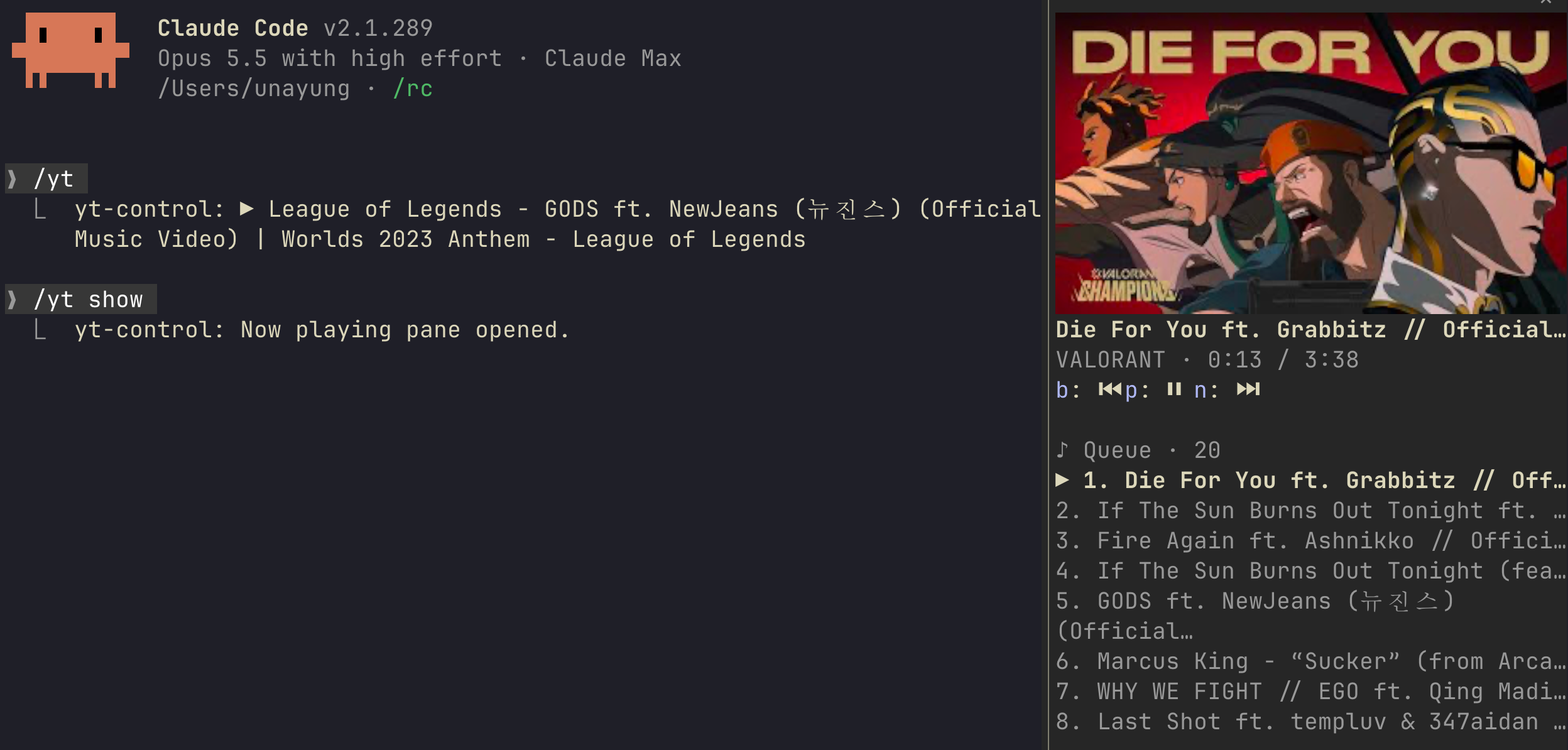
cliamp を基盤にした YouTube プレーヤーを Claude Code に組み込む。操作、再生中の情報、サムネイル、プレイリストに対応する。
Unayung/cc-mods-youtube/tree/main/plugins/yt-control
yt-control は cliamp を基盤にターミナルへ YouTube プレーヤーを組み込む Claude Code プラグインだ。/yt playlist <URL> でプレイリストを読み込み、/yt、/yt prev、/yt next、/yt show で再生を操作する。Now playing ペインにはタイトル、アーティスト、進行状況、ターミナルで描画したサムネイル、クリックできるキューが表示され、/config で4つの配置と3種類のアイコンスタイルを設定できる。Claude Code 2.1.288+、cliamp v2.2+、yt-dlp が必要で、cc-mods-youtube マーケットプレイスからインストールできる。MIT ライセンス。
まず作者の README で marketplace とプラグイン名を確認してください。コマンドはリポジトリの構成によって変わる場合があります。
claude plugin marketplace add Unayung/cc-mods-youtube
claude plugin install yt-control
A YouTube player inside Claude Code, built as a Claude Code mod and backed by cliamp.
Load a YouTube playlist with one command and control it without leaving the terminal. cliamp plays the audio, so no browser tab is needed.
/config| What | Why | Install |
|---|---|---|
| Claude Code 2.1.288 or newer | runs the mod (function hooks) | claude update |
| macOS or Linux | the mod shells out to sh, curl and an image converter | |
| cliamp v2.2 or newer | plays the audio; the mod drives it over cliamp remote | see cliamp's README; cliamp upgrade if you already have it |
| yt-dlp | cliamp uses it to resolve YouTube URLs | brew install yt-dlp, pacman -S yt-dlp, pipx install yt-dlp |
| curl | downloads the thumbnail | usually preinstalled |
| sips (macOS, built in) or ImageMagick (Linux) | converts the thumbnail to PNG | pacman -S imagemagick, apt install imagemagick |
| A terminal with the kitty graphics protocol (kitty, Ghostty, WezTerm) | draws the thumbnail | optional; other terminals show the title instead |
When cliamp or yt-dlp is missing or cliamp is too old, the pane and /yt say what to install. Install it and run /yt again; no restart needed.
claude plugin marketplace add Unayung/cc-mods-youtube
claude plugin install yt-control@cc-mods-youtube
Then start a new Claude Code session. The install may say that some options are not set yet; all have defaults, so this is safe to ignore.
/yt playlist <YouTube URL>   load a playlist (or a single video) into cliamp and play it
/yt                          play / pause
/yt prev   /yt next          previous / next track
/yt show                     open the Now playing pane
If the cliamp daemon is not running, /yt playlist starts it in the background. You can also run cliamp's own TUI in another terminal; the mod talks to the same socket.
YouTube Mix links (watch?v=...&list=RD...) work as well as regular playlists.
[thumbnail]
Title
Artist · 1:05 / 3:34
⏮️ ⏸️ ⏭️

🎵 Queue · 20
1. A track            ← click to play
▶️ 2. Playing now
3. Next track
The thumbnail follows the pane's width. Focus the pane with ctrl+x tab; then b / p / n press previous / play-pause / next, and the arrow keys scroll the queue.
Open /config and look for yt-control:
| Option | Values | Default |
|---|---|---|
| Player position | above-prompt: a band with buttons above the prompt<br>pane: the Now playing pane with thumbnail and queue<br>prompt-hint: text after the hint line under the prompt<br>status: a status line | above-prompt |
| Icon style | emoji, nerd (needs a Nerd Font), unicode | emoji |
| Stop music on exit | stop cliamp when you leave Claude Code (/exit, ctrl+c, closing the terminal); /clear and switching sessions keep it playing. Turn it off if you run cliamp on its own | on |
/yt show opens the pane whatever the position is.
The thumbnail shows as the video title in grey text. Claude Code did not detect kitty graphics support. Inside a terminal multiplexer (tmux, zellij, herdr) this is expected even when the outer terminal supports it. If your multiplexer passes kitty graphics through, force it on in ~/.claude/settings.json:
{ "env": { "CLAUDE_CODE_FORCE_TERMINAL_IMAGES": "1" } }
/yt playlist briefly plays something else first. A freshly started cliamp daemon resumes the last track it played; the mod replaces the queue right after.
cliamp is not installed although it is. The mod looks in your PATH plus ~/.local/bin, /opt/homebrew/bin and /usr/local/bin. If cliamp lives elsewhere, add its directory to PATH for the process that starts Claude Code.
The pane does not appear on its own. A pane opened at startup only shows when the terminal is at least 144 columns wide. Run /yt show.
claude plugin uninstall yt-control@cc-mods-youtube
claude plugin marketplace remove cc-mods-youtube
Thumbnails are cached in /tmp/yt-control-art/.
The mod polls cliamp remote state every 2 seconds and reads the queue with cliamp remote call queue.list when the playlist changes. Controls call cliamp prev|toggle|next; clicking a track calls queue.play with its index. Loading runs queue.clear then url.load. Thumbnails come from i.ytimg.com by video id.
The band, pane and status line are drawn in the terminal only; the mod adds nothing to the system prompt and registers no tool for the model. The one-line reply of a /yt command (for example ▶️ Artist - Title) is an ordinary command output line in the transcript.
claude --plugin-dir plugins/yt-control     # load from this checkout
claude plugin validate plugins/yt-control
claude plugin test plugins/yt-control
MIT

Claude Code 用の Firstmate Calm。帆船の作業アニメーションと会話だけを表示するトランスクリプト表示を提供し、Pi Calm 拡張機能と home ごとの config/calm 設定を共有します。hooks モジュールは CLAUDE_CODE_ENABLE_FUNCTION_HOOKS または Claude Code の tengu_plugin_hooks_modules rollout flag から読み込まれることがありますが、mod が有効になるのは CLAUDE_CODE_ENABLE_FUNCTION_HOOKS が正確に 1 の場合だけで、それ以外は完全な no-op です。

Claude Code の出力スタイル(Epistemic Ink)と、そこに書かれた ```mermaid および ```math フェンスをターミナル図として描画する mod の組み合わせ。転記テキストでそのまま描けるものは文字のまま残す。

Claude Code プロンプト上に住むピクセル ポケモン。Claude が行うすべてに反応します。
